<?xml version="1.0" encoding="utf-8"?>
<feed xmlns="http://www.w3.org/2005/Atom">
  <author>
    <name>柚木 鉉</name>
  </author>
  <generator uri="https://hexo.io/">Hexo</generator>
  <id>https://gloomyghost.com/</id>
  <link href="https://gloomyghost.com/" rel="alternate"/>
  <link href="https://gloomyghost.com/atom.xml" rel="self"/>
  <rights>All rights reserved 2026, 柚木 鉉</rights>
  <subtitle>Ne me plaignez pas C'est pour cela que je suis née</subtitle>
  <title>柚木鉉の空間</title>
  <updated>2026-04-25T03:17:29.451Z</updated>
  <entry>
    <author>
      <name>柚木 鉉</name>
    </author>
    <category term="RISC-V" scheme="https://gloomyghost.com/tags/RISC-V/"/>
    <category term="ISA" scheme="https://gloomyghost.com/tags/ISA/"/>
    <content>
      <![CDATA[<h1 id="RISC-V-基础体系架构" data-id="RISC-V-基础体系架构" class="notion-h"><a href="#RISC-V-基础体系架构" class="headerlink" title="RISC-V 基础体系架构"></a>RISC-V 基础体系架构</h1><h2 id="1-架构介绍、寄存器、函数调用规范与栈" data-id="1-架构介绍、寄存器、函数调用规范与栈" class="notion-h"><a href="#1-架构介绍、寄存器、函数调用规范与栈" class="headerlink" title="1. 架构介绍、寄存器、函数调用规范与栈"></a>1. 架构介绍、寄存器、函数调用规范与栈</h2><h3 id="1-1-架构介绍" data-id="1-1-架构介绍" class="notion-h"><a href="#1-1-架构介绍" class="headerlink" title="1.1 架构介绍"></a>1.1 架构介绍</h3><h4 id="1-1-1-RISC-V由来" data-id="1-1-1-RISC-V由来" class="notion-h"><a href="#1-1-1-RISC-V由来" class="headerlink" title="1.1.1 RISC-V由来"></a>1.1.1 RISC-V由来</h4><p><strong>RISC（Reduced Instruction Set Computer）</strong>：精简指令集计算机，通过减少指令集数量和复杂度来提高性能和效率。</p><p>RISC-V是由加州大学伯克利分校开发的<strong>开源指令集架构</strong>，特点如下：</p><table><thead><tr><th>特性</th><th>说明</th></tr></thead><tbody><tr><td>开放性</td><td>BSD开源协议，无需授权费</td></tr><tr><td>简洁性</td><td>指令集精简，易于理解</td></tr><tr><td>可扩展</td><td>支持自定义扩展指令</td></tr><tr><td>商业可用</td><td>可应用于商业场景</td></tr></tbody></table><h4 id="1-1-2-RISC与CISC对比" data-id="1-1-2-RISC与CISC对比" class="notion-h"><a href="#1-1-2-RISC与CISC对比" class="headerlink" title="1.1.2 RISC与CISC对比"></a>1.1.2 RISC与CISC对比</h4><table><thead><tr><th>特性</th><th>RISC（精简指令集）</th><th>CISC（复杂指令集）</th></tr></thead><tbody><tr><td>指令数量</td><td>少，固定长度</td><td>多，可变长度</td></tr><tr><td>指令复杂度</td><td>低，单周期执行</td><td>高，多周期执行</td></tr><tr><td>寄存器数量</td><td>多</td><td>少</td></tr><tr><td>硬件复杂度</td><td>低</td><td>高</td></tr><tr><td>编译器优化</td><td>容易</td><td>困难</td></tr></tbody></table><h4 id="1-1-3-RISC-V与ARM对比" data-id="1-1-3-RISC-V与ARM对比" class="notion-h"><a href="#1-1-3-RISC-V与ARM对比" class="headerlink" title="1.1.3 RISC-V与ARM对比"></a>1.1.3 RISC-V与ARM对比</h4><table><thead><tr><th>特性</th><th>RISC-V</th><th>ARM</th></tr></thead><tbody><tr><td>指令集数量</td><td>精简</td><td>丰富</td></tr><tr><td>指令集宽度</td><td>支持128位扩展</td><td>最高64位（v8-A）</td></tr><tr><td>指令复杂度</td><td>汇编简单易懂</td><td>相对复杂</td></tr><tr><td>执行效率</td><td>注重效率和功耗优化</td><td>注重通用性和兼容性</td></tr><tr><td>微操作数量</td><td>一般单微操作</td><td>不固定，部分多微操作</td></tr><tr><td>开放程度</td><td>BSD开源，无需授权</td><td>需授权，闭源</td></tr><tr><td>功耗性能优化</td><td>发展阶段，逐步完善</td><td>已广泛优化</td></tr></tbody></table><h4 id="1-1-4-RISC-V指令集模块" data-id="1-1-4-RISC-V指令集模块" class="notion-h"><a href="#1-1-4-RISC-V指令集模块" class="headerlink" title="1.1.4 RISC-V指令集模块"></a>1.1.4 RISC-V指令集模块</h4><p><strong>模块化ISA</strong>：RISC-V采用模块化设计，处理器可选择实现需要的扩展模块。</p><p><strong>增量型ISA</strong>（传统方式）：新处理器需实现所有历史扩展以保持向后兼容。</p><p>RISC-V指令集分类：</p><table><thead><tr><th>类别</th><th>标识</th><th>说明</th></tr></thead><tbody><tr><td>基本整数指令集</td><td>I</td><td>完整整数指令集</td></tr><tr><td>精简整数指令集</td><td>E</td><td>嵌入式场景</td></tr><tr><td>整数整除指令集</td><td>M</td><td>乘除运算</td></tr><tr><td>原子操作指令集</td><td>A</td><td>原子内存操作</td></tr><tr><td>单精度浮点</td><td>F</td><td>32位浮点</td></tr><tr><td>双精度浮点</td><td>D</td><td>64位浮点</td></tr><tr><td>压缩指令集</td><td>C</td><td>16位压缩指令</td></tr></tbody></table><p><strong>命名示例</strong>：<code>rv64imac</code> 表示64位架构，包含I/M/A/C扩展。</p><h4 id="1-1-5-玄铁系列处理器实例" data-id="1-1-5-玄铁系列处理器实例" class="notion-h"><a href="#1-1-5-玄铁系列处理器实例" class="headerlink" title="1.1.5 玄铁系列处理器实例"></a>1.1.5 玄铁系列处理器实例</h4><table><thead><tr><th>系列</th><th>特点</th><th>代表型号</th></tr></thead><tbody><tr><td>C系列（高性能）</td><td>高性能处理</td><td>C906/C907/C908/C910/C920</td></tr><tr><td>E系列（超低能耗）</td><td>MCU级低功耗</td><td>E902/E906/E907</td></tr><tr><td>R系列（可靠实时）</td><td>实时增强</td><td>R910</td></tr></tbody></table><h3 id="1-2-寄存器" data-id="1-2-寄存器" class="notion-h"><a href="#1-2-寄存器" class="headerlink" title="1.2 寄存器"></a>1.2 寄存器</h3><h4 id="1-2-1-通用寄存器" data-id="1-2-1-通用寄存器" class="notion-h"><a href="#1-2-1-通用寄存器" class="headerlink" title="1.2.1 通用寄存器"></a>1.2.1 通用寄存器</h4><p>64位架构提供<strong>32个64位通用寄存器</strong>（x0-x31），32位架构为32个32位寄存器。</p><table><thead><tr><th>寄存器</th><th>别名</th><th>用途</th><th>备注</th></tr></thead><tbody><tr><td>x0</td><td>zero</td><td>固定为0</td><td>编译器优化用途</td></tr><tr><td>x1</td><td>ra</td><td>返回地址</td><td>保存函数返回地址（类似ARM的LR）</td></tr><tr><td>x2</td><td>sp</td><td>栈指针</td><td>指向栈顶地址</td></tr><tr><td>x3</td><td>gp</td><td>全局指针</td><td>编译器优化，指向全局数据区</td></tr><tr><td>x4</td><td>tp</td><td>线程指针</td><td>存放task_struct指针</td></tr><tr><td>x5</td><td>t0</td><td>临时寄存器</td><td>函数调用不需保存</td></tr><tr><td>x6</td><td>t1</td><td>临时寄存器</td><td>函数调用不需保存</td></tr><tr><td>x7</td><td>t2</td><td>临时寄存器</td><td>函数调用不需保存</td></tr><tr><td>x8</td><td>s0/fp</td><td>保存寄存器/栈帧指针</td><td>函数调用需保存，类似ARM的FP</td></tr><tr><td>x9</td><td>s1</td><td>保存寄存器</td><td>函数调用需保存</td></tr><tr><td>x10</td><td>a0</td><td>参数/返回值</td><td>第1个参数，函数返回值</td></tr><tr><td>x11</td><td>a1</td><td>参数/返回值</td><td>第2个参数，函数返回值</td></tr><tr><td>x12</td><td>a2</td><td>参数寄存器</td><td>第3个参数</td></tr><tr><td>x13</td><td>a3</td><td>参数寄存器</td><td>第4个参数</td></tr><tr><td>x14</td><td>a4</td><td>参数寄存器</td><td>第5个参数</td></tr><tr><td>x15</td><td>a5</td><td>参数寄存器</td><td>第6个参数</td></tr><tr><td>x16</td><td>a6</td><td>参数寄存器</td><td>第7个参数</td></tr><tr><td>x17</td><td>a7</td><td>参数寄存器</td><td>第8个参数</td></tr><tr><td>x18</td><td>s2</td><td>保存寄存器</td><td>函数调用需保存</td></tr><tr><td>x19</td><td>s3</td><td>保存寄存器</td><td>函数调用需保存</td></tr><tr><td>x20</td><td>s4</td><td>保存寄存器</td><td>函数调用需保存</td></tr><tr><td>x21</td><td>s5</td><td>保存寄存器</td><td>函数调用需保存</td></tr><tr><td>x22</td><td>s6</td><td>保存寄存器</td><td>函数调用需保存</td></tr><tr><td>x23</td><td>s7</td><td>保存寄存器</td><td>函数调用需保存</td></tr><tr><td>x24</td><td>s8</td><td>保存寄存器</td><td>函数调用需保存</td></tr><tr><td>x25</td><td>s9</td><td>保存寄存器</td><td>函数调用需保存</td></tr><tr><td>x26</td><td>s10</td><td>保存寄存器</td><td>函数调用需保存</td></tr><tr><td>x27</td><td>s11</td><td>保存寄存器</td><td>函数调用需保存</td></tr><tr><td>x28</td><td>t3</td><td>临时寄存器</td><td>函数调用不需保存</td></tr><tr><td>x29</td><td>t4</td><td>临时寄存器</td><td>函数调用不需保存</td></tr><tr><td>x30</td><td>t5</td><td>临时寄存器</td><td>函数调用不需保存</td></tr><tr><td>x31</td><td>t6</td><td>临时寄存器</td><td>函数调用不需保存</td></tr></tbody></table><p><strong>寄存器分类说明</strong>：</p><table><thead><tr><th>类型</th><th>寄存器</th><th>调用约定</th></tr></thead><tbody><tr><td>临时寄存器</td><td>t0-t6</td><td>调用者保存，函数可随意使用</td></tr><tr><td>保存寄存器</td><td>s0-s11</td><td>被调用者保存，函数使用前需保存到栈</td></tr><tr><td>参数寄存器</td><td>a0-a7</td><td>传递函数参数</td></tr><tr><td>返回值寄存器</td><td>a0-a1</td><td>保存函数返回值</td></tr><tr><td>特殊寄存器</td><td>zero/ra/sp/gp/tp</td><td>有固定用途</td></tr></tbody></table><h4 id="1-2-2-系统寄存器（CSR）" data-id="1-2-2-系统寄存器（CSR）" class="notion-h"><a href="#1-2-2-系统寄存器（CSR）" class="headerlink" title="1.2.2 系统寄存器（CSR）"></a>1.2.2 系统寄存器（CSR）</h4><p><strong>mepc/sepc</strong>：在M模式和S模式下处理trap时，记录原程序发生trap时的地址。</p><p><strong>mtval</strong>：Machine Trap Value，辅助软件进行trap处理。</p><ul><li>当trap为断点、地址错位、访问错误、页错误时，写入出错的虚拟地址</li><li>与mepc配合：mepc保存导致异常的指令地址，mtval保存访问的虚拟地址</li></ul><h3 id="1-3-函数调用规范" data-id="1-3-函数调用规范" class="notion-h"><a href="#1-3-函数调用规范" class="headerlink" title="1.3 函数调用规范"></a>1.3 函数调用规范</h3><h4 id="1-3-1-调用规范要点" data-id="1-3-1-调用规范要点" class="notion-h"><a href="#1-3-1-调用规范要点" class="headerlink" title="1.3.1 调用规范要点"></a>1.3.1 调用规范要点</h4><table><thead><tr><th>序号</th><th>规范</th></tr></thead><tbody><tr><td>1</td><td>前8个参数使用a0-a7寄存器传递，超过8个则使用栈传递</td></tr><tr><td>2</td><td>参数小于寄存器宽度时，先按符号扩展到32位，再扩展到64位</td></tr><tr><td>3</td><td>128位参数使用一对寄存器传递</td></tr><tr><td>4</td><td>返回值保存到a0和a1寄存器</td></tr><tr><td>5</td><td>返回地址保存在ra寄存器</td></tr><tr><td>6</td><td>使用s0-s11寄存器需先保存到栈，使用后恢复</td></tr><tr><td>7</td><td>栈向下增长，sp需对齐到16字节边界</td></tr><tr><td>8</td><td>使用”-fno-omit-frame-pointer”编译选项时，s0作为栈帧指针</td></tr></tbody></table><h4 id="1-3-2-栈帧结构" data-id="1-3-2-栈帧结构" class="notion-h"><a href="#1-3-2-栈帧结构" class="headerlink" title="1.3.2 栈帧结构"></a>1.3.2 栈帧结构</h4><p>函数栈布局（栈向下增长）：</p><table><thead><tr><th>区域</th><th>内容</th><th>位置</th></tr></thead><tbody><tr><td>参数区</td><td>超过8个的参数</td><td>SP偏移0处开始</td></tr><tr><td>保存区</td><td>s0-s11等保存寄存器</td><td>参数区上方</td></tr><tr><td>局部变量</td><td>函数局部变量</td><td>保存区上方</td></tr><tr><td>返回地址</td><td>ra寄存器值</td><td>局部变量上方</td></tr></tbody></table><p><strong>栈操作指令</strong>：</p><p>RISC-V没有专门的push/pop指令，使用addi替代：</p><figure class="highlight plaintext"><table><tbody><tr><td class="code"><pre><code class="hljs asm">addi sp, sp, -32    // 栈向下扩展32字节<br>addi sp, sp, 32     // 栈向上收缩32字节<br></code></pre></td></tr></tbody></table></figure><h4 id="1-3-3-传参示例" data-id="1-3-3-传参示例" class="notion-h"><a href="#1-3-3-传参示例" class="headerlink" title="1.3.3 传参示例"></a>1.3.3 传参示例</h4><p>C代码：</p><figure class="highlight c"><table><tbody><tr><td class="code"><pre><code class="hljs c"><span class="hljs-meta">#<span class="hljs-keyword">include</span> <span class="hljs-string">&lt;stdio.h&gt;</span></span><br><br><span class="hljs-type">int</span> <span class="hljs-title function_">main</span><span class="hljs-params">(<span class="hljs-type">void</span>)</span><br>{<br>    <span class="hljs-built_in">printf</span>(<span class="hljs-string">"data: %d, %d, %d, %d, %d, %d, %d, %d, %d, %d\n"</span>,<br>           <span class="hljs-number">1</span>, <span class="hljs-number">2</span>, <span class="hljs-number">3</span>, <span class="hljs-number">4</span>, <span class="hljs-number">5</span>, <span class="hljs-number">6</span>, <span class="hljs-number">7</span>, <span class="hljs-number">8</span>, <span class="hljs-number">9</span>, <span class="hljs-number">10</span>);<br>    <span class="hljs-keyword">return</span> <span class="hljs-number">0</span>;<br>}<br></code></pre></td></tr></tbody></table></figure><p>汇编代码（GCC生成）：</p><figure class="highlight plaintext"><table><tbody><tr><td class="code"><pre><code class="hljs asm">    .file   "test2.c"<br>    .option nopic<br>    .text<br>    .section        .rodata<br>    .align  3<br>.LC0:<br>    .string "data: %d, %d, %d, %d, %d, %d, %d, %d, %d, %d\n"<br>    .text<br>    .align  1<br>    .align  4<br>    .globl  main<br>    .type   main, @function<br>main:<br>    addi    sp, sp, -48       // 分配栈空间<br>    sd      ra, 40(sp)        // 保存返回地址<br>    sd      s0, 32(sp)        // 保存栈帧指针<br>    addi    s0, sp, 48        // 设置栈帧基址<br>    li      a5, 10            // 第10个参数<br>    sd      a5, 16(sp)        // 存入栈<br>    li      a5, 9             // 第9个参数<br>    sd      a5, 8(sp)         // 存入栈<br>    li      a5, 8             // 第8个参数<br>    sd      a5, 0(sp)         // 存入栈<br>    li      a7, 7             // a7传递第7个参数<br>    li      a6, 6             // a6传递第6个参数<br>    li      a5, 5             // a5传递第5个参数<br>    li      a4, 4             // a4传递第4个参数<br>    li      a3, 3             // a3传递第3个参数<br>    li      a2, 2             // a2传递第2个参数<br>    li      a1, 1             // a1传递第1个参数<br>    lui     a0, %hi(.LC0)     // a0传递字符串地址<br>    addi    a0, a0, %lo(.LC0)<br>    call    printf            // 调用printf<br>    li      a5, 0<br>    mv      a0, a5            // 返回值0<br>    ld      ra, 40(sp)        // 恢复返回地址<br>    ld      s0, 32(sp)        // 恢复栈帧指针<br>    addi    sp, sp, 48        // 收回栈空间<br>    jr      ra                // 返回<br></code></pre></td></tr></tbody></table></figure><p><strong>解析</strong>：前8个参数通过a1-a7寄存器传递，第8-10个参数通过栈传递。</p><h4 id="1-3-4-函数跳转示例" data-id="1-3-4-函数跳转示例" class="notion-h"><a href="#1-3-4-函数跳转示例" class="headerlink" title="1.3.4 函数跳转示例"></a>1.3.4 函数跳转示例</h4><p>C代码：</p><figure class="highlight c"><table><tbody><tr><td class="code"><pre><code class="hljs c"><span class="hljs-meta">#<span class="hljs-keyword">include</span> <span class="hljs-string">&lt;stdio.h&gt;</span></span><br><br><span class="hljs-type">static</span> <span class="hljs-type">int</span> test = <span class="hljs-number">0</span>;<br><br><span class="hljs-type">int</span> <span class="hljs-title function_">func2</span><span class="hljs-params">(<span class="hljs-type">void</span>)</span><br>{<br>    <span class="hljs-type">int</span> a = <span class="hljs-number">0</span>;<br>    <span class="hljs-keyword">return</span> <span class="hljs-number">0</span>;<br>}<br><br><span class="hljs-type">int</span> <span class="hljs-title function_">func1</span><span class="hljs-params">(<span class="hljs-type">void</span>)</span><br>{<br>    <span class="hljs-type">int</span> b = <span class="hljs-number">0</span>;<br>    func2();<br>    <span class="hljs-keyword">return</span> <span class="hljs-number">0</span>;<br>}<br><br><span class="hljs-type">int</span> <span class="hljs-title function_">main</span><span class="hljs-params">(<span class="hljs-type">void</span>)</span><br>{<br>    <span class="hljs-type">int</span> a = <span class="hljs-number">0</span>, b = <span class="hljs-number">1</span>, c = <span class="hljs-number">2</span>, d = <span class="hljs-number">3</span>, e = <span class="hljs-number">4</span>, f = <span class="hljs-number">5</span>, g = <span class="hljs-number">6</span>, h = <span class="hljs-number">7</span>, i = <span class="hljs-number">8</span>, j = <span class="hljs-number">9</span>;<br>    b = a + a;<br>    func1();<br>    <span class="hljs-keyword">return</span> <span class="hljs-number">0</span>;<br>}<br></code></pre></td></tr></tbody></table></figure><p>汇编代码：</p><figure class="highlight plaintext"><table><tbody><tr><td class="code"><pre><code class="hljs asm">    .file   "test.c"<br>    .option nopic<br>    .text<br>    .local  test<br>    .comm   test, 4, 4<br>    .align  1<br>    .align  4<br>    .globl  func2<br>    .type   func2, @function<br>func2:<br>    addi    sp, sp, -32       // 分配栈空间<br>    sd      s0, 24(sp)        // 保存s0（叶函数不保存ra）<br>    addi    s0, sp, 32        // 设置栈帧<br>    sw      zero, -20(s0)     // 局部变量a=0<br>    li      a5, 0<br>    mv      a0, a5            // 返回值<br>    ld      s0, 24(sp)        // 恢复s0<br>    addi    sp, sp, 32        // 收回栈<br>    jr      ra                // 返回<br><br>func1:<br>    addi    sp, sp, -32<br>    sd      ra, 24(sp)        // 保存ra（非叶函数需保存）<br>    sd      s0, 16(sp)        // 保存s0<br>    addi    s0, sp, 32<br>    sw      zero, -20(s0)     // 局部变量b=0<br>    call    func2             // 调用func2<br>    li      a5, 0<br>    mv      a0, a5<br>    ld      ra, 24(sp)        // 恢复ra<br>    ld      s0, 16(sp)        // 恢复s0<br>    addi    sp, sp, 32<br>    jr      ra<br><br>main:<br>    addi    sp, sp, -64       // 分配64字节栈空间<br>    sd      ra, 56(sp)        // 保存ra<br>    sd      s0, 48(sp)        // 保存s0<br>    addi    s0, sp, 64<br>    sw      zero, -20(s0)     // a=0<br>    li      a5, 1<br>    sw      a5, -24(s0)       // b=1<br>    li      a5, 2<br>    sw      a5, -28(s0)       // c=2<br>    ...                       // 其他局部变量初始化<br>    lw      a5, -20(s0)<br>    slliw   a5, a5, 1         // b = a + a<br>    sw      a5, -24(s0)<br>    call    func1             // 调用func1<br>    li      a5, 0<br>    mv      a0, a5<br>    ld      ra, 56(sp)<br>    ld      s0, 48(sp)<br>    addi    sp, sp, 64<br>    jr      ra<br></code></pre></td></tr></tbody></table></figure><p><strong>解析</strong>：</p><ul><li>func2是叶函数（不调用其他函数），无需保存ra</li><li>func1是非叶函数，需保存ra</li><li>main函数分配较大栈空间存放多个局部变量</li></ul><hr><h2 id="2-RISC-V指令集" data-id="2-RISC-V指令集" class="notion-h"><a href="#2-RISC-V指令集" class="headerlink" title="2. RISC-V指令集"></a>2. RISC-V指令集</h2><p>RISC-V ISA分为两部分：</p><ul><li><strong>非特权指令</strong>：用户态（低权限模式）可执行的指令，用于通用计算</li><li><strong>特权指令</strong>：运行现代操作系统所需，用于资源管控</li></ul><h3 id="2-1-特权级ISA" data-id="2-1-特权级ISA" class="notion-h"><a href="#2-1-特权级ISA" class="headerlink" title="2.1 特权级ISA"></a>2.1 特权级ISA</h3><h4 id="2-1-1-特权等级" data-id="2-1-1-特权等级" class="notion-h"><a href="#2-1-1-特权等级" class="headerlink" title="2.1.1 特权等级"></a>2.1.1 特权等级</h4><table><thead><tr><th>特权模式</th><th>缩写</th><th>权限级别</th><th>主要用途</th></tr></thead><tbody><tr><td>User/Application</td><td>U</td><td>最低</td><td>用户程序运行</td></tr><tr><td>Supervisor</td><td>S</td><td>中等</td><td>操作系统内核</td></tr><tr><td>Reserved</td><td>H</td><td>-</td><td>虚拟化扩展</td></tr><tr><td>Machine</td><td>M</td><td>最高（强制实现）</td><td>启动配置、底层控制</td></tr><tr><td>Debug</td><td>D</td><td>可高于M</td><td>调试模式</td></tr></tbody></table><p><strong>各模式权限差异</strong>：</p><table><thead><tr><th>权限类型</th><th>U模式</th><th>S模式</th><th>M模式</th></tr></thead><tbody><tr><td>寄存器访问</td><td>受限</td><td>中等</td><td>完全</td></tr><tr><td>特权指令</td><td>禁止</td><td>部分</td><td>完全</td></tr><tr><td>内存访问</td><td>受PMP限制</td><td>受PMP限制</td><td>完全</td></tr></tbody></table><p><strong>典型Linux系统</strong>：</p><ul><li>用户态应用：U模式</li><li>内核：S模式</li><li>OpenSBI/U-Boot：M模式</li></ul><h4 id="2-1-2-特权指令" data-id="2-1-2-特权指令" class="notion-h"><a href="#2-1-2-特权指令" class="headerlink" title="2.1.2 特权指令"></a>2.1.2 特权指令</h4><table><thead><tr><th>指令</th><th>功能</th><th>说明</th></tr></thead><tbody><tr><td>ECALL</td><td>产生同步异常</td><td>用于U/S模式陷入M模式（系统调用）</td></tr><tr><td>EBREAK</td><td>产生断点异常</td><td>用于跳转到Debug模式</td></tr><tr><td>mret</td><td>从M模式异常返回</td><td>恢复M模式上下文</td></tr><tr><td>sret</td><td>从S模式异常返回</td><td>恢复S模式上下文</td></tr><tr><td>uret</td><td>从U模式异常返回</td><td>恢复U模式上下文</td></tr><tr><td>sfence.vma</td><td>刷新TLB</td><td>刷新当前hart的TLB</td></tr><tr><td>WFI</td><td>等待中断</td><td>hart暂停直到有中断待处理</td></tr></tbody></table><p><strong>FENCE指令族</strong>：</p><table><thead><tr><th>指令</th><th>功能</th><th>说明</th></tr></thead><tbody><tr><td>FENCE</td><td>内存屏障</td><td>保证前后内存操作顺序对外可见</td></tr><tr><td>FENCE.I</td><td>指令屏障</td><td>保证I$和D$一致性（自修改代码场景）</td></tr></tbody></table><p><strong>CSR读写指令</strong>：</p><table><thead><tr><th>指令</th><th>功能</th><th>示例</th></tr></thead><tbody><tr><td>csrr</td><td>读CSR到通用寄存器</td><td><code>csrr t0, mstatus</code></td></tr><tr><td>csrw</td><td>写CSR</td><td><code>csrw mstatus, t0</code></td></tr><tr><td>csrs</td><td>CSR指定bit置1</td><td><code>csrsi mstatus, (1 &lt;&lt; 2)</code></td></tr><tr><td>csrc</td><td>CSR指定bit置0</td><td><code>csrci mstatus, (1 &lt;&lt; 2)</code></td></tr><tr><td>csrrw</td><td>读CSR并写入新值</td><td><code>csrrw t0, mstatus, t0</code></td></tr><tr><td>csrrs</td><td>读CSR并置指定bit</td><td>-</td></tr><tr><td>csrrc</td><td>读CSR并清指定bit</td><td>-</td></tr></tbody></table><h3 id="2-2-异常与中断" data-id="2-2-异常与中断" class="notion-h"><a href="#2-2-异常与中断" class="headerlink" title="2.2 异常与中断"></a>2.2 异常与中断</h3><h4 id="2-2-1-异常分类" data-id="2-2-1-异常分类" class="notion-h"><a href="#2-2-1-异常分类" class="headerlink" title="2.2.1 异常分类"></a>2.2.1 异常分类</h4><table><thead><tr><th>类型</th><th>定义</th><th>示例</th></tr></thead><tbody><tr><td>同步异常</td><td>执行指令直接导致</td><td>非法指令、ECALL、断点</td></tr><tr><td>异步异常（中断）</td><td>与当前指令无关</td><td>外部中断、定时器中断</td></tr></tbody></table><p><strong>Trap术语</strong>：</p><ul><li><strong>自陷（trap）</strong>：异常导致控制权转移给处理程序</li><li><strong>垂直自陷</strong>：提升特权等级的自陷</li><li><strong>水平自陷</strong>：保持原有特权等级的自陷</li></ul><h4 id="2-2-2-异常处理流程" data-id="2-2-2-异常处理流程" class="notion-h"><a href="#2-2-2-异常处理流程" class="headerlink" title="2.2.2 异常处理流程"></a>2.2.2 异常处理流程</h4><p><strong>异常发生时CPU硬件自动执行</strong>：</p><table><thead><tr><th>步骤</th><th>操作</th></tr></thead><tbody><tr><td>1</td><td>保存当前PC到mepc寄存器</td></tr><tr><td>2</td><td>将异常类型写入mcause寄存器</td></tr><tr><td>3</td><td>将异常相关虚拟地址写入mtval寄存器</td></tr><tr><td>4</td><td>保存中断状态：MIE→MPIE（mstatus寄存器）</td></tr><tr><td>5</td><td>保存处理器模式到MPP字段（mstatus寄存器）</td></tr><tr><td>6</td><td>关闭本地中断：设置MIE=0</td></tr><tr><td>7</td><td>设置处理器模式为M模式</td></tr><tr><td>8</td><td>跳转到异常向量表：mtvec值→PC</td></tr></tbody></table><p><strong>异常返回时mret自动执行</strong>：</p><table><thead><tr><th>步骤</th><th>操作</th></tr></thead><tbody><tr><td>1</td><td>恢复中断使能：MPIE→MIE</td></tr><tr><td>2</td><td>恢复处理器模式：MPP→当前模式</td></tr><tr><td>3</td><td>返回异常现场：mepc→PC</td></tr></tbody></table><p><strong>操作系统异常处理流程</strong>：</p><table><thead><tr><th>步骤</th><th>操作</th></tr></thead><tbody><tr><td>1</td><td>保存上下文（通用寄存器+CSR）到栈</td></tr><tr><td>2</td><td>查询mcause，跳转对应处理程序</td></tr><tr><td>3</td><td>执行异常/中断处理</td></tr><tr><td>4</td><td>恢复栈中的上下文</td></tr><tr><td>5</td><td>执行mret返回</td></tr></tbody></table><h4 id="2-2-3-异常向量表" data-id="2-2-3-异常向量表" class="notion-h"><a href="#2-2-3-异常向量表" class="headerlink" title="2.2.3 异常向量表"></a>2.2.3 异常向量表</h4><p>异常处理入口：</p><figure class="highlight plaintext"><table><tbody><tr><td class="code"><pre><code class="hljs plaintext">trap_init    : /arch/riscv/kernel/traps.c<br>    -&gt; csr_write(CSR_STVEC, &amp;handle_exception);<br></code></pre></td></tr></tbody></table></figure><p>异常总入口处理分支：</p><figure class="highlight plaintext"><table><tbody><tr><td class="code"><pre><code class="hljs plaintext">handle_exception    : /arch/riscv/kernel/entry.S<br>    -&gt; 根据scause判断异常类型<br>        -&gt; do_irq（中断处理）<br>        -&gt; handle_syscall（系统调用）<br>        -&gt; excp_vect_table（各类异常）<br></code></pre></td></tr></tbody></table></figure><p>异常向量表内容：</p><table><thead><tr><th>向量号</th><th>异常类型</th><th>处理函数</th></tr></thead><tbody><tr><td>0</td><td>指令地址未对齐</td><td>do_trap_insn_misaligned</td></tr><tr><td>1</td><td>指令访问错误</td><td>do_trap_insn_fault</td></tr><tr><td>2</td><td>非法指令</td><td>do_trap_insn_illegal</td></tr><tr><td>3</td><td>断点</td><td>do_trap_break</td></tr><tr><td>4</td><td>加载地址未对齐</td><td>do_trap_load_misaligned</td></tr><tr><td>5</td><td>加载访问错误</td><td>do_trap_load_fault</td></tr><tr><td>6</td><td>存储地址未对齐</td><td>do_trap_store_misaligned</td></tr><tr><td>7</td><td>存储访问错误</td><td>do_trap_store_fault</td></tr><tr><td>8</td><td>U模式ECALL</td><td>do_trap_ecall_u</td></tr><tr><td>9</td><td>S模式ECALL</td><td>do_trap_ecall_s</td></tr><tr><td>11</td><td>M模式ECALL</td><td>do_trap_ecall_m</td></tr><tr><td>12</td><td>指令页错误</td><td>do_page_fault</td></tr><tr><td>13</td><td>加载页错误</td><td>do_page_fault</td></tr><tr><td>15</td><td>存储页错误</td><td>do_page_fault</td></tr></tbody></table><h4 id="2-2-4-异常托管（委托）" data-id="2-2-4-异常托管（委托）" class="notion-h"><a href="#2-2-4-异常托管（委托）" class="headerlink" title="2.2.4 异常托管（委托）"></a>2.2.4 异常托管（委托）</h4><p>默认所有异常/中断在M模式处理。通过委托机制可交由S模式处理，减少模式切换开销。</p><p>委托寄存器：</p><table><thead><tr><th>寄存器</th><th>功能</th></tr></thead><tbody><tr><td>mideleg</td><td>中断委托配置</td></tr><tr><td>medeleg</td><td>异常委托配置</td></tr></tbody></table><h3 id="2-3-CSR寄存器" data-id="2-3-CSR寄存器" class="notion-h"><a href="#2-3-CSR寄存器" class="headerlink" title="2.3 CSR寄存器"></a>2.3 CSR寄存器</h3><h4 id="2-3-1-CSR地址编码" data-id="2-3-1-CSR地址编码" class="notion-h"><a href="#2-3-1-CSR地址编码" class="headerlink" title="2.3.1 CSR地址编码"></a>2.3.1 CSR地址编码</h4><p>CSR地址编码规则（12位地址）：</p><table><thead><tr><th>位段</th><th>含义</th></tr></thead><tbody><tr><td>[11:10]</td><td>读写权限（00/01=读写，10/11=只读）</td></tr><tr><td>[9:8]</td><td>可访问最低特权等级</td></tr></tbody></table><p><strong>注意</strong>：RISC-V不使用CSR影子寄存器（ARM中同一编码在不同异常等级表示不同物理寄存器）。</p><h4 id="2-3-2-U模式CSR" data-id="2-3-2-U模式CSR" class="notion-h"><a href="#2-3-2-U模式CSR" class="headerlink" title="2.3.2 U模式CSR"></a>2.3.2 U模式CSR</h4><table><thead><tr><th>地址</th><th>名称</th><th>功能</th></tr></thead><tbody><tr><td>0x000</td><td>ustatus</td><td>用户状态寄存器</td></tr><tr><td>0x004</td><td>uie</td><td>用户中断使能</td></tr><tr><td>0x005</td><td>utvec</td><td>用户异常向量表基址</td></tr><tr><td>0x040</td><td>uscratch</td><td>用户scratch</td></tr><tr><td>0x041</td><td>uepc</td><td>用户异常PC</td></tr><tr><td>0x042</td><td>ucause</td><td>用户异常原因</td></tr><tr><td>0x043</td><td>utval</td><td>用户异常值</td></tr><tr><td>0x044</td><td>uip</td><td>用户中断pending</td></tr></tbody></table><h4 id="2-3-3-S模式CSR" data-id="2-3-3-S模式CSR" class="notion-h"><a href="#2-3-3-S模式CSR" class="headerlink" title="2.3.3 S模式CSR"></a>2.3.3 S模式CSR</h4><table><thead><tr><th>地址</th><th>名称</th><th>功能</th></tr></thead><tbody><tr><td>0x100</td><td>sstatus</td><td>超级用户状态寄存器</td></tr><tr><td>0x104</td><td>sie</td><td>超级用户中断使能</td></tr><tr><td>0x105</td><td>stvec</td><td>超级用户异常向量表基址</td></tr><tr><td>0x140</td><td>sscratch</td><td>超级用户scratch</td></tr><tr><td>0x141</td><td>sepc</td><td>超级用户异常PC</td></tr><tr><td>0x142</td><td>scause</td><td>超级用户异常原因</td></tr><tr><td>0x143</td><td>stval</td><td>超级用户异常值</td></tr><tr><td>0x144</td><td>sip</td><td>超级用户中断pending</td></tr></tbody></table><p><strong>sstatus寄存器位域</strong>：</p><table><thead><tr><th>字段</th><th>位</th><th>说明</th></tr></thead><tbody><tr><td>SIE</td><td>BIT1</td><td>使能S模式下的中断</td></tr><tr><td>SPIE</td><td>BIT5</td><td>临时保存的中断使能状态（S模式）</td></tr><tr><td>SPP</td><td>BIT8</td><td>异常之前的特权模式（S模式异常）</td></tr></tbody></table><h4 id="2-3-4-M模式CSR" data-id="2-3-4-M模式CSR" class="notion-h"><a href="#2-3-4-M模式CSR" class="headerlink" title="2.3.4 M模式CSR"></a>2.3.4 M模式CSR</h4><table><thead><tr><th>地址</th><th>名称</th><th>功能</th></tr></thead><tbody><tr><td>0x300</td><td>mstatus</td><td>机器状态寄存器</td></tr><tr><td>0x304</td><td>mie</td><td>机器中断使能</td></tr><tr><td>0x305</td><td>mtvec</td><td>机器异常向量表基址</td></tr><tr><td>0x340</td><td>mscratch</td><td>机器scratch</td></tr><tr><td>0x341</td><td>mepc</td><td>机器异常PC</td></tr><tr><td>0x342</td><td>mcause</td><td>机器异常原因</td></tr><tr><td>0x343</td><td>mtval</td><td>机器异常值</td></tr><tr><td>0x344</td><td>mip</td><td>机器中断pending</td></tr><tr><td>0x302</td><td>medeleg</td><td>异常委托</td></tr><tr><td>0x303</td><td>mideleg</td><td>中断委托</td></tr></tbody></table><p><strong>mstatus寄存器位域</strong>：</p><table><thead><tr><th>字段</th><th>位</th><th>说明</th></tr></thead><tbody><tr><td>SIE</td><td>BIT1</td><td>使能S模式下的中断</td></tr><tr><td>MIE</td><td>BIT3</td><td>使能M模式下的中断</td></tr><tr><td>SPIE</td><td>BIT5</td><td>临时保存的中断使能状态（S模式）</td></tr><tr><td>MPIE</td><td>BIT7</td><td>临时保存的中断使能状态（M模式）</td></tr><tr><td>SPP</td><td>BIT8</td><td>异常之前的特权模式（S模式异常）</td></tr><tr><td>MPP</td><td>BIT[12:11]</td><td>异常之前的特权模式（M模式异常）</td></tr></tbody></table><p><strong>要点</strong>：mstatus的MIE/SIE是中断总开关，mie/sie是每类中断的具体开关。建议先开具体中断，再开总开关。</p><p><strong>mtvec寄存器位域</strong>：</p><table><thead><tr><th>字段</th><th>位</th><th>说明</th></tr></thead><tbody><tr><td>BASE</td><td>BIT[MXLEN-1:2]</td><td>异常向量表基地址</td></tr><tr><td>MODE</td><td>BIT[1:0]</td><td>向量模式：0=直接访问，1=向量访问</td></tr></tbody></table><p><strong>向量模式说明</strong>：</p><ul><li>直接访问模式：软件读取mcause后跳转对应处理函数</li><li>向量访问模式：硬件根据mcause自动跳转到BASE+4*exception_code</li></ul><p><strong>mcause寄存器位域</strong>：</p><table><thead><tr><th>字段</th><th>位</th><th>说明</th></tr></thead><tbody><tr><td>Interrupt</td><td>BIT[MXLEN-1]</td><td>1=中断，0=异常</td></tr><tr><td>Exception Code</td><td>BIT[MXLEN-2:0]</td><td>异常/中断编号</td></tr></tbody></table><p><strong>mideleg寄存器委托位</strong>：</p><table><thead><tr><th>字段</th><th>位</th><th>说明</th></tr></thead><tbody><tr><td>SSIP</td><td>BIT[1]</td><td>将软件中断委托给S模式</td></tr><tr><td>STIP</td><td>BIT[5]</td><td>将时钟中断委托给S模式</td></tr></tbody></table><h3 id="2-4-非特权级ISA" data-id="2-4-非特权级ISA" class="notion-h"><a href="#2-4-非特权级ISA" class="headerlink" title="2.4 非特权级ISA"></a>2.4 非特权级ISA</h3><p>非特权指令是用户模式下可执行的指令集，包括：</p><ul><li>算术运算和逻辑操作</li><li>数据传输（加载/存储）</li><li>分支和跳转指令</li></ul><hr><h2 id="3-中断与异常" data-id="3-中断与异常" class="notion-h"><a href="#3-中断与异常" class="headerlink" title="3. 中断与异常"></a>3. 中断与异常</h2><h3 id="3-1-中断硬件基础" data-id="3-1-中断硬件基础" class="notion-h"><a href="#3-1-中断硬件基础" class="headerlink" title="3.1 中断硬件基础"></a>3.1 中断硬件基础</h3><p>RISC-V支持两种中断类型：</p><table><thead><tr><th>类型</th><th>控制器</th><th>中断源</th><th>特点</th></tr></thead><tbody><tr><td>本地中断</td><td>CLINT</td><td>软件中断、定时器中断</td><td>直接发送给单个hart，无仲裁</td></tr><tr><td>全局中断</td><td>PLIC</td><td>所有外设</td><td>可路由到任意hart，需仲裁</td></tr></tbody></table><h4 id="3-1-1-CLINT（本地中断控制器）" data-id="3-1-1-CLINT（本地中断控制器）" class="notion-h"><a href="#3-1-1-CLINT（本地中断控制器）" class="headerlink" title="3.1.1 CLINT（本地中断控制器）"></a>3.1.1 CLINT（本地中断控制器）</h4><p>提供两种本地中断：</p><ul><li><strong>软件中断（SSIP）</strong>：用于核间通信</li><li><strong>定时器中断（STIP）</strong>：用于定时器事件</li></ul><h4 id="3-1-2-PLIC（平台级中断控制器）" data-id="3-1-2-PLIC（平台级中断控制器）" class="notion-h"><a href="#3-1-2-PLIC（平台级中断控制器）" class="headerlink" title="3.1.2 PLIC（平台级中断控制器）"></a>3.1.2 PLIC（平台级中断控制器）</h4><p><strong>PLIC关键特性</strong>：</p><table><thead><tr><th>特性</th><th>说明</th></tr></thead><tbody><tr><td>中断源Gateway</td><td>每个中断源有独立Gateway，PLIC维护pending bit</td></tr><tr><td>中断请求不可取消</td><td>Gateway发出请求后无法取消</td></tr><tr><td>优先级配置</td><td>每个中断源可配置优先级，0表示屏蔽</td></tr><tr><td>阈值机制</td><td>优先级大于阈值才发起处理请求</td></tr></tbody></table><p><strong>中断数据流</strong>：</p><table><thead><tr><th>步骤</th><th>操作</th></tr></thead><tbody><tr><td>1</td><td>Gateway发出Interrupt Request信号给PLIC</td></tr><tr><td>2</td><td>PLIC设置IP（Interrupt Pending）bit</td></tr><tr><td>3</td><td>CPU收到Interrupt Notification，发送Claim请求到PLIC</td></tr><tr><td>4</td><td>PLIC返回中断ID，清除对应IP bit</td></tr><tr><td>5</td><td>CPU处理中断</td></tr><tr><td>6</td><td>CPU发送Completion信号给Gateway</td></tr><tr><td>7</td><td>Gateway允许下一个中断进入</td></tr></tbody></table><p><strong>不同触发方式处理</strong>：</p><table><thead><tr><th>触发方式</th><th>处理流程</th></tr></thead><tbody><tr><td>电平触发</td><td>设备拉低电平→Gateway转换→等待Completion</td></tr><tr><td>边缘触发</td><td>Gateway收到信号即产生request</td></tr></tbody></table><h3 id="3-2-Vector模式" data-id="3-2-Vector模式" class="notion-h"><a href="#3-2-Vector模式" class="headerlink" title="3.2 Vector模式"></a>3.2 Vector模式</h3><p>Andes实现的Vector模式流程：</p><table><thead><tr><th>步骤</th><th>操作</th></tr></thead><tbody><tr><td>1</td><td>PLIC获取中断信号</td></tr><tr><td>2</td><td>PLIC转换得出中断号，通知CPU</td></tr><tr><td>3</td><td>CPU硬件自动响应，回信号给PLIC</td></tr><tr><td>4</td><td>CPU根据中断号自动跳转到中断向量表</td></tr><tr><td>5</td><td>中断处理完成后，软件通知PLIC处理完毕</td></tr></tbody></table><h3 id="3-3-中断路由" data-id="3-3-中断路由" class="notion-h"><a href="#3-3-中断路由" class="headerlink" title="3.3 中断路由"></a>3.3 中断路由</h3><p>默认所有异常/中断在M模式响应。通过OpenSBI配置委托后，部分中断/异常路由到S模式。</p><p><strong>委托配置</strong>：</p><table><thead><tr><th>类型</th><th>委托项</th></tr></thead><tbody><tr><td>中断</td><td>SSIP（软件中断）、STIP（时钟中断）、SEIP（外部中断）</td></tr><tr><td>异常</td><td>地址非对齐、断点、U模式ECALL</td></tr></tbody></table><p><strong>代码流程</strong>：</p><figure class="highlight plaintext"><table><tbody><tr><td class="code"><pre><code class="hljs plaintext">sbi_init<br>    -&gt; sbi_hart_init<br>        -&gt; sbi_hart_reinit<br>            -&gt; delegate_traps<br>                -&gt; interrupts = MIP_SSIP | MIP_STIP | MIP_SEIP<br>                -&gt; exceptions = (1U &lt;&lt; CAUSE_MISALIGNED_FETCH) |<br>                                (1U &lt;&lt; CAUSE_BREAKPOINT) |<br>                                (1U &lt;&lt; CAUSE_USER_ECALL)<br></code></pre></td></tr></tbody></table></figure><h3 id="3-4-中断代码流程" data-id="3-4-中断代码流程" class="notion-h"><a href="#3-4-中断代码流程" class="headerlink" title="3.4 中断代码流程"></a>3.4 中断代码流程</h3><p>一级中断控制器注册：</p><figure class="highlight plaintext"><table><tbody><tr><td class="code"><pre><code class="hljs plaintext">一级中断控制器："riscv,cpu-intc"<br>    -&gt; rc = set_handle_irq(&amp;riscv_intc_irq)<br>        -&gt; handle_arch_irq = riscv_intc_irq<br></code></pre></td></tr></tbody></table></figure><p>中断处理流程：</p><figure class="highlight plaintext"><table><tbody><tr><td class="code"><pre><code class="hljs plaintext">handle_exception    : /arch/riscv/kernel/entry.S<br>    -&gt; 根据scause判断异常类型<br>        -&gt; do_irq<br>            -&gt; handle_arch_irq = riscv_intc_irq<br>                -&gt; generic_handle_domain_irq(regs-&gt;cause)<br>                    -&gt; desc-&gt;handle_irq(desc)<br></code></pre></td></tr></tbody></table></figure><p><strong>说明</strong>：hwirq号即mcause寄存器的值，对应RISC-V异常向量号。</p><hr><h2 id="4-Cache原理" data-id="4-Cache原理" class="notion-h"><a href="#4-Cache原理" class="headerlink" title="4. Cache原理"></a>4. Cache原理</h2><p>RISC-V官方仅定义<code>FENCE.I</code>指令用于cache flush，各厂商有自定义实现。</p><h3 id="4-1-Cache写机制" data-id="4-1-Cache写机制" class="notion-h"><a href="#4-1-Cache写机制" class="headerlink" title="4.1 Cache写机制"></a>4.1 Cache写机制</h3><table><thead><tr><th>机制</th><th>操作方式</th><th>优点</th><th>缺点</th></tr></thead><tbody><tr><td>Write Through</td><td>写cache时同步写内存</td><td>简单，数据一致</td><td>速度慢</td></tr><tr><td>Post Write</td><td>写入更新缓冲器，延迟写内存</td><td>速度提升</td><td>缓冲区有限</td></tr><tr><td>Write Back</td><td>标记脏位，替换时才写内存</td><td>效率高</td><td>实现复杂</td></tr></tbody></table><h3 id="4-2-实现示例（Andes-A27L2）" data-id="4-2-实现示例（Andes-A27L2）" class="notion-h"><a href="#4-2-实现示例（Andes-A27L2）" class="headerlink" title="4.2 实现示例（Andes-A27L2）"></a>4.2 实现示例（Andes-A27L2）</h3><h4 id="4-2-1-Fence操作" data-id="4-2-1-Fence操作" class="notion-h"><a href="#4-2-1-Fence操作" class="headerlink" title="4.2.1 Fence操作"></a>4.2.1 Fence操作</h4><table><thead><tr><th>操作</th><th>说明</th></tr></thead><tbody><tr><td>CCTL</td><td>Cache Control寄存器和操作方法</td></tr></tbody></table><h4 id="4-2-2-芯片初始化" data-id="4-2-2-芯片初始化" class="notion-h"><a href="#4-2-2-芯片初始化" class="headerlink" title="4.2.2 芯片初始化"></a>4.2.2 芯片初始化</h4><p>初始化代码：</p><figure class="highlight c"><table><tbody><tr><td class="code"><pre><code class="hljs c"><span class="hljs-type">unsigned</span> <span class="hljs-type">long</span> <span class="hljs-type">long</span> mcache_ctl_val = csr_read(CSR_MCACHE_CTL);<br><span class="hljs-type">unsigned</span> <span class="hljs-type">long</span> <span class="hljs-type">long</span> mmisc_ctl_val = csr_read(CSR_MMISC_CTL);<br><br>mcache_ctl_val |= (V5_MCACHE_CTL_DC_COHEN_EN |<br>                   V5_MCACHE_CTL_IC_EN |<br>                   V5_MCACHE_CTL_DC_EN |<br>                   V5_MCACHE_CTL_CCTL_SUEN |<br>                   V5_MCACHE_CTL_L1I_PREFETCH_EN |<br>                   V5_MCACHE_CTL_L1D_PREFETCH_EN |<br>                   V5_MCACHE_CTL_DC_WAROUND_1_EN |<br>                   V5_MCACHE_CTL_L2C_WAROUND_1_EN);<br><br>csr_write(CSR_MCACHE_CTL, mcache_ctl_val);<br><br><span class="hljs-comment">// 等待DC_COHSTA置位</span><br>mcache_ctl_val = csr_read(CSR_MCACHE_CTL);<br><span class="hljs-keyword">if</span> ((mcache_ctl_val &amp; V5_MCACHE_CTL_DC_COHEN_EN)) {<br>    <span class="hljs-keyword">while</span> (!(mcache_ctl_val &amp; V5_MCACHE_CTL_DC_COHSTA_EN))<br>        mcache_ctl_val = csr_read(CSR_MCACHE_CTL);<br>}<br><br>mmisc_ctl_val |= V5_MMISC_CTL_NON_BLOCKING_EN;<br>csr_write(CSR_MMISC_CTL, mmisc_ctl_val);<br></code></pre></td></tr></tbody></table></figure><h4 id="4-2-3-开启Cache" data-id="4-2-3-开启Cache" class="notion-h"><a href="#4-2-3-开启Cache" class="headerlink" title="4.2.3 开启Cache"></a>4.2.3 开启Cache</h4><p><strong>开L1 Cache</strong>：</p><figure class="highlight c"><table><tbody><tr><td class="code"><pre><code class="hljs c"><span class="hljs-keyword">asm</span> <span class="hljs-title function_">volatile</span> <span class="hljs-params">(</span><br><span class="hljs-params">    <span class="hljs-string">"csrr t1, 0x7ca\n\t"</span></span><br><span class="hljs-params">    <span class="hljs-string">"ori t0, t1, 0x2\n\t"</span></span><br><span class="hljs-params">    <span class="hljs-string">"csrw 0x7ca, t0\n\t"</span></span><br><span class="hljs-params">)</span>;<br><span class="hljs-comment">// 或使用SBI调用</span><br>sbi_ecall(SBI_EXT_ANDES, SBI_EXT_ANDES_DCACHE_OP, <span class="hljs-number">1</span>, <span class="hljs-number">0</span>, <span class="hljs-number">0</span>, <span class="hljs-number">0</span>, <span class="hljs-number">0</span>, <span class="hljs-number">0</span>);<br></code></pre></td></tr></tbody></table></figure><p><strong>开L2 Cache</strong>：</p><figure class="highlight c"><table><tbody><tr><td class="code"><pre><code class="hljs c">writel(<span class="hljs-number">0x49000008</span>, BIT(<span class="hljs-number">0</span>));<br>writel(readl((<span class="hljs-type">void</span> *)<span class="hljs-number">0x49000008</span>) | <span class="hljs-number">0x1</span>, (<span class="hljs-type">void</span> *)<span class="hljs-number">0x49000008</span>);<br></code></pre></td></tr></tbody></table></figure><h4 id="4-2-4-刷Cache接口" data-id="4-2-4-刷Cache接口" class="notion-h"><a href="#4-2-4-刷Cache接口" class="headerlink" title="4.2.4 刷Cache接口"></a>4.2.4 刷Cache接口</h4><figure class="highlight c"><table><tbody><tr><td class="code"><pre><code class="hljs c">flush_dcache_all <span class="hljs-comment">// inval + wb</span><br>{<br>    csr_write(CCTL_REG_MCCTLCOMMAND_NUM, CCTL_L1D_WBINVAL_ALL);<br><br>    <span class="hljs-keyword">volatile</span> <span class="hljs-class"><span class="hljs-keyword">struct</span> <span class="hljs-title">l2cache</span> *<span class="hljs-title">regs</span> =</span> gd-&gt;arch.l2c;<br>    u8 hart = gd-&gt;arch.boot_hart;<br>    <span class="hljs-type">void</span> __iomem *cctlcmd = (<span class="hljs-type">void</span> __iomem *)CCTL_CMD_REG(regs, hart);<br>    <span class="hljs-type">void</span> __iomem *cctlstat = (<span class="hljs-type">void</span> __iomem *)CCTL_STATUS_REG(regs, hart);<br><br>    <span class="hljs-keyword">if</span> (regs) {<br>        writel(L2_WBINVAL_ALL, cctlcmd);<br>        <span class="hljs-keyword">while</span> (readl(cctlstat) &amp; CCTL_STATUS_MSK(hart)) {<br>            <span class="hljs-keyword">if</span> (readl(cctlstat) &amp; CCTL_STATUS_ILLEGAL(hart)) {<br>                <span class="hljs-built_in">printf</span>(<span class="hljs-string">"L2 flush illegal! hanging..."</span>);<br>                hang();<br>            }<br>        }<br>    }<br>}<br></code></pre></td></tr></tbody></table></figure><h4 id="4-2-5-MSB机制" data-id="4-2-5-MSB机制" class="notion-h"><a href="#4-2-5-MSB机制" class="headerlink" title="4.2.5 MSB机制"></a>4.2.5 MSB机制</h4><p>由于MMU机制限制，PTE中没有标记page是否cache的bit。引入MSB机制：物理地址最高位作为no-cache标记。</p><p><strong>示例</strong>：<code>0x8000a000</code> 表示 <code>0xa000</code> 地址的no-cache映射。</p><hr><h2 id="5-Machine-Timer" data-id="5-Machine-Timer" class="notion-h"><a href="#5-Machine-Timer" class="headerlink" title="5. Machine Timer"></a>5. Machine Timer</h2><p>S模式下的timer事件路由到S模式执行。</p><h3 id="5-1-Timer初始化" data-id="5-1-Timer初始化" class="notion-h"><a href="#5-1-Timer初始化" class="headerlink" title="5.1 Timer初始化"></a>5.1 Timer初始化</h3><figure class="highlight plaintext"><table><tbody><tr><td class="code"><pre><code class="hljs plaintext">plmt_cold_timer_init<br>    -&gt; sbi_timer_set_device<br></code></pre></td></tr></tbody></table></figure><h3 id="5-2-Timer写操作" data-id="5-2-Timer写操作" class="notion-h"><a href="#5-2-Timer写操作" class="headerlink" title="5.2 Timer写操作"></a>5.2 Timer写操作</h3><p>写timer调用SBI接口：</p><figure class="highlight plaintext"><table><tbody><tr><td class="code"><pre><code class="hljs plaintext">sbi_ecall_time_handler(SBI_EXT_TIME_SET_TIMER)<br>    -&gt; sbi_timer_event_start<br></code></pre></td></tr></tbody></table></figure><h3 id="5-3-Timer读操作" data-id="5-3-Timer读操作" class="notion-h"><a href="#5-3-Timer读操作" class="headerlink" title="5.3 Timer读操作"></a>5.3 Timer读操作</h3><p>读timer触发异常，在SBI中捕获并处理：</p><figure class="highlight plaintext"><table><tbody><tr><td class="code"><pre><code class="hljs plaintext">sbi_illegal_insn_handler<br>    -&gt; illegal_insn_table[28]: system_opcode_insn<br>        -&gt; sbi_emulate_csr_read<br>            -&gt; sbi_timer_virt_value:<br>                case CSR_TIME: sbi_timer_virt_value()/sbi_timer_value()<br>                case CSR_TIMEH: sbi_timer_virt_value/sbi_timer_value<br></code></pre></td></tr></tbody></table></figure><hr><h2 id="6-编译工具链" data-id="6-编译工具链" class="notion-h"><a href="#6-编译工具链" class="headerlink" title="6. 编译工具链"></a>6. 编译工具链</h2><h3 id="6-1-处理器架构命名" data-id="6-1-处理器架构命名" class="notion-h"><a href="#6-1-处理器架构命名" class="headerlink" title="6.1 处理器架构命名"></a>6.1 处理器架构命名</h3><p>以<code>rv32imac</code>为例：</p><table><thead><tr><th>前缀</th><th>含义</th></tr></thead><tbody><tr><td>rv</td><td>RISC-V架构</td></tr><tr><td>32</td><td>32位架构</td></tr><tr><td>i</td><td>基本整数指令集</td></tr><tr><td>m</td><td>乘法指令集</td></tr><tr><td>a</td><td>原子操作指令集</td></tr><tr><td>c</td><td>压缩指令集</td></tr></tbody></table><p><strong>其他位宽</strong>：rv64（64位）、rv128（128位）</p><h3 id="6-2-Andes工具链" data-id="6-2-Andes工具链" class="notion-h"><a href="#6-2-Andes工具链" class="headerlink" title="6.2 Andes工具链"></a>6.2 Andes工具链</h3><table><thead><tr><th>工具链前缀</th><th>用途</th><th>说明</th></tr></thead><tbody><tr><td>nds32-elf</td><td>嵌入式裸机开发</td><td>无操作系统，直接运行硬件</td></tr><tr><td>nds32-linux</td><td>Linux系统开发</td><td>构建内核和用户空间应用</td></tr></tbody></table><h3 id="6-3-Xuantie工具链" data-id="6-3-Xuantie工具链" class="notion-h"><a href="#6-3-Xuantie工具链" class="headerlink" title="6.3 Xuantie工具链"></a>6.3 Xuantie工具链</h3><table><thead><tr><th>工具链前缀</th><th>用途</th><th>说明</th></tr></thead><tbody><tr><td>riscv64-elf</td><td>嵌入式裸机开发</td><td>无操作系统，直接运行硬件</td></tr><tr><td>riscv64-linux</td><td>Linux系统开发</td><td>构建内核和用户空间应用</td></tr></tbody></table><hr><h2 id="参考文献" data-id="参考文献" class="notion-h"><a href="#参考文献" class="headerlink" title="参考文献"></a>参考文献</h2><ul><li><a href="https://tinylab.org/riscv-privileged/">https://tinylab.org/riscv-privileged/</a></li><li>The_RISC-V_Instruction_Set_Manual_Volume_I_User-Level_ISA_TD001_V2.2.pdf</li><li>The_RISC-V_Instruction_Set_Manual_Volume_II_Privileged_Architecture_TD002_V1.10.pdf</li><li><a href="https://tinylab.org/cpu-design-part1-riscv-privilleged-instruction/">https://tinylab.org/cpu-design-part1-riscv-privilleged-instruction/</a></li><li><a href="https://blog.csdn.net/zhangshangjie1/article/details/135003940">https://blog.csdn.net/zhangshangjie1/article/details/135003940</a></li><li><a href="https://blog.csdn.net/u011011827/article/details/125387460">https://blog.csdn.net/u011011827/article/details/125387460</a></li></ul>]]>
    </content>
    <id>https://gloomyghost.com/live/2026-04-19-20260419.aspx</id>
    <link href="https://gloomyghost.com/live/2026-04-19-20260419.aspx"/>
    <published>2026-04-18T16:00:00.000Z</published>
    <summary>
      <![CDATA[<h1 id="RISC-V-基础体系架构" data-id="RISC-V-基础体系架构" class="notion-h"><a href="#RISC-V-基础体系架构" class="headerlink" title="RISC-V 基础体系架构"></a>RISC-V]]>
    </summary>
    <title>RISC-V 基础体系架构</title>
    <updated>2026-04-25T03:17:29.451Z</updated>
  </entry>
  <entry>
    <author>
      <name>柚木 鉉</name>
    </author>
    <category term="Windows" scheme="https://gloomyghost.com/tags/Windows/"/>
    <category term="GCC" scheme="https://gloomyghost.com/tags/GCC/"/>
    <category term="服务器" scheme="https://gloomyghost.com/tags/%E6%9C%8D%E5%8A%A1%E5%99%A8/"/>
    <content>
      <![CDATA[<p>在某些情况下，当在DELL 730服务器上测试新到的不支持的PCIE设备时，开机后风扇狂转，尽管 CPU 和主板温度正常。这通常是由于未被服务器认证的 PCIE 设备导致的。为了解决这个问题，我们可以通过调整服务器的 IPMI 配置来禁用第三方 PCIe 卡的风扇响应，从而降低风扇转速。</p><h2 id="前提条件" data-id="前提条件" class="notion-h"><a href="#前提条件" class="headerlink" title="前提条件"></a>前提条件</h2><ol><li>需要具备 <strong>root</strong> 或管理员权限。</li><li>服务器上已安装 IPMI Tools（如果没有安装，请参见下面的安装步骤）。</li><li>需要配置 iDRAC 访问权限（对于 Windows 系统）。</li></ol><h2 id="解决方法" data-id="解决方法" class="notion-h"><a href="#解决方法" class="headerlink" title="解决方法"></a>解决方法</h2><h3 id="安装-IPMI-Tools" data-id="安装-IPMI-Tools" class="notion-h"><a href="#安装-IPMI-Tools" class="headerlink" title="安装 IPMI Tools"></a>安装 IPMI Tools</h3><h4 id="Linux-系统" data-id="Linux-系统" class="notion-h"><a href="#Linux-系统" class="headerlink" title="Linux 系统"></a>Linux 系统</h4><p>在 Linux 系统上，首先需要安装 OpenIPMI 和 IPMI-tools。</p><p>执行以下命令：</p><figure class="highlight bash"><table><tbody><tr><td class="code"><pre><code class="hljs bash"><span class="hljs-comment"># 安装 OpenIPMI 和 IPMI-tools</span><br>yum install OpenIPMI OpenIPMI-tools<br><br><span class="hljs-comment"># 可选：设置 IPMI 在启动时自动运行</span><br>chkconfig ipmi on<br><br><span class="hljs-comment"># 可选：手动启动 IPMI 服务</span><br>service ipmi start<br></code></pre></td></tr></tbody></table></figure><h4 id="Windows-系统" data-id="Windows-系统" class="notion-h"><a href="#Windows-系统" class="headerlink" title="Windows 系统"></a>Windows 系统</h4><p>在 Windows 系统上，你需要安装 Dell EMC iDRAC 工具包。你可以从 Dell 官方网站下载并安装 <a href="https://www.dell.com/support/home">Dell EMC iDRAC Tools for Microsoft Windows Server®</a>（版本 v9.4.0）。</p><ol><li>下载并安装 iDRAC 工具。</li><li>确保你的 Windows 服务器可以连接到 iDRAC 控制台。</li></ol><h3 id="查询系统默认针对第三方-PCIe-设备的风扇配置" data-id="查询系统默认针对第三方-PCIe-设备的风扇配置" class="notion-h"><a href="#查询系统默认针对第三方-PCIe-设备的风扇配置" class="headerlink" title="查询系统默认针对第三方 PCIe 设备的风扇配置"></a>查询系统默认针对第三方 PCIe 设备的风扇配置</h3><p>通过 <code>ipmitool</code> 查询当前的风扇配置，确定是否已经禁用了对第三方 PCIe 设备的响应。</p><h4 id="Linux-查询命令" data-id="Linux-查询命令" class="notion-h"><a href="#Linux-查询命令" class="headerlink" title="Linux 查询命令"></a>Linux 查询命令</h4><p>执行以下命令来查询系统默认针对第三方 PCIe 设备的风扇配置：</p><figure class="highlight bash"><table><tbody><tr><td class="code"><pre><code class="hljs bash">ipmitool raw 0x30 0xce 0x01 0x16 0x05 0x00 0x00 0x00<br></code></pre></td></tr></tbody></table></figure><h4 id="Windows-查询命令" data-id="Windows-查询命令" class="notion-h"><a href="#Windows-查询命令" class="headerlink" title="Windows 查询命令"></a>Windows 查询命令</h4><p>如果你使用的是 Windows 系统，可以通过以下命令查询风扇配置：</p><figure class="highlight bash"><table><tbody><tr><td class="code"><pre><code class="hljs bash">ipmitool.exe –I lanplus -H &lt;iDRAC’s IP&gt; -U &lt;User Name&gt; -P &lt;Password&gt; raw 0x30 0xce 0x01 0x16 0x05 0x00 0x00 0x00<br></code></pre></td></tr></tbody></table></figure><h4 id="解释响应" data-id="解释响应" class="notion-h"><a href="#解释响应" class="headerlink" title="解释响应"></a>解释响应</h4><ul><li><p><strong>Disabled (禁用)</strong>： 如果响应如下，表示风扇响应已经被禁用。</p><figure class="highlight bash"><table><tbody><tr><td class="code"><pre><code class="hljs bash">16 05 00 00 00 05 00 01 00 00<br></code></pre></td></tr></tbody></table></figure></li><li><p><strong>Enabled (启用)</strong>： 如果响应如下，表示风扇响应处于启用状态。</p><figure class="highlight bash"><table><tbody><tr><td class="code"><pre><code class="hljs bash">16 05 00 00 00 05 00 00 00 00<br></code></pre></td></tr></tbody></table></figure></li></ul><h3 id="关闭第三方-PCIe-卡的响应" data-id="关闭第三方-PCIe-卡的响应" class="notion-h"><a href="#关闭第三方-PCIe-卡的响应" class="headerlink" title="关闭第三方 PCIe 卡的响应"></a>关闭第三方 PCIe 卡的响应</h3><p>如果系统默认启用了风扇响应，我们可以通过 IPMI 工具来关闭第三方 PCIe 卡的风扇响应。</p><h4 id="Linux-关闭响应命令" data-id="Linux-关闭响应命令" class="notion-h"><a href="#Linux-关闭响应命令" class="headerlink" title="Linux 关闭响应命令"></a>Linux 关闭响应命令</h4><p>执行以下命令来关闭第三方 PCIe 卡的风扇响应：</p><figure class="highlight bash"><table><tbody><tr><td class="code"><pre><code class="hljs bash">ipmitool raw 0x30 0xce 0x00 0x16 0x05 0x00 0x00 0x00 0x05 0x00 0x01 0x00 0x00<br></code></pre></td></tr></tbody></table></figure><h4 id="Windows-关闭响应命令" data-id="Windows-关闭响应命令" class="notion-h"><a href="#Windows-关闭响应命令" class="headerlink" title="Windows 关闭响应命令"></a>Windows 关闭响应命令</h4><p>如果你在 Windows 系统上操作，请使用以下命令：</p><figure class="highlight bash"><table><tbody><tr><td class="code"><pre><code class="hljs bash">ipmitool.exe –I lanplus -H &lt;iDRAC’s IP&gt; -U &lt;User Name&gt; -P &lt;Password&gt; raw 0x30 0xce 0x00 0x16 0x05 0x00 0x00 0x00 0x05 0x00 0x01 0x00 0x00<br></code></pre></td></tr></tbody></table></figure><h3 id="打开第三方-PCIe-卡的响应" data-id="打开第三方-PCIe-卡的响应" class="notion-h"><a href="#打开第三方-PCIe-卡的响应" class="headerlink" title="打开第三方 PCIe 卡的响应"></a>打开第三方 PCIe 卡的响应</h3><p>如果你需要重新启用风扇响应，可以使用以下命令。</p><h4 id="Linux-打开响应命令" data-id="Linux-打开响应命令" class="notion-h"><a href="#Linux-打开响应命令" class="headerlink" title="Linux 打开响应命令"></a>Linux 打开响应命令</h4><p>执行以下命令来启用风扇响应：</p><figure class="highlight bash"><table><tbody><tr><td class="code"><pre><code class="hljs bash">ipmitool raw 0x30 0xce 0x00 0x16 0x05 0x00 0x00 0x00 0x05 0x00 0x00 0x00 0x00<br></code></pre></td></tr></tbody></table></figure><h4 id="Windows-打开响应命令" data-id="Windows-打开响应命令" class="notion-h"><a href="#Windows-打开响应命令" class="headerlink" title="Windows 打开响应命令"></a>Windows 打开响应命令</h4><p>在 Windows 系统上执行以下命令来启用响应：</p><figure class="highlight bash"><table><tbody><tr><td class="code"><pre><code class="hljs bash">ipmitool.exe –I lanplus -H &lt;iDRAC’s IP&gt; -U &lt;User Name&gt; -P &lt;Password&gt; raw 0x30 0xce 0x00 0x16 0x05 0x00 0x00 0x00 0x05 0x00 0x00 0x00 0x00<br></code></pre></td></tr></tbody></table></figure><h3 id="验证配置" data-id="验证配置" class="notion-h"><a href="#验证配置" class="headerlink" title="验证配置"></a>验证配置</h3><p>在完成修改后，可以重新运行查询命令，验证风扇响应是否已经成功关闭或启用。</p><figure class="highlight bash"><table><tbody><tr><td class="code"><pre><code class="hljs bash">ipmitool raw 0x30 0xce 0x01 0x16 0x05 0x00 0x00 0x00<br></code></pre></td></tr></tbody></table></figure><p>如果系统响应为禁用状态（<code>00 00</code>），说明操作成功。</p><h2 id="注意事项" data-id="注意事项" class="notion-h"><a href="#注意事项" class="headerlink" title="注意事项"></a>注意事项</h2><ol><li>进行这些操作时，确保 iDRAC 控制台已正确配置，并且能通过 IP 进行远程访问。</li><li>确保操作过程中系统不会突然关机或重启，以免影响硬件配置的稳定性。</li><li>在 Windows 系统中，<code>ipmitool.exe</code> 需要正确配置 iDRAC 的 IP 地址以及管理员凭证。</li></ol>]]>
    </content>
    <id>https://gloomyghost.com/live/2025-11-30-20251130.aspx</id>
    <link href="https://gloomyghost.com/live/2025-11-30-20251130.aspx"/>
    <published>2025-11-29T16:00:00.000Z</published>
    <summary>
      <![CDATA[<p>在某些情况下，当在DELL 730服务器上测试新到的不支持的PCIE设备时，开机后风扇狂转，尽管 CPU 和主板温度正常。这通常是由于未被服务器认证的 PCIE 设备导致的。为了解决这个问题，我们可以通过调整服务器的 IPMI 配置来禁用第三方 PCIe 卡的风扇响应，从而]]>
    </summary>
    <title>DELL R730 服务器安装 AMD 显卡风扇狂转问题</title>
    <updated>2026-04-25T03:17:29.451Z</updated>
  </entry>
  <entry>
    <author>
      <name>柚木 鉉</name>
    </author>
    <category term="Linux" scheme="https://gloomyghost.com/tags/Linux/"/>
    <category term="GCC" scheme="https://gloomyghost.com/tags/GCC/"/>
    <category term="编译工具链" scheme="https://gloomyghost.com/tags/%E7%BC%96%E8%AF%91%E5%B7%A5%E5%85%B7%E9%93%BE/"/>
    <category term="嵌入式开发" scheme="https://gloomyghost.com/tags/%E5%B5%8C%E5%85%A5%E5%BC%8F%E5%BC%80%E5%8F%91/"/>
    <content>
      <![CDATA[<p>在嵌入式开发和系统编程中，我们经常需要处理目标文件（OBJ）和静态库（Archive Library）。特别是在处理一些遗留代码或者需要自定义函数行为时，将OBJ文件链接到库并修改其中的符号名称是一项常见但重要的任务。本文将详细介绍整个过程，包括文件类型识别、库文件创建以及符号重定义。</p><h2 id="背景" data-id="背景" class="notion-h"><a href="#背景" class="headerlink" title="背景"></a>背景</h2><p>在实际开发中，我们可能会遇到以下场景需要进行OBJ文件和库文件的操作：</p><ol><li>需要将多个OBJ文件打包成一个静态库，方便管理和使用</li><li>遇到符号冲突问题，需要修改库中的函数名称</li><li>调试或定制特定函数的行为</li><li>在嵌入式系统中优化代码大小和结构</li></ol><p>本文将以一个ARM平台的实际案例为例，详细说明如何完成这些操作。</p><h2 id="步骤一：识别文件类型" data-id="步骤一：识别文件类型" class="notion-h"><a href="#步骤一：识别文件类型" class="headerlink" title="步骤一：识别文件类型"></a>步骤一：识别文件类型</h2><p>在进行任何操作之前，我们首先需要确认当前文件的类型。在Linux/Unix系统中，可以使用<code>readelf</code>命令来查看ELF格式文件的头部信息，从而确定文件类型。</p><h3 id="检查OBJ文件" data-id="检查OBJ文件" class="notion-h"><a href="#检查OBJ文件" class="headerlink" title="检查OBJ文件"></a>检查OBJ文件</h3><figure class="highlight bash"><table><tbody><tr><td class="code"><pre><code class="hljs bash"><span class="hljs-comment"># 查看目标文件信息</span><br>readelf -h libdram<br></code></pre></td></tr></tbody></table></figure><p>输出结果：</p><figure class="highlight plaintext"><table><tbody><tr><td class="code"><pre><code class="hljs plaintext">ELF Header:<br>  Magic:   7f 45 4c 46 01 01 01 00 00 00 00 00 00 00 00 00<br>  Class:                             ELF32<br>  Data:                              2's complement, little endian<br>  Version:                           1 (current)<br>  OS/ABI:                            UNIX - System V<br>  ABI Version:                       0<br>  Type:                              REL (Relocatable file)<br>  Machine:                           ARM<br>  Version:                           0x1<br>  Entry point address:               0x0<br>  Start of program headers:          0 (bytes into file)<br>  Start of section headers:          285904 (bytes into file)<br>  Flags:                             0x5000000, Version5 EABI<br>  Size of this header:               52 (bytes)<br>  Size of program headers:           0 (bytes)<br>  Number of program headers:         0<br>  Size of section headers:           40 (bytes)<br>  Number of section headers:         179<br>  Section header string table index: 178<br></code></pre></td></tr></tbody></table></figure><p>关键信息解读：</p><ul><li><code>Type: REL (Relocatable file)</code> - 这表明文件是一个可重定位目标文件（OBJ文件）</li><li><code>Machine: ARM</code> - 文件是为ARM架构编译的</li><li><code>Class: ELF32</code> - 32位ELF格式文件</li></ul><h3 id="检查库文件" data-id="检查库文件" class="notion-h"><a href="#检查库文件" class="headerlink" title="检查库文件"></a>检查库文件</h3><p>对于已经打包为静态库的文件，我们可以使用同样的命令来查看：</p><figure class="highlight bash"><table><tbody><tr><td class="code"><pre><code class="hljs bash"><span class="hljs-comment"># 查看静态库信息</span><br>readelf -h libdram.a<br></code></pre></td></tr></tbody></table></figure><p>输出结果：</p><figure class="highlight plaintext"><table><tbody><tr><td class="code"><pre><code class="hljs plaintext">File: libdram.a(libdram)<br>ELF Header:<br>  Magic:   7f 45 4c 46 01 01 01 00 00 00 00 00 00 00 00 00<br>  Class:                             ELF32<br>  Data:                              2's complement, little endian<br>  Version:                           1 (current)<br>  OS/ABI:                            UNIX - System V<br>  ABI Version:                       0<br>  Type:                              REL (Relocatable file)<br>  Machine:                           ARM<br>  Version:                           0x1<br>  Entry point address:               0x0<br>  Start of program headers:          0 (bytes into file)<br>  Start of section headers:          285904 (bytes into file)<br>  Flags:                             0x5000000, Version5 EABI<br>  Size of this header:               52 (bytes)<br>  Size of program headers:           0 (bytes)<br>  Number of program headers:         0<br>  Size of section headers:           40 (bytes)<br>  Number of section headers:         179<br>  Section header string table index: 178<br></code></pre></td></tr></tbody></table></figure><p>注意第一行显示 <code>File: libdram.a(libdram)</code>，这表明我们正在查看静态库 <code>libdram.a</code> 中的 <code>libdram</code> 对象文件。这是识别静态库的一个重要特征。</p><h2 id="步骤二：将OBJ文件链接到静态库" data-id="步骤二：将OBJ文件链接到静态库" class="notion-h"><a href="#步骤二：将OBJ文件链接到静态库" class="headerlink" title="步骤二：将OBJ文件链接到静态库"></a>步骤二：将OBJ文件链接到静态库</h2><p>确认文件类型后，我们可以使用 <code>ar</code> 命令将OBJ文件打包到静态库中。对于ARM平台，我们使用 <code>arm-none-eabi-ar</code> 工具：</p><figure class="highlight bash"><table><tbody><tr><td class="code"><pre><code class="hljs bash"><span class="hljs-comment"># 将OBJ文件添加到静态库</span><br>arm-none-eabi-ar -rsc libdram.a libdram<br></code></pre></td></tr></tbody></table></figure><p>参数解释：</p><ul><li><code>-r</code> - 将文件插入库中，如果库中已存在同名文件则替换</li><li><code>-s</code> - 为库创建或更新索引，这对于链接器高效查找符号非常重要</li><li><code>-c</code> - 如果库不存在，则创建库而不显示警告消息</li></ul><h2 id="步骤三：修改库中的符号名称" data-id="步骤三：修改库中的符号名称" class="notion-h"><a href="#步骤三：修改库中的符号名称" class="headerlink" title="步骤三：修改库中的符号名称"></a>步骤三：修改库中的符号名称</h2><p>在某些情况下，我们可能需要修改库中函数的符号名称，例如避免符号冲突或自定义特定函数的行为。可以使用 <code>objcopy</code> 工具来实现这一点：</p><figure class="highlight bash"><table><tbody><tr><td class="code"><pre><code class="hljs bash"><span class="hljs-comment"># 重定义符号名称</span><br>arm-none-eabi-objcopy --redefine-sym <span class="hljs-built_in">printf</span>=printf_dram libdram.a libdram.a<br></code></pre></td></tr></tbody></table></figure><p>上面的命令将库中所有的 <code>printf</code> 符号重命名为 <code>printf_dram</code>。这样，当链接这个库时，对 <code>printf</code> 的调用将不会与系统标准库中的 <code>printf</code> 冲突，而是会调用我们修改过的 <code>printf_dram</code> 函数。</p>]]>
    </content>
    <id>https://gloomyghost.com/live/2025-11-21-20251121.aspx</id>
    <link href="https://gloomyghost.com/live/2025-11-21-20251121.aspx"/>
    <published>2025-11-20T08:00:00.000Z</published>
    <summary>
      <![CDATA[<p>在嵌入式开发和系统编程中，我们经常需要处理目标文件（OBJ）和静态库（Archive Library）。特别是在处理一些遗留代码或者需要自定义函数行为时，将OBJ文件链接到库并修改其中的符号名称是一项常见但重要的任务。本文将详细介绍整个过程，包括文件类型识别、库文件创建以及]]>
    </summary>
    <title>将编译 OBJ 链接到库，并且对库中的符号进行修改</title>
    <updated>2026-04-25T03:17:29.451Z</updated>
  </entry>
  <entry>
    <author>
      <name>柚木 鉉</name>
    </author>
    <category term="Windows" scheme="https://gloomyghost.com/tags/Windows/"/>
    <category term="Game" scheme="https://gloomyghost.com/tags/Game/"/>
    <content>
      <![CDATA[<table><thead><tr><th>场景</th><th>帧率</th><th>GPU占用率3D</th><th>核心频率</th><th>显存频率</th><th>GPU 温度</th><th>功耗</th></tr></thead><tbody><tr><td>不锁帧，4K</td><td>69</td><td>100</td><td>1695MHz</td><td>9751MHz</td><td>80</td><td>532.9W</td></tr><tr><td>锁帧60，4K</td><td>59</td><td>84</td><td>1785MHz</td><td>9751MHz</td><td>79</td><td>532.6W</td></tr><tr><td>锁帧30，4K</td><td>30</td><td>45</td><td>1905MHz</td><td>9751MHz</td><td>75</td><td>445.1W</td></tr><tr><td>不锁帧，2K</td><td>120</td><td>90</td><td>1830MHz</td><td>9751MHz</td><td>79</td><td>538.8W</td></tr><tr><td>锁帧60，2K</td><td>59</td><td>45</td><td>1905MHz</td><td>9751MHz</td><td>74</td><td>437.4W</td></tr><tr><td>锁帧30，2K</td><td>30</td><td>39</td><td>1155MHz</td><td>5001MHz</td><td>62</td><td>259.4W</td></tr><tr><td>不锁帧，1080P</td><td>120</td><td>68</td><td>1905MHz</td><td>9751MHz</td><td>75</td><td>508.8W</td></tr><tr><td>锁帧60，1080P</td><td>59</td><td>44</td><td>1695MHz</td><td>9501MHz</td><td>66</td><td>347.4W</td></tr><tr><td>锁帧30，1080P</td><td>30</td><td>36</td><td>780MHz</td><td>5001MHz</td><td>60</td><td>247.1W</td></tr><tr><td>不锁帧，720P</td><td>120</td><td>51</td><td>1920MHz</td><td>9751MHz</td><td>69</td><td>437.7W</td></tr><tr><td>锁帧60，720P</td><td>59</td><td>43</td><td>1215MHz</td><td>5001MHz</td><td>66</td><td>270.6W</td></tr><tr><td>锁帧30，720P</td><td>30</td><td>30</td><td>630MHz</td><td>5001MHz</td><td>55</td><td>241.9W</td></tr><tr><td>功耗墙限制20%，720P</td><td>30</td><td>24</td><td>210MHz</td><td>5001MHz</td><td>52</td><td>238.1W</td></tr></tbody></table><ol><li><strong>帧率</strong>：帧率越高，GPU的负载通常会越大，因此功耗也会增高。在一定的分辨率下，尽量选择低帧率（例如锁帧30或60）来节省功耗。</li><li><strong>GPU占用率3D</strong>：高占用率意味着GPU在处理更多任务，这通常对应着更高的功耗。尽量选择占用率较低的设置来降低功耗。</li><li><strong>功耗</strong>：直接的性能指标，显然我们是想要在保证游戏流畅度的前提下尽量降低功耗。</li><li><strong>温度</strong>：高温度可能导致系统降频以防止过热，这也间接影响功耗和性能。</li></ol><p>结合这些信息，我们可以评估不同配置的表现，目标是找到一个平衡点：既能维持较好的游戏体验（例如流畅的帧率），又能控制功耗。</p><h3 id="不同分辨率和帧率下的功耗分析：" data-id="不同分辨率和帧率下的功耗分析：" class="notion-h"><a href="#不同分辨率和帧率下的功耗分析：" class="headerlink" title="不同分辨率和帧率下的功耗分析："></a>不同分辨率和帧率下的功耗分析：</h3><ul><li><p><strong>不锁帧，4K</strong>：帧率69，GPU占用100%，功耗532.9W。这种配置帧率较高，但功耗也非常高。适合追求最高画质和流畅度的玩家，但功耗高。</p></li><li><p><strong>锁帧60，4K</strong>：帧率59，GPU占用84%，功耗532.6W。与不锁帧4K相近，功耗几乎没有变化，但GPU占用有所下降。</p></li><li><p><strong>锁帧30，4K</strong>：帧率30，GPU占用45%，功耗445.1W。这个配置降低了帧率，明显减少了功耗和GPU占用，适合对画质要求较高但不要求极高帧率的玩家。</p></li><li><p><strong>不锁帧，2K</strong>：帧率120，GPU占用90%，功耗538.8W。虽然帧率较高，但功耗接近4K的设置，这表明即使分辨率降低，GPU占用率仍然较高，功耗依然较大。</p></li><li><p><strong>锁帧60，2K</strong>：帧率59，GPU占用45%，功耗437.4W。这个设置比4K的锁帧60低一些，功耗明显下降，且GPU占用减少。</p></li><li><p><strong>锁帧30，2K</strong>：帧率30，GPU占用39%，功耗259.4W。功耗最为低廉，适合对性能要求不高的玩家。</p></li><li><p><strong>不锁帧，1080P</strong>：帧率120，GPU占用68%，功耗508.8W。相较于4K和2K的高帧率设置，1080P下的功耗较为适中，但仍然不算低。</p></li><li><p><strong>锁帧60，1080P</strong>：帧率59，GPU占用44%，功耗347.4W。相比其他高分辨率的锁帧60，1080P下的功耗较低。</p></li><li><p><strong>锁帧30，1080P</strong>：帧率30，GPU占用36%，功耗247.1W。功耗进一步降低，适合注重节能的用户。</p></li><li><p><strong>不锁帧，720P</strong>：帧率120，GPU占用51%，功耗437.7W。这个配置下，帧率非常高，但功耗依然接近1080P的水平。</p></li><li><p><strong>锁帧60，720P</strong>：帧率59，GPU占用43%，功耗270.6W。相较于1080P，功耗进一步下降，适合不太追求超高分辨率的用户。</p></li><li><p><strong>锁帧30，720P</strong>：帧率30，GPU占用30%，功耗241.9W。虽然分辨率最低，但功耗最低，适合希望最大限度节省功耗的玩家。</p></li><li><p><strong>功耗墙限制20%，720P</strong>：帧率30，GPU占用24%，功耗238.1W。功耗在最低水平，适合对功耗极为敏感的情况，但游戏体验可能会有所妥协。</p></li></ul><h3 id="总结：" data-id="总结：" class="notion-h"><a href="#总结：" class="headerlink" title="总结："></a>总结：</h3><ul><li>如果追求低功耗且对画质要求不太高，可以选择 <strong>锁帧30，720P</strong> 或 <strong>功耗墙限制20%，720P</strong>，这两种配置下的功耗非常低，分别为 <strong>241.9W</strong> 和 <strong>238.1W</strong>。</li><li>如果你希望在中等功耗和较好体验之间取得平衡，选择 <strong>锁帧60，1080P</strong> 或 <strong>锁帧30，2K</strong> 都是不错的选择。它们的功耗分别为 <strong>347.4W</strong> 和 <strong>259.4W</strong>，都能提供流畅体验，同时功耗不会过高。</li><li>如果你更注重性能，愿意接受较高的功耗，则可以选择 <strong>不锁帧，4K</strong> 或 <strong>不锁帧，2K</strong>，它们虽然功耗较高（分别为 <strong>532.9W</strong> 和 <strong>538.8W</strong>），但能提供更高的帧率和更强的表现。</li></ul>]]>
    </content>
    <id>https://gloomyghost.com/live/2025-09-23-20250923.aspx</id>
    <link href="https://gloomyghost.com/live/2025-09-23-20250923.aspx"/>
    <published>2025-09-22T16:00:00.000Z</published>
    <summary>
      <![CDATA[<table>
<thead>
<tr>
<th>场景</th>
<th>帧率</th>
<th>GPU占用率3D</th>
<th>核心频率</th>
<th>显存频率</th>
<th>GPU 温度</th>
<th>功耗</th>
</tr>
</thead>
<tbody]]>
    </summary>
    <title>FFXIV 功耗优化与显卡温度曲线</title>
    <updated>2026-04-25T03:17:29.451Z</updated>
  </entry>
  <entry>
    <author>
      <name>柚木 鉉</name>
    </author>
    <category term="NAS" scheme="https://gloomyghost.com/tags/NAS/"/>
    <category term="Windows Server" scheme="https://gloomyghost.com/tags/Windows-Server/"/>
    <content>
      <![CDATA[<p><strong>问题现象</strong><br>Windows Server存储池，虚拟磁盘在系统启动后不自动连接，需要手动连接</p><p><strong>解决办法</strong><br><strong>Win2012</strong><br>使用PowerShell执行命令以下命令，列出 IsManualAttach 属性为 True 的虚拟磁盘，当系统重新启动的时候这些磁盘将不自动重新连接</p><figure class="highlight plaintext"><table><tr><td class="code"><pre><code class="hljs plaintext">Get-VirtualDisk | Where-Object &#123;$_.IsManualAttach –eq $True&#125;<br></code></pre></td></tr></table></figure><p>使用以下命令设置所有不自动重新连接的虚拟磁盘自动连接</p><figure class="highlight plaintext"><table><tr><td class="code"><pre><code class="hljs plaintext">Get-VirtualDisk | Where-Object &#123;$_.IsManualAttach –eq $True&#125; | Set-VirtualDisk –IsManualAttach $False<br></code></pre></td></tr></table></figure><p><strong>Win2019</strong></p><figure class="highlight plaintext"><table><tr><td class="code"><pre><code class="hljs plaintext">Get-VirtualDisk | Set-VirtualDisk -ismanualattach $false<br></code></pre></td></tr></table></figure>]]>
    </content>
    <id>https://gloomyghost.com/live/2025-06-12-20250612.aspx</id>
    <link href="https://gloomyghost.com/live/2025-06-12-20250612.aspx"/>
    <published>2025-06-11T16:00:00.000Z</published>
    <summary>
      <![CDATA[<p><strong>问题现象</strong><br>Windows Server存储池，虚拟磁盘在系统启动后不自动连接，需要手动连接</p>
<p><strong>解决办法</strong><br><strong>Win2012</strong><br>使用PowerShel]]>
    </summary>
    <title>Windows Server存储池，虚拟磁盘在系统启动后不自动连接</title>
    <updated>2026-04-25T03:17:29.451Z</updated>
  </entry>
  <entry>
    <author>
      <name>柚木 鉉</name>
    </author>
    <category term="NAS" scheme="https://gloomyghost.com/tags/NAS/"/>
    <category term="Windows Server" scheme="https://gloomyghost.com/tags/Windows-Server/"/>
    <content>
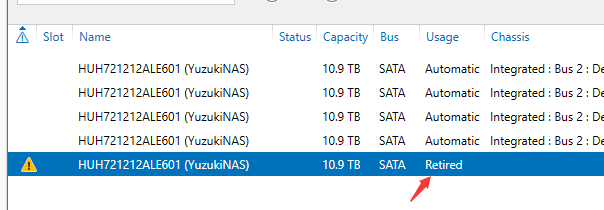
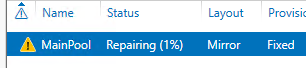
      <![CDATA[<p>最近 NAS 掉盘了，无法正常使用，需要更换一块磁盘。</p><p>先看一下坏的盘</p><figure class="highlight powershell"><table><tr><td class="code"><pre><code class="hljs powershell"><span class="hljs-built_in">Get-PhysicalDisk</span> | <span class="hljs-built_in">Where-Object</span> –Property HealthStatus –ne Healthy<br></code></pre></td></tr></table></figure><p><img src="/../images/post/2025-05-17-20250517/image-20250517092336041.png" alt="image-20250517092336041"></p><p>新盘插入之后加入存储池中，之后需要运行命令将坏的盘退休</p><figure class="highlight powershell"><table><tr><td class="code"><pre><code class="hljs powershell"><span class="hljs-variable">$FailedDisk</span> = <span class="hljs-built_in">Get-PhysicalDisk</span> | <span class="hljs-built_in">Where-Object</span> –Property HealthStatus –ne Healthy<br><span class="hljs-variable">$FailedDisk</span> | <span class="hljs-built_in">Set-PhysicalDisk</span> –Usage Retired<br></code></pre></td></tr></table></figure><p><img src="/../images/post/2025-05-17-20250517/image-20250517092438671.png" alt="image-20250517092438671"></p><p>然后需要重建磁盘库，点击修复磁盘库</p><p><img src="/../images/post/2025-05-17-20250517/image-20250517092454435.png" alt="image-20250517092454435"></p><p>等待修复完成，删除损坏的盘</p>]]>
    </content>
    <id>https://gloomyghost.com/live/2025-05-17-20250517.aspx</id>
    <link href="https://gloomyghost.com/live/2025-05-17-20250517.aspx"/>
    <published>2025-05-16T16:00:00.000Z</published>
    <summary>
      <![CDATA[<p>最近 NAS 掉盘了，无法正常使用，需要更换一块磁盘。</p>
<p>先看一下坏的盘</p>
<figure class="highlight powershell"><table><tr><td class="code"><pre><code class="hljs po]]>
    </summary>
    <title>Windows Server 2025 更换 NAS 存储池中的磁盘</title>
    <updated>2026-04-25T03:17:29.451Z</updated>
  </entry>
  <entry>
    <author>
      <name>柚木 鉉</name>
    </author>
    <category term="PVT" scheme="https://gloomyghost.com/tags/PVT/"/>
    <category term="Corner" scheme="https://gloomyghost.com/tags/Corner/"/>
    <content>
      <![CDATA[<p>在芯片制造中，即使是同一设计图纸生产的芯片，其性能也可能千差万别——有的能稳定超频运行，有的却只能在低频下工作。这种差异的根源，正是制造工艺中不可避免的波动性。为了系统化描述和应对这种波动，工程师们提出了**Corner（工艺角）**的概念，并通过SS/TT/FF等关键工艺条件来量化芯片的性能边界。</p><h4 id="一、什么是工艺角（Corner）？" data-id="一、什么是工艺角（Corner）？" class="notion-h"><a href="#一、什么是工艺角（Corner）？" class="headerlink" title="一、什么是工艺角（Corner）？"></a>一、什么是工艺角（Corner）？</h4><p><strong>工艺角</strong>是芯片制造中对工艺参数波动的极端模拟场景。由于制造过程中掺杂浓度、刻蚀精度、材料厚度等参数的微小偏差，每个芯片的晶体管特性都会存在差异。这种差异会导致同一型号芯片的速度、功耗等性能指标出现显著分化。</p><p>工艺角的本质是<strong>通过极端参数组合，覆盖芯片可能遇到的所有性能场景</strong>，从而在设计阶段验证芯片的鲁棒性。它通常与**PVT（Process-Voltage-Temperature）**模型结合使用，其中：</p><ul><li><strong>Process</strong>：工艺参数波动（即工艺角）</li><li><strong>Voltage</strong>：供电电压变化（如±10%）</li><li><strong>Temperature</strong>：工作温度范围（如-40°C~125°C）</li></ul><h4 id="二、SS-TT-FF工艺角的核心特点" data-id="二、SS-TT-FF工艺角的核心特点" class="notion-h"><a href="#二、SS-TT-FF工艺角的核心特点" class="headerlink" title="二、SS/TT/FF工艺角的核心特点"></a>二、SS/TT/FF工艺角的核心特点</h4><h5 id="1-TT（Typical-Typical）"><a href="#1-TT（Typical-Typical）" class="headerlink" title="1. TT（Typical-Typical）"></a>1. <strong>TT（Typical-Typical）</strong></h5><ul><li><strong>定义</strong>：NMOS和PMOS晶体管的工艺参数均处于典型值。</li><li><strong>性能表现</strong>：速度和功耗均为设计预期值，代表芯片的“平均性能”。</li><li><strong>应用场景</strong>：标称工作频率的基准值（如CPU的基频标注）。</li></ul><h5 id="2-FF（Fast-Fast）"><a href="#2-FF（Fast-Fast）" class="headerlink" title="2. FF（Fast-Fast）"></a>2. <strong>FF（Fast-Fast）</strong></h5><ul><li><strong>定义</strong>：NMOS和PMOS均处于“快速”工艺角，载流子迁移率高。</li><li><strong>性能表现</strong>：<ul><li>晶体管开关速度<strong>最快</strong>（高频潜力大）</li><li>漏电流增加，<strong>功耗最高</strong></li><li>可能因信号过于敏感导致稳定性下降</li></ul></li><li><strong>应用场景</strong>：超频芯片筛选、高性能计算场景。</li></ul><h5 id="3-SS（Slow-Slow）"><a href="#3-SS（Slow-Slow）" class="headerlink" title="3. SS（Slow-Slow）"></a>3. <strong>SS（Slow-Slow）</strong></h5><ul><li><strong>定义</strong>：NMOS和PMOS均处于“缓慢”工艺角，载流子迁移率低。</li><li><strong>性能表现</strong>：<ul><li>晶体管速度<strong>最慢</strong>（极限频率低）</li><li>漏电流最小，<strong>功耗最低</strong></li><li>信号延迟大，但抗干扰能力强</li></ul></li><li><strong>应用场景</strong>：低功耗设备、工控级高可靠性需求场景。</li></ul><h5 id="4-FS（Fast-Slow）与SF（Slow-Fast）"><a href="#4-FS（Fast-Slow）与SF（Slow-Fast）" class="headerlink" title="4. FS（Fast-Slow）与SF（Slow-Fast）"></a>4. <strong>FS（Fast-Slow）与SF（Slow-Fast）</strong></h5><ul><li><strong>不对称工艺角</strong>：模拟NMOS与PMOS速度不匹配的极端情况。</li><li><strong>典型问题</strong>：<ul><li>FS：NMOS快、PMOS慢 → 可能导致逻辑门输出电平异常</li><li>SF：NMOS慢、PMOS快 → 增大时序路径竞争风险</li></ul></li><li><strong>应用场景</strong>：验证电路对工艺偏差的容忍度。</li></ul><h4 id="三、工艺角的四大应用价值" data-id="三、工艺角的四大应用价值" class="notion-h"><a href="#三、工艺角的四大应用价值" class="headerlink" title="三、工艺角的四大应用价值"></a>三、工艺角的四大应用价值</h4><ol><li><p><strong>设计验证</strong><br>通过仿真SS/FF等极端工艺角，提前暴露时序违例、功耗超标等问题。例如：</p><ul><li>在SS工艺角下，需确保关键路径延迟不超过时钟周期。</li><li>在FF工艺角下，需验证电源网络能否承受峰值电流。</li></ul></li><li><p><strong>性能分级与筛选</strong><br>制造完成后，芯片会根据实际性能分级：</p><ul><li>FF偏向的芯片：标为高频版本（如CPU的“K”系列）</li><li>SS偏向的芯片：用于低功耗嵌入式场景</li><li>超出SS/FF边界的芯片：可能被降级或报废</li></ul></li><li><p><strong>良率提升</strong><br>分析工艺角分布数据，可优化制造参数：</p><ul><li>若SS角良率低，可能需调整掺杂工艺。</li><li>若FF角功耗超标，需优化电源管理电路。</li></ul></li><li><p><strong>超频潜力评估</strong><br>FF工艺角的仿真结果，常被用于预测芯片超频上限。例如：</p><ul><li>标称频率基于TT角，但FF角仿真显示可提升30% → 预留超频空间。</li></ul></li></ol><h4 id="四、工艺角的现实影响：以CPU为例" data-id="四、工艺角的现实影响：以CPU为例" class="notion-h"><a href="#四、工艺角的现实影响：以CPU为例" class="headerlink" title="四、工艺角的现实影响：以CPU为例"></a>四、工艺角的现实影响：以CPU为例</h4><ul><li><p><strong>同一型号的性能差异</strong>：<br>由于工艺偏差，i9-13900K芯片在FF角下可能轻松超频至6.0GHz，而SS角芯片可能连标称5.8GHz都难以稳定。</p></li><li><p><strong>“灰烬版”芯片的由来</strong>：<br>厂商为提高良率，会将部分勉强通过FF角测试的芯片标为高端型号，但这些芯片的超频余量极小（被称为“出厂即灰烬”）。</p></li><li><p><strong>低功耗设备的秘密</strong>：<br>智能手表等设备会刻意选用SS角芯片，牺牲速度换取更长续航，甚至通过降电压进一步降低功耗。</p></li></ul><h4 id="五、未来挑战：先进工艺下的Corner风暴" data-id="五、未来挑战：先进工艺下的Corner风暴" class="notion-h"><a href="#五、未来挑战：先进工艺下的Corner风暴" class="headerlink" title="五、未来挑战：先进工艺下的Corner风暴"></a>五、未来挑战：先进工艺下的Corner风暴</h4><p>随着工艺进入3nm以下节点，工艺角的影响更加复杂：</p><ol><li><strong>新工艺角增加</strong>：FinFET的鳍片高度、GAA晶体管的纳米片数量等新参数引入更多工艺角组合。</li><li><strong>动态电压温度补偿</strong>：芯片需实时感知自身工艺角特性，动态调整电压频率（如苹果M系列芯片的自主功耗管理）。</li><li><strong>AI辅助Corner仿真</strong>：机器学习被用于预测工艺角分布，替代传统蒙特卡洛仿真，加速设计周期。</li></ol><h4 id="结语" data-id="结语" class="notion-h"><a href="#结语" class="headerlink" title="结语"></a>结语</h4><p>工艺角是芯片性能的“基因检测报告”，SS/TT/FF则是这份报告中的关键指标。理解这些概念，不仅能解释“同型号芯片为何性能不同”，更能让我们看清半导体行业如何在纳米级的波动中，驾驭不确定性，缔造出兼顾性能与可靠性的计算奇迹。下一次当你超频CPU时，或许会想起：这背后是一场与工艺角的精密博弈。</p>]]>
    </content>
    <id>https://gloomyghost.com/live/2025-02-04-20250204.aspx</id>
    <link href="https://gloomyghost.com/live/2025-02-04-20250204.aspx"/>
    <published>2025-02-03T16:00:00.000Z</published>
    <summary>
      <![CDATA[<p>在芯片制造中，即使是同一设计图纸生产的芯片，其性能也可能千差万别——有的能稳定超频运行，有的却只能在低频下工作。这种差异的根源，正是制造工艺中不可避免的波动性。为了系统化描述和应对这种波动，工程师们提出了**Corner（工艺角）**的概念，并通过SS/TT/FF等关键工艺]]>
    </summary>
    <title>芯片制造的Corner与SS/TT/FF工艺角：性能差异的核心密码</title>
    <updated>2026-04-25T03:17:29.451Z</updated>
  </entry>
  <entry>
    <author>
      <name>柚木 鉉</name>
    </author>
    <category term="T113" scheme="https://gloomyghost.com/tags/T113/"/>
    <category term="HIFI4" scheme="https://gloomyghost.com/tags/HIFI4/"/>
    <content>
      <![CDATA[<p>HIFI 4 简介如下</p><p>Cadence® Tensilica® HiFi 4 DSP是一款32位固定点和浮点处理器，专为智能音箱、家庭娱乐和汽车信息娱乐等要求高的DSP应用而设计。它为复杂的多麦克风远场处理、使用神经网络技术的唤醒词检测提供了改进的性能，并支持最新的基于对象的编解码器，适用于机顶盒，音响和电视产品。</p><p>主要优势：</p><ol><li>复杂的面向对象编解码器：有效执行复杂的音频编解码器，适用于电视、机顶盒和音响。</li><li>高性能的DSP：在FFT和FIR等计算密集型函数方面，HiFi 4 DSP的性能比HiFi 3z DSP提高了一倍，支持ANC、降噪和声音分析等占用性能的算法。</li><li>基于神经网络的语音助手：结合高性能的DSP和增强的NN性能，可靠地用于电视、机顶盒、音箱和智能音箱的远场语音助手功能。</li><li>ISO 26262：具有硬件和软件安全机制，符合ASIL标准。</li></ol><p>主要特点：</p><ul><li>在特定条件下支持每个周期8个32x16位MAC。</li><li>四个VLIW槽体结构，每个周期可发出两个64位加载。</li><li>可选向量浮点单元，提供每个周期最多四个单精度IEEE浮点MAC。</li><li>软件兼容完整的HiFi DSP产品线，提供超过300种HiFi优化的音频和语音编解码器和音频增强软件包。</li><li>HiFi NN库提供了经过优化的常用NN处理函数集，可轻松集成到流行的机器学习框架中。</li></ul><p><img src="/../images/post/2024-02-22-20240222/tensilica-hifi-idma-128.jpg" alt="img"></p><p>在 D1-H T113 A523 系列芯片中可以发现 HIFI4 的踪影</p><p><img src="/../images/post/2024-02-22-20240222/image-20240222205218154.png" alt="image-20240222205218154"></p><h1 id="HIFI-4-启动流程" data-id="HIFI-4-启动流程" class="notion-h"><a href="#HIFI-4-启动流程" class="headerlink" title="HIFI 4 启动流程"></a>HIFI 4 启动流程</h1><p>先看时钟初始化流程</p><figure class="highlight c"><table><tbody><tr><td class="code"><pre><code class="hljs c"><span class="hljs-type">void</span> <span class="hljs-title function_">sunxi_hifi4_clock_init</span><span class="hljs-params">(<span class="hljs-type">uint32_t</span> addr)</span> {<br>    <span class="hljs-type">uint32_t</span> reg_val = <span class="hljs-number">0</span>;<br><br>    <span class="hljs-comment">// 设置SRAM映射</span><br>    sram_remap_set(<span class="hljs-number">1</span>);<br><br>    <span class="hljs-comment">// 配置DSP时钟源为PERI2X，时钟倍频因子为2，并打开DSP时钟门控</span><br>    reg_val |= CCU_DSP_CLK_SRC_PERI2X;<br>    reg_val |= CCU_DSP_CLK_FACTOR_M(<span class="hljs-number">2</span>);<br>    reg_val |= (<span class="hljs-number">1</span> &lt;&lt; CCU_BIT_DSP_SCLK_GATING);<br>    writel(reg_val, CCU_BASE + CCU_DSP_CLK_REG);<br><br>    <span class="hljs-comment">// 进行时钟门控设置，使得DSP0配置部分的时钟门控位为1</span><br>    reg_val = readl(CCU_BASE + CCU_DSP_BGR_REG);<br>    reg_val |= (<span class="hljs-number">1</span> &lt;&lt; CCU_BIT_DSP0_CFG_GATING);<br>    writel(reg_val, CCU_BASE + CCU_DSP_BGR_REG);<br><br>    <span class="hljs-comment">// 进行复位操作，首先对DSP0进行配置复位，然后对DSP0进行调试复位</span><br>    reg_val = readl(CCU_BASE + CCU_DSP_BGR_REG);<br>    reg_val |= (<span class="hljs-number">1</span> &lt;&lt; CCU_BIT_DSP0_CFG_RST);<br>    reg_val |= (<span class="hljs-number">1</span> &lt;&lt; CCU_BIT_DSP0_DBG_RST);<br>    writel(reg_val, CCU_BASE + CCU_DSP_BGR_REG);<br><br>    <span class="hljs-comment">// 如果需要设置外部复位向量，则将外部复位向量写入指定寄存器，并设置启动向量选择，设置code地址</span><br>    <span class="hljs-keyword">if</span> (addr != DSP_DEFAULT_RST_VEC) {<br>        writel(addr, DSP0_CFG_BASE + DSP_ALT_RESET_VEC_REG);<br><br>        reg_val = readl(DSP0_CFG_BASE + DSP_CTRL_REG0);<br>        reg_val |= (<span class="hljs-number">1</span> &lt;&lt; BIT_START_VEC_SEL);<br>        writel(reg_val, DSP0_CFG_BASE + DSP_CTRL_REG0);<br>    }<br><br>    <span class="hljs-comment">// 设置运行暂停标志</span><br>    sunxi_hifi4_set_run_stall(<span class="hljs-number">1</span>);<br><br>    <span class="hljs-comment">// 打开DSP时钟使能</span><br>    reg_val = readl(DSP0_CFG_BASE + DSP_CTRL_REG0);<br>    reg_val |= (<span class="hljs-number">1</span> &lt;&lt; BIT_DSP_CLKEN);<br>    writel(reg_val, DSP0_CFG_BASE + DSP_CTRL_REG0);<br><br>    <span class="hljs-comment">// 取消对DSP0的复位</span><br>    reg_val = readl(CCU_BASE + CCU_DSP_BGR_REG);<br>    reg_val |= (<span class="hljs-number">1</span> &lt;&lt; CCU_BIT_DSP0_RST);<br>    writel(reg_val, CCU_BASE + CCU_DSP_BGR_REG);<br><br>    <span class="hljs-comment">/* 复原 */</span><br>    sram_remap_set(<span class="hljs-number">0</span>);<br>    sunxi_hifi4_set_run_stall(<span class="hljs-number">0</span>);<br>}<br></code></pre></td></tr></tbody></table></figure><ul><li><p>通过<code>sram_remap_set(1)</code>函数设置SRAM映射，确保存储器映射正确。</p></li><li><p>配置DSP的时钟源为PERI2X，并将时钟倍频因子设置为2，同时打开DSP的时钟门控功能，以确保时钟信号正常传输到DSP。</p></li><li><p>进行时钟门控设置，将DSP0的配置部分时钟门控位置为1，以确保配置部分的时钟信号可用。</p></li><li><p>进行复位操作，首先对DSP0进行配置复位，然后对DSP0进行调试复位，以确保DSP在初始化过程中处于良好的初始状态。</p></li><li><p>如果需要设置外部复位向量，将指定的地址写入相应的寄存器，同时设置启动向量选择。我们在这里设置 HIFI4 的程序启动地址。</p></li><li><p>设置运行暂停标志，以确保DSP在初始化完成后进入正常的工作状态。</p></li><li><p>打开DSP时钟使能，以确保DSP的时钟信号正常启动。</p></li><li><p>取消对DSP0的复位，使得DSP可以开始正常的运行。</p></li></ul><p>通过以上初始化流程的操作，可以确保DSP在初始化后可以正常工作，并准备好接收和处理相应的任务和指令。</p><h2 id="编译-HIFI-4-固件" data-id="编译-HIFI-4-固件" class="notion-h"><a href="#编译-HIFI-4-固件" class="headerlink" title="编译 HIFI 4 固件"></a>编译 HIFI 4 固件</h2><p>由于 HIFI 4 使用的是 Xtensa Xplorer 套件，这个套件需要购买。但是没钱，所以需要手搓一个，手搓方法参考之前写的 HIFI5 即可。</p><p>既然有了编译器，那就适配一个 FreeRTOS，链接：<a href="https://github.com/YuzukiHD/FreeRTOS-HIFI4-DSP">https://github.com/YuzukiHD/FreeRTOS-HIFI4-DSP</a></p><h3 id="搭建环境" data-id="搭建环境" class="notion-h"><a href="#搭建环境" class="headerlink" title="搭建环境"></a>搭建环境</h3><p>用下面的命令克隆代码并搭建环境</p><figure class="highlight plaintext"><table><tbody><tr><td class="code"><pre><code class="hljs plaintext">git clone https://github.com/YuzukiHD/FreeRTOS-HIFI4-DSP.git<br>cd FreeRTOS-HIFI4-DSP<br>wget https://github.com/YuzukiHD/FreeRTOS-HIFI4-DSP/releases/download/Toolchains/xtensa-hifi4-dsp.tar.gz<br>mkdir -p tools/xtensa-hifi4-gcc<br>mv xtensa-hifi4-dsp.tar.gz tools/xtensa-hifi4-gcc/<br>cd tools/xtensa-hifi4-gcc/<br>tar xvf xtensa-hifi4-dsp.tar.gz<br>cd -<br></code></pre></td></tr></tbody></table></figure><p><img src="/../images/post/2024-02-22-20240222/image-20240222213136340.png" alt="image-20240222213136340"></p><h3 id="构建-FreeRTOS" data-id="构建-FreeRTOS" class="notion-h"><a href="#构建-FreeRTOS" class="headerlink" title="构建 FreeRTOS"></a>构建 FreeRTOS</h3><p>构建固件非常简单，执行 <code>make</code> 即可，生成的固件在 <code>./build/dsp.elf</code> 下</p><p><img src="/../images/post/2024-02-22-20240222/image-20240222213255206.png" alt="image-20240222213255206"></p><h2 id="使用-SyterKit-启动" data-id="使用-SyterKit-启动" class="notion-h"><a href="#使用-SyterKit-启动" class="headerlink" title="使用 SyterKit 启动"></a>使用 SyterKit 启动</h2><p>SyterKit 是一个纯裸机框架，用于 TinyVision 或者其他 v851se/v851s/v851s3/v853 等芯片的开发板，SyterKit 使用 CMake 作为构建系统构建，支持多种应用与多种外设驱动。同时 SyterKit 也具有启动引导的功能，可以替代 U-Boot 实现快速启动</p><h3 id="获取-SyterKit-源码" data-id="获取-SyterKit-源码" class="notion-h"><a href="#获取-SyterKit-源码" class="headerlink" title="获取 SyterKit 源码"></a>获取 SyterKit 源码</h3><p>SyterKit 源码位于GitHub，可以前往下载。</p><figure class="highlight shell"><table><tbody><tr><td class="code"><pre><code class="hljs shell">git clone https://github.com/YuzukiHD/SyterKit.git<br></code></pre></td></tr></tbody></table></figure><h3 id="从零构建-SyterKit" data-id="从零构建-SyterKit" class="notion-h"><a href="#从零构建-SyterKit" class="headerlink" title="从零构建 SyterKit"></a>从零构建 SyterKit</h3><p>构建 SyterKit 非常简单，只需要在 Linux 操作系统中安装配置环境即可编译。SyterKit 需要的软件包有：</p><ul><li><code>gcc-arm-none-eabi</code></li><li><code>CMake</code></li></ul><p>对于常用的 Ubuntu 系统，可以通过如下命令安装</p><figure class="highlight shell"><table><tbody><tr><td class="code"><pre><code class="hljs shell">sudo apt-get update<br>sudo apt-get install gcc-arm-none-eabi cmake build-essential -y<br></code></pre></td></tr></tbody></table></figure><p>然后新建一个文件夹存放编译的输出文件，并且进入这个文件夹</p><figure class="highlight shell"><table><tbody><tr><td class="code"><pre><code class="hljs shell">mkdir build<br>cd build<br></code></pre></td></tr></tbody></table></figure><p>然后运行命令编译 SyterKit</p><figure class="highlight shell"><table><tbody><tr><td class="code"><pre><code class="hljs shell">cmake ..<br>make<br></code></pre></td></tr></tbody></table></figure><p><img src="/../images/post/2024-02-22-20240222/image-20231216174136154.png" alt="image-20231216174136154"></p><p>编译后的可执行文件位于 <code>build/app</code> 中，这里包括 SyterKit 的多种APP可供使用。</p><p><img src="/../images/post/2024-02-22-20240222/image-20231216173846369.png" alt="image-20231216173846369"></p><p>进入 <code>load_hifi4</code></p><p><img src="/../images/post/2024-02-22-20240222/image-20240222214431758.png" alt="image-20240222214431758"></p><p>按照需求选择，这里我们使用卡启动，所以使用 <code>load_hifi4_bin_card.bin</code></p><p><img src="/../images/post/2024-02-22-20240222/image-20240222214515148.png" alt="image-20240222214515148"></p><h3 id="使用-genimage-打包固件" data-id="使用-genimage-打包固件" class="notion-h"><a href="#使用-genimage-打包固件" class="headerlink" title="使用 genimage 打包固件"></a>使用 genimage 打包固件</h3><p>编写 genimage.cfg 作为打包的配置</p><figure class="highlight plaintext"><table><tbody><tr><td class="code"><pre><code class="hljs cfg">image boot.vfat {<br>vfat {<br>files = {<br>"dsp.elf"<br>}<br>}<br>size = 8M<br>}<br><br>image sdcard.img {<br>hdimage {}<br><br>partition boot0 {<br>in-partition-table = "no"<br>image = "syter_boot_bin_card.bin"<br>offset = 8K<br>}<br><br>partition boot0-gpt {<br>in-partition-table = "no"<br>image = "syter_boot_bin_card.bin"<br>offset = 128K<br>}<br><br>partition kernel {<br>partition-type = 0xC<br>bootable = "true"<br>image = "boot.vfat"<br>}<br>}<br></code></pre></td></tr></tbody></table></figure><p>由于genimage的脚本比较复杂，所以编写一个 <code>genimage.sh</code> 作为简易使用的工具</p><figure class="highlight sh"><table><tbody><tr><td class="code"><pre><code class="hljs sh"><span class="hljs-meta">#!/usr/bin/env bash</span><br><br><span class="hljs-function"><span class="hljs-title">die</span></span>() {<br>  <span class="hljs-built_in">cat</span> &lt;&lt;<span class="hljs-string">EOF &gt;&amp;2</span><br><span class="hljs-string">Error: $@</span><br><span class="hljs-string"></span><br><span class="hljs-string">Usage: ${0} -c GENIMAGE_CONFIG_FILE</span><br><span class="hljs-string">EOF</span><br>  <span class="hljs-built_in">exit</span> 1<br>}<br><br><span class="hljs-comment"># Parse arguments and put into argument list of the script</span><br>opts=<span class="hljs-string">"<span class="hljs-subst">$(getopt -n <span class="hljs-string">"<span class="hljs-variable">${0##*/}</span>"</span> -o c: -- <span class="hljs-string">"<span class="hljs-variable">$@</span>"</span>)</span>"</span> || <span class="hljs-built_in">exit</span> $?<br><span class="hljs-built_in">eval</span> <span class="hljs-built_in">set</span> -- <span class="hljs-string">"<span class="hljs-variable">$opts</span>"</span><br><br>GENIMAGE_TMP=<span class="hljs-string">"<span class="hljs-variable">${BUILD_DIR}</span>/genimage.tmp"</span><br><br><span class="hljs-keyword">while</span> <span class="hljs-literal">true</span> ; <span class="hljs-keyword">do</span><br><span class="hljs-keyword">case</span> <span class="hljs-string">"<span class="hljs-variable">$1</span>"</span> <span class="hljs-keyword">in</span><br>-c)<br>  GENIMAGE_CFG=<span class="hljs-string">"<span class="hljs-variable">${2}</span>"</span>;<br>  <span class="hljs-built_in">shift</span> 2 ;;<br>--) <span class="hljs-comment"># Discard all non-option parameters</span><br>  <span class="hljs-built_in">shift</span> 1;<br>  <span class="hljs-built_in">break</span> ;;<br>*)<br>  die <span class="hljs-string">"unknown option '<span class="hljs-variable">${1}</span>'"</span> ;;<br><span class="hljs-keyword">esac</span><br><span class="hljs-keyword">done</span><br><br>[ -n <span class="hljs-string">"<span class="hljs-variable">${GENIMAGE_CFG}</span>"</span> ] || die <span class="hljs-string">"Missing argument"</span><br><br><span class="hljs-comment"># Pass an empty rootpath. genimage makes a full copy of the given rootpath to</span><br><span class="hljs-comment"># ${GENIMAGE_TMP}/root so passing TARGET_DIR would be a waste of time and disk</span><br><span class="hljs-comment"># space. We don't rely on genimage to build the rootfs image, just to insert a</span><br><span class="hljs-comment"># pre-built one in the disk image.</span><br><br><span class="hljs-built_in">trap</span> <span class="hljs-string">'rm -rf "${ROOTPATH_TMP}"'</span> EXIT<br>ROOTPATH_TMP=<span class="hljs-string">"<span class="hljs-subst">$(mktemp -d)</span>"</span><br>GENIMAGE_TMP=<span class="hljs-string">"<span class="hljs-subst">$(mktemp -d)</span>"</span><br><span class="hljs-built_in">rm</span> -rf <span class="hljs-string">"<span class="hljs-variable">${GENIMAGE_TMP}</span>"</span><br><br>genimage \<br>--rootpath <span class="hljs-string">"<span class="hljs-variable">${ROOTPATH_TMP}</span>"</span>     \<br>--tmppath <span class="hljs-string">"<span class="hljs-variable">${GENIMAGE_TMP}</span>"</span>    \<br>--inputpath <span class="hljs-string">"<span class="hljs-variable">${BINARIES_DIR}</span>"</span>  \<br>--outputpath <span class="hljs-string">"<span class="hljs-variable">${BINARIES_DIR}</span>"</span> \<br>--config <span class="hljs-string">"<span class="hljs-variable">${GENIMAGE_CFG}</span>"</span><br></code></pre></td></tr></tbody></table></figure><p>准备完成，运行打包即可</p><figure class="highlight plaintext"><table><tbody><tr><td class="code"><pre><code class="hljs plaintext">./genimage.sh -c genimage.cfg<br></code></pre></td></tr></tbody></table></figure><p><img src="/../images/post/2024-02-22-20240222/IMG_1366.PNG" alt="IMG_1366"></p><h2 id="性能对比" data-id="性能对比" class="notion-h"><a href="#性能对比" class="headerlink" title="性能对比"></a>性能对比</h2><p>官方 XCC 编译器</p><figure class="highlight plaintext"><table><tbody><tr><td class="code"><pre><code class="hljs plaintext">2K performance run parameters for coremark.<br>CoreMark Size    : 666<br>Total ticks      : 26696<br>Total time (secs): 26<br>Iterations/Sec   : 1923.07692<br>Iterations       : 50000<br>Compiler version : GCC4.2.0 (Xtensa 14.04 release)<br>Compiler flags   : -Os<br>Memory location  : STACK<br>seedcrc          : 0xe9f5<br>[0]crclist       : 0xe714<br>[0]crcmatrix     : 0x1fd7<br>[0]crcstate      : 0x8e3a<br>[0]crcfinal      : 0xa14c<br>Correct operation validated. See README.md for run and reporting rules.<br>CoreMark 1.0 : 1923.07692 /  GCC4.2.0 (Xtensa 14.04 release) -Os / STACK<br></code></pre></td></tr></tbody></table></figure><p>GCC</p><figure class="highlight plaintext"><table><tbody><tr><td class="code"><pre><code class="hljs plaintext">Dhrystone Benchmark, Version 2.1 (Language: C)<br><br>Program compiled without 'register' attribute<br><br>Execution starts, 10000000 runs through Dhrystone<br>Execution ends<br><br>Final values of the variables used in the benchmark:<br><br>Int_Glob:            5<br>        should be:   5<br>Bool_Glob:           1<br>        should be:   1<br>Ch_1_Glob:           A<br>        should be:   A<br>Ch_2_Glob:           B<br>        should be:   B<br>Arr_1_Glob[8]:       7<br>        should be:   7<br>Arr_2_Glob[8][7]:    10000010<br>        should be:   Number_Of_Runs + 10<br>Ptr_Glob-&gt;<br>  Ptr_Comp:          933177280<br>        should be:   (implementation-dependent)<br>  Discr:             0<br>        should be:   0<br>  Enum_Comp:         2<br>        should be:   2<br>  Int_Comp:          17<br>        should be:   17<br>  Str_Comp:          DHRYSTONE PROGRAM, SOME STRING<br>        should be:   DHRYSTONE PROGRAM, SOME STRING<br>Next_Ptr_Glob-&gt;<br>  Ptr_Comp:          933177280<br>        should be:   (implementation-dependent), same as above<br>  Discr:             0<br>        should be:   0<br>  Enum_Comp:         1<br>        should be:   1<br>  Int_Comp:          18<br>        should be:   18<br>  Str_Comp:          DHRYSTONE PROGRAM, SOME STRING<br>        should be:   DHRYSTONE PROGRAM, SOME STRING<br>Int_1_Loc:           5<br>        should be:   5<br>Int_2_Loc:           13<br>        should be:   13<br>Int_3_Loc:           7<br>        should be:   7<br>Enum_Loc:            1<br>        should be:   1<br>Str_1_Loc:           DHRYSTONE PROGRAM, 1'ST STRING<br>        should be:   DHRYSTONE PROGRAM, 1'ST STRING<br>Str_2_Loc:           DHRYSTONE PROGRAM, 2'ND STRING<br>        should be:   DHRYSTONE PROGRAM, 2'ND STRING<br><br>Microseconds for one run through Dhrystone:    0.8<br>Dhrystones per Second:                      1241310.8<br>DMIPS:                                      706.49<br><br>Rolled Double Precision Linpack Benchmark - PC Version in 'C/C++'<br><br>Compiler     xtensa hifi4 dsp xtensa-elf-gcc 10.2<br>Optimisation -O2<br><br>norm resid      resid           machep         x[0]-1          x[n-1]-1<br>   1.7    7.41628980e-14   2.22044605e-16  -1.49880108e-14  -1.89848137e-14<br><br>Times are reported for matrices of order          100<br>1 pass times for array with leading dimension of  201<br><br>      dgefa      dgesl      total     Mflops       unit      ratio<br>    0.07600    0.00200    0.07800       8.80     0.2272     1.3929<br><br>Calculating matgen overhead<br>       100 times   0.43 seconds<br>       200 times   0.85 seconds<br>       400 times   1.70 seconds<br>       800 times   3.41 seconds<br>      1600 times   6.81 seconds<br>Overhead for 1 matgen      0.00426 seconds<br><br>Calculating matgen/dgefa passes for 5 seconds<br>       100 times   8.05 seconds<br>Passes used         62<br><br>Times for array with leading dimension of 201<br><br>      dgefa      dgesl      total     Mflops       unit      ratio<br>    0.07621    0.00231    0.07852       8.75     0.2287     1.4021<br>    0.07621    0.00231    0.07852       8.75     0.2287     1.4021<br>    0.07621    0.00231    0.07852       8.75     0.2287     1.4021<br>    0.07621    0.00231    0.07852       8.75     0.2287     1.4021<br>    0.07621    0.00231    0.07852       8.75     0.2287     1.4021<br>Average                                 8.75<br><br>Calculating matgen2 overhead<br>Overhead for 1 matgen      0.00426 seconds<br><br>Times for array with leading dimension of 200<br><br>      dgefa      dgesl      total     Mflops       unit      ratio<br>    0.07626    0.00231    0.07857       8.74     0.2288     1.4030<br>    0.07626    0.00231    0.07857       8.74     0.2288     1.4030<br>    0.07626    0.00231    0.07857       8.74     0.2288     1.4030<br>    0.07626    0.00231    0.07857       8.74     0.2288     1.4030<br>    0.07626    0.00231    0.07857       8.74     0.2288     1.4030<br>Average                                 8.74<br><br>Rolled Double  Precision        8.74 Mflops<br><br>2K performance run parameters for coremark.<br>CoreMark Size    : 666<br>Total ticks      : 16427<br>Total time (secs): 16.427000<br>Iterations/Sec   : 1400.133926<br>Iterations       : 23000<br>Compiler version : GCC10.3.0<br>Compiler flags   : -O2<br>Memory location  : STACK<br>seedcrc          : 0xe9f5<br>[0]crclist       : 0xe714<br>[0]crcmatrix     : 0x1fd7<br>[0]crcstate      : 0x8e3a<br>[0]crcfinal      : 0xd340<br>Correct operation validated. See README.md for run and reporting rules.<br>CoreMark 1.0 : 1400.133926 / GCC10.3.0 -O2 / STACK<br></code></pre></td></tr></tbody></table></figure>]]>
    </content>
    <id>https://gloomyghost.com/live/2024-02-22-20240222.aspx</id>
    <link href="https://gloomyghost.com/live/2024-02-22-20240222.aspx"/>
    <published>2024-02-21T16:00:00.000Z</published>
    <summary>
      <![CDATA[<p>HIFI 4 简介如下</p>
<p>Cadence® Tensilica® HiFi 4 DSP是一款32位固定点和浮点处理器，专为智能音箱、家庭娱乐和汽车信息娱乐等要求高的DSP应用而设计。它为复杂的多麦克风远场处理、使用神经网络技术的唤醒词检测提供了改进的性能，并支持]]>
    </summary>
    <title>T527 T113-S3 使用 SyterKit + 自制编译器开发 HIFI4 DSP</title>
    <updated>2026-04-25T03:17:29.451Z</updated>
  </entry>
  <entry>
    <author>
      <name>柚木 鉉</name>
    </author>
    <category term="TinyVision" scheme="https://gloomyghost.com/tags/TinyVision/"/>
    <category term="NPU" scheme="https://gloomyghost.com/tags/NPU/"/>
    <category term="OpenCV" scheme="https://gloomyghost.com/tags/OpenCV/"/>
    <content>
      <![CDATA[<p>TinyVision V851s 使用 OpenCV + NPU 实现 Mobilenet v2 物体识别。上一篇已经介绍了如何使用 TinyVision 与 OpenCV 开摄像头，本篇将使用已经训练完成并且转换后的模型来介绍对接 NPU 实现物体识别的功能。</p><h1 id="MobileNet-V2" data-id="MobileNet-V2" class="notion-h"><a href="#MobileNet-V2" class="headerlink" title="MobileNet V2"></a>MobileNet V2</h1><p>MobileNet V2是一种轻量级的卷积神经网络（CNN）架构，专门设计用于在移动设备和嵌入式设备上进行计算资源受限的实时图像分类和目标检测任务。</p><p>以下是MobileNet V2的一些关键特点和创新之处：</p><ol><li><p>Depthwise Separable Convolution（深度可分离卷积）：MobileNet V2使用了深度可分离卷积，将标准卷积分解为两个步骤：depthwise convolution（深度卷积）和pointwise convolution（逐点卷积）。这种分解方式可以显著减少计算量和参数数量，从而提高模型的轻量化程度。</p></li><li><p>Inverted Residuals with Linear Bottlenecks（带线性瓶颈的倒残差结构）：MobileNet V2引入了带有线性瓶颈的倒残差结构，以增加模型的非线性表示能力。这种结构在每个残差块的中间层采用较低维度的逐点卷积来减少计算量，并使用扩张卷积来增加感受野，使网络能够更好地捕捉图像中的细节和全局信息。</p></li><li><p>Width Multiplier（宽度乘数）：MobileNet V2提供了一个宽度乘数参数，可以根据计算资源的限制来调整模型的宽度。通过减少每个层的通道数，可以进一步减小模型的体积和计算量，适应不同的设备和应用场景。</p></li><li><p>Linear Bottlenecks（线性瓶颈）：为了减少非线性激活函数对模型性能的影响，MobileNet V2使用线性激活函数来缓解梯度消失问题。这种线性激活函数在倒残差结构的中间层中使用，有助于提高模型的收敛速度和稳定性。</p></li></ol><p>总体而言，MobileNet V2通过深度可分离卷积、倒残差结构和宽度乘数等技术，实现了较高的模型轻量化程度和计算效率，使其成为在资源受限的移动设备上进行实时图像分类和目标检测的理想选择。</p><h1 id="NPU" data-id="NPU" class="notion-h"><a href="#NPU" class="headerlink" title="NPU"></a>NPU</h1><p>V851s 芯片内置一颗 NPU，其处理性能为最大 0.5 TOPS 并有 128KB 内部高速缓存用于高速数据交换</p><h2 id="NPU-系统架构" data-id="NPU-系统架构" class="notion-h"><a href="#NPU-系统架构" class="headerlink" title="NPU 系统架构"></a>NPU 系统架构</h2><p>NPU 的系统架构如下图所示：</p><p><img src="/../images/post/2024-01-26-20240126/image-20220712100607889.png" alt="image-20220712100607889"></p><p>上层的应用程序可以通过加载模型与数据到 NPU 进行计算，也可以使用 NPU 提供的软件 API 操作 NPU 执行计算。</p><p>NPU包括三个部分：可编程引擎（Programmable Engines，PPU）、神经网络引擎（Neural Network Engine，NN）和各级缓存。</p><p>可编程引擎可以使用 EVIS 硬件加速指令与 Shader 语言进行编程，也可以实现激活函数等操作。</p><p>神经网络引擎包含 NN 核心与 Tensor Process Fabric（TPF，图中简写为 Fabric） 两个部分。NN核心一般计算卷积操作， Tensor Process Fabric 则是作为 NN 核心中的高速数据交换的通路。算子是由可编程引擎与神经网络引擎共同实现的。</p><p>NPU 支持 UINT8，INT8，INT16 三种数据格式。</p><h2 id="NPU-模型转换" data-id="NPU-模型转换" class="notion-h"><a href="#NPU-模型转换" class="headerlink" title="NPU 模型转换"></a>NPU 模型转换</h2><p>NPU 使用的模型是 NPU 自定义的一类模型结构，不能直接将网络训练出的模型直接导入 NPU 进行计算。这就需要将网络训练出的转换模型到 NPU 的模型上。</p><p>NPU 的模型转换步骤如下图所示：</p><p><img src="/../images/post/2024-01-26-20240126/image-20220712112951142.png" alt="image-20220712113105463"></p><p>NPU 模型转换包括准备阶段、量化阶段与验证阶段。</p><h3 id="准备阶段" data-id="准备阶段" class="notion-h"><a href="#准备阶段" class="headerlink" title="准备阶段"></a>准备阶段</h3><p>首先我们把准备好模型使用工具导入，并创建配置文件。</p><p>这时候工具会把模型导入并转换为 NPU 所使用的网络模型、权重模型与配置文件。</p><p>配置文件用于对网络的输入和输出的参数进行描述以及配置。这些参数包括输入/输出 tensor 的形状、归一化系数 (均值/零点)、图像格式、tensor 的输出格式、后处理方式等等。</p><h3 id="量化阶段" data-id="量化阶段" class="notion-h"><a href="#量化阶段" class="headerlink" title="量化阶段"></a>量化阶段</h3><p>由于训练好的神经网络对数据精度以及噪声的不敏感，因此可以通过量化将参数从浮点数转换为定点数。这样做有两个优点：</p><p>（1）减少了数据量，进而可以使用容量更小的存储设备，节省了成本；</p><p>（2）由于数据量减少，浮点转化为定点数也大大降低了系统的计算量，也提高了计算的速度。</p><p>但是量化也有一个致命缺陷——会导致精度的丢失。</p><p>由于浮点数转换为定点数时会大大降低数据量，导致实际的权重参数准确度降低。在简单的网络里这不是什么大问题，但是如果是复杂的多层多模型的网络，每一层微小的误差都会导致最终数据的错误。</p><p>那么，可以不量化直接使用原来的数据吗？当然是可以的。</p><p>但是由于使用的是浮点数，无法将数据导入到只支持定点运算的 NN 核心进行计算，这就需要可编程引擎来代替 NN 核进行计算，这样可以大大降低运算效率。</p><p>另外，在进行量化过程时，不仅对参数进行了量化，也会对输入输出的数据进行量化。如果模型没有输入数据，就不知道输入输出的数据范围。这时候我们就需要准备一些具有代表性的输入来参与量化。这些输入数据一般从训练模型的数据集里获得，例如图片数据集里的图片。</p><p>另外选择的数据集不一定要把所有训练数据全部加入量化，通常我们选择几百张能够代表所有场景的输入数据就即可。理论上说，量化数据放入得越多，量化后精度可能更好，但是到达一定阈值后效果增长将会非常缓慢甚至不再增长。</p><h3 id="验证阶段" data-id="验证阶段" class="notion-h"><a href="#验证阶段" class="headerlink" title="验证阶段"></a>验证阶段</h3><p>由于上一阶段对模型进行了量化导致了精度的丢失，就需要对每个阶段的模型进行验证，对比结果是否一致。</p><p>首先我们需要使用非量化情况下的模型运行生成每一层的 tensor 作为 Golden tensor。输入的数据可以是数据集中的任意一个数据。然后量化后使用预推理相同的数据再次输出一次 tensor，对比这一次输出的每一层的 tensor 与 Golden tensor 的差别。</p><p>如果差别较大可以尝试更换量化模型和量化方式。差别不大即可使用 IDE 进行仿真。也可以直接部署到 V851s 上进行测试。</p><p>此时测试同样会输出 tensor 数据，对比这一次输出的每一层的 tensor 与 Golden tensor 的差别，差别不大即可集成到 APP 中了。</p><h2 id="NPU-的开发流程" data-id="NPU-的开发流程" class="notion-h"><a href="#NPU-的开发流程" class="headerlink" title="NPU 的开发流程"></a>NPU 的开发流程</h2><p>NPU 开发完整的流程如下图所示:</p><p><img src="/../images/post/2024-01-26-20240126/image-20240126194601436.png" alt="image-20240126194601436"></p><h3 id="模型训练" data-id="模型训练" class="notion-h"><a href="#模型训练" class="headerlink" title="模型训练"></a>模型训练</h3><p>在模型训练阶段，用户根据需求和实际情况选择合适的框架（如Caffe、TensorFlow 等）使用数据集进行训练得到符合需求的模型，此模型可称为预训练模型。也可直接使用已经训练好的模型。V851s 的 NPU 支持包括分类、检测、跟踪、人脸、姿态估计、分割、深度、语音、像素处理等各个场景90 多个公开模型。</p><h3 id="模型转换" data-id="模型转换" class="notion-h"><a href="#模型转换" class="headerlink" title="模型转换"></a>模型转换</h3><p>在模型转化阶段，通过Acuity Toolkit 把预训练模型和少量训练数据转换为NPU 可用的模型NBG文件。<br>一般步骤如下：</p><ol><li>模型导入，生成网络结构文件、网络权重文件、输入描述文件和输出描述文件。</li><li>模型量化，生成量化描述文件和熵值文件，可改用不同的量化方式。</li><li>仿真推理，可逐一对比float 和其他量化精度的仿真结果的相似度，评估量化后的精度是否满足要求。</li><li>模型导出，生成端侧代码和*.nb 文件，可编辑输出描述文件的配置，配置是否添加后处理节点等。</li></ol><h3 id="模型部署及应用开发" data-id="模型部署及应用开发" class="notion-h"><a href="#模型部署及应用开发" class="headerlink" title="模型部署及应用开发"></a>模型部署及应用开发</h3><p>在模型部署阶段，就是基于VIPLite API 开发应用程序实现业务逻辑。</p><h1 id="源码解析" data-id="源码解析" class="notion-h"><a href="#源码解析" class="headerlink" title="源码解析"></a>源码解析</h1><p>完整的代码已经上传Github开源，前往以下地址：<a href="https://github.com/YuzukiHD/TinyVision/tree/main/tina/openwrt/package/thirdparty/vision/opencv_camera_mobilenet_v2_ssd/src">https://github.com/YuzukiHD/TinyVision/tree/main/tina/openwrt/package/thirdparty/vision/opencv_camera_mobilenet_v2_ssd/src</a></p><h2 id="Mobilenet-v2-前处理" data-id="Mobilenet-v2-前处理" class="notion-h"><a href="#Mobilenet-v2-前处理" class="headerlink" title="Mobilenet v2 前处理"></a>Mobilenet v2 前处理</h2><figure class="highlight c"><table><tbody><tr><td class="code"><pre><code class="hljs c"><span class="hljs-type">void</span> <span class="hljs-title function_">get_input_data</span><span class="hljs-params">(<span class="hljs-type">const</span> cv::Mat&amp; sample, <span class="hljs-type">uint8_t</span>* input_data, <span class="hljs-type">int</span> input_h, <span class="hljs-type">int</span> input_w, <span class="hljs-type">const</span> <span class="hljs-type">float</span>* mean, <span class="hljs-type">const</span> <span class="hljs-type">float</span>* scale)</span>{<br>    cv::Mat img;<br>    <span class="hljs-keyword">if</span> (sample.channels() == <span class="hljs-number">1</span>)<br>        cv::cvtColor(sample, img, cv::COLOR_GRAY2RGB);<br>    <span class="hljs-keyword">else</span><br>        cv::cvtColor(sample, img, cv::COLOR_BGR2RGB);<br>    cv::resize(img, img, cv::Size(input_h, input_w));<br>    <span class="hljs-type">uint8_t</span>* img_data = img.data;<br>    <span class="hljs-comment">/* nhwc to nchw */</span><br>    <span class="hljs-keyword">for</span> (<span class="hljs-type">int</span> h = <span class="hljs-number">0</span>; h &lt; input_h; h++) {<br>        <span class="hljs-keyword">for</span> (<span class="hljs-type">int</span> w = <span class="hljs-number">0</span>; w &lt; input_w; w++) {<br>            <span class="hljs-keyword">for</span> (<span class="hljs-type">int</span> c = <span class="hljs-number">0</span>; c &lt; <span class="hljs-number">3</span>; c++) {<br>                <span class="hljs-type">int</span> in_index = h * input_w * <span class="hljs-number">3</span> + w * <span class="hljs-number">3</span> + c;<br>                <span class="hljs-type">int</span> out_index = c * input_h * input_w + h * input_w + w;<br>                input_data[out_index] = (<span class="hljs-type">uint8_t</span>)(img_data[in_index]);<span class="hljs-comment">//uint8</span><br>            }<br>        }<br>    }<br>}<br><br><span class="hljs-type">uint8_t</span> *<span class="hljs-title function_">mbv2_ssd_preprocess</span><span class="hljs-params">(<span class="hljs-type">const</span> cv::Mat&amp; sample, <span class="hljs-type">int</span> input_size, <span class="hljs-type">int</span> img_channel)</span> {<br><span class="hljs-type">const</span> <span class="hljs-type">float</span> mean[<span class="hljs-number">3</span>] = {<span class="hljs-number">127</span>, <span class="hljs-number">127</span>, <span class="hljs-number">127</span>};<br><span class="hljs-type">const</span> <span class="hljs-type">float</span> scale[<span class="hljs-number">3</span>] = {<span class="hljs-number">0.0078125</span>, <span class="hljs-number">0.0078125</span>, <span class="hljs-number">0.0078125</span>};<br><span class="hljs-type">int</span> img_size = input_size * input_size * img_channel;<br><span class="hljs-type">uint8_t</span> *tensor_data = <span class="hljs-literal">NULL</span>;<br>tensor_data = (<span class="hljs-type">uint8_t</span> *)<span class="hljs-built_in">malloc</span>(<span class="hljs-number">1</span> * img_size * <span class="hljs-keyword">sizeof</span>(<span class="hljs-type">uint8_t</span>));<br>get_input_data(sample, tensor_data, input_size, input_size, mean, scale);<br>    <span class="hljs-keyword">return</span> tensor_data;<br>}<br></code></pre></td></tr></tbody></table></figure><p>这段C++代码是用于对输入图像进行预处理，以便输入到MobileNet V2 SSD模型中进行目标检测。</p><ol><li><p><code>get_input_data</code>函数：</p><ul><li>该函数对输入的图像进行预处理，将其转换为适合MobileNet V2 SSD模型输入的格式。</li><li>首先，对输入图像进行通道格式的转换，确保图像通道顺序符合模型要求（RGB格式）。</li><li>然后，将图像大小调整为指定的输入尺寸（<code>input_h * input_w</code>）。</li><li>最后，将处理后的图像数据按照特定顺序（NCHW格式）填充到<code>input_data</code>数组中，以便作为模型的输入数据使用。</li></ul></li><li><p><code>mbv2_ssd_preprocess</code>函数：</p><ul><li>该函数是对输入图像进行 MobileNet V2 SSD 模型的预处理，并返回处理后的数据。</li><li>在函数内部，首先定义了图像各通道的均值（mean）和缩放比例（scale）。</li><li>然后计算了输入图像的总大小，并分配了相应大小的内存空间用于存储预处理后的数据。</li><li>调用了<code>get_input_data</code>函数对输入图像进行预处理，将处理后的数据存储在<code>tensor_data</code>中，并最终返回该数据指针。</li></ul></li></ol><p>总的来说，这段代码的功能是将输入图像进行预处理，以适应MobileNet V2 SSD模型的输入要求，并返回预处理后的数据供模型使用。同时需要注意，在使用完<code>tensor_data</code>后，需要在适当的时候释放相应的内存空间，以避免内存泄漏问题。</p><h3 id="Mobilenet-v2-后处理" data-id="Mobilenet-v2-后处理" class="notion-h"><a href="#Mobilenet-v2-后处理" class="headerlink" title="Mobilenet v2 后处理"></a>Mobilenet v2 后处理</h3><p>这部分分为来讲:</p><figure class="highlight cpp"><table><tbody><tr><td class="code"><pre><code class="hljs cpp"><span class="hljs-comment">// 比较函数，用于按照分数对Bbox_t对象进行排序</span><br><span class="hljs-function"><span class="hljs-type">bool</span> <span class="hljs-title">comp</span><span class="hljs-params">(<span class="hljs-type">const</span> Bbox_t &amp;a, <span class="hljs-type">const</span> Bbox_t &amp;b)</span> </span>{<br>    <span class="hljs-keyword">return</span> a.score &gt; b.score;<br>}<br><br><span class="hljs-comment">// 计算两个框之间的交集面积</span><br><span class="hljs-function"><span class="hljs-type">static</span> <span class="hljs-keyword">inline</span> <span class="hljs-type">float</span> <span class="hljs-title">intersection_area</span><span class="hljs-params">(<span class="hljs-type">const</span> Bbox_t&amp; a, <span class="hljs-type">const</span> Bbox_t&amp; b)</span> </span>{<br>    <span class="hljs-comment">// 将框表示为cv::Rect_&lt;float&gt;对象</span><br>    <span class="hljs-function">cv::Rect_&lt;<span class="hljs-type">float</span>&gt; <span class="hljs-title">rect_a</span><span class="hljs-params">(a.xmin, a.ymin, a.xmax-a.xmin, a.ymax-a.ymin)</span></span>;<br>    <span class="hljs-function">cv::Rect_&lt;<span class="hljs-type">float</span>&gt; <span class="hljs-title">rect_b</span><span class="hljs-params">(b.xmin, b.ymin, b.xmax-b.xmin, b.ymax-b.ymin)</span></span>;<br><br>    <span class="hljs-comment">// 计算两个矩形的交集</span><br>    cv::Rect_&lt;<span class="hljs-type">float</span>&gt; inter = rect_a &amp; rect_b;<br><br>    <span class="hljs-comment">// 返回交集的面积</span><br>    <span class="hljs-keyword">return</span> inter.<span class="hljs-built_in">area</span>();<br>}<br><br><span class="hljs-comment">// 非极大值抑制算法（NMS）</span><br><span class="hljs-function"><span class="hljs-type">static</span> <span class="hljs-type">void</span> <span class="hljs-title">nms_sorted_bboxes</span><span class="hljs-params">(<span class="hljs-type">const</span> std::vector&lt;Bbox_t&gt;&amp; bboxs, std::vector&lt;<span class="hljs-type">int</span>&gt;&amp; picked, <span class="hljs-type">float</span> nms_threshold)</span> </span>{<br>    picked.<span class="hljs-built_in">clear</span>();<br>    <span class="hljs-type">const</span> <span class="hljs-type">int</span> n = bboxs.<span class="hljs-built_in">size</span>();<br><br>    <span class="hljs-comment">// 创建存储每个框面积的向量</span><br>    <span class="hljs-function">std::vector&lt;<span class="hljs-type">float</span>&gt; <span class="hljs-title">areas</span><span class="hljs-params">(n)</span></span>;<br><br>    <span class="hljs-comment">// 计算每个框的面积并存储</span><br>    <span class="hljs-keyword">for</span> (<span class="hljs-type">int</span> i = <span class="hljs-number">0</span>; i &lt; n; i++){<br>        areas[i] = (bboxs[i].xmax - bboxs[i].xmin) * (bboxs[i].ymax - bboxs[i].ymin);<br>    }<br><br>    <span class="hljs-comment">// 对每个框进行遍历</span><br>    <span class="hljs-keyword">for</span> (<span class="hljs-type">int</span> i = <span class="hljs-number">0</span>; i &lt; n; i++) {<br>        <span class="hljs-type">const</span> Bbox_t&amp; a = bboxs[i];<br>        <span class="hljs-type">int</span> keep = <span class="hljs-number">1</span>;<br><br>        <span class="hljs-comment">// 对已经选择的框进行遍历</span><br>        <span class="hljs-keyword">for</span> (<span class="hljs-type">int</span> j = <span class="hljs-number">0</span>; j &lt; (<span class="hljs-type">int</span>)picked.<span class="hljs-built_in">size</span>(); j++) {<br>            <span class="hljs-type">const</span> Bbox_t&amp; b = bboxs[picked[j]];<br><br>            <span class="hljs-comment">// 计算交集和并集面积</span><br>            <span class="hljs-type">float</span> inter_area = <span class="hljs-built_in">intersection_area</span>(a, b);<br>            <span class="hljs-type">float</span> union_area = areas[i] + areas[picked[j]] - inter_area;<br><br>            <span class="hljs-comment">// 计算交并比</span><br>            <span class="hljs-keyword">if</span> (inter_area / union_area &gt; nms_threshold)<br>                keep = <span class="hljs-number">0</span>; <span class="hljs-comment">// 如果交并比大于阈值，则不选择该框</span><br>        }<br><br>        <span class="hljs-comment">// 如果符合条件则选择该框，加入到结果向量中</span><br>        <span class="hljs-keyword">if</span> (keep)<br>            picked.<span class="hljs-built_in">push_back</span>(i);<br>    }<br>}<br></code></pre></td></tr></tbody></table></figure><p>这段代码实现了目标检测中常用的非极大值抑制算法（NMS）。<code>comp</code>函数用于对<code>Bbox_t</code>对象按照分数进行降序排序。<code>intersection_area</code>函数用于计算两个框之间的交集面积。<code>nms_sorted_bboxes</code>函数是NMS算法的具体实现，它接受一个已经按照分数排序的框的向量<code>bboxs</code>，以及一个空的整数向量<code>picked</code>，用于存储保留下来的框的索引。<code>nms_threshold</code>是一个阈值，用于控制重叠度。</p><p>算法的步骤如下：</p><ol><li>清空存储结果的<code>picked</code>向量。</li><li>获取框的个数<code>n</code>，创建一个用于存储每个框面积的向量<code>areas</code>。</li><li>遍历每个框，计算其面积并存储到<code>areas</code>向量中。</li><li>对每个框进行遍历，通过计算交并比来判断是否选择该框。如果交并比大于阈值，则不选择该框。</li><li>如果符合条件，则选择该框，将其索引加入到<code>picked</code>向量中。</li><li>完成非极大值抑制算法，<code>picked</code>向量中存储了保留下来的框的索引。</li></ol><p>这个算法的作用是去除高度重叠的框，只保留得分最高的那个框，以减少冗余检测结果。</p><figure class="highlight c"><table><tbody><tr><td class="code"><pre><code class="hljs c">cv::Mat <span class="hljs-title function_">detect_ssd</span><span class="hljs-params">(<span class="hljs-type">const</span> cv::Mat&amp; bgr, <span class="hljs-type">float</span> **output)</span> {<br>    <span class="hljs-comment">// 定义阈值和常数</span><br>    <span class="hljs-type">float</span> iou_threshold = <span class="hljs-number">0.45</span>;<br>    <span class="hljs-type">float</span> conf_threshold = <span class="hljs-number">0.5</span>;<br>    <span class="hljs-type">const</span> <span class="hljs-type">int</span> inputH = <span class="hljs-number">300</span>;<br>    <span class="hljs-type">const</span> <span class="hljs-type">int</span> inputW = <span class="hljs-number">300</span>;<br>    <span class="hljs-type">const</span> <span class="hljs-type">int</span> outputClsSize = <span class="hljs-number">21</span>;<br><span class="hljs-meta">#<span class="hljs-keyword">if</span> MBV2_SSD</span><br>    <span class="hljs-type">int</span> output_dim_1 = <span class="hljs-number">3000</span>;<br><span class="hljs-meta">#<span class="hljs-keyword">else</span></span><br>    <span class="hljs-type">int</span> output_dim_1 = <span class="hljs-number">8732</span>;<br><span class="hljs-meta">#<span class="hljs-keyword">endif</span></span><br><br>    <span class="hljs-comment">// 计算输出数据的大小</span><br>    <span class="hljs-type">int</span> size0 = <span class="hljs-number">1</span> * output_dim_1 * outputClsSize;<br>    <span class="hljs-type">int</span> size1 = <span class="hljs-number">1</span> * output_dim_1 * <span class="hljs-number">4</span>;<br><br>    <span class="hljs-comment">// 将输出数据转换为向量</span><br>    <span class="hljs-built_in">std</span>::<span class="hljs-built_in">vector</span>&lt;<span class="hljs-type">float</span>&gt; <span class="hljs-title function_">scores_data</span><span class="hljs-params">(output[<span class="hljs-number">0</span>], &amp;output[<span class="hljs-number">0</span>][size0<span class="hljs-number">-1</span>])</span>;<br>    <span class="hljs-built_in">std</span>::<span class="hljs-built_in">vector</span>&lt;<span class="hljs-type">float</span>&gt; <span class="hljs-title function_">boxes_data</span><span class="hljs-params">(output[<span class="hljs-number">1</span>], &amp;output[<span class="hljs-number">1</span>][size1<span class="hljs-number">-1</span>])</span>;<br><br>    <span class="hljs-comment">// 获取分数和边界框的指针</span><br>    <span class="hljs-type">const</span> <span class="hljs-type">float</span>* scores = scores_data.data();<br>    <span class="hljs-type">const</span> <span class="hljs-type">float</span>* bboxes = boxes_data.data();<br><br>    <span class="hljs-comment">// 计算缩放比例</span><br>    <span class="hljs-type">float</span> scale_w = bgr.cols / (<span class="hljs-type">float</span>)inputW;<br>    <span class="hljs-type">float</span> scale_h = bgr.rows / (<span class="hljs-type">float</span>)inputH;<br>    <span class="hljs-type">bool</span> pass = <span class="hljs-literal">true</span>;<br><br>    <span class="hljs-comment">// 创建存储检测结果的向量</span><br>    <span class="hljs-built_in">std</span>::<span class="hljs-built_in">vector</span>&lt;Bbox_t&gt; BBox;<br><br>    <span class="hljs-comment">// 遍历每个框</span><br>    <span class="hljs-keyword">for</span>(<span class="hljs-type">int</span> i = <span class="hljs-number">0</span>; i &lt; output_dim_1; i++) {<br>        <span class="hljs-built_in">std</span>::<span class="hljs-built_in">vector</span>&lt;<span class="hljs-type">float</span>&gt; conf;<br>        <span class="hljs-comment">// 获取每个框的置信度</span><br>        <span class="hljs-keyword">for</span>(<span class="hljs-type">int</span> j = <span class="hljs-number">0</span>; j &lt; outputClsSize; j++) {<br>            conf.emplace_back(scores[i * outputClsSize + j]);<br>        }<br>        <span class="hljs-comment">// 找到置信度最大的类别</span><br>        <span class="hljs-type">int</span> max_index = <span class="hljs-built_in">std</span>::max_element(conf.begin(), conf.end()) - conf.begin();<br>        <span class="hljs-comment">// 如果类别不是背景类，并且置信度大于阈值，则选中该框</span><br>        <span class="hljs-keyword">if</span> (max_index != <span class="hljs-number">0</span>) {<br>            <span class="hljs-keyword">if</span>(conf[max_index] &lt; conf_threshold)<br>                <span class="hljs-keyword">continue</span>;<br>            Bbox_t b;<br>            <span class="hljs-comment">// 根据缩放比例计算框的坐标和尺寸</span><br>            <span class="hljs-type">int</span> left = bboxes[i * <span class="hljs-number">4</span>] * scale_w * <span class="hljs-number">300</span>;<br>            <span class="hljs-type">int</span> top = bboxes[i * <span class="hljs-number">4</span> + <span class="hljs-number">1</span>] * scale_h * <span class="hljs-number">300</span>;<br>            <span class="hljs-type">int</span> right = bboxes[ i * <span class="hljs-number">4</span> + <span class="hljs-number">2</span>] * scale_w * <span class="hljs-number">300</span>;<br>            <span class="hljs-type">int</span> bottom = bboxes[i * <span class="hljs-number">4</span> + <span class="hljs-number">3</span>] * scale_h * <span class="hljs-number">300</span>;<br>            <span class="hljs-comment">// 确保坐标不超出图像范围</span><br>            b.xmin = <span class="hljs-built_in">std</span>::max(<span class="hljs-number">0</span>, left);<br>            b.ymin = <span class="hljs-built_in">std</span>::max(<span class="hljs-number">0</span>, top);<br>            b.xmax = right;<br>            b.ymax = bottom;<br>            b.score = conf[max_index];<br>            b.cls_idx = max_index;<br>            BBox.emplace_back(b);<br>        }<br>        conf.clear();<br>    }<br><br>    <span class="hljs-comment">// 按照分数对框进行排序</span><br>    <span class="hljs-built_in">std</span>::sort(BBox.begin(), BBox.end(), comp);<br><br>    <span class="hljs-comment">// 应用非极大值抑制算法，获取保留的框的索引</span><br>    <span class="hljs-built_in">std</span>::<span class="hljs-built_in">vector</span>&lt;<span class="hljs-type">int</span>&gt; keep_index;<br>    nms_sorted_bboxes(BBox, keep_index, iou_threshold);<br><br>    <span class="hljs-comment">// 创建存储框位置的向量</span><br>    <span class="hljs-built_in">std</span>::<span class="hljs-built_in">vector</span>&lt;cv::Rect&gt; bbox_per_frame;<br><br>    <span class="hljs-comment">// 遍历保留的框，绘制框和标签</span><br>    <span class="hljs-keyword">for</span>(<span class="hljs-type">int</span> i = <span class="hljs-number">0</span>; i &lt; keep_index.size(); i++) {<br>        <span class="hljs-type">int</span> left = BBox[keep_index[i]].xmin;<br>        <span class="hljs-type">int</span> top = BBox[keep_index[i]].ymin;<br>        <span class="hljs-type">int</span> right = BBox[keep_index[i]].xmax;<br>        <span class="hljs-type">int</span> bottom = BBox[keep_index[i]].ymax;<br>        <span class="hljs-type">int</span> width = right - left;<br>        <span class="hljs-type">int</span> height = bottom - top;<br>        <span class="hljs-type">int</span> center_x = left + width / <span class="hljs-number">2</span>;<br>        cv::rectangle(bgr, cv::Point(left, top), cv::Point(right, bottom), cv::Scalar(<span class="hljs-number">0</span>, <span class="hljs-number">0</span>, <span class="hljs-number">255</span>), <span class="hljs-number">1</span>);<br>        <span class="hljs-type">char</span> text[<span class="hljs-number">256</span>];<br>        <span class="hljs-built_in">sprintf</span>(text, <span class="hljs-string">"%s %.1f%%"</span>, class_names[BBox[keep_index[i]].cls_idx], BBox[keep_index[i]].score * <span class="hljs-number">100</span>);<br>        cv::putText(bgr, text, cv::Point(left, top), cv::FONT_HERSHEY_COMPLEX, <span class="hljs-number">1</span>, cv::Scalar(<span class="hljs-number">0</span>, <span class="hljs-number">255</span>, <span class="hljs-number">255</span>), <span class="hljs-number">1</span>, <span class="hljs-number">8</span>, <span class="hljs-number">0</span>);<br>        bbox_per_frame.emplace_back(left, top, width, height);<br>    }<br><br>    <span class="hljs-comment">// 返回绘制了框和标签的图像</span><br>    <span class="hljs-keyword">return</span> bgr;<br>}<br></code></pre></td></tr></tbody></table></figure><p>这段代码主要用于处理模型的输出结果，将输出数据转换为向量，并计算缩放比例，然后创建一个向量来存储检测结果。</p><p>具体步骤如下：</p><ol><li>定义了一些阈值和常数，包括IOU阈值（<code>iou_threshold</code>）、置信度阈值（<code>conf_threshold</code>）、输入图像的高度和宽度（<code>inputH</code>和<code>inputW</code>）、输出类别数量（<code>outputClsSize</code>）、输出维度（<code>output_dim_1</code>）。</li><li>计算输出数据的大小，分别为类别得分数据的大小（<code>size0</code>）和边界框数据的大小（<code>size1</code>）。</li><li>将输出数据转换为向量，分别为类别得分数据向量（<code>scores_data</code>）和边界框数据向量（<code>boxes_data</code>）。</li><li>获取类别得分和边界框的指针，分别为<code>scores</code>和<code>bboxes</code>。</li><li>计算图像的缩放比例，根据输入图像的尺寸和模型输入尺寸之间的比例计算得到。</li><li>创建一个向量<code>BBox</code>，用于存储检测结果。该向量的类型为<code>Bbox_t</code></li><li>遍历每一个框（共有<code>output_dim_1</code>个框）。</li><li>获取每一个框的各个类别的置信度，并将其存储在<code>conf</code>向量中。</li><li>找到置信度最大的类别，并记录其下标<code>max_index</code>。</li><li>如果最大置信度的类别不是背景类，并且置信度大于设定的阈值，则选中该框。</li><li>根据缩放比例计算框的坐标和尺寸，其中<code>left</code>、<code>top</code>、<code>right</code>和<code>bottom</code>分别表示框的左上角和右下角的坐标。</li><li>确保框的坐标不超出图像范围，并将目标框的信息（包括位置、置信度、类别等）存储在<code>Bbox_t</code>类型的变量<code>b</code>中。</li><li>将<code>b</code>加入到<code>BBox</code>向量中。</li><li>清空<code>conf</code>向量，为下一个框的检测做准备。</li><li>对所有检测到的目标框按照置信度从高到低排序；</li><li>应用非极大值抑制算法，筛选出重叠度较小的目标框，并将保留的目标框的索引存储在<code>keep_index</code>向量中；</li><li>遍历保留的目标框，对每个目标框进行绘制和标注；</li><li>在图像上用矩形框标出目标框的位置和大小，并在矩形框内添加目标类别和置信度；</li><li>将绘制好的目标框信息（包括左上角坐标、宽度和高度）存储在<code>bbox_per_frame</code>向量中；</li><li>返回绘制好的图像。</li></ol><p>需要注意的是，该代码使用了OpenCV库中提供的绘制矩形框和添加文字的相关函数。其中<code>cv::rectangle()</code>函数用于绘制矩形框，<code>cv::putText()</code>函数用于在矩形框内添加目标类别和置信度。</p><h2 id="获取显示屏的参数信息" data-id="获取显示屏的参数信息" class="notion-h"><a href="#获取显示屏的参数信息" class="headerlink" title="获取显示屏的参数信息"></a>获取显示屏的参数信息</h2><figure class="highlight c"><table><tbody><tr><td class="code"><pre><code class="hljs c"><span class="hljs-comment">// 帧缓冲器信息结构体，包括每个像素的位数和虚拟分辨率</span><br><span class="hljs-class"><span class="hljs-keyword">struct</span> <span class="hljs-title">framebuffer_info</span> {</span><br>    <span class="hljs-type">uint32_t</span> bits_per_pixel;<br>    <span class="hljs-type">uint32_t</span> xres_virtual;<br>};<br><br><span class="hljs-comment">// 获取帧缓冲器的信息函数，接受设备路径作为参数</span><br><span class="hljs-keyword">struct</span> framebuffer_info <span class="hljs-title function_">get_framebuffer_info</span><span class="hljs-params">(<span class="hljs-type">const</span> <span class="hljs-type">char</span>* framebuffer_device_path)</span><br>{<br>    <span class="hljs-class"><span class="hljs-keyword">struct</span> <span class="hljs-title">framebuffer_info</span> <span class="hljs-title">info</span>;</span><br>    <span class="hljs-class"><span class="hljs-keyword">struct</span> <span class="hljs-title">fb_var_screeninfo</span> <span class="hljs-title">screen_info</span>;</span><br>    <span class="hljs-type">int</span> fd = <span class="hljs-number">-1</span>;<br><br>    <span class="hljs-comment">// 打开设备文件</span><br>    fd = open(framebuffer_device_path, O_RDWR);<br><br>    <span class="hljs-comment">// 如果成功打开设备文件，则使用 ioctl 函数获取屏幕信息</span><br>    <span class="hljs-keyword">if</span> (fd &gt;= <span class="hljs-number">0</span>) {<br>        <span class="hljs-keyword">if</span> (!ioctl(fd, FBIOGET_VSCREENINFO, &amp;screen_info)) {<br>            info.xres_virtual = screen_info.xres_virtual;   <span class="hljs-comment">// 虚拟分辨率</span><br>            info.bits_per_pixel = screen_info.bits_per_pixel;   <span class="hljs-comment">// 像素位数</span><br>        }<br>    }<br><br>    <span class="hljs-keyword">return</span> info;<br>};<br></code></pre></td></tr></tbody></table></figure><p>这段代码的用途是获取帧缓冲器的信息。</p><p>具体来说：</p><ol><li><p><code>framebuffer_info</code> 是一个结构体，用于存储帧缓冲器的信息，包括每个像素的位数和虚拟分辨率。</p></li><li><p><code>get_framebuffer_info</code> 是一个函数，用于获取帧缓冲器的信息。它接受帧缓冲器设备路径作为参数，打开设备文件并使用 ioctl 函数获取屏幕信息，然后将信息存储在 <code>framebuffer_info</code> 结构体中并返回。</p></li></ol><h2 id="信号处理函数" data-id="信号处理函数" class="notion-h"><a href="#信号处理函数" class="headerlink" title="信号处理函数"></a>信号处理函数</h2><p>注册信号处理函数，用于 <code>ctrl-c</code> 之后关闭摄像头，防止下一次使用摄像头出现摄像头仍被占用的情况。</p><figure class="highlight c++"><table><tbody><tr><td class="code"><pre><code class="hljs c++"><span class="hljs-comment">/* Signal handler */</span><br><span class="hljs-function"><span class="hljs-type">static</span> <span class="hljs-type">void</span> <span class="hljs-title">terminate</span><span class="hljs-params">(<span class="hljs-type">int</span> sig_no)</span></span><br><span class="hljs-function"></span>{<br>    <span class="hljs-built_in">printf</span>(<span class="hljs-string">"Got signal %d, exiting ...\n"</span>, sig_no);<br>    cap.<span class="hljs-built_in">release</span>();<br>    <span class="hljs-built_in">exit</span>(<span class="hljs-number">1</span>);<br>}<br><br><span class="hljs-function"><span class="hljs-type">static</span> <span class="hljs-type">void</span> <span class="hljs-title">install_sig_handler</span><span class="hljs-params">(<span class="hljs-type">void</span>)</span></span><br><span class="hljs-function"></span>{<br>    <span class="hljs-built_in">signal</span>(SIGBUS, terminate); <span class="hljs-comment">// 当程序访问一个不合法的内存地址时发送的信号</span><br>    <span class="hljs-built_in">signal</span>(SIGFPE, terminate); <span class="hljs-comment">// 浮点异常信号</span><br>    <span class="hljs-built_in">signal</span>(SIGHUP, terminate); <span class="hljs-comment">// 终端断开连接信号</span><br>    <span class="hljs-built_in">signal</span>(SIGILL, terminate); <span class="hljs-comment">// 非法指令信号</span><br>    <span class="hljs-built_in">signal</span>(SIGINT, terminate); <span class="hljs-comment">// 中断进程信号</span><br>    <span class="hljs-built_in">signal</span>(SIGIOT, terminate); <span class="hljs-comment">// IOT 陷阱信号</span><br>    <span class="hljs-built_in">signal</span>(SIGPIPE, terminate); <span class="hljs-comment">// 管道破裂信号</span><br>    <span class="hljs-built_in">signal</span>(SIGQUIT, terminate); <span class="hljs-comment">// 停止进程信号</span><br>    <span class="hljs-built_in">signal</span>(SIGSEGV, terminate); <span class="hljs-comment">// 无效的内存引用信号</span><br>    <span class="hljs-built_in">signal</span>(SIGSYS, terminate); <span class="hljs-comment">// 非法系统调用信号</span><br>    <span class="hljs-built_in">signal</span>(SIGTERM, terminate); <span class="hljs-comment">// 终止进程信号</span><br>    <span class="hljs-built_in">signal</span>(SIGTRAP, terminate); <span class="hljs-comment">// 跟踪/断点陷阱信号</span><br>    <span class="hljs-built_in">signal</span>(SIGUSR1, terminate); <span class="hljs-comment">// 用户定义信号1</span><br>    <span class="hljs-built_in">signal</span>(SIGUSR2, terminate); <span class="hljs-comment">// 用户定义信号2</span><br>}<br></code></pre></td></tr></tbody></table></figure><p>这段代码定义了两个函数，并给出了相应的注释说明。具体注释如下：</p><ul><li><code>static void terminate(int sig_no)</code>：信号处理函数。<ul><li><code>int sig_no</code>：接收到的信号编号。</li><li><code>printf("Got signal %d, exiting ...\n", sig_no);</code>：打印接收到的信号编号。</li><li><code>cap.release();</code>：释放视频流捕获对象。</li><li><code>exit(1);</code>：退出程序。</li></ul></li><li><code>static void install_sig_handler(void)</code>：安装信号处理函数。<ul><li><code>signal(SIGBUS, terminate);</code>：为SIGBUS信号安装信号处理函数。</li><li><code>signal(SIGFPE, terminate);</code>：为SIGFPE信号安装信号处理函数。</li><li><code>signal(SIGHUP, terminate);</code>：为SIGHUP信号安装信号处理函数。</li><li><code>signal(SIGILL, terminate);</code>：为SIGILL信号安装信号处理函数。</li><li><code>signal(SIGINT, terminate);</code>：为SIGINT信号安装信号处理函数。</li><li><code>signal(SIGIOT, terminate);</code>：为SIGIOT信号安装信号处理函数。</li><li><code>signal(SIGPIPE, terminate);</code>：为SIGPIPE信号安装信号处理函数。</li><li><code>signal(SIGQUIT, terminate);</code>：为SIGQUIT信号安装信号处理函数。</li><li><code>signal(SIGSEGV, terminate);</code>：为SIGSEGV信号安装信号处理函数。</li><li><code>signal(SIGSYS, terminate);</code>：为SIGSYS信号安装信号处理函数。</li><li><code>signal(SIGTERM, terminate);</code>：为SIGTERM信号安装信号处理函数。</li><li><code>signal(SIGTRAP, terminate);</code>：为SIGTRAP信号安装信号处理函数。</li><li><code>signal(SIGUSR1, terminate);</code>：为SIGUSR1信号安装信号处理函数。</li><li><code>signal(SIGUSR2, terminate);</code>：为SIGUSR2信号安装信号处理函数。</li></ul></li></ul><p>这段代码的功能是安装信号处理函数，用于捕获和处理不同类型的信号。当程序接收到指定的信号时，会调用<code>terminate</code>函数进行处理。</p><p>具体而言，<code>terminate</code>函数会打印接收到的信号编号，并释放视频流捕获对象<code>cap</code>，然后调用<code>exit(1)</code>退出程序。</p><p><code>install_sig_handler</code>函数用于为多个信号注册同一个信号处理函数<code>terminate</code>，使得当这些信号触发时，都会执行相同的处理逻辑。</p><h2 id="主循环" data-id="主循环" class="notion-h"><a href="#主循环" class="headerlink" title="主循环"></a>主循环</h2><figure class="highlight cpp"><table><tbody><tr><td class="code"><pre><code class="hljs cpp"><span class="hljs-function"><span class="hljs-type">int</span> <span class="hljs-title">main</span><span class="hljs-params">(<span class="hljs-type">int</span> argc, <span class="hljs-type">char</span> *argv[])</span></span><br><span class="hljs-function"></span>{<br>    <span class="hljs-type">const</span> <span class="hljs-type">int</span> frame_width = <span class="hljs-number">480</span>; <span class="hljs-comment">// 视频帧宽度</span><br>    <span class="hljs-type">const</span> <span class="hljs-type">int</span> frame_height = <span class="hljs-number">480</span>; <span class="hljs-comment">// 视频帧高度</span><br>    <span class="hljs-type">const</span> <span class="hljs-type">int</span> frame_rate = <span class="hljs-number">30</span>; <span class="hljs-comment">// 视频帧率</span><br><br>    <span class="hljs-type">char</span>* nbg = <span class="hljs-string">"/usr/lib/model/mobilenet_v2_ssd.nb"</span>; <span class="hljs-comment">// 模型文件路径</span><br><br>    <span class="hljs-built_in">install_sig_handler</span>(); <span class="hljs-comment">// 安装信号处理程序</span><br><br>    framebuffer_info fb_info = <span class="hljs-built_in">get_framebuffer_info</span>(<span class="hljs-string">"/dev/fb0"</span>); <span class="hljs-comment">// 获取帧缓冲区信息</span><br><br>    cap.<span class="hljs-built_in">open</span>(<span class="hljs-number">0</span>); <span class="hljs-comment">// 打开视频设备</span><br><br>    <span class="hljs-keyword">if</span> (!cap.<span class="hljs-built_in">isOpened</span>()) {<br>        std::cerr &lt;&lt; <span class="hljs-string">"Could not open video device."</span> &lt;&lt; std::endl; <span class="hljs-comment">// 如果打开视频设备失败，则输出错误信息并返回</span><br>        <span class="hljs-keyword">return</span> <span class="hljs-number">1</span>;<br>    }<br><br>    std::cout &lt;&lt; <span class="hljs-string">"Successfully opened video device."</span> &lt;&lt; std::endl; <span class="hljs-comment">// 成功打开视频设备，输出成功信息</span><br>    cap.<span class="hljs-built_in">set</span>(cv::CAP_PROP_FRAME_WIDTH, frame_width); <span class="hljs-comment">// 设置视频帧宽度</span><br>    cap.<span class="hljs-built_in">set</span>(cv::CAP_PROP_FRAME_HEIGHT, frame_height); <span class="hljs-comment">// 设置视频帧高度</span><br>    cap.<span class="hljs-built_in">set</span>(cv::CAP_PROP_FPS, frame_rate); <span class="hljs-comment">// 设置视频帧率</span><br>    <span class="hljs-function">std::ofstream <span class="hljs-title">ofs</span><span class="hljs-params">(<span class="hljs-string">"/dev/fb0"</span>)</span></span>; <span class="hljs-comment">// 打开帧缓冲区文件</span><br>    cv::Mat frame; <span class="hljs-comment">// 创建用于存储视频帧的 Mat 对象</span><br><br>    <span class="hljs-built_in">awnn_init</span>(<span class="hljs-number">7</span> * <span class="hljs-number">1024</span> * <span class="hljs-number">1024</span>); <span class="hljs-comment">// 初始化 AWNN 库</span><br>    Awnn_Context_t *context = <span class="hljs-built_in">awnn_create</span>(nbg); <span class="hljs-comment">// 创建 AWNN 上下文</span><br>    <span class="hljs-keyword">if</span> (<span class="hljs-literal">NULL</span> == context){<br>        std::cerr &lt;&lt; <span class="hljs-string">"fatal error, awnn_create failed."</span> &lt;&lt; std::endl; <span class="hljs-comment">// 如果创建 AWNN 上下文失败，则输出致命错误信息并返回</span><br>        <span class="hljs-keyword">return</span> <span class="hljs-number">-1</span>;<br>    }<br>    <span class="hljs-comment">/* copy input */</span><br>    <span class="hljs-type">uint32_t</span> input_width = <span class="hljs-number">300</span>; <span class="hljs-comment">// 输入图像宽度</span><br>    <span class="hljs-type">uint32_t</span> input_height = <span class="hljs-number">300</span>; <span class="hljs-comment">// 输入图像高度</span><br>    <span class="hljs-type">uint32_t</span> input_depth = <span class="hljs-number">3</span>; <span class="hljs-comment">// 输入图像通道数</span><br>    <span class="hljs-type">uint32_t</span> sz = input_width * input_height * input_depth; <span class="hljs-comment">// 输入图像数据总大小</span><br><br>    <span class="hljs-type">uint8_t</span>* plant_data = <span class="hljs-literal">NULL</span>; <span class="hljs-comment">// 定义输入图像数据指针，初始化为 NULL</span><br><br>    <span class="hljs-keyword">while</span> (<span class="hljs-literal">true</span>) {<br>    <span class="hljs-comment">// 从视频设备中读取一帧图像</span><br>    cap &gt;&gt; frame;<br><br>    <span class="hljs-comment">// 检查图像的位深度是否为8位和通道数是否为3</span><br>    <span class="hljs-keyword">if</span> (frame.<span class="hljs-built_in">depth</span>() != CV_8U) {<br>        std::cerr &lt;&lt; <span class="hljs-string">"不是8位每像素和通道。"</span> &lt;&lt; std::endl;<br>    } <span class="hljs-keyword">else</span> <span class="hljs-keyword">if</span> (frame.<span class="hljs-built_in">channels</span>() != <span class="hljs-number">3</span>) {<br>        std::cerr &lt;&lt; <span class="hljs-string">"不是3个通道。"</span> &lt;&lt; std::endl;<br>    } <span class="hljs-keyword">else</span> {<br>        <span class="hljs-comment">// 转置和翻转图像以调整其方向</span><br>        cv::<span class="hljs-built_in">transpose</span>(frame, frame);<br>        cv::<span class="hljs-built_in">flip</span>(frame, frame, <span class="hljs-number">0</span>);<br><br>        <span class="hljs-comment">// 将图像大小调整为所需的输入宽度和高度</span><br>        cv::<span class="hljs-built_in">resize</span>(frame, frame, cv::<span class="hljs-built_in">Size</span>(input_width, input_height));<br><br>        <span class="hljs-comment">// 对MobileNetV2 SSD模型进行预处理</span><br>        plant_data = <span class="hljs-built_in">mbv2_ssd_preprocess</span>(frame, input_width, input_depth);<br><br>        <span class="hljs-comment">// 设置AWNN上下文的输入缓冲区</span><br>        <span class="hljs-type">uint8_t</span> *input_buffers[<span class="hljs-number">1</span>] = {plant_data};<br>        <span class="hljs-built_in">awnn_set_input_buffers</span>(context, input_buffers);<br><br>        <span class="hljs-comment">// 运行AWNN上下文进行模型推理</span><br>        <span class="hljs-built_in">awnn_run</span>(context);<br><br>        <span class="hljs-comment">// 从AWNN上下文中获取输出缓冲区</span><br>        <span class="hljs-type">float</span> **results = <span class="hljs-built_in">awnn_get_output_buffers</span>(context);<br><br>        <span class="hljs-comment">// 使用SSD模型进行目标检测并更新图像</span><br>        frame = <span class="hljs-built_in">detect_ssd</span>(frame, results);<br><br>        <span class="hljs-comment">// 将图像大小调整为显示尺寸</span><br>        cv::<span class="hljs-built_in">resize</span>(frame, frame, cv::<span class="hljs-built_in">Size</span>(DISPLAY_X, DISPLAY_Y));<br><br>        <span class="hljs-comment">// 获取帧缓冲区的宽度和位深度</span><br>        <span class="hljs-type">int</span> framebuffer_width = fb_info.xres_virtual;<br>        <span class="hljs-type">int</span> framebuffer_depth = fb_info.bits_per_pixel;<br><br>        <span class="hljs-comment">// 根据帧缓冲区的位深度将图像转换为兼容格式</span><br>        cv::Size2f frame_size = frame.<span class="hljs-built_in">size</span>();<br>        cv::Mat framebuffer_compat;<br>        <span class="hljs-keyword">switch</span> (framebuffer_depth) {<br>            <span class="hljs-keyword">case</span> <span class="hljs-number">16</span>:<br>                <span class="hljs-comment">// 将BGR转换为BGR565格式以适用于16位帧缓冲区</span><br>                cv::<span class="hljs-built_in">cvtColor</span>(frame, framebuffer_compat, cv::COLOR_BGR2BGR565);<br><br>                <span class="hljs-comment">// 将转换后的图像写入帧缓冲区文件</span><br>                <span class="hljs-keyword">for</span> (<span class="hljs-type">int</span> y = <span class="hljs-number">0</span>; y &lt; frame_size.height; y++) {<br>                    ofs.<span class="hljs-built_in">seekp</span>(y * framebuffer_width * <span class="hljs-number">2</span>);<br>                    ofs.<span class="hljs-built_in">write</span>(<span class="hljs-built_in">reinterpret_cast</span>&lt;<span class="hljs-type">char</span>*&gt;(framebuffer_compat.<span class="hljs-built_in">ptr</span>(y)), frame_size.width * <span class="hljs-number">2</span>);<br>                }<br>                <span class="hljs-keyword">break</span>;<br>            <span class="hljs-keyword">case</span> <span class="hljs-number">32</span>:<br>                <span class="hljs-comment">// 将图像分解为BGR通道并添加一个alpha通道以适用于32位帧缓冲区</span><br>                std::vector&lt;cv::Mat&gt; split_bgr;<br>                cv::<span class="hljs-built_in">split</span>(frame, split_bgr);<br>                split_bgr.<span class="hljs-built_in">push_back</span>(cv::<span class="hljs-built_in">Mat</span>(frame_size, CV_8UC1, cv::<span class="hljs-built_in">Scalar</span>(<span class="hljs-number">255</span>)));<br>                cv::<span class="hljs-built_in">merge</span>(split_bgr, framebuffer_compat);<br><br>                <span class="hljs-comment">// 将转换后的图像写入帧缓冲区文件</span><br>                <span class="hljs-keyword">for</span> (<span class="hljs-type">int</span> y = <span class="hljs-number">0</span>; y &lt; frame_size.height; y++) {<br>                    ofs.<span class="hljs-built_in">seekp</span>(y * framebuffer_width * <span class="hljs-number">4</span>);<br>                    ofs.<span class="hljs-built_in">write</span>(<span class="hljs-built_in">reinterpret_cast</span>&lt;<span class="hljs-type">char</span>*&gt;(framebuffer_compat.<span class="hljs-built_in">ptr</span>(y)), frame_size.width * <span class="hljs-number">4</span>);<br>                }<br>                <span class="hljs-keyword">break</span>;<br>            <span class="hljs-keyword">default</span>:<br>                std::cerr &lt;&lt; <span class="hljs-string">"不支持的帧缓冲区位深度。"</span> &lt;&lt; std::endl;<br>        }<br><br>        <span class="hljs-comment">// 释放为plant_data分配的内存空间</span><br>        <span class="hljs-built_in">free</span>(plant_data);<br>    }<br>}<br></code></pre></td></tr></tbody></table></figure><p>这段代码主要实现了以下功能：</p><ol><li><p>定义了视频帧的宽度、高度和帧率。</p></li><li><p>指定了模型文件的路径。</p></li><li><p>安装信号处理程序。</p></li><li><p>获取帧缓冲区的信息。</p></li><li><p>打开视频设备，并设置视频帧的宽度、高度和帧率。</p></li><li><p>打开帧缓冲区文件，用于后续操作。</p></li><li><p>初始化 AWNN 库，并分配一定大小的内存。</p></li><li><p>创建 AWNN 上下文。</p></li><li><p>定义输入图像的宽度、高度和通道数，并计算输入图像数据的总大小。</p></li><li><p>声明一个输入图像数据指针。</p></li><li><p>主循环函数，用于不断从视频设备中获取视频帧并进行处理和展示。</p></li></ol><p>具体的步骤如下：</p><ol><li>使用<code>cap</code>对象从视频设备中获取一帧图像，并将其存储在<code>frame</code>中。</li><li>检查图像的位深度是否为8位（CV_8U），如果不是，则输出错误信息。</li><li>检查图像的通道数是否为3，如果不是，则输出错误信息。</li><li>对图像进行转置和翻转操作，以调整图像的方向。</li><li>将图像的大小调整为设定的输入宽度和高度。</li><li>调用<code>mbv2_ssd_preprocess</code>函数对图像进行预处理，并将结果存储在<code>plant_data</code>中。</li><li>将<code>plant_data</code>设置为AWNN上下文的输入缓冲区。</li><li>运行AWNN上下文，执行模型推理。</li><li>使用<code>detect_ssd</code>函数对图像进行目标检测，得到检测结果的可视化图像。</li><li>将图像的大小调整为设定的显示宽度和高度。</li><li>根据帧缓冲区的位深度，将图像转换为与帧缓冲区兼容的格式，并写入帧缓冲区文件。</li><li>释放<code>plant_data</code>的内存空间。</li><li>循环回到第1步，继续获取和处理下一帧图像。</li></ol><p>这段代码主要完成了从视频设备获取图像、预处理图像、执行模型推理、目标检测和将结果写入帧缓冲区文件等一系列操作，以实现实时目标检测并在显示设备上展示检测结果。</p><h2 id="效果展示" data-id="效果展示" class="notion-h"><a href="#效果展示" class="headerlink" title="效果展示"></a>效果展示</h2><p><img src="/../images/post/2024-01-26-20240126/image-20240126200516520.png" alt="image-20240126200516520"></p>]]>
    </content>
    <id>https://gloomyghost.com/live/2024-01-26-20240126.aspx</id>
    <link href="https://gloomyghost.com/live/2024-01-26-20240126.aspx"/>
    <published>2024-01-25T16:00:00.000Z</published>
    <summary>
      <![CDATA[<p>TinyVision V851s 使用 OpenCV + NPU 实现 Mobilenet v2 物体识别。上一篇已经介绍了如何使用 TinyVision 与 OpenCV 开摄像头，本篇将使用已经训练完成并且转换后的模型来介绍对接 NPU 实现物体识别的功能。</p>
<]]>
    </summary>
    <title>TinyVision V851s 使用 OpenCV + NPU 实现 Mobilenet v2 目标分类识别</title>
    <updated>2026-04-25T03:17:29.451Z</updated>
  </entry>
  <entry>
    <author>
      <name>柚木 鉉</name>
    </author>
    <category term="TinyPower" scheme="https://gloomyghost.com/tags/TinyPower/"/>
    <category term="PMU" scheme="https://gloomyghost.com/tags/PMU/"/>
    <content>
      <![CDATA[<p>TinyPower 是 AXP 系列的电源模组，AXP系列的 PMU 支持通过 IIC 配置电压，也可以通过刷写 eFUSE 来设置每次启动的默认电压。</p><h2 id="刷写器-AXP-Prog-固件下载" data-id="刷写器-AXP-Prog-固件下载" class="notion-h"><a href="#刷写器-AXP-Prog-固件下载" class="headerlink" title="刷写器 AXP Prog 固件下载"></a>刷写器 AXP Prog 固件下载</h2><p>准备：</p><ul><li><p>STM32 ST-LINK Utility v4.1.0 setup.exe</p></li><li><p>ST-Link</p></li><li><p>AXP Prog</p></li></ul><p>先通过杜邦线连接上 AXP Prog</p><p><img src="/../images/post/2024-01-25-20240125/EB51A6BB224FAA5CB867514BAD9F83B1.png" alt="EB51A6BB224FAA5CB867514BAD9F83B1"></p><p>打开 STM32 ST-LINK Utility ，连接烧录器</p><p><img src="/../images/post/2024-01-25-20240125/image-20240125194132503.png" alt="image-20240125194132503"></p><p>打开固件</p><p><img src="/../images/post/2024-01-25-20240125/image-20240125194149079.png" alt="image-20240125194149079"></p><p>开始下载</p><p><img src="/../images/post/2024-01-25-20240125/image-20240125194204956.png" alt="image-20240125194204956"></p><p>下载完毕，插入 USB 可以看到新设备</p><p><img src="/../images/post/2024-01-25-20240125/image-20240125194253359.png" alt="image-20240125194253359"></p>]]>
    </content>
    <id>https://gloomyghost.com/live/2024-01-25-20240125.aspx</id>
    <link href="https://gloomyghost.com/live/2024-01-25-20240125.aspx"/>
    <published>2024-01-24T16:00:00.000Z</published>
    <summary>
      <![CDATA[<p>TinyPower 是 AXP 系列的电源模组，AXP系列的 PMU 支持通过 IIC 配置电压，也可以通过刷写 eFUSE 来设置每次启动的默认电压。</p>
<h2 id="刷写器-AXP-Prog-固件下载" data-id="刷写器-AXP-Prog-固件下载" c]]>
    </summary>
    <title>TinyPower 电压刷写</title>
    <updated>2026-04-25T03:17:29.451Z</updated>
  </entry>
  <entry>
    <author>
      <name>柚木 鉉</name>
    </author>
    <category term="Allwinner" scheme="https://gloomyghost.com/tags/Allwinner/"/>
    <category term="Arm" scheme="https://gloomyghost.com/tags/Arm/"/>
    <category term="OpenCV" scheme="https://gloomyghost.com/tags/OpenCV/"/>
    <category term="Camera" scheme="https://gloomyghost.com/tags/Camera/"/>
    <content>
      <![CDATA[<p>AWOL 版本的 Tina Linux 使用的是 Tina5.0，OpenWrt 升级到了 21.05 版本，相较于商业量产版本的 Tina Linux 新了许多，而且支持更多新软件包。不过可惜的是 MPP 没有移植到 Tina5.0，不过 MPP 使用门槛较高，学习难度大，不是做产品也没必要研究。这里就研究下使用 AWOL 开源版本的 Tina Linux 与 OpenCV 框架开启摄像头拍照捕获视频。</p><h2 id="准备开发环境" data-id="准备开发环境" class="notion-h"><a href="#准备开发环境" class="headerlink" title="准备开发环境"></a>准备开发环境</h2><p>首先准备一台 Ubuntu 20.04 / Ubuntu 18.04 / Ubuntu 16.04 / Ubuntu 14.04 的虚拟机或实体机，其他系统没有测试过出 BUG 不管。</p><p>更新系统，安装基础软件包</p><figure class="highlight plaintext"><table><tbody><tr><td class="code"><pre><code class="hljs plaintext">sudo apt-get update<br>sudo apt-get upgrade -y<br>sudo apt-get install build-essential subversion git libncurses5-dev zlib1g-dev gawk flex bison quilt libssl-dev xsltproc libxml-parser-perl mercurial bzr ecj cvs unzip lsof python3 python2 python3-dev android-tools-mkbootimg python2 libpython3-dev<br></code></pre></td></tr></tbody></table></figure><p>安装完成后还需要安装 i386 支持，SDK 有几个打包固件使用的程序是 32 位的，如果不安装就等着 <code>Segment fault</code> 吧。</p><figure class="highlight plaintext"><table><tbody><tr><td class="code"><pre><code class="hljs plaintext">sudo dpkg --add-architecture i386<br>sudo apt-get update<br>sudo apt install gcc-multilib<br>sudo apt install libc6:i386 libstdc++6:i386 lib32z1<br></code></pre></td></tr></tbody></table></figure><h2 id="下载-AWOL-Tina-Linux-BSP" data-id="下载-AWOL-Tina-Linux-BSP" class="notion-h"><a href="#下载-AWOL-Tina-Linux-BSP" class="headerlink" title="下载 AWOL Tina Linux BSP"></a>下载 AWOL Tina Linux BSP</h2><h3 id="注册一个-AWOL-账号" data-id="注册一个-AWOL-账号" class="notion-h"><a href="#注册一个-AWOL-账号" class="headerlink" title="注册一个 AWOL 账号"></a>注册一个 AWOL 账号</h3><p>下载 SDK 需要使用 AWOL 的账号，前往 <code>https://bbs.aw-ol.com/</code> 注册一个就行。其中需要账号等级为 LV2，可以去这个帖子：<a href="https://bbs.aw-ol.com/topic/4158/share/1">https://bbs.aw-ol.com/topic/4158/share/1</a> 水四条回复就有 LV2 等级了。</p><h3 id="安装-repo-管理器" data-id="安装-repo-管理器" class="notion-h"><a href="#安装-repo-管理器" class="headerlink" title="安装 repo 管理器"></a>安装 repo 管理器</h3><p>BSP 使用 <code>repo</code> 下载，首先安装 <code>repo </code>，这里建议使用国内镜像源安装</p><figure class="highlight bash"><table><tbody><tr><td class="code"><pre><code class="hljs bash"><span class="hljs-built_in">mkdir</span> -p ~/.bin<br>PATH=<span class="hljs-string">"<span class="hljs-variable">${HOME}</span>/.bin:<span class="hljs-variable">${PATH}</span>"</span><br>curl https://mirrors.bfsu.edu.cn/git/git-repo &gt; ~/.bin/repo<br><span class="hljs-built_in">chmod</span> a+rx ~/.bin/repo<br></code></pre></td></tr></tbody></table></figure><p>请注意这里使用的是临时安装，安装完成后重启终端就没有了，需要再次运行下面的命令才能使用，如何永久安装请自行百度。</p><figure class="highlight bash"><table><tbody><tr><td class="code"><pre><code class="hljs bash">PATH=<span class="hljs-string">"<span class="hljs-variable">${HOME}</span>/.bin:<span class="hljs-variable">${PATH}</span>"</span><br></code></pre></td></tr></tbody></table></figure><p>安装使用 <code>repo</code> 的过程中会遇到各种错误，请百度解决。repo 是谷歌开发的，repo 的官方服务器是谷歌的服务器，repo 每次运行时需要检查更新然后卡死，这是很正常的情况，所以在国内需要更换镜像源提高下载速度。将如下内容复制到你的<code>~/.bashrc</code> 里</p><figure class="highlight bash"><table><tbody><tr><td class="code"><pre><code class="hljs bash"><span class="hljs-built_in">echo</span> <span class="hljs-built_in">export</span> REPO_URL=<span class="hljs-string">'https://mirrors.bfsu.edu.cn/git/git-repo'</span> &gt;&gt; ~/.bashrc<br><span class="hljs-built_in">source</span> ~/.bashrc<br></code></pre></td></tr></tbody></table></figure><p>如果您使用的是 dash、hash、 zsh 等 shell，请参照 shell 的文档配置。环境变量配置一个 <code>REPO_URL</code> 的地址</p><p>配置一下 git 身份认证，设置保存 git 账号密码不用每次都输入。</p><figure class="highlight bash"><table><tbody><tr><td class="code"><pre><code class="hljs bash">git config --global credential.helper store<br></code></pre></td></tr></tbody></table></figure><h3 id="新建文件夹保存-SDK" data-id="新建文件夹保存-SDK" class="notion-h"><a href="#新建文件夹保存-SDK" class="headerlink" title="新建文件夹保存 SDK"></a>新建文件夹保存 SDK</h3><p>使用 <code>mkdir</code> 命令新建文件夹，保存之后需要拉取的 SDK，然后 <code>cd</code> 进入到刚才新建的文件夹中。</p><figure class="highlight bash"><table><tbody><tr><td class="code"><pre><code class="hljs bash"><span class="hljs-built_in">mkdir</span> tina-v853-open<br><span class="hljs-built_in">cd</span> tina-v853-open<br></code></pre></td></tr></tbody></table></figure><h3 id="初始化-repo-仓库" data-id="初始化-repo-仓库" class="notion-h"><a href="#初始化-repo-仓库" class="headerlink" title="初始化 repo 仓库"></a>初始化 repo 仓库</h3><p>使用 <code>repo init</code> 命令初始化仓库，<code>tina-v853-open</code> 的仓库地址是 <code>https://sdk.aw-ol.com/git_repo/V853Tina_Open/manifest.git</code> 需要执行命令：</p><figure class="highlight bash"><table><tbody><tr><td class="code"><pre><code class="hljs bash">repo init -u https://sdk.aw-ol.com/git_repo/V853Tina_Open/manifest.git -b master -m tina-v853-open.xml<br></code></pre></td></tr></tbody></table></figure><h3 id="拉取-SDK" data-id="拉取-SDK" class="notion-h"><a href="#拉取-SDK" class="headerlink" title="拉取 SDK"></a>拉取 SDK</h3><figure class="highlight bash"><table><tbody><tr><td class="code"><pre><code class="hljs bash">repo <span class="hljs-built_in">sync</span><br></code></pre></td></tr></tbody></table></figure><h3 id="创建开发环境" data-id="创建开发环境" class="notion-h"><a href="#创建开发环境" class="headerlink" title="创建开发环境"></a>创建开发环境</h3><figure class="highlight bash"><table><tbody><tr><td class="code"><pre><code class="hljs bash">repo start devboard-v853-tina-for-awol --all<br></code></pre></td></tr></tbody></table></figure><h2 id="适配-TinyVision-板子" data-id="适配-TinyVision-板子" class="notion-h"><a href="#适配-TinyVision-板子" class="headerlink" title="适配 TinyVision 板子"></a>适配 TinyVision 板子</h2><p>刚才下载到的 SDK 只支持一个板子，售价 1999 的 <code>V853-Vision</code> 开发板，这里要添加自己的板子的适配。</p><p>下载支持包：<a href="https://github.com/YuzukiTsuru/YuzukiTsuru.GitHub.io/releases/download/2024-01-21-20240121/tina-bsp-tinyvision.tar.gz">https://github.com/YuzukiTsuru/YuzukiTsuru.GitHub.io/releases/download/2024-01-21-20240121/tina-bsp-tinyvision.tar.gz</a></p><p>或者可以在：<a href="https://github.com/YuzukiHD/TinyVision/tree/main/tina">https://github.com/YuzukiHD/TinyVision/tree/main/tina</a> 下载到文件，不过这部分没预先下载软件包到 dl 文件夹所以编译的时候需要手动下载。</p><p>放到 SDK 的主目录下</p><p><img src="/../images/post/2024-01-21-20240121/image-20240122151606422.png" alt="image-20240122151606422"></p><p>运行解压指令</p><figure class="highlight bash"><table><tbody><tr><td class="code"><pre><code class="hljs bash">tar xvf tina-bsp-tinyvision.tar.gz<br></code></pre></td></tr></tbody></table></figure><p>即可使 Tina SDK 支持 TinyVision 板子</p><p><img src="/../images/post/2024-01-21-20240121/image-20240122151823777.png" alt="image-20240122151823777"></p><h2 id="初始化-SDK-环境" data-id="初始化-SDK-环境" class="notion-h"><a href="#初始化-SDK-环境" class="headerlink" title="初始化 SDK 环境"></a>初始化 SDK 环境</h2><p>每次开发之前都需要初始化 SDK 环境，命令如下</p><figure class="highlight plaintext"><table><tbody><tr><td class="code"><pre><code class="hljs plaintext">source build/envsetup.sh<br></code></pre></td></tr></tbody></table></figure><p>然后按 1 选择 TinyVision</p><p><img src="/../images/post/2024-01-21-20240121/image-20240122202904787.png" alt="image-20240122202904787"></p><h2 id="适配-ISP" data-id="适配-ISP" class="notion-h"><a href="#适配-ISP" class="headerlink" title="适配 ISP"></a>适配 ISP</h2><p>Tina SDK 内置一个 libAWispApi 的包，支持在用户层对接 ISP，但是很可惜这个包没有适配 V85x 系列，这里就需要自行适配。其实适配很简单，SDK 已经提供了 lib 只是没提供编译支持。我们需要加上这个支持。</p><p>前往 <code>openwrt/package/allwinner/vision/libAWIspApi/machinfo</code> 文件夹中，新建一个文件夹 <code>v851se</code> ，然后新建文件 <code>build.mk</code> 写入如下配置：</p><figure class="highlight plaintext"><table><tbody><tr><td class="code"><pre><code class="hljs plaintext">ISP_DIR:=isp600<br></code></pre></td></tr></tbody></table></figure><p><img src="/../images/post/2024-01-21-20240121/image-20240122161729785.png" alt="image-20240122161729785"></p><p>对于 v851s，v853 也可以这样操作，然后 <code>m menuconfig</code> 勾选上这个包</p><p><img src="/../images/post/2024-01-21-20240121/image-20240122202641560.png" alt="image-20240122202641560"></p><h2 id="开启-camerademo-测试摄像头" data-id="开启-camerademo-测试摄像头" class="notion-h"><a href="#开启-camerademo-测试摄像头" class="headerlink" title="开启 camerademo 测试摄像头"></a>开启 camerademo 测试摄像头</h2><p>进入 <code>m menuconfig</code> 进入如下页面进行配置。</p><figure class="highlight plaintext"><table><tbody><tr><td class="code"><pre><code class="hljs plaintext">Allwinner  ---&gt;<br>Vision  ---&gt;<br>&lt;*&gt; camerademo........................................ camerademo test sensor  ---&gt;<br>[*]   Enabel vin isp support<br></code></pre></td></tr></tbody></table></figure><p>编译系统然后烧录系统，运行命令 <code>camerademo</code> ，可以看到是正常拍摄照片的</p><p><img src="/../images/post/2024-01-21-20240121/image-20240122162014027.png" alt="image-20240122162014027"></p><h2 id="适配-OpenCV" data-id="适配-OpenCV" class="notion-h"><a href="#适配-OpenCV" class="headerlink" title="适配 OpenCV"></a>适配 OpenCV</h2><h3 id="勾选-OpenCV-包" data-id="勾选-OpenCV-包" class="notion-h"><a href="#勾选-OpenCV-包" class="headerlink" title="勾选 OpenCV 包"></a>勾选 OpenCV 包</h3><p><code>m menuconfig</code> 进入软件包配置，勾选</p><figure class="highlight plaintext"><table><tbody><tr><td class="code"><pre><code class="hljs plaintext">OpenCV  ---&gt;<br>&lt;*&gt; opencv....................................................... opencv libs<br>[*]   Enabel sunxi vin isp support<br></code></pre></td></tr></tbody></table></figure><h3 id="OpenCV-适配过程" data-id="OpenCV-适配过程" class="notion-h"><a href="#OpenCV-适配过程" class="headerlink" title="OpenCV 适配过程"></a>OpenCV 适配过程</h3><p><strong>本部分的操作已经包含在 tina-bsp-tinyvision.tar.gz 中了，已经适配好了，如果不想了解如何适配 OpenCV 可以直接跳过这部分</strong></p><h4 id="OpenCV-的多平面视频捕获支持" data-id="OpenCV-的多平面视频捕获支持" class="notion-h"><a href="#OpenCV-的多平面视频捕获支持" class="headerlink" title="OpenCV 的多平面视频捕获支持"></a>OpenCV 的多平面视频捕获支持</h4><p>一般来说，如果不适配 OpenCV 直接开摄像头，会得到一个报错：</p><figure class="highlight plaintext"><table><tbody><tr><td class="code"><pre><code class="hljs plaintext">[  702.464977] [VIN_ERR]video0 has already stream off<br>[  702.473357] [VIN_ERR]gc2053_mipi is not used, video0 cannot be close!<br>VIDEOIO ERROR: V4L2: Unable to capture video memory.VIDEOIO ERROR: V4L: can't open camera by index 0<br>/dev/video0 does not support memory mapping<br>Could not open video device.<br></code></pre></td></tr></tbody></table></figure><p>这是由于 OpenCV 的 V4L2 实现是使用的 <code>V4L2_CAP_VIDEO_CAPTURE</code> 标准，而 <code>sunxi-vin</code> 驱动的 RAW Sensor 平台使用的是 <code>V4L2_BUF_TYPE_VIDEO_CAPTURE_MPLANE</code> ，导致了默认 OpenCV 的配置错误。</p><p><code>V4L2_CAP_VIDEO_CAPTURE_MPLANE</code>和<code>V4L2_BUF_TYPE_VIDEO_CAPTURE</code>是 Video4Linux2（V4L2）框架中用于视频捕获的不同类型和能力标志。</p><ol><li><code>V4L2_CAP_VIDEO_CAPTURE_MPLANE</code>： 这个标志指示设备支持多平面（multi-plane）视频捕获。在多平面捕获中，图像数据可以分解成多个平面（planes），每个平面包含不同的颜色分量或者图像数据的不同部分。这种方式可以提高效率和灵活性，尤其适用于处理涉及多个颜色分量或者多个图像通道的视频流。</li><li><code>V4L2_BUF_TYPE_VIDEO_CAPTURE</code>： 这个类型表示普通的单平面（single-plane）视频捕获。在单平面捕获中，图像数据以单个平面的形式存储，即所有的颜色分量或者图像数据都保存在一个平面中。</li></ol><p>因此，区别在于支持的数据格式和存储方式。<code>V4L2_CAP_VIDEO_CAPTURE_MPLANE</code>表示设备支持多平面视频捕获，而<code>V4L2_BUF_TYPE_VIDEO_CAPTURE</code>表示普通的单平面视频捕获。</p><p>这里就需要通过检查<code>capability.capabilities</code>中是否包含<code>V4L2_CAP_VIDEO_CAPTURE</code>标志来确定是否支持普通的视频捕获类型。如果支持，那么将<code>type</code>设置为<code>V4L2_BUF_TYPE_VIDEO_CAPTURE</code>。</p><p>如果不支持普通的视频捕获类型，那么通过检查<code>capability.capabilities</code>中是否包含<code>V4L2_CAP_VIDEO_CAPTURE_MPLANE</code>标志来确定是否支持多平面视频捕获类型。如果支持，那么将<code>type</code>设置为<code>V4L2_BUF_TYPE_VIDEO_CAPTURE_MPLANE</code>。</p><p>例如如下修改：</p><figure class="highlight diff"><table><tbody><tr><td class="code"><pre><code class="hljs diff"><span class="hljs-deletion">-    form.type                = V4L2_BUF_TYPE_VIDEO_CAPTURE;</span><br><span class="hljs-deletion">-    form.fmt.pix.pixelformat = palette;</span><br><span class="hljs-deletion">-    form.fmt.pix.field       = V4L2_FIELD_ANY;</span><br><span class="hljs-deletion">-    form.fmt.pix.width       = width;</span><br><span class="hljs-deletion">-    form.fmt.pix.height      = height;</span><br><span class="hljs-addition">+    if (capability.capabilities &amp; V4L2_CAP_VIDEO_CAPTURE) {</span><br><span class="hljs-addition">+form.type                = V4L2_BUF_TYPE_VIDEO_CAPTURE;</span><br><span class="hljs-addition">+form.fmt.pix.pixelformat = palette;</span><br><span class="hljs-addition">+form.fmt.pix.field       = V4L2_FIELD_NONE;</span><br><span class="hljs-addition">+form.fmt.pix.width       = width;</span><br><span class="hljs-addition">+form.fmt.pix.height      = height;</span><br><span class="hljs-addition">+} else if (capability.capabilities &amp; V4L2_CAP_VIDEO_CAPTURE_MPLANE) {</span><br><span class="hljs-addition">+        form.type = V4L2_BUF_TYPE_VIDEO_CAPTURE_MPLANE;</span><br><span class="hljs-addition">+        form.fmt.pix_mp.width = width;</span><br><span class="hljs-addition">+        form.fmt.pix_mp.height = height;</span><br><span class="hljs-addition">+        form.fmt.pix_mp.pixelformat = palette;</span><br><span class="hljs-addition">+        form.fmt.pix_mp.field = V4L2_FIELD_NONE;</span><br><span class="hljs-addition">+}</span><br></code></pre></td></tr></tbody></table></figure><p>这段代码是在设置视频捕获的格式和参数时进行了修改。</p><p>原来的代码中，直接设置了<code>form.type</code>为<code>V4L2_BUF_TYPE_VIDEO_CAPTURE</code>，表示使用普通的视频捕获类型。然后设置了其他参数，如像素格式(<code>pixelformat</code>)、帧字段(<code>field</code>)、宽度(<code>width</code>)和高度(<code>height</code>)等。</p><p>修改后的代码进行了条件判断，根据设备的能力选择合适的视频捕获类型。如果设备支持普通的视频捕获类型（<code>V4L2_CAP_VIDEO_CAPTURE</code>标志被设置），则使用普通的视频捕获类型并设置相应的参数。如果设备支持多平面视频捕获类型（<code>V4L2_CAP_VIDEO_CAPTURE_MPLANE</code>标志被设置），则使用多平面视频捕获类型并设置相应的参数。</p><p>对于普通的视频捕获类型，设置的参数与原来的代码一致，只是将帧字段(<code>field</code>)从<code>V4L2_FIELD_ANY</code>改为<code>V4L2_FIELD_NONE</code>，表示不指定特定的帧字段。</p><p>对于多平面视频捕获类型，设置了新的参数，如多平面的宽度(<code>pix_mp.width</code>)、高度(<code>pix_mp.height</code>)、像素格式(<code>pix_mp.pixelformat</code>)和帧字段(<code>pix_mp.field</code>)等。</p><p>通过这个修改，可以根据设备的能力选择适当的视频捕获类型，并设置相应的参数，以满足不同设备的要求。</p><h4 id="OpenCV-的-ISP-支持" data-id="OpenCV-的-ISP-支持" class="notion-h"><a href="#OpenCV-的-ISP-支持" class="headerlink" title="OpenCV 的 ISP 支持"></a>OpenCV 的 ISP 支持</h4><p>OpenCV 默认不支持开启 RAW Sensor，不过现在需要配置为 OpenCV 开启 RAW Sensor 抓图，然后通过 OpenCV 送图到之前适配的 libAWispApi 库进行 ISP 处理。在这里增加一个函数作为 RAW Sensor 抓图的处理。</p><figure class="highlight c++"><table><tbody><tr><td class="code"><pre><code class="hljs c++"><span class="hljs-meta">#<span class="hljs-keyword">ifdef</span> __USE_VIN_ISP__</span><br><span class="hljs-function"><span class="hljs-type">bool</span> <span class="hljs-title">CvCaptureCAM_V4L::RAWSensor</span><span class="hljs-params">()</span></span><br><span class="hljs-function"></span>{<br>    <span class="hljs-keyword">struct</span> <span class="hljs-title class_">v4l2_control</span> ctrl;<br>    <span class="hljs-keyword">struct</span> <span class="hljs-title class_">v4l2_queryctrl</span> qc_ctrl;<br><br>    <span class="hljs-built_in">memset</span>(&amp;ctrl, <span class="hljs-number">0</span>, <span class="hljs-built_in">sizeof</span>(<span class="hljs-keyword">struct</span> v4l2_control));<br>    <span class="hljs-built_in">memset</span>(&amp;qc_ctrl, <span class="hljs-number">0</span>, <span class="hljs-built_in">sizeof</span>(<span class="hljs-keyword">struct</span> v4l2_queryctrl));<br>    ctrl.id = V4L2_CID_SENSOR_TYPE;<br>    qc_ctrl.id = V4L2_CID_SENSOR_TYPE;<br><br>    <span class="hljs-keyword">if</span> (<span class="hljs-number">-1</span> == <span class="hljs-built_in">ioctl</span> (deviceHandle, VIDIOC_QUERYCTRL, &amp;qc_ctrl)){<br>        <span class="hljs-built_in">fprintf</span>(stderr, <span class="hljs-string">"V4L2: %s QUERY V4L2_CID_SENSOR_TYPE failed\n"</span>, deviceName.<span class="hljs-built_in">c_str</span>());<br>        <span class="hljs-keyword">return</span> <span class="hljs-literal">false</span>;<br>    }<br><br>    <span class="hljs-keyword">if</span> (<span class="hljs-number">-1</span> == <span class="hljs-built_in">ioctl</span>(deviceHandle, VIDIOC_G_CTRL, &amp;ctrl)) {<br>        <span class="hljs-built_in">fprintf</span>(stderr, <span class="hljs-string">"V4L2: %s G_CTRL V4L2_CID_SENSOR_TYPE failed\n"</span>, deviceName.<span class="hljs-built_in">c_str</span>());<br>        <span class="hljs-keyword">return</span> <span class="hljs-literal">false</span>;<br>    }<br><br>    <span class="hljs-keyword">return</span> ctrl.value == V4L2_SENSOR_TYPE_RAW;<br>}<br><span class="hljs-meta">#<span class="hljs-keyword">endif</span></span><br></code></pre></td></tr></tbody></table></figure><p>这段代码的功能是检查V4L2摄像头设备的传感器类型是否为RAW格式。它使用了V4L2的ioctl函数来查询和获取传感器类型信息。具体步骤如下：</p><ol><li>定义了两个v4l2_control结构体变量<code>ctrl</code>和<code>qc_ctrl</code>，并初始化为零</li><li>将<code>ctrl.id</code>和<code>qc_ctrl.id</code>分别设置为<code>V4L2_CID_SENSOR_TYPE</code>，表示要查询的控制和查询ID</li><li>使用<code>ioctl</code>函数的VIDIOC_QUERYCTRL命令来查询传感器类型的控制信息，并将结果保存在<code>qc_ctrl</code>中</li><li>如果查询失败（<code>ioctl</code>返回-1），则输出错误信息并返回false</li><li>使用<code>ioctl</code>函数的VIDIOC_G_CTRL命令来获取传感器类型的当前值，并将结果保存在<code>ctrl</code>中</li><li>如果获取失败（<code>ioctl</code>返回-1），则输出错误信息并返回false</li><li>检查<code>ctrl.value</code>是否等于<code>V4L2_SENSOR_TYPE_RAW</code>，如果相等，则返回true，表示传感器类型为RAW格式；否则返回false</li></ol><p>并且使用了<code>#ifdef __USE_VIN_ISP__</code>指令。这表示只有在定义了<code>__USE_VIN_ISP__</code>宏时，才会编译和执行这段代码</p><p>然后在 OpenCV 的 <code> bool CvCaptureCAM_V4L::streaming(bool startStream)</code> 捕获流函数中添加 ISP 处理</p><figure class="highlight c++"><table><tbody><tr><td class="code"><pre><code class="hljs c++"><span class="hljs-meta">#<span class="hljs-keyword">ifdef</span> __USE_VIN_ISP__</span><br>RawSensor = <span class="hljs-built_in">RAWSensor</span>();<br><br><span class="hljs-keyword">if</span> (startStream &amp;&amp; RawSensor) {<br><span class="hljs-type">int</span> VideoIndex = <span class="hljs-number">-1</span>;<br><br><span class="hljs-built_in">sscanf</span>(deviceName.<span class="hljs-built_in">c_str</span>(), <span class="hljs-string">"/dev/video%d"</span>, &amp;VideoIndex);<br><br>IspPort = <span class="hljs-built_in">CreateAWIspApi</span>();<br>IspId = <span class="hljs-number">-1</span>;<br>IspId = IspPort-&gt;<span class="hljs-built_in">ispGetIspId</span>(VideoIndex);<br><span class="hljs-keyword">if</span> (IspId &gt;= <span class="hljs-number">0</span>)<br>IspPort-&gt;<span class="hljs-built_in">ispStart</span>(IspId);<br>} <span class="hljs-keyword">else</span> <span class="hljs-keyword">if</span> (RawSensor &amp;&amp; IspId &gt;= <span class="hljs-number">0</span> &amp;&amp; IspPort) {<br>IspPort-&gt;<span class="hljs-built_in">ispStop</span>(IspId);<br><span class="hljs-built_in">DestroyAWIspApi</span>(IspPort);<br>IspPort = <span class="hljs-literal">NULL</span>;<br>IspId = <span class="hljs-number">-1</span>;<br>}<br><span class="hljs-meta">#<span class="hljs-keyword">endif</span></span><br></code></pre></td></tr></tbody></table></figure><p>这段代码是在条件编译<code>__USE_VIN_ISP__</code>的情况下进行了修改。</p><ul><li><p>首先，它创建了一个<code>RawSensor</code>对象，并检查<code>startStream</code>和<code>RawSensor</code>是否为真。如果满足条件，接下来会解析设备名称字符串，提取出视频索引号。</p></li><li><p>然后，它调用<code>CreateAWIspApi()</code>函数创建了一个AWIspApi对象，并初始化变量<code>IspId</code>为-1。接着，通过调用<code>ispGetIspId()</code>函数获取指定视频索引号对应的ISP ID，并将其赋值给<code>IspId</code>。如果<code>IspId</code>大于等于0，表示获取到有效的ISP ID，就调用<code>ispStart()</code>函数启动ISP流处理。</p></li><li><p>如果不满足第一个条件，即<code>startStream</code>为假或者没有<code>RawSensor</code>对象，那么会检查<code>IspId</code>是否大于等于0并且<code>IspPort</code>对象是否存在。如果满足这些条件，说明之前已经启动了ISP流处理，此时会调用<code>ispStop()</code>函数停止ISP流处理，并销毁<code>IspPort</code>对象。最后，将<code>IspPort</code>置为空指针，将<code>IspId</code>重置为-1。</p></li></ul><p>这段代码主要用于控制图像信号处理（ISP）的启动和停止。根据条件的不同，可以选择在开始视频流捕获时启动ISP流处理，或者在停止视频流捕获时停止ISP流处理，以便对视频数据进行处理和增强。</p><p>至于其他包括编译脚本的修改，全局变量定义等操作，可以参考补丁文件 <code>openwrt/package/thirdparty/vision/opencv/patches/0004-support-sunxi-vin-camera.patch</code></p><h2 id="使用-OpenCV-捕获摄像头并且输出到屏幕上" data-id="使用-OpenCV-捕获摄像头并且输出到屏幕上" class="notion-h"><a href="#使用-OpenCV-捕获摄像头并且输出到屏幕上" class="headerlink" title="使用 OpenCV 捕获摄像头并且输出到屏幕上"></a>使用 OpenCV 捕获摄像头并且输出到屏幕上</h2><h3 id="快速测试" data-id="快速测试" class="notion-h"><a href="#快速测试" class="headerlink" title="快速测试"></a>快速测试</h3><p>这个 DEMO 也已经包含在 tina-bsp-tinyvision.tar.gz 中了，可以快速测试这个 DEMO</p><p>运行 <code>m menuconfig</code></p><figure class="highlight plaintext"><table><tbody><tr><td class="code"><pre><code class="hljs plaintext">OpenCV  ---&gt;<br>&lt;*&gt; opencv....................................................... opencv libs<br>[*]   Enabel sunxi vin isp support<br>&lt;*&gt; opencv_camera.............................opencv_camera and display image<br></code></pre></td></tr></tbody></table></figure><h3 id="源码详解" data-id="源码详解" class="notion-h"><a href="#源码详解" class="headerlink" title="源码详解"></a>源码详解</h3><p>编写一个程序，使用 OpenCV 捕获摄像头输出并且显示到屏幕上，程序如下：</p><figure class="highlight c++"><table><tbody><tr><td class="code"><pre><code class="hljs c++"><span class="hljs-meta">#<span class="hljs-keyword">include</span> <span class="hljs-string">&lt;fcntl.h&gt;</span></span><br><span class="hljs-meta">#<span class="hljs-keyword">include</span> <span class="hljs-string">&lt;fstream&gt;</span></span><br><span class="hljs-meta">#<span class="hljs-keyword">include</span> <span class="hljs-string">&lt;iostream&gt;</span></span><br><span class="hljs-meta">#<span class="hljs-keyword">include</span> <span class="hljs-string">&lt;linux/fb.h&gt;</span></span><br><span class="hljs-meta">#<span class="hljs-keyword">include</span> <span class="hljs-string">&lt;signal.h&gt;</span></span><br><span class="hljs-meta">#<span class="hljs-keyword">include</span> <span class="hljs-string">&lt;stdint.h&gt;</span></span><br><span class="hljs-meta">#<span class="hljs-keyword">include</span> <span class="hljs-string">&lt;sys/ioctl.h&gt;</span></span><br><br><span class="hljs-meta">#<span class="hljs-keyword">include</span> <span class="hljs-string">&lt;opencv2/opencv.hpp&gt;</span></span><br><br><span class="hljs-meta">#<span class="hljs-keyword">define</span> DISPLAY_X 240</span><br><span class="hljs-meta">#<span class="hljs-keyword">define</span> DISPLAY_Y 240</span><br><br><span class="hljs-type">static</span> cv::VideoCapture cap;<br><br><span class="hljs-keyword">struct</span> <span class="hljs-title class_">framebuffer_info</span> {<br>    <span class="hljs-type">uint32_t</span> bits_per_pixel;<br>    <span class="hljs-type">uint32_t</span> xres_virtual;<br>};<br><br><span class="hljs-keyword">struct</span> <span class="hljs-title class_">framebuffer_info</span> <span class="hljs-built_in">get_framebuffer_info</span>(<span class="hljs-type">const</span> <span class="hljs-type">char</span>* framebuffer_device_path)<br>{<br>    <span class="hljs-keyword">struct</span> <span class="hljs-title class_">framebuffer_info</span> info;<br>    <span class="hljs-keyword">struct</span> <span class="hljs-title class_">fb_var_screeninfo</span> screen_info;<br>    <span class="hljs-type">int</span> fd = <span class="hljs-number">-1</span>;<br>    fd = <span class="hljs-built_in">open</span>(framebuffer_device_path, O_RDWR);<br>    <span class="hljs-keyword">if</span> (fd &gt;= <span class="hljs-number">0</span>) {<br>        <span class="hljs-keyword">if</span> (!<span class="hljs-built_in">ioctl</span>(fd, FBIOGET_VSCREENINFO, &amp;screen_info)) {<br>            info.xres_virtual = screen_info.xres_virtual;<br>            info.bits_per_pixel = screen_info.bits_per_pixel;<br>        }<br>    }<br>    <span class="hljs-keyword">return</span> info;<br>};<br><br><span class="hljs-comment">/* Signal handler */</span><br><span class="hljs-function"><span class="hljs-type">static</span> <span class="hljs-type">void</span> <span class="hljs-title">terminate</span><span class="hljs-params">(<span class="hljs-type">int</span> sig_no)</span></span><br><span class="hljs-function"></span>{<br>    <span class="hljs-built_in">printf</span>(<span class="hljs-string">"Got signal %d, exiting ...\n"</span>, sig_no);<br>    cap.<span class="hljs-built_in">release</span>();<br>    <span class="hljs-built_in">exit</span>(<span class="hljs-number">1</span>);<br>}<br><br><span class="hljs-function"><span class="hljs-type">static</span> <span class="hljs-type">void</span> <span class="hljs-title">install_sig_handler</span><span class="hljs-params">(<span class="hljs-type">void</span>)</span></span><br><span class="hljs-function"></span>{<br>    <span class="hljs-built_in">signal</span>(SIGBUS, terminate);<br>    <span class="hljs-built_in">signal</span>(SIGFPE, terminate);<br>    <span class="hljs-built_in">signal</span>(SIGHUP, terminate);<br>    <span class="hljs-built_in">signal</span>(SIGILL, terminate);<br>    <span class="hljs-built_in">signal</span>(SIGINT, terminate);<br>    <span class="hljs-built_in">signal</span>(SIGIOT, terminate);<br>    <span class="hljs-built_in">signal</span>(SIGPIPE, terminate);<br>    <span class="hljs-built_in">signal</span>(SIGQUIT, terminate);<br>    <span class="hljs-built_in">signal</span>(SIGSEGV, terminate);<br>    <span class="hljs-built_in">signal</span>(SIGSYS, terminate);<br>    <span class="hljs-built_in">signal</span>(SIGTERM, terminate);<br>    <span class="hljs-built_in">signal</span>(SIGTRAP, terminate);<br>    <span class="hljs-built_in">signal</span>(SIGUSR1, terminate);<br>    <span class="hljs-built_in">signal</span>(SIGUSR2, terminate);<br>}<br><br><span class="hljs-function"><span class="hljs-type">int</span> <span class="hljs-title">main</span><span class="hljs-params">(<span class="hljs-type">int</span>, <span class="hljs-type">char</span>**)</span></span><br><span class="hljs-function"></span>{<br>    <span class="hljs-type">const</span> <span class="hljs-type">int</span> frame_width = <span class="hljs-number">480</span>;<br>    <span class="hljs-type">const</span> <span class="hljs-type">int</span> frame_height = <span class="hljs-number">480</span>;<br>    <span class="hljs-type">const</span> <span class="hljs-type">int</span> frame_rate = <span class="hljs-number">30</span>;<br><br>    <span class="hljs-built_in">install_sig_handler</span>();<br><br>    framebuffer_info fb_info = <span class="hljs-built_in">get_framebuffer_info</span>(<span class="hljs-string">"/dev/fb0"</span>);<br><br>    cap.<span class="hljs-built_in">open</span>(<span class="hljs-number">0</span>);<br><br>    <span class="hljs-keyword">if</span> (!cap.<span class="hljs-built_in">isOpened</span>()) {<br>        std::cerr &lt;&lt; <span class="hljs-string">"Could not open video device."</span> &lt;&lt; std::endl;<br>        <span class="hljs-keyword">return</span> <span class="hljs-number">1</span>;<br>    }<br><br>    std::cout &lt;&lt; <span class="hljs-string">"Successfully opened video device."</span> &lt;&lt; std::endl;<br>    cap.<span class="hljs-built_in">set</span>(cv::CAP_PROP_FRAME_WIDTH, frame_width);<br>    cap.<span class="hljs-built_in">set</span>(cv::CAP_PROP_FRAME_HEIGHT, frame_height);<br>    cap.<span class="hljs-built_in">set</span>(cv::CAP_PROP_FPS, frame_rate);<br><br>    <span class="hljs-function">std::ofstream <span class="hljs-title">ofs</span><span class="hljs-params">(<span class="hljs-string">"/dev/fb0"</span>)</span></span>;<br><br>    cv::Mat frame;<br>    cv::Mat trams_temp_fream;<br>    cv::Mat yuv_frame;<br><br>    <span class="hljs-keyword">while</span> (<span class="hljs-literal">true</span>) {<br>        cap &gt;&gt; frame;<br>        <span class="hljs-keyword">if</span> (frame.<span class="hljs-built_in">depth</span>() != CV_8U) {<br>            std::cerr &lt;&lt; <span class="hljs-string">"Not 8 bits per pixel and channel."</span> &lt;&lt; std::endl;<br>        } <span class="hljs-keyword">else</span> <span class="hljs-keyword">if</span> (frame.<span class="hljs-built_in">channels</span>() != <span class="hljs-number">3</span>) {<br>            std::cerr &lt;&lt; <span class="hljs-string">"Not 3 channels."</span> &lt;&lt; std::endl;<br>        } <span class="hljs-keyword">else</span> {<br>            cv::<span class="hljs-built_in">transpose</span>(frame, frame);<br>            cv::<span class="hljs-built_in">flip</span>(frame, frame, <span class="hljs-number">0</span>);<br>            cv::<span class="hljs-built_in">resize</span>(frame, frame, cv::<span class="hljs-built_in">Size</span>(DISPLAY_X, DISPLAY_Y));<br>            <span class="hljs-type">int</span> framebuffer_width = fb_info.xres_virtual;<br>            <span class="hljs-type">int</span> framebuffer_depth = fb_info.bits_per_pixel;<br>            cv::Size2f frame_size = frame.<span class="hljs-built_in">size</span>();<br>            cv::Mat framebuffer_compat;<br>            <span class="hljs-keyword">switch</span> (framebuffer_depth) {<br>            <span class="hljs-keyword">case</span> <span class="hljs-number">16</span>:<br>                cv::<span class="hljs-built_in">cvtColor</span>(frame, framebuffer_compat, cv::COLOR_BGR2BGR565);<br>                <span class="hljs-keyword">for</span> (<span class="hljs-type">int</span> y = <span class="hljs-number">0</span>; y &lt; frame_size.height; y++) {<br>                    ofs.<span class="hljs-built_in">seekp</span>(y * framebuffer_width * <span class="hljs-number">2</span>);<br>                    ofs.<span class="hljs-built_in">write</span>(<span class="hljs-built_in">reinterpret_cast</span>&lt;<span class="hljs-type">char</span>*&gt;(framebuffer_compat.<span class="hljs-built_in">ptr</span>(y)), frame_size.width * <span class="hljs-number">2</span>);<br>                }<br>                <span class="hljs-keyword">break</span>;<br>            <span class="hljs-keyword">case</span> <span class="hljs-number">32</span>: {<br>                std::vector&lt;cv::Mat&gt; split_bgr;<br>                cv::<span class="hljs-built_in">split</span>(frame, split_bgr);<br>                split_bgr.<span class="hljs-built_in">push_back</span>(cv::<span class="hljs-built_in">Mat</span>(frame_size, CV_8UC1, cv::<span class="hljs-built_in">Scalar</span>(<span class="hljs-number">255</span>)));<br>                cv::<span class="hljs-built_in">merge</span>(split_bgr, framebuffer_compat);<br>                <span class="hljs-keyword">for</span> (<span class="hljs-type">int</span> y = <span class="hljs-number">0</span>; y &lt; frame_size.height; y++) {<br>                    ofs.<span class="hljs-built_in">seekp</span>(y * framebuffer_width * <span class="hljs-number">4</span>);<br>                    ofs.<span class="hljs-built_in">write</span>(<span class="hljs-built_in">reinterpret_cast</span>&lt;<span class="hljs-type">char</span>*&gt;(framebuffer_compat.<span class="hljs-built_in">ptr</span>(y)), frame_size.width * <span class="hljs-number">4</span>);<br>                }<br>            } <span class="hljs-keyword">break</span>;<br>            <span class="hljs-keyword">default</span>:<br>                std::cerr &lt;&lt; <span class="hljs-string">"Unsupported depth of framebuffer."</span> &lt;&lt; std::endl;<br>            }<br>        }<br>    }<br>}<br></code></pre></td></tr></tbody></table></figure><p>第一部分，处理 frame_buffer 信息：</p><figure class="highlight c++"><table><tbody><tr><td class="code"><pre><code class="hljs c++"><span class="hljs-comment">// 引入头文件</span><br><span class="hljs-meta">#<span class="hljs-keyword">include</span> <span class="hljs-string">&lt;fcntl.h&gt;</span></span><br><span class="hljs-meta">#<span class="hljs-keyword">include</span> <span class="hljs-string">&lt;fstream&gt;</span></span><br><span class="hljs-meta">#<span class="hljs-keyword">include</span> <span class="hljs-string">&lt;iostream&gt;</span></span><br><span class="hljs-meta">#<span class="hljs-keyword">include</span> <span class="hljs-string">&lt;linux/fb.h&gt;</span></span><br><span class="hljs-meta">#<span class="hljs-keyword">include</span> <span class="hljs-string">&lt;signal.h&gt;</span></span><br><span class="hljs-meta">#<span class="hljs-keyword">include</span> <span class="hljs-string">&lt;stdint.h&gt;</span></span><br><span class="hljs-meta">#<span class="hljs-keyword">include</span> <span class="hljs-string">&lt;sys/ioctl.h&gt;</span></span><br><br><span class="hljs-meta">#<span class="hljs-keyword">include</span> <span class="hljs-string">&lt;opencv2/opencv.hpp&gt;</span></span><br><br><span class="hljs-comment">// 定义显示屏宽度和高度</span><br><span class="hljs-meta">#<span class="hljs-keyword">define</span> DISPLAY_X 240</span><br><span class="hljs-meta">#<span class="hljs-keyword">define</span> DISPLAY_Y 240</span><br><br><span class="hljs-type">static</span> cv::VideoCapture cap; <span class="hljs-comment">// 视频流捕获对象</span><br><br><span class="hljs-comment">// 帧缓冲信息结构体</span><br><span class="hljs-keyword">struct</span> <span class="hljs-title class_">framebuffer_info</span> {<br>    <span class="hljs-type">uint32_t</span> bits_per_pixel; <span class="hljs-comment">// 每个像素的位数</span><br>    <span class="hljs-type">uint32_t</span> xres_virtual; <span class="hljs-comment">// 虚拟屏幕的宽度</span><br>};<br><br><span class="hljs-comment">// 获取帧缓冲信息函数</span><br><span class="hljs-keyword">struct</span> <span class="hljs-title class_">framebuffer_info</span> <span class="hljs-built_in">get_framebuffer_info</span>(<span class="hljs-type">const</span> <span class="hljs-type">char</span>* framebuffer_device_path)<br>{<br>    <span class="hljs-keyword">struct</span> <span class="hljs-title class_">framebuffer_info</span> info;<br>    <span class="hljs-keyword">struct</span> <span class="hljs-title class_">fb_var_screeninfo</span> screen_info;<br>    <span class="hljs-type">int</span> fd = <span class="hljs-number">-1</span>;<br><br>    <span class="hljs-comment">// 打开帧缓冲设备文件</span><br>    fd = <span class="hljs-built_in">open</span>(framebuffer_device_path, O_RDWR);<br>    <span class="hljs-keyword">if</span> (fd &gt;= <span class="hljs-number">0</span>) {<br>        <span class="hljs-comment">// 通过 ioctl 获取屏幕信息</span><br>        <span class="hljs-keyword">if</span> (!<span class="hljs-built_in">ioctl</span>(fd, FBIOGET_VSCREENINFO, &amp;screen_info)) {<br>            info.xres_virtual = screen_info.xres_virtual; <span class="hljs-comment">// 虚拟屏幕的宽度</span><br>            info.bits_per_pixel = screen_info.bits_per_pixel; <span class="hljs-comment">// 每个像素的位数</span><br>        }<br>    }<br>    <span class="hljs-keyword">return</span> info;<br>}<br></code></pre></td></tr></tbody></table></figure><p>这段代码定义了一些常量、全局变量以及两个函数，并给出了相应的注释说明。具体注释如下：</p><ul><li><code>#define DISPLAY_X 240</code>：定义显示屏的宽度为240。</li><li><code>#define DISPLAY_Y 240</code>：定义显示屏的高度为240。</li><li><code>static cv::VideoCapture cap;</code>：定义一个静态的OpenCV视频流捕获对象，用于捕获视频流。</li><li><code>struct framebuffer_info</code>：定义了一个帧缓冲信息的结构体。<ul><li><code>uint32_t bits_per_pixel</code>：每个像素的位数。</li><li><code>uint32_t xres_virtual</code>：虚拟屏幕的宽度。</li></ul></li><li><code>struct framebuffer_info get_framebuffer_info(const char* framebuffer_device_path)</code>：获取帧缓冲信息的函数。<ul><li><code>const char* framebuffer_device_path</code>：帧缓冲设备文件的路径。</li><li><code>int fd = -1;</code>：初始化文件描述符为-1。</li><li><code>fd = open(framebuffer_device_path, O_RDWR);</code>：打开帧缓冲设备文件，并将文件描述符保存在变量<code>fd</code>中。</li><li><code>if (fd &gt;= 0)</code>：检查文件是否成功打开。</li><li><code>if (!ioctl(fd, FBIOGET_VSCREENINFO, &amp;screen_info))</code>：通过ioctl获取屏幕信息，并将信息保存在变量<code>screen_info</code>中。<ul><li><code>FBIOGET_VSCREENINFO</code>：控制命令，用于获取屏幕信息。</li><li><code>&amp;screen_info</code>：屏幕信息结构体的指针。</li></ul></li><li><code>info.xres_virtual = screen_info.xres_virtual;</code>：将屏幕的虚拟宽度保存在帧缓冲信息结构体的字段<code>xres_virtual</code>中。</li><li><code>info.bits_per_pixel = screen_info.bits_per_pixel;</code>：将每个像素的位数保存在帧缓冲信息结构体的字段<code>bits_per_pixel</code>中。</li><li><code>return info;</code>：返回帧缓冲信息结构体。</li></ul></li></ul><p>第二部分，注册信号处理函数，用于 <code>ctrl-c</code> 之后关闭摄像头，防止下一次使用摄像头出现摄像头仍被占用的情况。</p><figure class="highlight c++"><table><tbody><tr><td class="code"><pre><code class="hljs c++"><span class="hljs-comment">/* Signal handler */</span><br><span class="hljs-function"><span class="hljs-type">static</span> <span class="hljs-type">void</span> <span class="hljs-title">terminate</span><span class="hljs-params">(<span class="hljs-type">int</span> sig_no)</span></span><br><span class="hljs-function"></span>{<br>    <span class="hljs-built_in">printf</span>(<span class="hljs-string">"Got signal %d, exiting ...\n"</span>, sig_no);<br>    cap.<span class="hljs-built_in">release</span>();<br>    <span class="hljs-built_in">exit</span>(<span class="hljs-number">1</span>);<br>}<br><br><span class="hljs-function"><span class="hljs-type">static</span> <span class="hljs-type">void</span> <span class="hljs-title">install_sig_handler</span><span class="hljs-params">(<span class="hljs-type">void</span>)</span></span><br><span class="hljs-function"></span>{<br>    <span class="hljs-built_in">signal</span>(SIGBUS, terminate); <span class="hljs-comment">// 当程序访问一个不合法的内存地址时发送的信号</span><br>    <span class="hljs-built_in">signal</span>(SIGFPE, terminate); <span class="hljs-comment">// 浮点异常信号</span><br>    <span class="hljs-built_in">signal</span>(SIGHUP, terminate); <span class="hljs-comment">// 终端断开连接信号</span><br>    <span class="hljs-built_in">signal</span>(SIGILL, terminate); <span class="hljs-comment">// 非法指令信号</span><br>    <span class="hljs-built_in">signal</span>(SIGINT, terminate); <span class="hljs-comment">// 中断进程信号</span><br>    <span class="hljs-built_in">signal</span>(SIGIOT, terminate); <span class="hljs-comment">// IOT 陷阱信号</span><br>    <span class="hljs-built_in">signal</span>(SIGPIPE, terminate); <span class="hljs-comment">// 管道破裂信号</span><br>    <span class="hljs-built_in">signal</span>(SIGQUIT, terminate); <span class="hljs-comment">// 停止进程信号</span><br>    <span class="hljs-built_in">signal</span>(SIGSEGV, terminate); <span class="hljs-comment">// 无效的内存引用信号</span><br>    <span class="hljs-built_in">signal</span>(SIGSYS, terminate); <span class="hljs-comment">// 非法系统调用信号</span><br>    <span class="hljs-built_in">signal</span>(SIGTERM, terminate); <span class="hljs-comment">// 终止进程信号</span><br>    <span class="hljs-built_in">signal</span>(SIGTRAP, terminate); <span class="hljs-comment">// 跟踪/断点陷阱信号</span><br>    <span class="hljs-built_in">signal</span>(SIGUSR1, terminate); <span class="hljs-comment">// 用户定义信号1</span><br>    <span class="hljs-built_in">signal</span>(SIGUSR2, terminate); <span class="hljs-comment">// 用户定义信号2</span><br>}<br></code></pre></td></tr></tbody></table></figure><p>这段代码定义了两个函数，并给出了相应的注释说明。具体注释如下：</p><ul><li><code>static void terminate(int sig_no)</code>：信号处理函数。<ul><li><code>int sig_no</code>：接收到的信号编号。</li><li><code>printf("Got signal %d, exiting ...\n", sig_no);</code>：打印接收到的信号编号。</li><li><code>cap.release();</code>：释放视频流捕获对象。</li><li><code>exit(1);</code>：退出程序。</li></ul></li><li><code>static void install_sig_handler(void)</code>：安装信号处理函数。<ul><li><code>signal(SIGBUS, terminate);</code>：为SIGBUS信号安装信号处理函数。</li><li><code>signal(SIGFPE, terminate);</code>：为SIGFPE信号安装信号处理函数。</li><li><code>signal(SIGHUP, terminate);</code>：为SIGHUP信号安装信号处理函数。</li><li><code>signal(SIGILL, terminate);</code>：为SIGILL信号安装信号处理函数。</li><li><code>signal(SIGINT, terminate);</code>：为SIGINT信号安装信号处理函数。</li><li><code>signal(SIGIOT, terminate);</code>：为SIGIOT信号安装信号处理函数。</li><li><code>signal(SIGPIPE, terminate);</code>：为SIGPIPE信号安装信号处理函数。</li><li><code>signal(SIGQUIT, terminate);</code>：为SIGQUIT信号安装信号处理函数。</li><li><code>signal(SIGSEGV, terminate);</code>：为SIGSEGV信号安装信号处理函数。</li><li><code>signal(SIGSYS, terminate);</code>：为SIGSYS信号安装信号处理函数。</li><li><code>signal(SIGTERM, terminate);</code>：为SIGTERM信号安装信号处理函数。</li><li><code>signal(SIGTRAP, terminate);</code>：为SIGTRAP信号安装信号处理函数。</li><li><code>signal(SIGUSR1, terminate);</code>：为SIGUSR1信号安装信号处理函数。</li><li><code>signal(SIGUSR2, terminate);</code>：为SIGUSR2信号安装信号处理函数。</li></ul></li></ul><p>这段代码的功能是安装信号处理函数，用于捕获和处理不同类型的信号。当程序接收到指定的信号时，会调用<code>terminate</code>函数进行处理。</p><p>具体而言，<code>terminate</code>函数会打印接收到的信号编号，并释放视频流捕获对象<code>cap</code>，然后调用<code>exit(1)</code>退出程序。</p><p><code>install_sig_handler</code>函数用于为多个信号注册同一个信号处理函数<code>terminate</code>，使得当这些信号触发时，都会执行相同的处理逻辑。</p><p>第三部分，主函数：</p><figure class="highlight c++"><table><tbody><tr><td class="code"><pre><code class="hljs c++"><span class="hljs-function"><span class="hljs-type">int</span> <span class="hljs-title">main</span><span class="hljs-params">(<span class="hljs-type">int</span>, <span class="hljs-type">char</span>**)</span></span><br><span class="hljs-function"></span>{<br>    <span class="hljs-type">const</span> <span class="hljs-type">int</span> frame_width = <span class="hljs-number">480</span>;<br>    <span class="hljs-type">const</span> <span class="hljs-type">int</span> frame_height = <span class="hljs-number">480</span>;<br>    <span class="hljs-type">const</span> <span class="hljs-type">int</span> frame_rate = <span class="hljs-number">30</span>;<br><br>    <span class="hljs-built_in">install_sig_handler</span>(); <span class="hljs-comment">// 安装信号处理函数</span><br><br>    framebuffer_info fb_info = <span class="hljs-built_in">get_framebuffer_info</span>(<span class="hljs-string">"/dev/fb0"</span>); <span class="hljs-comment">// 获取帧缓冲区信息</span><br><br>    cap.<span class="hljs-built_in">open</span>(<span class="hljs-number">0</span>); <span class="hljs-comment">// 打开摄像头</span><br><br>    <span class="hljs-keyword">if</span> (!cap.<span class="hljs-built_in">isOpened</span>()) {<br>        std::cerr &lt;&lt; <span class="hljs-string">"Could not open video device."</span> &lt;&lt; std::endl;<br>        <span class="hljs-keyword">return</span> <span class="hljs-number">1</span>;<br>    }<br><br>    std::cout &lt;&lt; <span class="hljs-string">"Successfully opened video device."</span> &lt;&lt; std::endl;<br>    cap.<span class="hljs-built_in">set</span>(cv::CAP_PROP_FRAME_WIDTH, frame_width);<br>    cap.<span class="hljs-built_in">set</span>(cv::CAP_PROP_FRAME_HEIGHT, frame_height);<br>    cap.<span class="hljs-built_in">set</span>(cv::CAP_PROP_FPS, frame_rate);<br><br>    <span class="hljs-function">std::ofstream <span class="hljs-title">ofs</span><span class="hljs-params">(<span class="hljs-string">"/dev/fb0"</span>)</span></span>; <span class="hljs-comment">// 打开帧缓冲区</span><br><br>    cv::Mat frame;<br>    cv::Mat trams_temp_fream;<br>    cv::Mat yuv_frame;<br><br>    <span class="hljs-keyword">while</span> (<span class="hljs-literal">true</span>) {<br>        cap &gt;&gt; frame; <span class="hljs-comment">// 读取一帧图像</span><br>        <span class="hljs-keyword">if</span> (frame.<span class="hljs-built_in">depth</span>() != CV_8U) { <span class="hljs-comment">// 判断是否为8位每通道像素</span><br>            std::cerr &lt;&lt; <span class="hljs-string">"Not 8 bits per pixel and channel."</span> &lt;&lt; std::endl;<br>        } <span class="hljs-keyword">else</span> <span class="hljs-keyword">if</span> (frame.<span class="hljs-built_in">channels</span>() != <span class="hljs-number">3</span>) { <span class="hljs-comment">// 判断是否为3通道</span><br>            std::cerr &lt;&lt; <span class="hljs-string">"Not 3 channels."</span> &lt;&lt; std::endl;<br>        } <span class="hljs-keyword">else</span> {<br>            cv::<span class="hljs-built_in">transpose</span>(frame, frame); <span class="hljs-comment">// 图像转置</span><br>            cv::<span class="hljs-built_in">flip</span>(frame, frame, <span class="hljs-number">0</span>); <span class="hljs-comment">// 图像翻转</span><br>            cv::<span class="hljs-built_in">resize</span>(frame, frame, cv::<span class="hljs-built_in">Size</span>(DISPLAY_X, DISPLAY_Y)); <span class="hljs-comment">// 改变图像大小</span><br>            <span class="hljs-type">int</span> framebuffer_width = fb_info.xres_virtual;<br>            <span class="hljs-type">int</span> framebuffer_depth = fb_info.bits_per_pixel;<br>            cv::Size2f frame_size = frame.<span class="hljs-built_in">size</span>();<br>            cv::Mat framebuffer_compat;<br>            <span class="hljs-keyword">switch</span> (framebuffer_depth) {<br>            <span class="hljs-keyword">case</span> <span class="hljs-number">16</span>:<br>                cv::<span class="hljs-built_in">cvtColor</span>(frame, framebuffer_compat, cv::COLOR_BGR2BGR565);<br>                <span class="hljs-keyword">for</span> (<span class="hljs-type">int</span> y = <span class="hljs-number">0</span>; y &lt; frame_size.height; y++) {<br>                    ofs.<span class="hljs-built_in">seekp</span>(y * framebuffer_width * <span class="hljs-number">2</span>);<br>                    ofs.<span class="hljs-built_in">write</span>(<span class="hljs-built_in">reinterpret_cast</span>&lt;<span class="hljs-type">char</span>*&gt;(framebuffer_compat.<span class="hljs-built_in">ptr</span>(y)), frame_size.width * <span class="hljs-number">2</span>);<br>                }<br>                <span class="hljs-keyword">break</span>;<br>            <span class="hljs-keyword">case</span> <span class="hljs-number">32</span>: {<br>                std::vector&lt;cv::Mat&gt; split_bgr;<br>                cv::<span class="hljs-built_in">split</span>(frame, split_bgr);<br>                split_bgr.<span class="hljs-built_in">push_back</span>(cv::<span class="hljs-built_in">Mat</span>(frame_size, CV_8UC1, cv::<span class="hljs-built_in">Scalar</span>(<span class="hljs-number">255</span>)));<br>                cv::<span class="hljs-built_in">merge</span>(split_bgr, framebuffer_compat);<br>                <span class="hljs-keyword">for</span> (<span class="hljs-type">int</span> y = <span class="hljs-number">0</span>; y &lt; frame_size.height; y++) {<br>                    ofs.<span class="hljs-built_in">seekp</span>(y * framebuffer_width * <span class="hljs-number">4</span>);<br>                    ofs.<span class="hljs-built_in">write</span>(<span class="hljs-built_in">reinterpret_cast</span>&lt;<span class="hljs-type">char</span>*&gt;(framebuffer_compat.<span class="hljs-built_in">ptr</span>(y)), frame_size.width * <span class="hljs-number">4</span>);<br>                }<br>            } <span class="hljs-keyword">break</span>;<br>            <span class="hljs-keyword">default</span>:<br>                std::cerr &lt;&lt; <span class="hljs-string">"Unsupported depth of framebuffer."</span> &lt;&lt; std::endl;<br>            }<br>        }<br>    }<br><br>    <span class="hljs-keyword">return</span> <span class="hljs-number">0</span>;<br>}<br></code></pre></td></tr></tbody></table></figure><p>这段代码主要实现了从摄像头获取图像并将其显示在帧缓冲区中。具体流程如下：</p><ul><li>定义了常量<code>frame_width</code>、<code>frame_height</code>和<code>frame_rate</code>表示图像的宽度、高度和帧率。</li><li>调用<code>install_sig_handler()</code>函数安装信号处理函数。</li><li>调用<code>get_framebuffer_info("/dev/fb0")</code>函数获取帧缓冲区信息。</li><li>调用<code>cap.open(0)</code>打开摄像头，并进行错误检查。</li><li>调用<code>cap.set()</code>函数设置摄像头的参数。</li><li>调用<code>std::ofstream ofs("/dev/fb0")</code>打开帧缓冲区。</li><li>循环读取摄像头的每一帧图像，对其进行转置、翻转、缩放等操作，然后将其写入帧缓冲区中。</li></ul><p>如果读取的图像不是8位每通道像素或者不是3通道，则会输出错误信息。如果帧缓冲区的深度不受支持，则也会输出错误信息。</p><h2 id="使用-Python3-操作-OpenCV" data-id="使用-Python3-操作-OpenCV" class="notion-h"><a href="#使用-Python3-操作-OpenCV" class="headerlink" title="使用 Python3 操作 OpenCV"></a>使用 Python3 操作 OpenCV</h2><h3 id="勾选-OpenCV-Python3-包" data-id="勾选-OpenCV-Python3-包" class="notion-h"><a href="#勾选-OpenCV-Python3-包" class="headerlink" title="勾选 OpenCV-Python3 包"></a>勾选 OpenCV-Python3 包</h3><p><code>m menuconfig</code> 进入软件包配置，勾选</p><figure class="highlight plaintext"><table><tbody><tr><td class="code"><pre><code class="hljs plaintext">OpenCV  ---&gt;<br>&lt;*&gt; opencv....................................................... opencv libs<br>[*]   Enabel sunxi vin isp support<br>[*]   Enabel opencv python3 binding support<br></code></pre></td></tr></tbody></table></figure><p><img src="/../images/post/2024-01-21-20240121/image-20240122202827423.png" alt="image-20240122202827423"></p><p>然后编译固件即可，请注意 Python3 编译非常慢，需要耐心等待下。</p><p>编写一个 Python 脚本，执行上面的相同操作</p><figure class="highlight python"><table><tbody><tr><td class="code"><pre><code class="hljs python"><span class="hljs-keyword">import</span> cv2<br><span class="hljs-keyword">import</span> numpy <span class="hljs-keyword">as</span> np<br><br>DISPLAY_X = <span class="hljs-number">240</span><br>DISPLAY_Y = <span class="hljs-number">240</span><br><br>frame_width = <span class="hljs-number">480</span><br>frame_height = <span class="hljs-number">480</span><br>frame_rate = <span class="hljs-number">30</span><br><br>cap = cv2.VideoCapture(<span class="hljs-number">0</span>) <span class="hljs-comment"># 打开摄像头</span><br><br><span class="hljs-keyword">if</span> <span class="hljs-keyword">not</span> cap.isOpened():<br>    <span class="hljs-built_in">print</span>(<span class="hljs-string">"Could not open video device."</span>)<br>    exit(<span class="hljs-number">1</span>)<br><br><span class="hljs-built_in">print</span>(<span class="hljs-string">"Successfully opened video device."</span>)<br>cap.<span class="hljs-built_in">set</span>(cv2.CAP_PROP_FRAME_WIDTH, frame_width)<br>cap.<span class="hljs-built_in">set</span>(cv2.CAP_PROP_FRAME_HEIGHT, frame_height)<br>cap.<span class="hljs-built_in">set</span>(cv2.CAP_PROP_FPS, frame_rate)<br><br>ofs = <span class="hljs-built_in">open</span>(<span class="hljs-string">"/dev/fb0"</span>, <span class="hljs-string">"wb"</span>) <span class="hljs-comment"># 打开帧缓冲区</span><br><br><span class="hljs-keyword">while</span> <span class="hljs-literal">True</span>:<br>    ret, frame = cap.read() <span class="hljs-comment"># 读取一帧图像</span><br>    <span class="hljs-keyword">if</span> frame.dtype != np.uint8 <span class="hljs-keyword">or</span> frame.ndim != <span class="hljs-number">3</span>:<br>        <span class="hljs-built_in">print</span>(<span class="hljs-string">"Not 8 bits per pixel and channel."</span>)<br>    <span class="hljs-keyword">elif</span> frame.shape[<span class="hljs-number">2</span>] != <span class="hljs-number">3</span>:<br>        <span class="hljs-built_in">print</span>(<span class="hljs-string">"Not 3 channels."</span>)<br>    <span class="hljs-keyword">else</span>:<br>        frame = cv2.transpose(frame) <span class="hljs-comment"># 图像转置</span><br>        frame = cv2.flip(frame, <span class="hljs-number">0</span>) <span class="hljs-comment"># 图像翻转</span><br>        frame = cv2.resize(frame, (DISPLAY_X, DISPLAY_Y)) <span class="hljs-comment"># 改变图像大小</span><br>        framebuffer_width = DISPLAY_X<br>_ = <span class="hljs-built_in">open</span>(<span class="hljs-string">"/sys/class/graphics/fb0/bits_per_pixel"</span>, <span class="hljs-string">"r"</span>)<br>framebuffer_depth = <span class="hljs-built_in">int</span>(_.read()[:<span class="hljs-number">2</span>])<br>_.close()<br>        frame_size = frame.shape<br>        framebuffer_compat = np.zeros(frame_size, dtype=np.uint8)<br>        <span class="hljs-keyword">if</span> framebuffer_depth == <span class="hljs-number">16</span>:<br>            framebuffer_compat = cv2.cvtColor(frame, cv2.COLOR_BGR2BGR565)<br>            <span class="hljs-keyword">for</span> y <span class="hljs-keyword">in</span> <span class="hljs-built_in">range</span>(frame_size[<span class="hljs-number">0</span>]):<br>                ofs.seek(y * framebuffer_width * <span class="hljs-number">2</span>)<br>                ofs.write(framebuffer_compat[y].tobytes())<br>        <span class="hljs-keyword">elif</span> framebuffer_depth == <span class="hljs-number">32</span>:<br>            split_bgr = cv2.split(frame)<br>            split_bgr.append(np.full((frame_size[<span class="hljs-number">0</span>], frame_size[<span class="hljs-number">1</span>]), <span class="hljs-number">255</span>, dtype=np.uint8))<br>            framebuffer_compat = cv2.merge(split_bgr)<br>            <span class="hljs-keyword">for</span> y <span class="hljs-keyword">in</span> <span class="hljs-built_in">range</span>(frame_size[<span class="hljs-number">0</span>]):<br>                ofs.seek(y * framebuffer_width * <span class="hljs-number">4</span>)<br>                ofs.write(framebuffer_compat[y].tobytes())<br>        <span class="hljs-keyword">else</span>:<br>            <span class="hljs-built_in">print</span>(<span class="hljs-string">"Unsupported depth of framebuffer."</span>)<br><br>cap.release()<br>ofs.close()<br><br></code></pre></td></tr></tbody></table></figure><h2 id="编译系统" data-id="编译系统" class="notion-h"><a href="#编译系统" class="headerlink" title="编译系统"></a>编译系统</h2><p>初始化 SDK 环境。</p><figure class="highlight plaintext"><table><tbody><tr><td class="code"><pre><code class="hljs plaintext">source build/envsetup.sh<br></code></pre></td></tr></tbody></table></figure><p>然后就是编译 SDK 输出固件</p><figure class="highlight plaintext"><table><tbody><tr><td class="code"><pre><code class="hljs plaintext">mp -j32<br></code></pre></td></tr></tbody></table></figure><p>如果出现错误，请再次运行</p><figure class="highlight plaintext"><table><tbody><tr><td class="code"><pre><code class="hljs plaintext">mp -j1 V=s<br></code></pre></td></tr></tbody></table></figure><p>以单线程编译解决依赖关系，并且输出全部编译 LOG 方便排查错误。</p><h2 id="线刷固件" data-id="线刷固件" class="notion-h"><a href="#线刷固件" class="headerlink" title="线刷固件"></a>线刷固件</h2><h3 id="修改-U-boot-支持线刷固件" data-id="修改-U-boot-支持线刷固件" class="notion-h"><a href="#修改-U-boot-支持线刷固件" class="headerlink" title="修改 U-boot 支持线刷固件"></a>修改 U-boot 支持线刷固件</h3><p>U-Boot 默认配置的是使用 SDC2 也就是 TinyVision 的 SD-NAND 刷写固件。同时也支持使用 SDC0 也就是 TF 卡烧写固件，但是需要手动配置一下 U-Boot。否则会出现如下问题，U-Boot 去初始化不存在的 SD NAND 导致刷不进系统。</p><p><img src="/../images/post/2024-01-21-20240121/image-20240122155351715.png" alt="image-20240122155351715"></p><p>前往文件夹 <code>brandy/brandy-2.0/u-boot-2018/drivers/sunxi_flash/mmc/sdmmc.c</code></p><p>找到第 188 行，将 <code>return sdmmc_init_for_sprite(0, 2);</code> 修改为 <code>return sdmmc_init_for_sprite(0, 0);</code></p><p><img src="/../images/post/2024-01-21-20240121/image-20240122155513106.png" alt="image-20240122155513106"></p><p>修改后需要重新编译固件。插入空白的 TF 卡，如果不是空白的 TF 卡可能出现芯片不进入烧录模式。</p><p><img src="/../images/post/2024-01-21-20240121/image-20240122160030117.png" alt="image-20240122160030117"></p><p>出现 <code>try card 0</code> 开始下载到 TF 卡内</p>]]>
    </content>
    <id>https://gloomyghost.com/live/2024-01-21-20240121.aspx</id>
    <link href="https://gloomyghost.com/live/2024-01-21-20240121.aspx"/>
    <published>2024-01-20T16:00:00.000Z</published>
    <summary>
      <![CDATA[<p>AWOL 版本的 Tina Linux 使用的是 Tina5.0，OpenWrt 升级到了 21.05 版本，相较于商业量产版本的 Tina Linux 新了许多，而且支持更多新软件包。不过可惜的是 MPP 没有移植到 Tina5.0，不过 MPP 使用门槛较高，学习难度大]]>
    </summary>
    <title>TinyVision V851 使用 AWOL Tina Linux 支持 OpenCV 开启摄像头</title>
    <updated>2026-04-25T03:17:29.451Z</updated>
  </entry>
  <entry>
    <author>
      <name>柚木 鉉</name>
    </author>
    <category term="Allwinner" scheme="https://gloomyghost.com/tags/Allwinner/"/>
    <category term="Arm" scheme="https://gloomyghost.com/tags/Arm/"/>
    <category term="ST7789V" scheme="https://gloomyghost.com/tags/ST7789V/"/>
    <category term="LCD" scheme="https://gloomyghost.com/tags/LCD/"/>
    <content>
      <![CDATA[<p>TinyVision 配套 LCD 模组使用 ST7789V 作为主控，模组大小为1.4寸。</p><h1 id="Linux-5-15-内核适配" data-id="Linux-5-15-内核适配" class="notion-h"><a href="#Linux-5-15-内核适配" class="headerlink" title="Linux 5.15 内核适配"></a>Linux 5.15 内核适配</h1><h2 id="驱动勾选" data-id="驱动勾选" class="notion-h"><a href="#驱动勾选" class="headerlink" title="驱动勾选"></a>驱动勾选</h2><p>由于使用的是 SPI0，所以 TinyVision 的 LCD 模块并不支持使用MIPI-DBI进行驱动，这里我们使用普通的SPI模拟时序。</p><h3 id="勾选-SPI-驱动" data-id="勾选-SPI-驱动" class="notion-h"><a href="#勾选-SPI-驱动" class="headerlink" title="勾选 SPI 驱动"></a>勾选 SPI 驱动</h3><p>这里我们使用 SPI-NG 驱动，勾选 <code>&lt;*&gt; SPI NG Driver Support for Allwinner SoCs</code></p><p><img src="/../images/post/2024-01-20-20240120/image-20240117100904335.png" alt="image-20240117100904335"></p><h3 id="勾选-Linux-FrameBuffer-驱动" data-id="勾选-Linux-FrameBuffer-驱动" class="notion-h"><a href="#勾选-Linux-FrameBuffer-驱动" class="headerlink" title="勾选 Linux FrameBuffer 驱动"></a>勾选 Linux FrameBuffer 驱动</h3><p>前往如下地址，勾选驱动</p><figure class="highlight plaintext"><table><tbody><tr><td class="code"><pre><code class="hljs plaintext">Device Drivers  ---&gt;<br>Graphics support  ---&gt;<br>Frame buffer Devices  ---&gt;<br>&lt;*&gt; Support for frame buffer devices<br>Console display driver support  ---&gt;<br>[*] Framebuffer Console support<br>[*]   Map the console to the primary display device<br>[*] Staging drivers  ---&gt;<br>&lt;*&gt;   Support for small TFT LCD display modules  ---&gt;<br>&lt;*&gt;   FB driver for the ST7789V LCD Controller<br></code></pre></td></tr></tbody></table></figure><h2 id="适配-FBTFT-的设备树接口" data-id="适配-FBTFT-的设备树接口" class="notion-h"><a href="#适配-FBTFT-的设备树接口" class="headerlink" title="适配 FBTFT 的设备树接口"></a>适配 FBTFT 的设备树接口</h2><p>进入内核文件夹，找到 <code>kernel/linux-5.15/drivers/staging/fbtft/fbtft-core.c</code></p><p>添加头文件</p><figure class="highlight c"><table><tbody><tr><td class="code"><pre><code class="hljs c"><span class="hljs-meta">#<span class="hljs-keyword">include</span> <span class="hljs-string">&lt;linux/gpio.h&gt;</span></span><br><span class="hljs-meta">#<span class="hljs-keyword">include</span> <span class="hljs-string">&lt;linux/of_gpio.h&gt;</span></span><br></code></pre></td></tr></tbody></table></figure><p>修改 <code>fbtft_request_one_gpio</code> 函数，如下</p><figure class="highlight c"><table><tbody><tr><td class="code"><pre><code class="hljs c"><span class="hljs-type">static</span> <span class="hljs-type">int</span> <span class="hljs-title function_">fbtft_request_one_gpio</span><span class="hljs-params">(<span class="hljs-keyword">struct</span> fbtft_par *par,</span><br><span class="hljs-params">                  <span class="hljs-type">const</span> <span class="hljs-type">char</span> *name, <span class="hljs-type">int</span> index,</span><br><span class="hljs-params">                  <span class="hljs-keyword">struct</span> gpio_desc **gpiop)</span><br>{<br>    <span class="hljs-class"><span class="hljs-keyword">struct</span> <span class="hljs-title">device</span> *<span class="hljs-title">dev</span> =</span> par-&gt;info-&gt;device;<br>    <span class="hljs-class"><span class="hljs-keyword">struct</span> <span class="hljs-title">device_node</span> *<span class="hljs-title">node</span> =</span> dev-&gt;of_node;<br>    <span class="hljs-type">int</span> gpio, flags, ret = <span class="hljs-number">0</span>;<br>    <span class="hljs-class"><span class="hljs-keyword">enum</span> <span class="hljs-title">of_gpio_flags</span> <span class="hljs-title">of_flags</span>;</span><br><br>    <span class="hljs-keyword">if</span> (of_find_property(node, name, <span class="hljs-literal">NULL</span>)) {<br>        gpio = of_get_named_gpio_flags(node, name, index, &amp;of_flags);<br>        <span class="hljs-keyword">if</span> (gpio == -ENOENT)<br>            <span class="hljs-keyword">return</span> <span class="hljs-number">0</span>;<br>        <span class="hljs-keyword">if</span> (gpio == -EPROBE_DEFER)<br>            <span class="hljs-keyword">return</span> gpio;<br>        <span class="hljs-keyword">if</span> (gpio &lt; <span class="hljs-number">0</span>) {<br>            dev_err(dev,<br>                <span class="hljs-string">"failed to get '%s' from DT\n"</span>, name);<br>            <span class="hljs-keyword">return</span> gpio;<br>        }<br>        flags = (of_flags &amp; OF_GPIO_ACTIVE_LOW) ? GPIOF_OUT_INIT_LOW :<br>                            GPIOF_OUT_INIT_HIGH;<br>        ret = devm_gpio_request_one(dev, gpio, flags,<br>                        dev-&gt;driver-&gt;name);<br>        <span class="hljs-keyword">if</span> (ret) {<br>            dev_err(dev,<br>                <span class="hljs-string">"gpio_request_one('%s'=%d) failed with %d\n"</span>,<br>                name, gpio, ret);<br>            <span class="hljs-keyword">return</span> ret;<br>        }<br><br>        *gpiop = gpio_to_desc(gpio);<br>        fbtft_par_dbg(DEBUG_REQUEST_GPIOS, par, <span class="hljs-string">"%s: '%s' = GPIO%d\n"</span>,<br>                            __func__, name, gpio);<br>    }<br><br>    <span class="hljs-keyword">return</span> ret;<br>}<br></code></pre></td></tr></tbody></table></figure><h2 id="编写配套屏幕-ST7789v-驱动" data-id="编写配套屏幕-ST7789v-驱动" class="notion-h"><a href="#编写配套屏幕-ST7789v-驱动" class="headerlink" title="编写配套屏幕 ST7789v 驱动"></a>编写配套屏幕 ST7789v 驱动</h2><p>进入内核文件夹，找到 <code>kernel/linux-5.15/drivers/staging/fbtft/fb_st7789v.c</code> 修改文件如下：</p><figure class="highlight c"><table><tbody><tr><td class="code"><pre><code class="hljs c"><span class="hljs-comment">// SPDX-License-Identifier: GPL-2.0+</span><br><span class="hljs-comment">/*</span><br><span class="hljs-comment"> * FB driver for the ST7789V LCD Controller</span><br><span class="hljs-comment"> *</span><br><span class="hljs-comment"> * Copyright (C) 2015 Dennis Menschel</span><br><span class="hljs-comment"> */</span><br><br><span class="hljs-meta">#<span class="hljs-keyword">include</span> <span class="hljs-string">&lt;linux/bitops.h&gt;</span></span><br><span class="hljs-meta">#<span class="hljs-keyword">include</span> <span class="hljs-string">&lt;linux/delay.h&gt;</span></span><br><span class="hljs-meta">#<span class="hljs-keyword">include</span> <span class="hljs-string">&lt;linux/gpio/consumer.h&gt;</span></span><br><span class="hljs-meta">#<span class="hljs-keyword">include</span> <span class="hljs-string">&lt;linux/init.h&gt;</span></span><br><span class="hljs-meta">#<span class="hljs-keyword">include</span> <span class="hljs-string">&lt;linux/kernel.h&gt;</span></span><br><span class="hljs-meta">#<span class="hljs-keyword">include</span> <span class="hljs-string">&lt;linux/interrupt.h&gt;</span></span><br><span class="hljs-meta">#<span class="hljs-keyword">include</span> <span class="hljs-string">&lt;linux/completion.h&gt;</span></span><br><span class="hljs-meta">#<span class="hljs-keyword">include</span> <span class="hljs-string">&lt;linux/module.h&gt;</span></span><br><br><span class="hljs-meta">#<span class="hljs-keyword">include</span> <span class="hljs-string">&lt;video/mipi_display.h&gt;</span></span><br><br><span class="hljs-meta">#<span class="hljs-keyword">include</span> <span class="hljs-string">"fbtft.h"</span></span><br><br><span class="hljs-meta">#<span class="hljs-keyword">define</span> DRVNAME <span class="hljs-string">"fb_st7789v"</span></span><br><br><span class="hljs-meta">#<span class="hljs-keyword">define</span> DEFAULT_GAMMA \</span><br><span class="hljs-meta"><span class="hljs-string">"70 2C 2E 15 10 09 48 33 53 0B 19 18 20 25\n"</span> \</span><br><span class="hljs-meta"><span class="hljs-string">"70 2C 2E 15 10 09 48 33 53 0B 19 18 20 25"</span></span><br><br><span class="hljs-meta">#<span class="hljs-keyword">define</span> HSD20_IPS_GAMMA \</span><br><span class="hljs-meta"><span class="hljs-string">"D0 05 0A 09 08 05 2E 44 45 0F 17 16 2B 33\n"</span> \</span><br><span class="hljs-meta"><span class="hljs-string">"D0 05 0A 09 08 05 2E 43 45 0F 16 16 2B 33"</span></span><br><br><span class="hljs-meta">#<span class="hljs-keyword">define</span> HSD20_IPS 1</span><br><br><span class="hljs-comment">/**</span><br><span class="hljs-comment"> * enum st7789v_command - ST7789V display controller commands</span><br><span class="hljs-comment"> *</span><br><span class="hljs-comment"> * @PORCTRL: porch setting</span><br><span class="hljs-comment"> * @GCTRL: gate control</span><br><span class="hljs-comment"> * @VCOMS: VCOM setting</span><br><span class="hljs-comment"> * @VDVVRHEN: VDV and VRH command enable</span><br><span class="hljs-comment"> * @VRHS: VRH set</span><br><span class="hljs-comment"> * @VDVS: VDV set</span><br><span class="hljs-comment"> * @VCMOFSET: VCOM offset set</span><br><span class="hljs-comment"> * @PWCTRL1: power control 1</span><br><span class="hljs-comment"> * @PVGAMCTRL: positive voltage gamma control</span><br><span class="hljs-comment"> * @NVGAMCTRL: negative voltage gamma control</span><br><span class="hljs-comment"> *</span><br><span class="hljs-comment"> * The command names are the same as those found in the datasheet to ease</span><br><span class="hljs-comment"> * looking up their semantics and usage.</span><br><span class="hljs-comment"> *</span><br><span class="hljs-comment"> * Note that the ST7789V display controller offers quite a few more commands</span><br><span class="hljs-comment"> * which have been omitted from this list as they are not used at the moment.</span><br><span class="hljs-comment"> * Furthermore, commands that are compliant with the MIPI DCS have been left</span><br><span class="hljs-comment"> * out as well to avoid duplicate entries.</span><br><span class="hljs-comment"> */</span><br><span class="hljs-class"><span class="hljs-keyword">enum</span> <span class="hljs-title">st7789v_command</span> {</span><br>PORCTRL = <span class="hljs-number">0xB2</span>,<br>GCTRL = <span class="hljs-number">0xB7</span>,<br>VCOMS = <span class="hljs-number">0xBB</span>,<br>VDVVRHEN = <span class="hljs-number">0xC2</span>,<br>VRHS = <span class="hljs-number">0xC3</span>,<br>VDVS = <span class="hljs-number">0xC4</span>,<br>VCMOFSET = <span class="hljs-number">0xC5</span>,<br>PWCTRL1 = <span class="hljs-number">0xD0</span>,<br>PVGAMCTRL = <span class="hljs-number">0xE0</span>,<br>NVGAMCTRL = <span class="hljs-number">0xE1</span>,<br>};<br><br><span class="hljs-meta">#<span class="hljs-keyword">define</span> MADCTL_BGR BIT(3) <span class="hljs-comment">/* bitmask for RGB/BGR order */</span></span><br><span class="hljs-meta">#<span class="hljs-keyword">define</span> MADCTL_MV BIT(5) <span class="hljs-comment">/* bitmask for page/column order */</span></span><br><span class="hljs-meta">#<span class="hljs-keyword">define</span> MADCTL_MX BIT(6) <span class="hljs-comment">/* bitmask for column address order */</span></span><br><span class="hljs-meta">#<span class="hljs-keyword">define</span> MADCTL_MY BIT(7) <span class="hljs-comment">/* bitmask for page address order */</span></span><br><br><span class="hljs-comment">/* 60Hz for 16.6ms, configured as 2*16.6ms */</span><br><span class="hljs-meta">#<span class="hljs-keyword">define</span> PANEL_TE_TIMEOUT_MS  33</span><br><br><span class="hljs-type">static</span> <span class="hljs-class"><span class="hljs-keyword">struct</span> <span class="hljs-title">completion</span> <span class="hljs-title">panel_te</span>;</span> <span class="hljs-comment">/* completion for panel TE line */</span><br><span class="hljs-type">static</span> <span class="hljs-type">int</span> irq_te; <span class="hljs-comment">/* Linux IRQ for LCD TE line */</span><br><br><span class="hljs-type">static</span> <span class="hljs-type">irqreturn_t</span> <span class="hljs-title function_">panel_te_handler</span><span class="hljs-params">(<span class="hljs-type">int</span> irq, <span class="hljs-type">void</span> *data)</span><br>{<br>complete(&amp;panel_te);<br><span class="hljs-keyword">return</span> IRQ_HANDLED;<br>}<br><br><span class="hljs-comment">/**</span><br><span class="hljs-comment"> * init_display() - initialize the display controller</span><br><span class="hljs-comment"> *</span><br><span class="hljs-comment"> * @par: FBTFT parameter object</span><br><span class="hljs-comment"> *</span><br><span class="hljs-comment"> * Most of the commands in this init function set their parameters to the</span><br><span class="hljs-comment"> * same default values which are already in place after the display has been</span><br><span class="hljs-comment"> * powered up. (The main exception to this rule is the pixel format which</span><br><span class="hljs-comment"> * would default to 18 instead of 16 bit per pixel.)</span><br><span class="hljs-comment"> * Nonetheless, this sequence can be used as a template for concrete</span><br><span class="hljs-comment"> * displays which usually need some adjustments.</span><br><span class="hljs-comment"> *</span><br><span class="hljs-comment"> * Return: 0 on success, &lt; 0 if error occurred.</span><br><span class="hljs-comment"> */</span><br><span class="hljs-type">static</span> <span class="hljs-type">int</span> <span class="hljs-title function_">init_display</span><span class="hljs-params">(<span class="hljs-keyword">struct</span> fbtft_par *par)</span><br>{<br>    par-&gt;fbtftops.reset(par);<br>    mdelay(<span class="hljs-number">50</span>);<br>    write_reg(par,<span class="hljs-number">0x36</span>,<span class="hljs-number">0x00</span>);<br>    write_reg(par,<span class="hljs-number">0x3A</span>,<span class="hljs-number">0x05</span>);<br>    write_reg(par,<span class="hljs-number">0xB2</span>,<span class="hljs-number">0x1F</span>,<span class="hljs-number">0x1F</span>,<span class="hljs-number">0x00</span>,<span class="hljs-number">0x33</span>,<span class="hljs-number">0x33</span>);<br>    write_reg(par,<span class="hljs-number">0xB7</span>,<span class="hljs-number">0x35</span>);<br>    write_reg(par,<span class="hljs-number">0xBB</span>,<span class="hljs-number">0x20</span>);<br>    write_reg(par,<span class="hljs-number">0xC0</span>,<span class="hljs-number">0x2C</span>);<br>    write_reg(par,<span class="hljs-number">0xC2</span>,<span class="hljs-number">0x01</span>);<br>    write_reg(par,<span class="hljs-number">0xC3</span>,<span class="hljs-number">0x01</span>);<br>    write_reg(par,<span class="hljs-number">0xC4</span>,<span class="hljs-number">0x18</span>);<br>    write_reg(par,<span class="hljs-number">0xC6</span>,<span class="hljs-number">0x13</span>);<br>    write_reg(par,<span class="hljs-number">0xD0</span>,<span class="hljs-number">0xA4</span>,<span class="hljs-number">0xA1</span>);<br>    write_reg(par,<span class="hljs-number">0xE0</span>,<span class="hljs-number">0xF0</span>,<span class="hljs-number">0x04</span>,<span class="hljs-number">0x07</span>,<span class="hljs-number">0x04</span>,<span class="hljs-number">0x04</span>,<span class="hljs-number">0x04</span>,<span class="hljs-number">0x25</span>,<span class="hljs-number">0x33</span>,<span class="hljs-number">0x3C</span>,<span class="hljs-number">0x36</span>,<span class="hljs-number">0x14</span>,<span class="hljs-number">0x12</span>,<span class="hljs-number">0x29</span>,<span class="hljs-number">0x30</span>);<br>    write_reg(par,<span class="hljs-number">0xE1</span>,<span class="hljs-number">0xF0</span>,<span class="hljs-number">0x02</span>,<span class="hljs-number">0x04</span>,<span class="hljs-number">0x05</span>,<span class="hljs-number">0x05</span>,<span class="hljs-number">0x21</span>,<span class="hljs-number">0x25</span>,<span class="hljs-number">0x32</span>,<span class="hljs-number">0x3B</span>,<span class="hljs-number">0x38</span>,<span class="hljs-number">0x12</span>,<span class="hljs-number">0x14</span>,<span class="hljs-number">0x27</span>,<span class="hljs-number">0x31</span>);<br>    write_reg(par,<span class="hljs-number">0xE4</span>,<span class="hljs-number">0x1D</span>,<span class="hljs-number">0x00</span>,<span class="hljs-number">0x00</span>);<br>write_reg(par,<span class="hljs-number">0x21</span>);<br>    write_reg(par,<span class="hljs-number">0x11</span>);<br>    mdelay(<span class="hljs-number">50</span>);<br>    write_reg(par,<span class="hljs-number">0x29</span>);<br>    mdelay(<span class="hljs-number">200</span>);<br>    <span class="hljs-keyword">return</span> <span class="hljs-number">0</span>;<br>}<br><br><span class="hljs-comment">/*</span><br><span class="hljs-comment"> * write_vmem() - write data to display.</span><br><span class="hljs-comment"> * @par: FBTFT parameter object.</span><br><span class="hljs-comment"> * @offset: offset from screen_buffer.</span><br><span class="hljs-comment"> * @len: the length of data to be writte.</span><br><span class="hljs-comment"> *</span><br><span class="hljs-comment"> * Return: 0 on success, or a negative error code otherwise.</span><br><span class="hljs-comment"> */</span><br><span class="hljs-type">static</span> <span class="hljs-type">int</span> <span class="hljs-title function_">write_vmem</span><span class="hljs-params">(<span class="hljs-keyword">struct</span> fbtft_par *par, <span class="hljs-type">size_t</span> offset, <span class="hljs-type">size_t</span> len)</span><br>{<br><span class="hljs-class"><span class="hljs-keyword">struct</span> <span class="hljs-title">device</span> *<span class="hljs-title">dev</span> =</span> par-&gt;info-&gt;device;<br><span class="hljs-type">int</span> ret;<br><br><span class="hljs-keyword">if</span> (irq_te) {<br>enable_irq(irq_te);<br>reinit_completion(&amp;panel_te);<br>ret = wait_for_completion_timeout(&amp;panel_te,<br>  msecs_to_jiffies(PANEL_TE_TIMEOUT_MS));<br><span class="hljs-keyword">if</span> (ret == <span class="hljs-number">0</span>)<br>dev_err(dev, <span class="hljs-string">"wait panel TE timeout\n"</span>);<br><br>disable_irq(irq_te);<br>}<br><br><span class="hljs-keyword">switch</span> (par-&gt;pdata-&gt;display.buswidth) {<br><span class="hljs-keyword">case</span> <span class="hljs-number">8</span>:<br>ret = fbtft_write_vmem16_bus8(par, offset, len);<br><span class="hljs-keyword">break</span>;<br><span class="hljs-keyword">case</span> <span class="hljs-number">9</span>:<br>ret = fbtft_write_vmem16_bus9(par, offset, len);<br><span class="hljs-keyword">break</span>;<br><span class="hljs-keyword">case</span> <span class="hljs-number">16</span>:<br>ret = fbtft_write_vmem16_bus16(par, offset, len);<br><span class="hljs-keyword">break</span>;<br><span class="hljs-keyword">default</span>:<br>dev_err(dev, <span class="hljs-string">"Unsupported buswidth %d\n"</span>,<br>par-&gt;pdata-&gt;display.buswidth);<br>ret = <span class="hljs-number">0</span>;<br><span class="hljs-keyword">break</span>;<br>}<br><br><span class="hljs-keyword">return</span> ret;<br>}<br><br><span class="hljs-comment">/**</span><br><span class="hljs-comment"> * set_var() - apply LCD properties like rotation and BGR mode</span><br><span class="hljs-comment"> *</span><br><span class="hljs-comment"> * @par: FBTFT parameter object</span><br><span class="hljs-comment"> *</span><br><span class="hljs-comment"> * Return: 0 on success, &lt; 0 if error occurred.</span><br><span class="hljs-comment"> */</span><br><span class="hljs-type">static</span> <span class="hljs-type">int</span> <span class="hljs-title function_">set_var</span><span class="hljs-params">(<span class="hljs-keyword">struct</span> fbtft_par *par)</span><br>{<br>u8 madctl_par = <span class="hljs-number">0</span>;<br><br><span class="hljs-keyword">if</span> (par-&gt;bgr)<br>madctl_par |= MADCTL_BGR;<br><span class="hljs-keyword">switch</span> (par-&gt;info-&gt;var.rotate) {<br><span class="hljs-keyword">case</span> <span class="hljs-number">0</span>:<br><span class="hljs-keyword">break</span>;<br><span class="hljs-keyword">case</span> <span class="hljs-number">90</span>:<br>madctl_par |= (MADCTL_MV | MADCTL_MY);<br><span class="hljs-keyword">break</span>;<br><span class="hljs-keyword">case</span> <span class="hljs-number">180</span>:<br>madctl_par |= (MADCTL_MX | MADCTL_MY);<br><span class="hljs-keyword">break</span>;<br><span class="hljs-keyword">case</span> <span class="hljs-number">270</span>:<br>madctl_par |= (MADCTL_MV | MADCTL_MX);<br><span class="hljs-keyword">break</span>;<br><span class="hljs-keyword">default</span>:<br><span class="hljs-keyword">return</span> -EINVAL;<br>}<br>write_reg(par, MIPI_DCS_SET_ADDRESS_MODE, madctl_par);<br><span class="hljs-keyword">return</span> <span class="hljs-number">0</span>;<br>}<br><br><span class="hljs-comment">/**</span><br><span class="hljs-comment"> * set_gamma() - set gamma curves</span><br><span class="hljs-comment"> *</span><br><span class="hljs-comment"> * @par: FBTFT parameter object</span><br><span class="hljs-comment"> * @curves: gamma curves</span><br><span class="hljs-comment"> *</span><br><span class="hljs-comment"> * Before the gamma curves are applied, they are preprocessed with a bitmask</span><br><span class="hljs-comment"> * to ensure syntactically correct input for the display controller.</span><br><span class="hljs-comment"> * This implies that the curves input parameter might be changed by this</span><br><span class="hljs-comment"> * function and that illegal gamma values are auto-corrected and not</span><br><span class="hljs-comment"> * reported as errors.</span><br><span class="hljs-comment"> *</span><br><span class="hljs-comment"> * Return: 0 on success, &lt; 0 if error occurred.</span><br><span class="hljs-comment"> */</span><br><span class="hljs-type">static</span> <span class="hljs-type">int</span> <span class="hljs-title function_">set_gamma</span><span class="hljs-params">(<span class="hljs-keyword">struct</span> fbtft_par *par, u32 *curves)</span><br>{<br><span class="hljs-type">int</span> i;<br><span class="hljs-type">int</span> j;<br><span class="hljs-type">int</span> c; <span class="hljs-comment">/* curve index offset */</span><br><br><span class="hljs-comment">/*</span><br><span class="hljs-comment"> * Bitmasks for gamma curve command parameters.</span><br><span class="hljs-comment"> * The masks are the same for both positive and negative voltage</span><br><span class="hljs-comment"> * gamma curves.</span><br><span class="hljs-comment"> */</span><br><span class="hljs-type">static</span> <span class="hljs-type">const</span> u8 gamma_par_mask[] = {<br><span class="hljs-number">0xFF</span>, <span class="hljs-comment">/* V63[3:0], V0[3:0]*/</span><br><span class="hljs-number">0x3F</span>, <span class="hljs-comment">/* V1[5:0] */</span><br><span class="hljs-number">0x3F</span>, <span class="hljs-comment">/* V2[5:0] */</span><br><span class="hljs-number">0x1F</span>, <span class="hljs-comment">/* V4[4:0] */</span><br><span class="hljs-number">0x1F</span>, <span class="hljs-comment">/* V6[4:0] */</span><br><span class="hljs-number">0x3F</span>, <span class="hljs-comment">/* J0[1:0], V13[3:0] */</span><br><span class="hljs-number">0x7F</span>, <span class="hljs-comment">/* V20[6:0] */</span><br><span class="hljs-number">0x77</span>, <span class="hljs-comment">/* V36[2:0], V27[2:0] */</span><br><span class="hljs-number">0x7F</span>, <span class="hljs-comment">/* V43[6:0] */</span><br><span class="hljs-number">0x3F</span>, <span class="hljs-comment">/* J1[1:0], V50[3:0] */</span><br><span class="hljs-number">0x1F</span>, <span class="hljs-comment">/* V57[4:0] */</span><br><span class="hljs-number">0x1F</span>, <span class="hljs-comment">/* V59[4:0] */</span><br><span class="hljs-number">0x3F</span>, <span class="hljs-comment">/* V61[5:0] */</span><br><span class="hljs-number">0x3F</span>, <span class="hljs-comment">/* V62[5:0] */</span><br>};<br><br><span class="hljs-keyword">for</span> (i = <span class="hljs-number">0</span>; i &lt; par-&gt;gamma.num_curves; i++) {<br>c = i * par-&gt;gamma.num_values;<br><span class="hljs-keyword">for</span> (j = <span class="hljs-number">0</span>; j &lt; par-&gt;gamma.num_values; j++)<br>curves[c + j] &amp;= gamma_par_mask[j];<br>write_reg(par, PVGAMCTRL + i,<br>  curves[c + <span class="hljs-number">0</span>],  curves[c + <span class="hljs-number">1</span>],  curves[c + <span class="hljs-number">2</span>],<br>  curves[c + <span class="hljs-number">3</span>],  curves[c + <span class="hljs-number">4</span>],  curves[c + <span class="hljs-number">5</span>],<br>  curves[c + <span class="hljs-number">6</span>],  curves[c + <span class="hljs-number">7</span>],  curves[c + <span class="hljs-number">8</span>],<br>  curves[c + <span class="hljs-number">9</span>],  curves[c + <span class="hljs-number">10</span>], curves[c + <span class="hljs-number">11</span>],<br>  curves[c + <span class="hljs-number">12</span>], curves[c + <span class="hljs-number">13</span>]);<br>}<br><span class="hljs-keyword">return</span> <span class="hljs-number">0</span>;<br>}<br><br><span class="hljs-comment">/**</span><br><span class="hljs-comment"> * blank() - blank the display</span><br><span class="hljs-comment"> *</span><br><span class="hljs-comment"> * @par: FBTFT parameter object</span><br><span class="hljs-comment"> * @on: whether to enable or disable blanking the display</span><br><span class="hljs-comment"> *</span><br><span class="hljs-comment"> * Return: 0 on success, &lt; 0 if error occurred.</span><br><span class="hljs-comment"> */</span><br><span class="hljs-type">static</span> <span class="hljs-type">int</span> <span class="hljs-title function_">blank</span><span class="hljs-params">(<span class="hljs-keyword">struct</span> fbtft_par *par, <span class="hljs-type">bool</span> on)</span><br>{<br><span class="hljs-keyword">if</span> (on)<br>write_reg(par, MIPI_DCS_SET_DISPLAY_OFF);<br><span class="hljs-keyword">else</span><br>write_reg(par, MIPI_DCS_SET_DISPLAY_ON);<br><span class="hljs-keyword">return</span> <span class="hljs-number">0</span>;<br>}<br><br><span class="hljs-type">static</span> <span class="hljs-type">void</span> <span class="hljs-title function_">set_addr_win</span><span class="hljs-params">(<span class="hljs-keyword">struct</span> fbtft_par *par, <span class="hljs-type">int</span> xs, <span class="hljs-type">int</span> ys, <span class="hljs-type">int</span> xe, <span class="hljs-type">int</span> ye)</span><br>{<br><span class="hljs-keyword">switch</span>(par-&gt;info-&gt;var.rotate)<br>{<br><span class="hljs-keyword">case</span>   <span class="hljs-number">0</span>:<br><span class="hljs-keyword">break</span>;<br> <span class="hljs-keyword">case</span>  <span class="hljs-number">90</span>:<br>xs+=<span class="hljs-number">80</span>;xe+=<span class="hljs-number">80</span>;<br><span class="hljs-keyword">break</span>;<br> <span class="hljs-keyword">case</span> <span class="hljs-number">180</span>:<br> <span class="hljs-keyword">break</span>;<br> <span class="hljs-keyword">case</span> <span class="hljs-number">270</span>:<br>xs+=<span class="hljs-number">80</span>;xe+=<span class="hljs-number">80</span>;<br> <span class="hljs-keyword">break</span>;<br> <span class="hljs-keyword">default</span> :<br><span class="hljs-keyword">break</span>;<br>}<br>write_reg(par, MIPI_DCS_SET_COLUMN_ADDRESS,<br>  (xs &gt;&gt; <span class="hljs-number">8</span>) &amp; <span class="hljs-number">0xFF</span>, xs &amp; <span class="hljs-number">0xFF</span>, (xe &gt;&gt; <span class="hljs-number">8</span>) &amp; <span class="hljs-number">0xFF</span>, xe &amp; <span class="hljs-number">0xFF</span>);<br><br>write_reg(par, MIPI_DCS_SET_PAGE_ADDRESS,<br>  (ys &gt;&gt; <span class="hljs-number">8</span>) &amp; <span class="hljs-number">0xFF</span>, ys &amp; <span class="hljs-number">0xFF</span>, (ye &gt;&gt; <span class="hljs-number">8</span>) &amp; <span class="hljs-number">0xFF</span>, ye &amp; <span class="hljs-number">0xFF</span>);<br><br>write_reg(par, MIPI_DCS_WRITE_MEMORY_START);<br>}<br><br><span class="hljs-type">static</span> <span class="hljs-type">void</span> <span class="hljs-title function_">reset</span><span class="hljs-params">(<span class="hljs-keyword">struct</span> fbtft_par *par)</span><br>{<br>    <span class="hljs-keyword">if</span> (!par-&gt;gpio.reset)<br>        <span class="hljs-keyword">return</span>;<br>    gpiod_set_value_cansleep(par-&gt;gpio.reset, <span class="hljs-number">1</span>);<br>    msleep(<span class="hljs-number">10</span>);<br>    gpiod_set_value_cansleep(par-&gt;gpio.reset, <span class="hljs-number">0</span>);<br>    msleep(<span class="hljs-number">200</span>);<br>    gpiod_set_value_cansleep(par-&gt;gpio.reset, <span class="hljs-number">1</span>);<br>    msleep(<span class="hljs-number">10</span>);<br>gpiod_set_value_cansleep(par-&gt;gpio.cs, <span class="hljs-number">1</span>);  <span class="hljs-comment">/* Activate chip */</span><br>}<br><br><span class="hljs-type">static</span> <span class="hljs-class"><span class="hljs-keyword">struct</span> <span class="hljs-title">fbtft_display</span> <span class="hljs-title">display</span> =</span> {<br>.regwidth = <span class="hljs-number">8</span>,<br>.width = <span class="hljs-number">240</span>,<br>.height = <span class="hljs-number">240</span>,<br>.gamma_num = <span class="hljs-number">2</span>,<br>.gamma_len = <span class="hljs-number">14</span>,<br>.gamma = HSD20_IPS_GAMMA,<br>.fbtftops = {<br>.init_display = init_display,<br>.set_addr_win = set_addr_win,<br>.write_vmem = write_vmem,<br>.set_var = set_var,<br>.set_gamma = set_gamma,<br>.blank = blank,<br>.reset = reset,<br>},<br>};<br><br>FBTFT_REGISTER_DRIVER(DRVNAME, <span class="hljs-string">"sitronix,st7789v"</span>, &amp;display);<br><br>MODULE_ALIAS(<span class="hljs-string">"spi:"</span> DRVNAME);<br>MODULE_ALIAS(<span class="hljs-string">"platform:"</span> DRVNAME);<br>MODULE_ALIAS(<span class="hljs-string">"spi:st7789v"</span>);<br>MODULE_ALIAS(<span class="hljs-string">"platform:st7789v"</span>);<br><br>MODULE_DESCRIPTION(<span class="hljs-string">"FB driver for the ST7789V LCD Controller"</span>);<br>MODULE_AUTHOR(<span class="hljs-string">"Dennis Menschel"</span>);<br>MODULE_LICENSE(<span class="hljs-string">"GPL"</span>);<br></code></pre></td></tr></tbody></table></figure><h2 id="编写设备树" data-id="编写设备树" class="notion-h"><a href="#编写设备树" class="headerlink" title="编写设备树"></a>编写设备树</h2><figure class="highlight plaintext"><table><tbody><tr><td class="code"><pre><code class="hljs plaintext">&amp;pio {<br>spi0_pins_default: spi0@0 {<br>pins = "PC0", "PC2", "PC3"; /* clk, mosi, miso */<br>function = "spi0";<br>drive-strength = &lt;10&gt;;<br>};<br><br>spi0_pins_cs: spi0@1 {<br>pins = "PC1", "PC4", "PC5"; /* cs, wp, hold */<br>function = "spi0";<br>drive-strength = &lt;10&gt;;<br>bias-pull-up;<br>};<br><br>spi0_pins_lcd: spi0@2 {<br>pins = "PC0", "PC2"; /* clk, mosi */<br>function = "spi0";<br>drive-strength = &lt;10&gt;;<br>};<br><br>spi0_pins_lcd_cs: spi0@3 {<br>pins = "PC1"; /* cs */<br>function = "spi0";<br>drive-strength = &lt;10&gt;;<br>};<br><br>spi0_pins_sleep: spi0@4 {<br>pins = "PC0", "PC2", "PC3", "PC1", "PC4", "PC5";<br>function = "gpio_in";<br>drive-strength = &lt;10&gt;;<br>};<br>};<br><br>&amp;spi0 {<br>pinctrl-0 = &lt;&amp;spi0_pins_lcd &amp;spi0_pins_lcd_cs&gt;;<br>pinctrl-1 = &lt;&amp;spi0_pins_sleep&gt;;<br>pinctrl-names = "default", "sleep";<br>sunxi,spi-bus-mode = &lt;SUNXI_SPI_BUS_MASTER&gt;;<br>sunxi,spi-cs-mode = &lt;SUNXI_SPI_CS_AUTO&gt;;<br>status = "okay";<br><br>st7789v@0 {<br>    status = "okay";<br>    compatible = "sitronix,st7789v";<br>reg = &lt;0&gt;;<br>spi-max-frequency = &lt;30000000&gt;;<br>rotate = &lt;0&gt;;<br>bgr;<br>fps = &lt;30&gt;;<br>buswidth = &lt;8&gt;;<br>reset = &lt;&amp;pio PC 5 GPIO_ACTIVE_LOW&gt;;<br>dc = &lt;&amp;pio PC 4 GPIO_ACTIVE_LOW&gt;;<br>debug = &lt;1&gt;;<br>};<br>};<br></code></pre></td></tr></tbody></table></figure><h1 id="Linux-4-9-内核适配" data-id="Linux-4-9-内核适配" class="notion-h"><a href="#Linux-4-9-内核适配" class="headerlink" title="Linux 4.9 内核适配"></a>Linux 4.9 内核适配</h1><h2 id="驱动勾选-1" data-id="驱动勾选-1" class="notion-h"><a href="#驱动勾选-1" class="headerlink" title="驱动勾选"></a>驱动勾选</h2><p>由于使用的是 SPI0，所以 TinyVision 的 LCD 模块并不支持使用MIPI-DBI进行驱动，这里我们使用普通的SPI模拟时序。</p><h3 id="勾选-SPI-驱动-1" data-id="勾选-SPI-驱动-1" class="notion-h"><a href="#勾选-SPI-驱动-1" class="headerlink" title="勾选 SPI 驱动"></a>勾选 SPI 驱动</h3><p>这里我们使用 SPI-NG 驱动，勾选 <code>&lt;*&gt; SPI NG Driver Support for Allwinner SoCs</code></p><p><img src="/../images/post/2024-01-20-20240120/image-20240117100904335.png" alt="image-20240117100904335"></p><h3 id="勾选-Linux-FrameBuffer-驱动-1" data-id="勾选-Linux-FrameBuffer-驱动-1" class="notion-h"><a href="#勾选-Linux-FrameBuffer-驱动-1" class="headerlink" title="勾选 Linux FrameBuffer 驱动"></a>勾选 Linux FrameBuffer 驱动</h3><p>前往如下地址，勾选驱动</p><figure class="highlight plaintext"><table><tbody><tr><td class="code"><pre><code class="hljs plaintext">Device Drivers  ---&gt;<br>Graphics support  ---&gt;<br>Frame buffer Devices  ---&gt;<br>&lt;*&gt; Support for frame buffer devices<br>Console display driver support  ---&gt;<br>[*] Framebuffer Console support<br>[*]   Map the console to the primary display device<br>[*] Staging drivers  ---&gt;<br>&lt;*&gt;   Support for small TFT LCD display modules  ---&gt;<br>&lt;*&gt;   FB driver for the ST7789V LCD Controller<br></code></pre></td></tr></tbody></table></figure><h2 id="适配-FBTFT-的设备树接口-1" data-id="适配-FBTFT-的设备树接口-1" class="notion-h"><a href="#适配-FBTFT-的设备树接口-1" class="headerlink" title="适配 FBTFT 的设备树接口"></a>适配 FBTFT 的设备树接口</h2><p>进入内核文件夹，找到 <code>lichee/linux-4.9/drivers/staging/fbtft/fbtft-core.c</code></p><p>添加头文件</p><figure class="highlight plaintext"><table><tbody><tr><td class="code"><pre><code class="hljs plaintext">#include &lt;linux/sunxi-gpio.h&gt;<br></code></pre></td></tr></tbody></table></figure><p>修改驱动注册接口</p><figure class="highlight c"><table><tbody><tr><td class="code"><pre><code class="hljs c"><span class="hljs-type">static</span> <span class="hljs-type">int</span> <span class="hljs-title function_">fbtft_request_one_gpio</span><span class="hljs-params">(<span class="hljs-keyword">struct</span> fbtft_par *par,</span><br><span class="hljs-params">  <span class="hljs-type">const</span> <span class="hljs-type">char</span> *name, <span class="hljs-type">int</span> index, <span class="hljs-type">int</span> *gpiop)</span><br>{<br><span class="hljs-class"><span class="hljs-keyword">struct</span> <span class="hljs-title">device</span> *<span class="hljs-title">dev</span> =</span> par-&gt;info-&gt;device;<br><span class="hljs-class"><span class="hljs-keyword">struct</span> <span class="hljs-title">device_node</span> *<span class="hljs-title">node</span> =</span> dev-&gt;of_node;<br><span class="hljs-type">int</span> gpio, flags, ret = <span class="hljs-number">0</span>;<br><span class="hljs-class"><span class="hljs-keyword">struct</span> <span class="hljs-title">gpio_config</span> <span class="hljs-title">gpio_of_flags</span>;</span><br><br><span class="hljs-keyword">if</span> (of_find_property(node, name, <span class="hljs-literal">NULL</span>)) {<br>gpio = of_get_named_gpio_flags(node, name, index, (<span class="hljs-keyword">enum</span> of_gpio_flags *)&amp;gpio_of_flags);<br><span class="hljs-keyword">if</span> (gpio == -ENOENT)<br><span class="hljs-keyword">return</span> <span class="hljs-number">0</span>;<br><span class="hljs-keyword">if</span> (gpio == -EPROBE_DEFER)<br><span class="hljs-keyword">return</span> gpio;<br><span class="hljs-keyword">if</span> (gpio &lt; <span class="hljs-number">0</span>) {<br>dev_err(dev,<br><span class="hljs-string">"failed to get '%s' from DT\n"</span>, name);<br><span class="hljs-keyword">return</span> gpio;<br>}<br><br><span class="hljs-comment">/* active low translates to initially low */</span><br>flags = (gpio_of_flags.data &amp; OF_GPIO_ACTIVE_LOW) ? GPIOF_OUT_INIT_LOW :<br>GPIOF_OUT_INIT_HIGH;<br>ret = devm_gpio_request_one(dev, gpio, flags,<br>dev-&gt;driver-&gt;name);<br><span class="hljs-keyword">if</span> (ret) {<br>dev_err(dev,<br><span class="hljs-string">"gpio_request_one('%s'=%d) failed with %d\n"</span>,<br>name, gpio, ret);<br><span class="hljs-keyword">return</span> ret;<br>}<br><span class="hljs-keyword">if</span> (gpiop)<br>*gpiop = gpio;<br>fbtft_par_dbg(DEBUG_REQUEST_GPIOS, par, <span class="hljs-string">"%s: '%s' = GPIO%d\n"</span>,<br>__func__, name, gpio);<br>}<br><span class="hljs-keyword">return</span> ret;<br>}<br><br><span class="hljs-type">static</span> <span class="hljs-type">int</span> <span class="hljs-title function_">fbtft_request_gpios_dt</span><span class="hljs-params">(<span class="hljs-keyword">struct</span> fbtft_par *par)</span><br>{<br><span class="hljs-type">int</span> i;<br><span class="hljs-type">int</span> ret;<br><br><span class="hljs-keyword">if</span> (!par-&gt;info-&gt;device-&gt;of_node)<br><span class="hljs-keyword">return</span> -EINVAL;<br><br>ret = fbtft_request_one_gpio(par, <span class="hljs-string">"reset"</span>, <span class="hljs-number">0</span>, &amp;par-&gt;gpio.reset);<br><span class="hljs-keyword">if</span> (ret)<br><span class="hljs-keyword">return</span> ret;<br>ret = fbtft_request_one_gpio(par, <span class="hljs-string">"dc"</span>, <span class="hljs-number">0</span>, &amp;par-&gt;gpio.dc);<br><span class="hljs-keyword">if</span> (ret)<br><span class="hljs-keyword">return</span> ret;<br>ret = fbtft_request_one_gpio(par, <span class="hljs-string">"rd"</span>, <span class="hljs-number">0</span>, &amp;par-&gt;gpio.rd);<br><span class="hljs-keyword">if</span> (ret)<br><span class="hljs-keyword">return</span> ret;<br>ret = fbtft_request_one_gpio(par, <span class="hljs-string">"wr"</span>, <span class="hljs-number">0</span>, &amp;par-&gt;gpio.wr);<br><span class="hljs-keyword">if</span> (ret)<br><span class="hljs-keyword">return</span> ret;<br>ret = fbtft_request_one_gpio(par, <span class="hljs-string">"cs"</span>, <span class="hljs-number">0</span>, &amp;par-&gt;gpio.cs);<br><span class="hljs-keyword">if</span> (ret)<br><span class="hljs-keyword">return</span> ret;<br>ret = fbtft_request_one_gpio(par, <span class="hljs-string">"latch"</span>, <span class="hljs-number">0</span>, &amp;par-&gt;gpio.latch);<br><span class="hljs-keyword">if</span> (ret)<br><span class="hljs-keyword">return</span> ret;<br><span class="hljs-keyword">for</span> (i = <span class="hljs-number">0</span>; i &lt; <span class="hljs-number">16</span>; i++) {<br>ret = fbtft_request_one_gpio(par, <span class="hljs-string">"db"</span>, i,<br>&amp;par-&gt;gpio.db[i]);<br><span class="hljs-keyword">if</span> (ret)<br><span class="hljs-keyword">return</span> ret;<br>ret = fbtft_request_one_gpio(par, <span class="hljs-string">"led"</span>, i,<br>&amp;par-&gt;gpio.led[i]);<br><span class="hljs-keyword">if</span> (ret)<br><span class="hljs-keyword">return</span> ret;<br>ret = fbtft_request_one_gpio(par, <span class="hljs-string">"aux"</span>, i,<br>&amp;par-&gt;gpio.aux[i]);<br><span class="hljs-keyword">if</span> (ret)<br><span class="hljs-keyword">return</span> ret;<br>}<br><br><span class="hljs-keyword">return</span> <span class="hljs-number">0</span>;<br>}<br></code></pre></td></tr></tbody></table></figure><h2 id="编写配套屏幕-ST7789v-驱动-1" data-id="编写配套屏幕-ST7789v-驱动-1" class="notion-h"><a href="#编写配套屏幕-ST7789v-驱动-1" class="headerlink" title="编写配套屏幕 ST7789v 驱动"></a>编写配套屏幕 ST7789v 驱动</h2><figure class="highlight c"><table><tbody><tr><td class="code"><pre><code class="hljs c"><span class="hljs-comment">/*</span><br><span class="hljs-comment"> * FB driver for the ST7789V LCD Controller</span><br><span class="hljs-comment"> *</span><br><span class="hljs-comment"> * Copyright (C) 2015 Dennis Menschel</span><br><span class="hljs-comment"> *</span><br><span class="hljs-comment"> * This program is free software; you can redistribute it and/or modify</span><br><span class="hljs-comment"> * it under the terms of the GNU General Public License as published by</span><br><span class="hljs-comment"> * the Free Software Foundation; either version 2 of the License, or</span><br><span class="hljs-comment"> * (at your option) any later version.</span><br><span class="hljs-comment"> *</span><br><span class="hljs-comment"> * This program is distributed in the hope that it will be useful,</span><br><span class="hljs-comment"> * but WITHOUT ANY WARRANTY; without even the implied warranty of</span><br><span class="hljs-comment"> * MERCHANTABILITY or FITNESS FOR A PARTICULAR PURPOSE.  See the</span><br><span class="hljs-comment"> * GNU General Public License for more details.</span><br><span class="hljs-comment"> */</span><br><br><span class="hljs-meta">#<span class="hljs-keyword">include</span> <span class="hljs-string">&lt;linux/bitops.h&gt;</span></span><br><span class="hljs-meta">#<span class="hljs-keyword">include</span> <span class="hljs-string">&lt;linux/delay.h&gt;</span></span><br><span class="hljs-meta">#<span class="hljs-keyword">include</span> <span class="hljs-string">&lt;linux/init.h&gt;</span></span><br><span class="hljs-meta">#<span class="hljs-keyword">include</span> <span class="hljs-string">&lt;linux/kernel.h&gt;</span></span><br><span class="hljs-meta">#<span class="hljs-keyword">include</span> <span class="hljs-string">&lt;linux/module.h&gt;</span></span><br><span class="hljs-meta">#<span class="hljs-keyword">include</span> <span class="hljs-string">&lt;linux/gpio.h&gt;</span></span><br><span class="hljs-meta">#<span class="hljs-keyword">include</span> <span class="hljs-string">&lt;video/mipi_display.h&gt;</span></span><br><br><span class="hljs-meta">#<span class="hljs-keyword">include</span> <span class="hljs-string">"fbtft.h"</span></span><br><br><span class="hljs-meta">#<span class="hljs-keyword">define</span> DRVNAME <span class="hljs-string">"fb_st7789v"</span></span><br><br><span class="hljs-meta">#<span class="hljs-keyword">define</span> DEFAULT_GAMMA \</span><br><span class="hljs-meta"><span class="hljs-string">"70 2C 2E 15 10 09 48 33 53 0B 19 18 20 25\n"</span> \</span><br><span class="hljs-meta"><span class="hljs-string">"70 2C 2E 15 10 09 48 33 53 0B 19 18 20 25"</span></span><br><br><span class="hljs-meta">#<span class="hljs-keyword">define</span> HSD20_IPS_GAMMA \</span><br><span class="hljs-meta"><span class="hljs-string">"D0 05 0A 09 08 05 2E 44 45 0F 17 16 2B 33\n"</span> \</span><br><span class="hljs-meta"><span class="hljs-string">"D0 05 0A 09 08 05 2E 43 45 0F 16 16 2B 33"</span></span><br><br><span class="hljs-comment">/**</span><br><span class="hljs-comment"> * enum st7789v_command - ST7789V display controller commands</span><br><span class="hljs-comment"> *</span><br><span class="hljs-comment"> * @PORCTRL: porch setting</span><br><span class="hljs-comment"> * @GCTRL: gate control</span><br><span class="hljs-comment"> * @VCOMS: VCOM setting</span><br><span class="hljs-comment"> * @VDVVRHEN: VDV and VRH command enable</span><br><span class="hljs-comment"> * @VRHS: VRH set</span><br><span class="hljs-comment"> * @VDVS: VDV set</span><br><span class="hljs-comment"> * @VCMOFSET: VCOM offset set</span><br><span class="hljs-comment"> * @PWCTRL1: power control 1</span><br><span class="hljs-comment"> * @PVGAMCTRL: positive voltage gamma control</span><br><span class="hljs-comment"> * @NVGAMCTRL: negative voltage gamma control</span><br><span class="hljs-comment"> *</span><br><span class="hljs-comment"> * The command names are the same as those found in the datasheet to ease</span><br><span class="hljs-comment"> * looking up their semantics and usage.</span><br><span class="hljs-comment"> *</span><br><span class="hljs-comment"> * Note that the ST7789V display controller offers quite a few more commands</span><br><span class="hljs-comment"> * which have been omitted from this list as they are not used at the moment.</span><br><span class="hljs-comment"> * Furthermore, commands that are compliant with the MIPI DCS have been left</span><br><span class="hljs-comment"> * out as well to avoid duplicate entries.</span><br><span class="hljs-comment"> */</span><br><span class="hljs-class"><span class="hljs-keyword">enum</span> <span class="hljs-title">st7789v_command</span> {</span><br>PORCTRL = <span class="hljs-number">0xB2</span>,<br>GCTRL = <span class="hljs-number">0xB7</span>,<br>VCOMS = <span class="hljs-number">0xBB</span>,<br>VDVVRHEN = <span class="hljs-number">0xC2</span>,<br>VRHS = <span class="hljs-number">0xC3</span>,<br>VDVS = <span class="hljs-number">0xC4</span>,<br>VCMOFSET = <span class="hljs-number">0xC5</span>,<br>PWCTRL1 = <span class="hljs-number">0xD0</span>,<br>PVGAMCTRL = <span class="hljs-number">0xE0</span>,<br>NVGAMCTRL = <span class="hljs-number">0xE1</span>,<br>};<br><br><span class="hljs-meta">#<span class="hljs-keyword">define</span> MADCTL_BGR BIT(3) <span class="hljs-comment">/* bitmask for RGB/BGR order */</span></span><br><span class="hljs-meta">#<span class="hljs-keyword">define</span> MADCTL_MV BIT(5) <span class="hljs-comment">/* bitmask for page/column order */</span></span><br><span class="hljs-meta">#<span class="hljs-keyword">define</span> MADCTL_MX BIT(6) <span class="hljs-comment">/* bitmask for column address order */</span></span><br><span class="hljs-meta">#<span class="hljs-keyword">define</span> MADCTL_MY BIT(7) <span class="hljs-comment">/* bitmask for page address order */</span></span><br><br><span class="hljs-comment">/**</span><br><span class="hljs-comment"> * init_display() - initialize the display controller</span><br><span class="hljs-comment"> *</span><br><span class="hljs-comment"> * @par: FBTFT parameter object</span><br><span class="hljs-comment"> *</span><br><span class="hljs-comment"> * Most of the commands in this init function set their parameters to the</span><br><span class="hljs-comment"> * same default values which are already in place after the display has been</span><br><span class="hljs-comment"> * powered up. (The main exception to this rule is the pixel format which</span><br><span class="hljs-comment"> * would default to 18 instead of 16 bit per pixel.)</span><br><span class="hljs-comment"> * Nonetheless, this sequence can be used as a template for concrete</span><br><span class="hljs-comment"> * displays which usually need some adjustments.</span><br><span class="hljs-comment"> *</span><br><span class="hljs-comment"> * Return: 0 on success, &lt; 0 if error occurred.</span><br><span class="hljs-comment"> */</span><br><span class="hljs-type">static</span> <span class="hljs-type">int</span> <span class="hljs-title function_">init_display</span><span class="hljs-params">(<span class="hljs-keyword">struct</span> fbtft_par *par)</span><br>{<br>    par-&gt;fbtftops.reset(par);<br>    mdelay(<span class="hljs-number">50</span>);<br>    write_reg(par,<span class="hljs-number">0x36</span>,<span class="hljs-number">0x00</span>);<br>    write_reg(par,<span class="hljs-number">0x3A</span>,<span class="hljs-number">0x05</span>);<br>    write_reg(par,<span class="hljs-number">0xB2</span>,<span class="hljs-number">0x1F</span>,<span class="hljs-number">0x1F</span>,<span class="hljs-number">0x00</span>,<span class="hljs-number">0x33</span>,<span class="hljs-number">0x33</span>);<br>    write_reg(par,<span class="hljs-number">0xB7</span>,<span class="hljs-number">0x35</span>);<br>    write_reg(par,<span class="hljs-number">0xBB</span>,<span class="hljs-number">0x20</span>);<br>    write_reg(par,<span class="hljs-number">0xC0</span>,<span class="hljs-number">0x2C</span>);<br>    write_reg(par,<span class="hljs-number">0xC2</span>,<span class="hljs-number">0x01</span>);<br>    write_reg(par,<span class="hljs-number">0xC3</span>,<span class="hljs-number">0x01</span>);<br>    write_reg(par,<span class="hljs-number">0xC4</span>,<span class="hljs-number">0x18</span>);<br>    write_reg(par,<span class="hljs-number">0xC6</span>,<span class="hljs-number">0x13</span>);<br>    write_reg(par,<span class="hljs-number">0xD0</span>,<span class="hljs-number">0xA4</span>,<span class="hljs-number">0xA1</span>);<br>    write_reg(par,<span class="hljs-number">0xE0</span>,<span class="hljs-number">0xF0</span>,<span class="hljs-number">0x04</span>,<span class="hljs-number">0x07</span>,<span class="hljs-number">0x04</span>,<span class="hljs-number">0x04</span>,<span class="hljs-number">0x04</span>,<span class="hljs-number">0x25</span>,<span class="hljs-number">0x33</span>,<span class="hljs-number">0x3C</span>,<span class="hljs-number">0x36</span>,<span class="hljs-number">0x14</span>,<span class="hljs-number">0x12</span>,<span class="hljs-number">0x29</span>,<span class="hljs-number">0x30</span>);<br>    write_reg(par,<span class="hljs-number">0xE1</span>,<span class="hljs-number">0xF0</span>,<span class="hljs-number">0x02</span>,<span class="hljs-number">0x04</span>,<span class="hljs-number">0x05</span>,<span class="hljs-number">0x05</span>,<span class="hljs-number">0x21</span>,<span class="hljs-number">0x25</span>,<span class="hljs-number">0x32</span>,<span class="hljs-number">0x3B</span>,<span class="hljs-number">0x38</span>,<span class="hljs-number">0x12</span>,<span class="hljs-number">0x14</span>,<span class="hljs-number">0x27</span>,<span class="hljs-number">0x31</span>);<br>    write_reg(par,<span class="hljs-number">0xE4</span>,<span class="hljs-number">0x1D</span>,<span class="hljs-number">0x00</span>,<span class="hljs-number">0x00</span>);<br>write_reg(par,<span class="hljs-number">0x21</span>);<br>    write_reg(par,<span class="hljs-number">0x11</span>);<br>    mdelay(<span class="hljs-number">50</span>);<br>    write_reg(par,<span class="hljs-number">0x29</span>);<br>    mdelay(<span class="hljs-number">200</span>);<br>    <span class="hljs-keyword">return</span> <span class="hljs-number">0</span>;<br><span class="hljs-keyword">return</span> <span class="hljs-number">0</span>;<br>}<br><br><span class="hljs-comment">/**</span><br><span class="hljs-comment"> * set_var() - apply LCD properties like rotation and BGR mode</span><br><span class="hljs-comment"> *</span><br><span class="hljs-comment"> * @par: FBTFT parameter object</span><br><span class="hljs-comment"> *</span><br><span class="hljs-comment"> * Return: 0 on success, &lt; 0 if error occurred.</span><br><span class="hljs-comment"> */</span><br><span class="hljs-type">static</span> <span class="hljs-type">int</span> <span class="hljs-title function_">set_var</span><span class="hljs-params">(<span class="hljs-keyword">struct</span> fbtft_par *par)</span><br>{<br>u8 madctl_par = <span class="hljs-number">0</span>;<br><br><span class="hljs-keyword">if</span> (par-&gt;bgr)<br>madctl_par |= MADCTL_BGR;<br><span class="hljs-keyword">switch</span> (par-&gt;info-&gt;var.rotate) {<br><span class="hljs-keyword">case</span> <span class="hljs-number">0</span>:<br><span class="hljs-keyword">break</span>;<br><span class="hljs-keyword">case</span> <span class="hljs-number">90</span>:<br>madctl_par |= (MADCTL_MV | MADCTL_MY);<br><span class="hljs-keyword">break</span>;<br><span class="hljs-keyword">case</span> <span class="hljs-number">180</span>:<br>madctl_par |= (MADCTL_MX | MADCTL_MY);<br><span class="hljs-keyword">break</span>;<br><span class="hljs-keyword">case</span> <span class="hljs-number">270</span>:<br>madctl_par |= (MADCTL_MV | MADCTL_MX);<br><span class="hljs-keyword">break</span>;<br><span class="hljs-keyword">default</span>:<br><span class="hljs-keyword">return</span> -EINVAL;<br>}<br>write_reg(par, MIPI_DCS_SET_ADDRESS_MODE, madctl_par);<br><span class="hljs-keyword">return</span> <span class="hljs-number">0</span>;<br>}<br><br><span class="hljs-comment">/**</span><br><span class="hljs-comment"> * set_gamma() - set gamma curves</span><br><span class="hljs-comment"> *</span><br><span class="hljs-comment"> * @par: FBTFT parameter object</span><br><span class="hljs-comment"> * @curves: gamma curves</span><br><span class="hljs-comment"> *</span><br><span class="hljs-comment"> * Before the gamma curves are applied, they are preprocessed with a bitmask</span><br><span class="hljs-comment"> * to ensure syntactically correct input for the display controller.</span><br><span class="hljs-comment"> * This implies that the curves input parameter might be changed by this</span><br><span class="hljs-comment"> * function and that illegal gamma values are auto-corrected and not</span><br><span class="hljs-comment"> * reported as errors.</span><br><span class="hljs-comment"> *</span><br><span class="hljs-comment"> * Return: 0 on success, &lt; 0 if error occurred.</span><br><span class="hljs-comment"> */</span><br><span class="hljs-type">static</span> <span class="hljs-type">int</span> <span class="hljs-title function_">set_gamma</span><span class="hljs-params">(<span class="hljs-keyword">struct</span> fbtft_par *par, <span class="hljs-type">unsigned</span> <span class="hljs-type">long</span> *curves)</span><br>{<br><span class="hljs-type">int</span> i;<br><span class="hljs-type">int</span> j;<br><span class="hljs-type">int</span> c; <span class="hljs-comment">/* curve index offset */</span><br><br><span class="hljs-comment">/*</span><br><span class="hljs-comment"> * Bitmasks for gamma curve command parameters.</span><br><span class="hljs-comment"> * The masks are the same for both positive and negative voltage</span><br><span class="hljs-comment"> * gamma curves.</span><br><span class="hljs-comment"> */</span><br><span class="hljs-type">const</span> u8 gamma_par_mask[] = {<br><span class="hljs-number">0xFF</span>, <span class="hljs-comment">/* V63[3:0], V0[3:0]*/</span><br><span class="hljs-number">0x3F</span>, <span class="hljs-comment">/* V1[5:0] */</span><br><span class="hljs-number">0x3F</span>, <span class="hljs-comment">/* V2[5:0] */</span><br><span class="hljs-number">0x1F</span>, <span class="hljs-comment">/* V4[4:0] */</span><br><span class="hljs-number">0x1F</span>, <span class="hljs-comment">/* V6[4:0] */</span><br><span class="hljs-number">0x3F</span>, <span class="hljs-comment">/* J0[1:0], V13[3:0] */</span><br><span class="hljs-number">0x7F</span>, <span class="hljs-comment">/* V20[6:0] */</span><br><span class="hljs-number">0x77</span>, <span class="hljs-comment">/* V36[2:0], V27[2:0] */</span><br><span class="hljs-number">0x7F</span>, <span class="hljs-comment">/* V43[6:0] */</span><br><span class="hljs-number">0x3F</span>, <span class="hljs-comment">/* J1[1:0], V50[3:0] */</span><br><span class="hljs-number">0x1F</span>, <span class="hljs-comment">/* V57[4:0] */</span><br><span class="hljs-number">0x1F</span>, <span class="hljs-comment">/* V59[4:0] */</span><br><span class="hljs-number">0x3F</span>, <span class="hljs-comment">/* V61[5:0] */</span><br><span class="hljs-number">0x3F</span>, <span class="hljs-comment">/* V62[5:0] */</span><br>};<br><br><span class="hljs-keyword">for</span> (i = <span class="hljs-number">0</span>; i &lt; par-&gt;gamma.num_curves; i++) {<br>c = i * par-&gt;gamma.num_values;<br><span class="hljs-keyword">for</span> (j = <span class="hljs-number">0</span>; j &lt; par-&gt;gamma.num_values; j++)<br>curves[c + j] &amp;= gamma_par_mask[j];<br>write_reg(<br>par, PVGAMCTRL + i,<br>curves[c + <span class="hljs-number">0</span>], curves[c + <span class="hljs-number">1</span>], curves[c + <span class="hljs-number">2</span>],<br>curves[c + <span class="hljs-number">3</span>], curves[c + <span class="hljs-number">4</span>], curves[c + <span class="hljs-number">5</span>],<br>curves[c + <span class="hljs-number">6</span>], curves[c + <span class="hljs-number">7</span>], curves[c + <span class="hljs-number">8</span>],<br>curves[c + <span class="hljs-number">9</span>], curves[c + <span class="hljs-number">10</span>], curves[c + <span class="hljs-number">11</span>],<br>curves[c + <span class="hljs-number">12</span>], curves[c + <span class="hljs-number">13</span>]);<br>}<br><span class="hljs-keyword">return</span> <span class="hljs-number">0</span>;<br>}<br><br><span class="hljs-comment">/**</span><br><span class="hljs-comment"> * blank() - blank the display</span><br><span class="hljs-comment"> *</span><br><span class="hljs-comment"> * @par: FBTFT parameter object</span><br><span class="hljs-comment"> * @on: whether to enable or disable blanking the display</span><br><span class="hljs-comment"> *</span><br><span class="hljs-comment"> * Return: 0 on success, &lt; 0 if error occurred.</span><br><span class="hljs-comment"> */</span><br><span class="hljs-type">static</span> <span class="hljs-type">int</span> <span class="hljs-title function_">blank</span><span class="hljs-params">(<span class="hljs-keyword">struct</span> fbtft_par *par, <span class="hljs-type">bool</span> on)</span><br>{<br><span class="hljs-keyword">if</span> (on)<br>write_reg(par, MIPI_DCS_SET_DISPLAY_OFF);<br><span class="hljs-keyword">else</span><br>write_reg(par, MIPI_DCS_SET_DISPLAY_ON);<br><span class="hljs-keyword">return</span> <span class="hljs-number">0</span>;<br>}<br><br><span class="hljs-type">static</span> <span class="hljs-type">void</span> <span class="hljs-title function_">set_addr_win</span><span class="hljs-params">(<span class="hljs-keyword">struct</span> fbtft_par *par, <span class="hljs-type">int</span> xs, <span class="hljs-type">int</span> ys, <span class="hljs-type">int</span> xe, <span class="hljs-type">int</span> ye)</span><br>{<br><span class="hljs-keyword">switch</span>(par-&gt;info-&gt;var.rotate)<br>{<br><span class="hljs-keyword">case</span>   <span class="hljs-number">0</span>:<br><span class="hljs-keyword">break</span>;<br> <span class="hljs-keyword">case</span>  <span class="hljs-number">90</span>:<br>xs+=<span class="hljs-number">80</span>;xe+=<span class="hljs-number">80</span>;<br><span class="hljs-keyword">break</span>;<br> <span class="hljs-keyword">case</span> <span class="hljs-number">180</span>:<br> <span class="hljs-keyword">break</span>;<br> <span class="hljs-keyword">case</span> <span class="hljs-number">270</span>:<br>xs+=<span class="hljs-number">80</span>;xe+=<span class="hljs-number">80</span>;<br> <span class="hljs-keyword">break</span>;<br> <span class="hljs-keyword">default</span> :<br><span class="hljs-keyword">break</span>;<br>}<br>write_reg(par, MIPI_DCS_SET_COLUMN_ADDRESS,<br>  (xs &gt;&gt; <span class="hljs-number">8</span>) &amp; <span class="hljs-number">0xFF</span>, xs &amp; <span class="hljs-number">0xFF</span>, (xe &gt;&gt; <span class="hljs-number">8</span>) &amp; <span class="hljs-number">0xFF</span>, xe &amp; <span class="hljs-number">0xFF</span>);<br><br>write_reg(par, MIPI_DCS_SET_PAGE_ADDRESS,<br>  (ys &gt;&gt; <span class="hljs-number">8</span>) &amp; <span class="hljs-number">0xFF</span>, ys &amp; <span class="hljs-number">0xFF</span>, (ye &gt;&gt; <span class="hljs-number">8</span>) &amp; <span class="hljs-number">0xFF</span>, ye &amp; <span class="hljs-number">0xFF</span>);<br><br>write_reg(par, MIPI_DCS_WRITE_MEMORY_START);<br>}<br><br><span class="hljs-type">static</span> <span class="hljs-type">void</span> <span class="hljs-title function_">reset</span><span class="hljs-params">(<span class="hljs-keyword">struct</span> fbtft_par *par)</span><br>{<br><span class="hljs-keyword">if</span> (par-&gt;gpio.reset == <span class="hljs-number">-1</span>)<br><span class="hljs-keyword">return</span>;<br>fbtft_par_dbg(DEBUG_RESET, par, <span class="hljs-string">"%s()\n"</span>, __func__);<br>gpio_set_value(par-&gt;gpio.reset, <span class="hljs-number">1</span>);<br>mdelay(<span class="hljs-number">20</span>);<br>gpio_set_value(par-&gt;gpio.reset, <span class="hljs-number">0</span>);<br>mdelay(<span class="hljs-number">20</span>);<br>gpio_set_value(par-&gt;gpio.reset, <span class="hljs-number">1</span>);<br>mdelay(<span class="hljs-number">120</span>);<br>}<br><br><span class="hljs-type">static</span> <span class="hljs-class"><span class="hljs-keyword">struct</span> <span class="hljs-title">fbtft_display</span> <span class="hljs-title">display</span> =</span> {<br>.regwidth = <span class="hljs-number">8</span>,<br>.width = <span class="hljs-number">240</span>,<br>.height = <span class="hljs-number">240</span>,<br>.gamma_num = <span class="hljs-number">2</span>,<br>.gamma_len = <span class="hljs-number">14</span>,<br>.gamma = HSD20_IPS_GAMMA,<br>.fbtftops = {<br>.init_display = init_display,<br>.set_addr_win = set_addr_win,<br>.set_var = set_var,<br>.set_gamma = set_gamma,<br>.blank = blank,<br>.reset = reset,<br>},<br>};<br><br>FBTFT_REGISTER_DRIVER(DRVNAME, <span class="hljs-string">"sitronix,st7789v"</span>, &amp;display);<br><br>MODULE_ALIAS(<span class="hljs-string">"spi:"</span> DRVNAME);<br>MODULE_ALIAS(<span class="hljs-string">"platform:"</span> DRVNAME);<br>MODULE_ALIAS(<span class="hljs-string">"spi:st7789v"</span>);<br>MODULE_ALIAS(<span class="hljs-string">"platform:st7789v"</span>);<br><br>MODULE_DESCRIPTION(<span class="hljs-string">"FB driver for the ST7789V LCD Controller"</span>);<br>MODULE_AUTHOR(<span class="hljs-string">"Dennis Menschel"</span>);<br>MODULE_LICENSE(<span class="hljs-string">"GPL"</span>);<br></code></pre></td></tr></tbody></table></figure><h2 id="编写设备树-1" data-id="编写设备树-1" class="notion-h"><a href="#编写设备树-1" class="headerlink" title="编写设备树"></a>编写设备树</h2><figure class="highlight plaintext"><table><tbody><tr><td class="code"><pre><code class="hljs plaintext">&amp;pio {<br>spi0_pins_a: spi0@0 {<br>allwinner,pins = "PC0", "PC2", "PC3";<br>allwinner,pname = "spi0_sclk", "spi0_mosi", "spi0_miso";<br>allwinner,function = "spi0";<br>allwinner,muxsel = &lt;4&gt;;<br>allwinner,drive = &lt;1&gt;;<br>allwinner,pull = &lt;0&gt;;<br>};<br><br>spi0_pins_b: spi0@1 {<br>allwinner,pins = "PC1", "PC5", "PC4";<br>allwinner,pname = "spi0_cs0", "spi0_hold", "spi0_wp";<br>allwinner,function = "spi0";<br>allwinner,muxsel = &lt;4&gt;;<br>allwinner,drive = &lt;1&gt;;<br>allwinner,pull = &lt;1&gt;;   // only CS should be pulled up<br>};<br><br>spi0_pins_c: spi0@2 {<br>allwinner,pins = "PC0", "PC1", "PC2", "PC3", "PC4", "PC5";<br>allwinner,function = "io_disabled";<br>allwinner,muxsel = &lt;7&gt;;<br>allwinner,drive = &lt;1&gt;;<br>allwinner,pull = &lt;0&gt;;<br>};<br><br>spi0_pins_lcd: spi0@3 {<br>allwinner,pins = "PC0", "PC2"; /* clk, mosi */<br>allwinner,function = "spi0";<br>allwinner,muxsel = &lt;4&gt;;<br>allwinner,drive = &lt;1&gt;;<br>allwinner,pull = &lt;0&gt;;<br>};<br><br>spi0_pins_lcd_cs: spi0@4 {<br>allwinner,pins = "PC1"; /* cs */<br>allwinner,function = "spi0";<br>allwinner,muxsel = &lt;4&gt;;<br>allwinner,pull = &lt;1&gt;;<br>allwinner,drive = &lt;1&gt;;<br>};<br>};<br><br>&amp;spi0 {<br>clock-frequency = &lt;100000000&gt;;<br>pinctrl-0 = &lt;&amp;spi0_pins_lcd &amp;spi0_pins_lcd_cs&gt;;<br>pinctrl-1 = &lt;&amp;spi0_pins_c&gt;;<br>pinctrl-names = "default", "sleep";<br>spi_slave_mode = &lt;0&gt;;<br>spi_dbi_enable = &lt;0&gt;;<br>spi0_cs_number = &lt;1&gt;;<br>status = "okay";<br><br>st7789v@0 {<br>    status = "okay";<br>    compatible = "sitronix,st7789v";<br>reg = &lt;0&gt;;<br>spi-max-frequency = &lt;30000000&gt;;<br>rotate = &lt;0&gt;;<br>bgr;<br>fps = &lt;30&gt;;<br>buswidth = &lt;8&gt;;<br>reset = &lt;&amp;pio PC 5 1 1 2 1&gt;;<br>dc = &lt;&amp;pio PC 4 1 1 2 0&gt;;<br>debug = &lt;1&gt;;<br>};<br>};<br></code></pre></td></tr></tbody></table></figure><h1 id="显示-Linux-终端" data-id="显示-Linux-终端" class="notion-h"><a href="#显示-Linux-终端" class="headerlink" title="显示 Linux 终端"></a>显示 Linux 终端</h1><p>前往驱动勾选如下选项</p><figure class="highlight plaintext"><table><tbody><tr><td class="code"><pre><code class="hljs plaintext">Device Drivers  ---&gt;<br>Graphics support  ---&gt;<br>Frame buffer Devices  ---&gt;<br>&lt;*&gt; Support for frame buffer devices<br>Console display driver support  ---&gt;<br>[*] Framebuffer Console support<br>[*]   Map the console to the primary display device<br></code></pre></td></tr></tbody></table></figure><p><img src="/../images/post/2024-01-20-20240120/image-20240117101158050.png" alt="image-20240117101158050"></p><p>然后在 <code>bootargs</code> 添加一行 <code>console=tty0</code> 即可显示。</p>]]>
    </content>
    <id>https://gloomyghost.com/live/2024-01-20-20240120.aspx</id>
    <link href="https://gloomyghost.com/live/2024-01-20-20240120.aspx"/>
    <published>2024-01-19T16:00:00.000Z</published>
    <summary>
      <![CDATA[<p>TinyVision 配套 LCD 模组使用 ST7789V 作为主控，模组大小为1.4寸。</p>
<h1 id="Linux-5-15-内核适配" data-id="Linux-5-15-内核适配" class="notion-h"><a href="#Linux-5-]]>
    </summary>
    <title>TinyVision LCD 模块驱动适配</title>
    <updated>2026-04-25T03:17:29.450Z</updated>
  </entry>
  <entry>
    <author>
      <name>柚木 鉉</name>
    </author>
    <category term="Allwinner" scheme="https://gloomyghost.com/tags/Allwinner/"/>
    <category term="Arm" scheme="https://gloomyghost.com/tags/Arm/"/>
    <category term="摄像头" scheme="https://gloomyghost.com/tags/%E6%91%84%E5%83%8F%E5%A4%B4/"/>
    <category term="ISP" scheme="https://gloomyghost.com/tags/ISP/"/>
    <content>
      <![CDATA[<p>TinyVision 的 ISP 调试，通过 ISP 调试可以调整摄像头的各项参数，画质。</p><p>ISP 模块主要用于处理 image sensor 输出的 RAW 数据，其主要功能包括：黑电平校正、坏点校正、镜头阴影校正、2D/3D 降噪、色彩增强、数字宽动态、3A 等。</p><p>ISP 算法包含硬件算法和软件算法库两部分：硬件算法集成在 SoC 中，称为 Tiger ISP，软件算法服务于 ISP 硬件算法，故称为 ISP Server。</p><p>资源下载：<a href="https://github.com/YuzukiHD/YuzukiHD.github.io/releases/tag/20240114">https://github.com/YuzukiHD/YuzukiHD.github.io/releases/tag/20240114</a></p><p><img src="/../images/post/2024-01-14-20240114/image-20240117001242335.png" alt="image-20240117001242335"></p><h2 id="准备阶段" data-id="准备阶段" class="notion-h"><a href="#准备阶段" class="headerlink" title="准备阶段"></a>准备阶段</h2><p>使用 PhoenixCard 在TF卡烧录以下固件：</p><p><img src="/../images/post/2024-01-14-20240114/image-20240115165928841.png" alt="image-20240115165928841"></p><p>如果没有安装 PhoenixCard 请使用 <code>dd</code> ，<code>win32diskmgr</code> 烧录下面这个固件</p><p><img src="/../images/post/2024-01-14-20240114/image-20240115170940341.png" alt="image-20240115170940341"></p><p>板子接入摄像头，USB 接入电脑。上电启动，使用 <code>adb shell</code> 查看是否启动完成</p><p><img src="/../images/post/2024-01-14-20240114/image-20240115171046044.png" alt="image-20240115171046044"></p><h2 id="TigerISP-初设置" data-id="TigerISP-初设置" class="notion-h"><a href="#TigerISP-初设置" class="headerlink" title="TigerISP 初设置"></a>TigerISP 初设置</h2><p>开启 TigerISP，选择 V85x IC</p><p><img src="/../images/post/2024-01-14-20240114/image-20240115171151949.png" alt="image-20240115171151949"></p><p>配置 <code>Adb via USB</code> ，其他如图配置即可</p><p><img src="/../images/post/2024-01-14-20240114/image-20240115171217710.png" alt="image-20240115171217710"></p><p>与 SoC 通讯，初始化 ISP 调试环境</p><p><img src="/../images/post/2024-01-14-20240114/image-20240115171316388.png" alt="image-20240115171316388"></p><p>初始化完成后，可以开始调试 ISP</p><p><img src="/../images/post/2024-01-14-20240114/image-20240115171340787.png" alt="image-20240115171340787"></p><p>先测试一下摄像头是否正常，点击 Extra Tools，进入 RAW</p><p><img src="/../images/post/2024-01-14-20240114/image-20240115171707157.png" alt="image-20240115171707157"></p><p>点击 Online Analyzing 的 dump 选项</p><p><img src="/../images/post/2024-01-14-20240114/image-20240115171756530.png" alt="image-20240115171756530"></p><p>即可开启摄像头，通过窗口查看拍摄到的内容</p><p><img src="/../images/post/2024-01-14-20240114/image-20240115171904416.png" alt="image-20240115171904416"></p>]]>
    </content>
    <id>https://gloomyghost.com/live/2024-01-14-20240114.aspx</id>
    <link href="https://gloomyghost.com/live/2024-01-14-20240114.aspx"/>
    <published>2024-01-13T16:00:00.000Z</published>
    <summary>
      <![CDATA[<p>TinyVision 的 ISP 调试，通过 ISP 调试可以调整摄像头的各项参数，画质。</p>
<p>ISP 模块主要用于处理 image sensor 输出的 RAW 数据，其主要功能包括：黑电平校正、坏点校正、镜头阴影校正、2D/3D 降噪、色彩增强、数字宽动态、3]]>
    </summary>
    <title>TinyVision 使用 TigerISP 调整摄像头 ISP</title>
    <updated>2026-04-25T03:17:29.450Z</updated>
  </entry>
  <entry>
    <author>
      <name>柚木 鉉</name>
    </author>
    <category term="Allwinner" scheme="https://gloomyghost.com/tags/Allwinner/"/>
    <category term="Arm" scheme="https://gloomyghost.com/tags/Arm/"/>
    <category term="主线内核" scheme="https://gloomyghost.com/tags/%E4%B8%BB%E7%BA%BF%E5%86%85%E6%A0%B8/"/>
    <category term="WIFI 驱动" scheme="https://gloomyghost.com/tags/WIFI-%E9%A9%B1%E5%8A%A8/"/>
    <content>
      <![CDATA[<p>TinyVision 使用GPIO引出WIFI模块，配套的WIFI模块主控芯片为 AIC8800D80</p><p>文章中的资源下下载地址：<a href="https://github.com/YuzukiHD/YuzukiHD.github.io/releases/tag/20240112">https://github.com/YuzukiHD/YuzukiHD.github.io/releases/tag/20240112</a></p><h2 id="Linux-4-9-内核驱动移植" data-id="Linux-4-9-内核驱动移植" class="notion-h"><a href="#Linux-4-9-内核驱动移植" class="headerlink" title="Linux 4.9 内核驱动移植"></a>Linux 4.9 内核驱动移植</h2><h3 id="Linux-4-9-BSP-内核驱动" data-id="Linux-4-9-BSP-内核驱动" class="notion-h"><a href="#Linux-4-9-BSP-内核驱动" class="headerlink" title="Linux 4.9 BSP 内核驱动"></a>Linux 4.9 BSP 内核驱动</h3><p>下载驱动后获得驱动的 <code>tar.gz</code> 压缩包</p><p><img src="/../images/post/2024-01-12-20240112/image-20240115145222134.png" alt="image-20240115145222134"></p><p>解压后找到如下驱动与文件夹</p><p><img src="/../images/post/2024-01-12-20240112/image-20240115145406939.png" alt="image-20240115145406939"></p><p>进入内核，找到 <code>linux-4.9/drivers/net/wireless</code> 文件夹中，新建文件夹<code>aic8800</code> 并且把上面的驱动与文件夹放入刚刚创建好的 <code>aic8800</code> 中。</p><p><img src="/../images/post/2024-01-12-20240112/image-20240115145530599.png" alt="image-20240115145530599"></p><p>修改 <code>linux-4.9/drivers/net/wireless/Kconfig</code> ，增加一行</p><figure class="highlight c"><table><tbody><tr><td class="code"><pre><code class="hljs c">source <span class="hljs-string">"drivers/net/wireless/aic8800/Kconfig"</span><br></code></pre></td></tr></tbody></table></figure><p><img src="/../images/post/2024-01-12-20240112/image-20240115145601334.png" alt="image-20240115145601334"></p><p>修改 <code>linux-4.9/drivers/net/wireless/Makefile</code> ，增加一行</p><figure class="highlight c"><table><tbody><tr><td class="code"><pre><code class="hljs c">obj-$(CONFIG_AIC_WLAN_SUPPORT) += aic8800/<br></code></pre></td></tr></tbody></table></figure><p><img src="/../images/post/2024-01-12-20240112/image-20240115145650592.png" alt="image-20240115145650592"></p><p>进入内核配置页，找到并勾选如下选项。</p><figure class="highlight plaintext"><table><tbody><tr><td class="code"><pre><code class="hljs plaintext">Device Drivers  ---&gt;<br>[*] Network device support  ---&gt;<br>[*]   Wireless LAN  ---&gt;<br>[*]   AIC wireless Support<br>  Enable Chip Interface (SDIO interface support)  ---&gt;<br>&lt;M&gt;   AIC8800 wlan Support<br>&lt;M&gt;   AIC8800 bluetooth Support (UART)<br></code></pre></td></tr></tbody></table></figure><p><img src="/../images/post/2024-01-12-20240112/image-20240115150856511.png" alt="image-20240115150856511"></p><p>编译后可以找到对应的驱动程序</p><p><img src="/../images/post/2024-01-12-20240112/image-20240115150831849.png" alt="image-20240115150831849"></p><p>其加载顺序是</p><figure class="highlight plaintext"><table><tbody><tr><td class="code"><pre><code class="hljs plaintext">insmod aic8800_bsp.ko<br>insmod aic8800_fdrv.ko<br>insmod aic8800_btlpm.ko<br></code></pre></td></tr></tbody></table></figure><h3 id="Linux-4-9-BSP-内核设备树" data-id="Linux-4-9-BSP-内核设备树" class="notion-h"><a href="#Linux-4-9-BSP-内核设备树" class="headerlink" title="Linux 4.9 BSP 内核设备树"></a>Linux 4.9 BSP 内核设备树</h3><p>设备树配置如下，参考电路原理图，REG_ON 为 PE6，HOSTWAKE 为 PE7</p><figure class="highlight dts"><table><tbody><tr><td class="code"><pre><code class="hljs dts"><span class="hljs-symbol">wlan:</span> <span class="hljs-title class_">wlan@0</span> <span class="hljs-punctuation">{</span><br><span class="hljs-attr">compatible</span>    <span class="hljs-operator">=</span> <span class="hljs-string">"allwinner,sunxi-wlan"</span><span class="hljs-punctuation">;</span><br><span class="hljs-attr">pinctrl-names</span> <span class="hljs-operator">=</span> <span class="hljs-string">"default"</span><span class="hljs-punctuation">;</span><br><span class="hljs-attr">clock-names</span>   <span class="hljs-operator">=</span> <span class="hljs-string">"32k-fanout0"</span><span class="hljs-punctuation">;</span><br><span class="hljs-attr">clocks</span>        <span class="hljs-operator">=</span> <span class="hljs-params">&lt;<span class="hljs-variable">&amp;clk_fanout0</span>&gt;</span><span class="hljs-punctuation">;</span><br>wlan_<span class="hljs-attr">busnum</span>   <span class="hljs-operator">=</span> <span class="hljs-params">&lt;<span class="hljs-number">0x1</span>&gt;</span><span class="hljs-punctuation">;</span><br>wlan_<span class="hljs-attr">regon</span>    <span class="hljs-operator">=</span> <span class="hljs-params">&lt;<span class="hljs-variable">&amp;pio</span> PE <span class="hljs-number">6</span> <span class="hljs-number">1</span> <span class="hljs-number">0x1</span> <span class="hljs-number">0x2</span> <span class="hljs-number">0</span>&gt;</span><span class="hljs-punctuation">;</span><br>wlan_<span class="hljs-attr">hostwake</span> <span class="hljs-operator">=</span> <span class="hljs-params">&lt;<span class="hljs-variable">&amp;pio</span> PE <span class="hljs-number">7</span> <span class="hljs-number">14</span> <span class="hljs-number">0x1</span> <span class="hljs-number">0x2</span> <span class="hljs-number">0</span>&gt;</span><span class="hljs-punctuation">;</span><br>chip_<span class="hljs-attr">en</span><span class="hljs-punctuation">;</span><br>power_<span class="hljs-attr">en</span><span class="hljs-punctuation">;</span><br><span class="hljs-attr">status</span>        <span class="hljs-operator">=</span> <span class="hljs-string">"okay"</span><span class="hljs-punctuation">;</span><br><span class="hljs-attr">wakeup-source</span><span class="hljs-punctuation">;</span><br><span class="hljs-punctuation">};</span><br></code></pre></td></tr></tbody></table></figure><p><img src="/../images/post/2024-01-12-20240112/image-20240115151211548.png" alt="image-20240115151211548"></p><h3 id="Tina-SDK-移植" data-id="Tina-SDK-移植" class="notion-h"><a href="#Tina-SDK-移植" class="headerlink" title="Tina SDK 移植"></a>Tina SDK 移植</h3><p>Tina SDK 基于OpenWrt 提供了一些自动化方案，可以参考 OpenWrt 的方法来移植这些驱动。</p><h4 id="WIFI-固件移植" data-id="WIFI-固件移植" class="notion-h"><a href="#WIFI-固件移植" class="headerlink" title="WIFI 固件移植"></a>WIFI 固件移植</h4><p>下载得到 <code>aic8800-firmware.tar.gz</code> 这里面包含着 WIFI 使用的固件</p><p><img src="/../images/post/2024-01-12-20240112/image-20240115151604351.png" alt="image-20240115151604351"></p><p>解压后拷贝到 <code>package/firmware/linux-firmware/aic8800</code> 即可</p><p><img src="/../images/post/2024-01-12-20240112/image-20240115151709361.png" alt="image-20240115151709361"></p><p>然后找到 <code>target/allwinner/v851se-common/modules.mk</code> 文件，在末尾添加如下内容</p><figure class="highlight makefile"><table><tbody><tr><td class="code"><pre><code class="hljs makefile"><span class="hljs-keyword">define</span> KernelPackage/net-aic8800<br>  SUBMENU:=<span class="hljs-variable">$(WIRELESS_MENU)</span><br>  TITLE:=aic8800 support (staging)<br>  DEPENDS:=+@IPV6 +@USES_AICSEMI<br>  KCONFIG:=\<br>    CONFIG_AIC8800_BTLPM_SUPPORT=m \<br>    CONFIG_AIC8800_WLAN_SUPPORT=m \<br>    CONFIG_AIC_WLAN_SUPPORT=m \<br>    CONFIG_PM=y \<br>    CONFIG_RFKILL=y \<br>    CONFIG_RFKILL_PM=y \<br>    CONFIG_RFKILL_GPIO=y<br><br>  FILES+=<span class="hljs-variable">$(LINUX_DIR)</span>/drivers/net/wireless/aic8800/aic8800_bsp/aic8800_bsp.ko<br>  FILES+=<span class="hljs-variable">$(LINUX_DIR)</span>/drivers/net/wireless/aic8800/aic8800_btlpm/aic8800_btlpm.ko<br>  FILES+=<span class="hljs-variable">$(LINUX_DIR)</span>/drivers/net/wireless/aic8800/aic8800_fdrv/aic8800_fdrv.ko<br>  AUTOLOAD:=<span class="hljs-variable">$(<span class="hljs-built_in">call</span> AutoProbe,aic8800_bsp aic8800_btlpm aic8800_fdrv)</span><br><span class="hljs-keyword">endef</span><br><br><span class="hljs-keyword">define</span> KernelPackage/net-aic8800/description<br> Kernel modules for aic8800 support<br><span class="hljs-keyword">endef</span><br><br><span class="hljs-variable">$(<span class="hljs-built_in">eval</span> $(<span class="hljs-built_in">call</span> KernelPackage,net-aic8800)</span>)<br></code></pre></td></tr></tbody></table></figure><p>通过这些内容可以使 Tina 自动去内核文件夹将 ko 打包进文件系统。</p><p><img src="/../images/post/2024-01-12-20240112/image-20240115151917530.png" alt="image-20240115151917530"></p><h4 id="配置自动装载模块" data-id="配置自动装载模块" class="notion-h"><a href="#配置自动装载模块" class="headerlink" title="配置自动装载模块"></a>配置自动装载模块</h4><p>修改文件：<code>target/allwinner/v851se-tinyvision/busybox-init-base-files/etc/init.d/rc.modules</code> 增加如下内容，每次开机的时候就会自动装载模块</p><figure class="highlight c"><table><tbody><tr><td class="code"><pre><code class="hljs c">#!/bin/sh<br>insmod /lib/modules/<span class="hljs-number">4.9</span>.<span class="hljs-number">191</span>/aic8800_bsp.ko<br>insmod /lib/modules/<span class="hljs-number">4.9</span>.<span class="hljs-number">191</span>/aic8800_fdrv.ko<br>insmod /lib/modules/<span class="hljs-number">4.9</span>.<span class="hljs-number">191</span>/aic8800_btlpm.ko<br></code></pre></td></tr></tbody></table></figure><h4 id="配置网络进程" data-id="配置网络进程" class="notion-h"><a href="#配置网络进程" class="headerlink" title="配置网络进程"></a>配置网络进程</h4><p>新建文件 <code>target/allwinner/v851se-tinyvision/busybox-init-base-files/etc/init.d/S50wifidaemon</code> 写入如下内容，每次开机装载模块后便初始化WIFI和配置WIFI模式</p><figure class="highlight plaintext"><table><tbody><tr><td class="code"><pre><code class="hljs plaintext">#!/bin/sh<br>#<br># Start wifi_daemon....<br>#<br><br>start() {<br>      printf "Starting wifi_daemon....: "<br>  wifi_daemon<br>  sleep 2<br>  wifi -o sta<br>}<br><br>stop() {<br>printf "Stopping wifi_daemon: "<br>}<br><br>case "$1" in<br>    start)<br>start<br>;;<br>    stop)<br>stop<br>;;<br>    restart|reload)<br>stop<br>start<br>;;<br>  *)<br>echo "Usage: $0 {start|stop|restart}"<br>exit 1<br>esac<br><br>exit $?<br></code></pre></td></tr></tbody></table></figure><h4 id="配置-WIFI-固件" data-id="配置-WIFI-固件" class="notion-h"><a href="#配置-WIFI-固件" class="headerlink" title="配置 WIFI 固件"></a>配置 WIFI 固件</h4><p>进入 Tina 配置页面，打开如下功能</p><figure class="highlight plaintext"><table><tbody><tr><td class="code"><pre><code class="hljs plaintext">Allwinner  ---&gt;<br>Wireless  ---&gt;<br>&lt;*&gt; wifimanager-v2.0................................... Tina wifimanager-v2.0<br>-*- wirelesscommon............................. Allwinner Wi-Fi/BT Public lib<br><br>Firmware  ---&gt;<br>&lt;*&gt; aic8800-firmware.................................... AIC aic8800 firmware<br><br>Kernel modules  ---&gt;<br>Wireless Drivers  ---&gt;<br>&lt;*&gt; kmod-net-aic8800............................... aic8800 support (staging)<br></code></pre></td></tr></tbody></table></figure><h3 id="测试" data-id="测试" class="notion-h"><a href="#测试" class="headerlink" title="测试"></a>测试</h3><p>上电启动，可以看到 LOG 正常挂载 WIFI</p><p><img src="/../images/post/2024-01-12-20240112/image-20240115152521341.png" alt="image-20240115152521341"></p><p>可以看到正常初始化进程</p><p><img src="/../images/post/2024-01-12-20240112/image-20240115152554437.png" alt="image-20240115152554437"></p><h2 id="Linux-5-15-内核驱动移植" data-id="Linux-5-15-内核驱动移植" class="notion-h"><a href="#Linux-5-15-内核驱动移植" class="headerlink" title="Linux 5.15 内核驱动移植"></a>Linux 5.15 内核驱动移植</h2><h3 id="Linux-5-15-内核驱动" data-id="Linux-5-15-内核驱动" class="notion-h"><a href="#Linux-5-15-内核驱动" class="headerlink" title="Linux 5.15 内核驱动"></a>Linux 5.15 内核驱动</h3><p>下载驱动后获得驱动的 <code>tar.gz</code> 压缩包</p><p><img src="/../images/post/2024-01-12-20240112/image-20240115145222134.png" alt="image-20240115145222134"></p><p>解压后找到如下驱动与文件夹</p><p><img src="/../images/post/2024-01-12-20240112/image-20240115145406939.png" alt="image-20240115145406939"></p><p>由于 Linux 5.15 需要保证内核的主线化，不可将非主线的第三方驱动放置于内核文件夹中，所以将驱动放置于 <code>bsp</code> 文件夹中。</p><p>进入<code>bsp</code>，找到 <code>bsp/drivers/net/wireless</code> 文件夹中，新建文件夹<code>aic8800</code> 并且把上面的驱动与文件夹放入刚刚创建好的 <code>aic8800</code> 中。</p><p><img src="/../images/post/2024-01-12-20240112/image-20240115161401833.png" alt="image-20240115161401833"></p><p>修改 <code>bsp/drivers/net/wireless/Kconfig</code> ，增加一行</p><figure class="highlight c"><table><tbody><tr><td class="code"><pre><code class="hljs c">source <span class="hljs-string">"bsp/drivers/net/wireless/aic8800/Kconfig"</span><br></code></pre></td></tr></tbody></table></figure><p><img src="/../images/post/2024-01-12-20240112/image-20240115163522102.png" alt="image-20240115163522102"></p><p>修改 <code>bsp/drivers/net/wireless/Makefile</code> ，增加一行</p><figure class="highlight c"><table><tbody><tr><td class="code"><pre><code class="hljs c">obj-$(CONFIG_AIC_WLAN_SUPPORT) += aic8800/<br></code></pre></td></tr></tbody></table></figure><p><img src="/../images/post/2024-01-12-20240112/image-20240115145650592.png" alt="image-20240115145650592"></p><p>修改 <code>bsp/drivers/net/wireless/aic8800/Kconfig</code>，修改为 <code>bsp</code> 的索引</p><p><img src="/../images/post/2024-01-12-20240112/image-20240115163428151.png" alt="image-20240115163428151"></p><figure class="highlight plaintext"><table><tbody><tr><td class="code"><pre><code class="hljs plaintext">if AIC_WLAN_SUPPORT<br>source "bsp/drivers/net/wireless/aic8800/aic8800_fdrv/Kconfig"<br>source "bsp/drivers/net/wireless/aic8800/aic8800_btlpm/Kconfig"<br>endif<br><br>if AIC_INTF_USB<br>source "bsp/drivers/net/wireless/aic8800/aic8800_btusb/Kconfig"<br>endif<br></code></pre></td></tr></tbody></table></figure><p>进入内核配置页，找到并勾选如下选项。</p><figure class="highlight plaintext"><table><tbody><tr><td class="code"><pre><code class="hljs plaintext">[*] Networking support  ---&gt;<br>&lt;*&gt;   Bluetooth subsystem support  ---&gt;<br>[*]   Bluetooth Classic (BR/EDR) features (NEW)<br>&lt;*&gt;     RFCOMM protocol support<br>[*]       RFCOMM TTY support<br>[*]   Bluetooth Low Energy (LE) features<br>[*]   Export Bluetooth internals in debugfs<br>  Bluetooth device drivers  ---&gt;<br>  &lt;*&gt; HCI UART driver<br>  [*]   UART (H4) protocol support<br>-*-   Wireless  ---&gt;<br>&lt;*&gt;   cfg80211 - wireless configuration API<br>[ ]     nl80211 testmode command<br>[ ]     enable developer warnings<br>[ ]     cfg80211 certification onus<br>[*]     enable powersave by default<br>[ ]     cfg80211 DebugFS entries<br>[*]     support CRDA<br>[*]     cfg80211 wireless extensions compatibility<br>&lt;*&gt;   Generic IEEE 802.11 Networking Stack (mac80211)<br>&lt;*&gt;   RF switch subsystem support  ---&gt;<br>[*]   RF switch input support<br>&lt;*&gt;   GPIO RFKILL driver<br><br>Device Drivers  ---&gt;<br>Network device support  ---&gt;<br>[*]   Wireless LAN  ---&gt;<br>[*]   AIC wireless Support<br>  Enable Chip Interface (SDIO interface support)  ---&gt;<br>&lt;M&gt;   AIC8800 wlan Support<br>&lt;M&gt;   AIC8800 bluetooth Support (UART)<br>Misc Devices Drivers  ---&gt;<br>&lt;*&gt; Allwinner rfkill driver<br>&lt;*&gt; Allwinner Network MAC Addess Manager<br></code></pre></td></tr></tbody></table></figure><h3 id="Linux-5-15-内核设备树" data-id="Linux-5-15-内核设备树" class="notion-h"><a href="#Linux-5-15-内核设备树" class="headerlink" title="Linux 5.15 内核设备树"></a>Linux 5.15 内核设备树</h3><figure class="highlight plaintext"><table><tbody><tr><td class="code"><pre><code class="hljs plaintext">&amp;rfkill {<br>compatible = "allwinner,sunxi-rfkill";<br>chip_en;<br>power_en;<br>pinctrl-0;<br>pinctrl-names;<br>status = "okay";<br><br>/* wlan session */<br>wlan {<br>compatible    = "allwinner,sunxi-wlan";<br>wlan_busnum   = &lt;0x1&gt;;<br>wlan_regon    = &lt;&amp;pio PE 6 GPIO_ACTIVE_HIGH&gt;;<br>wlan_hostwake = &lt;&amp;pio PE 7 GPIO_ACTIVE_HIGH&gt;;<br>wakeup-source;<br>};<br><br>/* bt session */<br>bt {<br>compatible    = "allwinner,sunxi-bt";<br>bt_rst_n      = &lt;&amp;pio PE 8 GPIO_ACTIVE_LOW&gt;;<br>};<br>};<br><br>&amp;addr_mgt {<br>compatible     = "allwinner,sunxi-addr_mgt";<br>type_addr_wifi = &lt;0x0&gt;;<br>type_addr_bt   = &lt;0x0&gt;;<br>type_addr_eth  = &lt;0x0&gt;;<br>status         = "okay";<br>};<br><br>&amp;btlpm {<br>compatible  = "allwinner,sunxi-btlpm";<br>uart_index  = &lt;0x2&gt;;<br>bt_wake     = &lt;&amp;pio PE 9 GPIO_ACTIVE_HIGH&gt;;<br>bt_hostwake = &lt;&amp;pio PE 10 GPIO_ACTIVE_HIGH&gt;; /* unused */<br>wakeup-source;<br>status      = "okay";<br>};<br></code></pre></td></tr></tbody></table></figure><p>编译时可以看到生成的对应的 ko 模块</p><p><img src="/../images/post/2024-01-12-20240112/image-20240115164630796.png" alt="image-20240115164630796"></p><h3 id="测试-1" data-id="测试-1" class="notion-h"><a href="#测试-1" class="headerlink" title="测试"></a>测试</h3><p>由于 Linux 5.15 不绑定 Tina，所以这里直接使用现成的 <code>debian rootfs</code> 来做测试。</p><p>使用上面编译出来的内核与ko驱动，并且将固件放置于 rootfs 对应的 <code>/lib/firmware/</code> 文件夹中</p>]]>
    </content>
    <id>https://gloomyghost.com/live/2024-01-12-20240112.aspx</id>
    <link href="https://gloomyghost.com/live/2024-01-12-20240112.aspx"/>
    <published>2024-01-11T16:00:00.000Z</published>
    <summary>
      <![CDATA[<p>TinyVision 使用GPIO引出WIFI模块，配套的WIFI模块主控芯片为 AIC8800D80</p>
<p>文章中的资源下下载地址：<a href="https://github.com/YuzukiHD/YuzukiHD.github.io/releases/t]]>
    </summary>
    <title>TinyVision 移植 AIC8800D80 WIFI 蓝牙驱动</title>
    <updated>2026-04-25T03:17:29.450Z</updated>
  </entry>
  <entry>
    <author>
      <name>柚木 鉉</name>
    </author>
    <category term="Allwinner" scheme="https://gloomyghost.com/tags/Allwinner/"/>
    <category term="Arm" scheme="https://gloomyghost.com/tags/Arm/"/>
    <category term="主线内核" scheme="https://gloomyghost.com/tags/%E4%B8%BB%E7%BA%BF%E5%86%85%E6%A0%B8/"/>
    <content>
      <![CDATA[<h2 id="构建-SyterKit-作为-Bootloader" data-id="构建-SyterKit-作为-Bootloader" class="notion-h"><a href="#构建-SyterKit-作为-Bootloader" class="headerlink" title="构建 SyterKit 作为 Bootloader"></a>构建 SyterKit 作为 Bootloader</h2><p>SyterKit 是一个纯裸机框架，用于 TinyVision 或者其他 v851se/v851s/v851s3/v853 等芯片的开发板，SyterKit 使用 CMake 作为构建系统构建，支持多种应用与多种外设驱动。同时 SyterKit 也具有启动引导的功能，可以替代 U-Boot 实现快速启动</p><h3 id="获取-SyterKit-源码" data-id="获取-SyterKit-源码" class="notion-h"><a href="#获取-SyterKit-源码" class="headerlink" title="获取 SyterKit 源码"></a>获取 SyterKit 源码</h3><p>SyterKit 源码位于GitHub，可以前往下载。</p><figure class="highlight shell"><table><tbody><tr><td class="code"><pre><code class="hljs shell">git clone https://github.com/YuzukiHD/SyterKit.git<br></code></pre></td></tr></tbody></table></figure><h3 id="从零构建-SyterKit" data-id="从零构建-SyterKit" class="notion-h"><a href="#从零构建-SyterKit" class="headerlink" title="从零构建 SyterKit"></a>从零构建 SyterKit</h3><p>构建 SyterKit 非常简单，只需要在 Linux 操作系统中安装配置环境即可编译。SyterKit 需要的软件包有：</p><ul><li><code>gcc-arm-none-eabi</code></li><li><code>CMake</code></li></ul><p>对于常用的 Ubuntu 系统，可以通过如下命令安装</p><figure class="highlight shell"><table><tbody><tr><td class="code"><pre><code class="hljs shell">sudo apt-get update<br>sudo apt-get install gcc-arm-none-eabi cmake build-essential -y<br></code></pre></td></tr></tbody></table></figure><p>然后新建一个文件夹存放编译的输出文件，并且进入这个文件夹</p><figure class="highlight shell"><table><tbody><tr><td class="code"><pre><code class="hljs shell">mkdir build<br>cd build<br></code></pre></td></tr></tbody></table></figure><p>然后运行命令编译 SyterKit</p><figure class="highlight shell"><table><tbody><tr><td class="code"><pre><code class="hljs shell">cmake ..<br>make<br></code></pre></td></tr></tbody></table></figure><p><img src="/../images/post/2023-12-20-20231220/1702729920306-f6cd8396-6b9e-4171-a32f-b6e908fa1fb9-image.png" alt="f6cd8396-6b9e-4171-a32f-b6e908fa1fb9-image.png"></p><p>编译后的可执行文件位于 <code>build/app</code> 中，这里包括 SyterKit 的多种APP可供使用。</p><p><img src="/../images/post/2023-12-20-20231220/1702729933404-ecd7330e-1281-4296-9de7-0433e12fef2f-image.png" alt="ecd7330e-1281-4296-9de7-0433e12fef2f-image.png"></p><p>这里我们使用的是 <code>syter_boot</code> 作为启动引导。进入 syter_boot 文件夹，可以看到这些文件</p><p><img src="/../images/post/2023-12-20-20231220/1702729955121-d631adb8-9d69-4f38-99f4-f080a3d04cc4-image.png" alt="d631adb8-9d69-4f38-99f4-f080a3d04cc4-image.png"></p><p>由于 TinyVision 是 TF 卡启动，所以我们需要用到 <code>syter_boot_bin_card.bin</code></p><p><img src="/../images/post/2023-12-20-20231220/1702729964449-0bee1188-3372-4a0a-94c3-5ae19322eab3-image.png" alt="0bee1188-3372-4a0a-94c3-5ae19322eab3-image.png"></p><h2 id="编译-Linux-6-1-内核" data-id="编译-Linux-6-1-内核" class="notion-h"><a href="#编译-Linux-6-1-内核" class="headerlink" title="编译 Linux-6.1 内核"></a>编译 Linux-6.1 内核</h2><p>由于 Debian 12 配套的内核是 Linux 6.1 LTS，所以这里我们选择构建 Linux 6.1 版本内核。</p><h3 id="搭建编译环境" data-id="搭建编译环境" class="notion-h"><a href="#搭建编译环境" class="headerlink" title="搭建编译环境"></a>搭建编译环境</h3><p>安装一些必要的安装包</p><figure class="highlight plaintext"><table><tbody><tr><td class="code"><pre><code class="hljs plaintext">sudo apt-get update &amp;&amp; sudo apt-get install -y gcc-arm-none-eabi gcc-arm-linux-gnueabihf g++-arm-linux-gnueabihf build-essential libncurses5-dev zlib1g-dev gawk flex bison quilt libssl-dev xsltproc libxml-parser-perl mercurial bzr ecj cvs unzip lsof<br></code></pre></td></tr></tbody></table></figure><h3 id="获取内核源码" data-id="获取内核源码" class="notion-h"><a href="#获取内核源码" class="headerlink" title="获取内核源码"></a>获取内核源码</h3><p>内核源码托管在 Github 上，可以直接获取到，这里使用 <code>--depth=1</code> 指定 git 深度为 1 加速下载。</p><figure class="highlight plaintext"><table><tbody><tr><td class="code"><pre><code class="hljs plaintext">git clone http://github.com/YuzukiHD/TinyVision --depth=1<br></code></pre></td></tr></tbody></table></figure><p>然后进入内核文件夹</p><figure class="highlight plaintext"><table><tbody><tr><td class="code"><pre><code class="hljs plaintext">cd kernel/linux-6.1<br></code></pre></td></tr></tbody></table></figure><h3 id="配置内核选项" data-id="配置内核选项" class="notion-h"><a href="#配置内核选项" class="headerlink" title="配置内核选项"></a>配置内核选项</h3><p>应用 defconfig</p><figure class="highlight plaintext"><table><tbody><tr><td class="code"><pre><code class="hljs plaintext">CROSS_COMPILE=arm-linux-gnueabihf- make ARCH=arm tinyvision_defconfig<br></code></pre></td></tr></tbody></table></figure><p>进入 <code>menuconfig</code> 配置选项</p><figure class="highlight plaintext"><table><tbody><tr><td class="code"><pre><code class="hljs plaintext">CROSS_COMPILE=arm-linux-gnueabihf- make ARCH=arm menuconfig<br></code></pre></td></tr></tbody></table></figure><p>进入 <code>General Setup -&gt;</code>，选中 <code>Control Group Support</code></p><p><img src="/../images/post/2023-12-20-20231220/image-20231221104449523.png" alt="image-20231221104449523"></p><p><img src="/../images/post/2023-12-20-20231220/image-20231221122711591.png" alt="image-20231221122711591"></p><p>前往 <code>File Systems</code> 找到 <code>FUSE (Filesystem in Userspace) support</code></p><p><img src="/../images/post/2023-12-20-20231220/image-20231221104607368.png" alt="image-20231221104607368"></p><p>前往 <code>File Systems</code> 找到 <code>Inotify support for userspace</code></p><p><img src="/../images/post/2023-12-20-20231220/image-20231221122848948.png" alt="image-20231221122848948"></p><p>编译内核</p><figure class="highlight plaintext"><table><tbody><tr><td class="code"><pre><code class="hljs plaintext">CROSS_COMPILE=arm-linux-gnueabihf- make ARCH=arm<br></code></pre></td></tr></tbody></table></figure><h2 id="使用-debootstrap-构建-debian-rootfs" data-id="使用-debootstrap-构建-debian-rootfs" class="notion-h"><a href="#使用-debootstrap-构建-debian-rootfs" class="headerlink" title="使用 debootstrap 构建 debian rootfs"></a>使用 debootstrap 构建 debian rootfs</h2><h3 id="准备环境，依赖" data-id="准备环境，依赖" class="notion-h"><a href="#准备环境，依赖" class="headerlink" title="准备环境，依赖"></a>准备环境，依赖</h3><p>下载安装依赖环境</p><figure class="highlight plaintext"><table><tbody><tr><td class="code"><pre><code class="hljs plaintext">sudo apt install debootstrap qemu qemu-user-static qemu-system qemu-utils qemu-system-misc binfmt-support dpkg-cross debian-ports-archive-keyring --no-install-recommends<br></code></pre></td></tr></tbody></table></figure><p>生成目标镜像，配置环境，这里我们生成一个 1024M 的镜像文件用于存放 rootfs</p><figure class="highlight shell"><table><tbody><tr><td class="code"><pre><code class="hljs shell">dd if=/dev/zero of=rootfs.img bs=1M count=1024<br>mkdir rootfs<br>mkfs.ext4 rootfs.img<br>sudo mount rootfs.img rootfs<br></code></pre></td></tr></tbody></table></figure><h3 id="开始构建基础-rootfs" data-id="开始构建基础-rootfs" class="notion-h"><a href="#开始构建基础-rootfs" class="headerlink" title="开始构建基础 rootfs"></a>开始构建基础 rootfs</h3><p>这里我们选择最新的 debian12 (bookwarm) 作为目标镜像，使用清华源来构建，输出到目标目录 rootfs_data 文件夹中。新版本的 debootstrap 只需要运行一次即可完成两次 stage 的操作，相较于老版本方便许多。</p><figure class="highlight shell"><table><tbody><tr><td class="code"><pre><code class="hljs shell">sudo debootstrap --arch=armhf bookworm rootfs_data https://mirrors.tuna.tsinghua.edu.cn/debian/<br></code></pre></td></tr></tbody></table></figure><p><img src="/../images/post/2023-12-20-20231220/image-20231221093653561.png" alt="image-20231221093653561"></p><p>看到 <code>I: Base system installed successfully.</code> 就是构建完成了</p><p><img src="/../images/post/2023-12-20-20231220/image-20231221094602269.png" alt="image-20231221094602269"></p><p>等待构建完成后，使用chroot进入到目录，这里编写一个挂载脚本方便挂载使用，新建文件 <code>ch-mount.sh</code> 并写入以下内容：</p><figure class="highlight bash"><table><tbody><tr><td class="code"><pre><code class="hljs bash"><span class="hljs-meta">#!/bin/bash</span><br><br><span class="hljs-keyword">function</span> <span class="hljs-function"><span class="hljs-title">mnt</span></span>() {<br>    <span class="hljs-built_in">echo</span> <span class="hljs-string">"MOUNTING"</span><br>    <span class="hljs-built_in">sudo</span> mount -t proc /proc <span class="hljs-variable">${2}</span>proc<br>    <span class="hljs-built_in">sudo</span> mount -t sysfs /sys <span class="hljs-variable">${2}</span>sys<br>    <span class="hljs-built_in">sudo</span> mount -o <span class="hljs-built_in">bind</span> /dev <span class="hljs-variable">${2}</span>dev<br>    <span class="hljs-built_in">sudo</span> mount -o <span class="hljs-built_in">bind</span> /dev/pts <span class="hljs-variable">${2}</span>dev/pts<br>    <span class="hljs-built_in">sudo</span> <span class="hljs-built_in">chroot</span> <span class="hljs-variable">${2}</span><br>}<br><br><span class="hljs-keyword">function</span> <span class="hljs-function"><span class="hljs-title">umnt</span></span>() {<br>    <span class="hljs-built_in">echo</span> <span class="hljs-string">"UNMOUNTING"</span><br>    <span class="hljs-built_in">sudo</span> umount <span class="hljs-variable">${2}</span>proc<br>    <span class="hljs-built_in">sudo</span> umount <span class="hljs-variable">${2}</span>sys<br>    <span class="hljs-built_in">sudo</span> umount <span class="hljs-variable">${2}</span>dev/pts<br>    <span class="hljs-built_in">sudo</span> umount <span class="hljs-variable">${2}</span>dev<br><br>}<br><br><span class="hljs-keyword">if</span> [ <span class="hljs-string">"<span class="hljs-variable">$1</span>"</span> == <span class="hljs-string">"-m"</span> ] &amp;&amp; [ -n <span class="hljs-string">"<span class="hljs-variable">$2</span>"</span> ] ;<br><span class="hljs-keyword">then</span><br>    mnt <span class="hljs-variable">$1</span> <span class="hljs-variable">$2</span><br><span class="hljs-keyword">elif</span> [ <span class="hljs-string">"<span class="hljs-variable">$1</span>"</span> == <span class="hljs-string">"-u"</span> ] &amp;&amp; [ -n <span class="hljs-string">"<span class="hljs-variable">$2</span>"</span> ];<br><span class="hljs-keyword">then</span><br>    umnt <span class="hljs-variable">$1</span> <span class="hljs-variable">$2</span><br><span class="hljs-keyword">else</span><br>    <span class="hljs-built_in">echo</span> <span class="hljs-string">""</span><br>    <span class="hljs-built_in">echo</span> <span class="hljs-string">"Either 1'st, 2'nd or both parameters were missing"</span><br>    <span class="hljs-built_in">echo</span> <span class="hljs-string">""</span><br>    <span class="hljs-built_in">echo</span> <span class="hljs-string">"1'st parameter can be one of these: -m(mount) OR -u(umount)"</span><br>    <span class="hljs-built_in">echo</span> <span class="hljs-string">"2'nd parameter is the full path of rootfs directory(with trailing '/')"</span><br>    <span class="hljs-built_in">echo</span> <span class="hljs-string">""</span><br>    <span class="hljs-built_in">echo</span> <span class="hljs-string">"For example: ch-mount -m /media/sdcard/"</span><br>    <span class="hljs-built_in">echo</span> <span class="hljs-string">""</span><br>    <span class="hljs-built_in">echo</span> 1st parameter : <span class="hljs-variable">${1}</span><br>    <span class="hljs-built_in">echo</span> 2nd parameter : <span class="hljs-variable">${2}</span><br><span class="hljs-keyword">fi</span><br></code></pre></td></tr></tbody></table></figure><p>然后赋予脚本执行的权限</p><figure class="highlight shell"><table><tbody><tr><td class="code"><pre><code class="hljs shell">chmod 777 ch-mount.sh<br></code></pre></td></tr></tbody></table></figure><ul><li>使用 <code>./ch-mount.sh -m rootfs_data</code> 挂载</li><li>使用 <code>./ch-mount.sh -u rootfs_data</code> 卸载</li></ul><p>执行挂载，可以看到进入了 debian 的 rootfs</p><p><img src="/../images/post/2023-12-20-20231220/image-20231221094725953.png" alt="image-20231221094725953"></p><p>配置系统字符集，选择 en_US 作为默认字符集</p><figure class="highlight shell"><table><tbody><tr><td class="code"><pre><code class="hljs shell">export LC_ALL=en_US.UTF-8<br>apt-get install locales<br>dpkg-reconfigure locales<br></code></pre></td></tr></tbody></table></figure><p>选择一个就可以</p><p><img src="/../images/post/2023-12-20-20231220/image-20231221095332517.png" alt="image-20231221095332517"></p><p>直接 OK 下一步</p><p><img src="/../images/post/2023-12-20-20231220/image-20231221095409399.png" alt="image-20231221095409399"></p><p>安装 Linux 基础工具</p><figure class="highlight plaintext"><table><tbody><tr><td class="code"><pre><code class="hljs plaintext">apt install sudo ssh openssh-server net-tools ethtool wireless-tools network-manager iputils-ping rsyslog alsa-utils bash-completion gnupg busybox kmod wget git curl --no-install-recommends<br></code></pre></td></tr></tbody></table></figure><p>安装编译工具</p><figure class="highlight bash"><table><tbody><tr><td class="code"><pre><code class="hljs bash">apt install build-essential<br></code></pre></td></tr></tbody></table></figure><p>安装 Linux nerd 工具</p><figure class="highlight plaintext"><table><tbody><tr><td class="code"><pre><code class="hljs plaintext">apt install vim nano neofetch<br></code></pre></td></tr></tbody></table></figure><p>设置本机入口 ip 地址</p><figure class="highlight plaintext"><table><tbody><tr><td class="code"><pre><code class="hljs plaintext">cat &lt;&lt;EOF &gt; /etc/hosts<br>127.0.0.1       localhost<br>127.0.1.1       $HOST<br>::1             localhost ip6-localhost ip6-loopback<br>ff02::1         ip6-allnodes<br>ff02::2         ip6-allrouters<br>EOF<br></code></pre></td></tr></tbody></table></figure><p>配置网卡</p><figure class="highlight plaintext"><table><tbody><tr><td class="code"><pre><code class="hljs plaintext">mkdir -p /etc/network<br>cat &gt;/etc/network/interfaces &lt;&lt;EOF<br>auto lo<br>iface lo inet loopback<br><br>auto eth0<br>iface eth0 inet dhcp<br>EOF<br></code></pre></td></tr></tbody></table></figure><p>配置 DNS 地址</p><figure class="highlight plaintext"><table><tbody><tr><td class="code"><pre><code class="hljs plaintext">cat &gt;/etc/resolv.conf &lt;&lt;EOF<br>nameserver 1.1.1.1<br>nameserver 8.8.8.8<br>EOF<br></code></pre></td></tr></tbody></table></figure><p>配置分区</p><figure class="highlight plaintext"><table><tbody><tr><td class="code"><pre><code class="hljs plaintext">cat &gt;/etc/fstab &lt;&lt;EOF<br>#&lt;file system&gt; &lt;mount point&gt;   &lt;type&gt;  &lt;options&gt;       &lt;dump&gt;  &lt;pass&gt;<br>/dev/mmcblk0p1  /boot   vfat    defaults                0       0<br>/dev/mmcblk0p2  /       ext4    defaults,noatime        0       1<br>EOF<br></code></pre></td></tr></tbody></table></figure><p>配置 root 密码</p><figure class="highlight plaintext"><table><tbody><tr><td class="code"><pre><code class="hljs plaintext">passwd<br></code></pre></td></tr></tbody></table></figure><p>配置主机名</p><figure class="highlight plaintext"><table><tbody><tr><td class="code"><pre><code class="hljs plaintext">echo TinyVision &gt; /etc/hostname<br></code></pre></td></tr></tbody></table></figure><p>退出 chroot</p><figure class="highlight plaintext"><table><tbody><tr><td class="code"><pre><code class="hljs plaintext">exit<br></code></pre></td></tr></tbody></table></figure><p>取消挂载 chroot</p><figure class="highlight plaintext"><table><tbody><tr><td class="code"><pre><code class="hljs plaintext">./ch-mount.sh -u rootfs_data/<br></code></pre></td></tr></tbody></table></figure><h3 id="拷贝-rootfs-到镜像中" data-id="拷贝-rootfs-到镜像中" class="notion-h"><a href="#拷贝-rootfs-到镜像中" class="headerlink" title="拷贝 rootfs 到镜像中"></a>拷贝 rootfs 到镜像中</h3><figure class="highlight plaintext"><table><tbody><tr><td class="code"><pre><code class="hljs plaintext">sudo cp -raf rootfs_data/* rootfs<br></code></pre></td></tr></tbody></table></figure><p>取消挂载</p><figure class="highlight plaintext"><table><tbody><tr><td class="code"><pre><code class="hljs plaintext">sudo umount rootfs<br></code></pre></td></tr></tbody></table></figure><p>至此 debian rootfs 就制作好了。</p><h2 id="打包固件" data-id="打包固件" class="notion-h"><a href="#打包固件" class="headerlink" title="打包固件"></a>打包固件</h2><p>编译完成 bootloader，内核，rootfs 后，还需要打包固件成为可以 dd 写入的固件，这里我们使用 genimage 工具来生成构建。</p><h1 id="生成刷机镜像" data-id="生成刷机镜像" class="notion-h"><a href="#生成刷机镜像" class="headerlink" title="生成刷机镜像"></a>生成刷机镜像</h1><p>编译内核后，可以在文件夹 <code>arch/arm/boot/dts/allwinner</code> 生成<code>sun8i-v851se-tinyvision.dtb</code> ，在文件夹<code>arch/arm/boot</code> 生成 <code>zImage</code> ，把他们拷贝出来。</p><p><img src="/../images/post/2023-12-20-20231220/1702731217300-33140ec9-fd56-4cef-9250-ffa210b74178.png" alt="33140ec9-fd56-4cef-9250-ffa210b74178.png"></p><p>然后将 <code>sun8i-v851se-tinyvision.dtb</code> 改名为 <code>sunxi.dtb</code> ，这个设备树名称是定义在 SyterKit 源码中的，如果之前修改了 SyterKit 的源码需要修改到对应的名称，SyterKit 会去读取这个设备树。</p><p>然后编写一个 <code>config.txt</code> 作为配置文件</p><figure class="highlight plaintext"><table><tbody><tr><td class="code"><pre><code class="hljs plaintext">[configs]<br>bootargs=root=/dev/mmcblk0p2 earlyprintk=sunxi-uart,0x02500000 loglevel=2 initcall_debug=0 rootwait console=ttyS0 init=/sbin/init<br>mac_addr=4a:13:e4:f9:79:75<br>bootdelay=3<br></code></pre></td></tr></tbody></table></figure><h3 id="安装-GENIMAGE" data-id="安装-GENIMAGE" class="notion-h"><a href="#安装-GENIMAGE" class="headerlink" title="安装 GENIMAGE"></a>安装 GENIMAGE</h3><p>这里我们使用 genimage 作为打包工具</p><figure class="highlight plaintext"><table><tbody><tr><td class="code"><pre><code class="hljs plaintext">sudo apt-get install libconfuse-dev #安装genimage依赖库<br>sudo apt-get install genext2fs      # 制作镜像时genimage将会用到<br>git clone https://github.com/pengutronix/genimage.git<br>cd genimage<br>./autogen.sh                        # 配置生成configure<br>./configure                         # 配置生成makefile<br>make<br>sudo make install<br></code></pre></td></tr></tbody></table></figure><p>编译后运行试一试，这里正常</p><p><img src="/../images/post/2023-12-20-20231220/1702731225454-8dd643b9-5f40-4b9e-a355-457fd80d8c5b.png" alt="8dd643b9-5f40-4b9e-a355-457fd80d8c5b.png"></p><h3 id="使用-GENIMAGE-打包固件" data-id="使用-GENIMAGE-打包固件" class="notion-h"><a href="#使用-GENIMAGE-打包固件" class="headerlink" title="使用 GENIMAGE 打包固件"></a>使用 GENIMAGE 打包固件</h3><p>编写 genimage.cfg 作为打包的配置</p><figure class="highlight plaintext"><table><tbody><tr><td class="code"><pre><code class="hljs cfg">image boot.vfat {<br>vfat {<br>files = {<br>"zImage",<br>"sunxi.dtb",<br>"config.txt"<br>}<br>}<br>size = 32M<br>}<br><br>image sdcard.img {<br>hdimage {}<br><br>partition boot0 {<br>in-partition-table = "no"<br>image = "syter_boot_bin_card.bin"<br>offset = 8K<br>}<br><br>partition boot0-gpt {<br>in-partition-table = "no"<br>image = "syter_boot_bin_card.bin"<br>offset = 128K<br>}<br><br>partition kernel {<br>partition-type = 0xC<br>bootable = "true"<br>image = "boot.vfat"<br>}<br><br>partition rootfs {<br>partition-type = 0x83<br>bootable = "true"<br>image = "rootfs.img"<br>}<br>}<br></code></pre></td></tr></tbody></table></figure><p>由于genimage的脚本比较复杂，所以编写一个 <code>genimage.sh</code> 作为简易使用的工具</p><figure class="highlight sh"><table><tbody><tr><td class="code"><pre><code class="hljs sh"><span class="hljs-meta">#!/usr/bin/env bash</span><br><br><span class="hljs-function"><span class="hljs-title">die</span></span>() {<br>  <span class="hljs-built_in">cat</span> &lt;&lt;<span class="hljs-string">EOF &gt;&amp;2</span><br><span class="hljs-string">Error: $@</span><br><span class="hljs-string"></span><br><span class="hljs-string">Usage: ${0} -c GENIMAGE_CONFIG_FILE</span><br><span class="hljs-string">EOF</span><br>  <span class="hljs-built_in">exit</span> 1<br>}<br><br><span class="hljs-comment"># Parse arguments and put into argument list of the script</span><br>opts=<span class="hljs-string">"<span class="hljs-subst">$(getopt -n <span class="hljs-string">"<span class="hljs-variable">${0##*/}</span>"</span> -o c: -- <span class="hljs-string">"<span class="hljs-variable">$@</span>"</span>)</span>"</span> || <span class="hljs-built_in">exit</span> $?<br><span class="hljs-built_in">eval</span> <span class="hljs-built_in">set</span> -- <span class="hljs-string">"<span class="hljs-variable">$opts</span>"</span><br><br>GENIMAGE_TMP=<span class="hljs-string">"<span class="hljs-variable">${BUILD_DIR}</span>/genimage.tmp"</span><br><br><span class="hljs-keyword">while</span> <span class="hljs-literal">true</span> ; <span class="hljs-keyword">do</span><br><span class="hljs-keyword">case</span> <span class="hljs-string">"<span class="hljs-variable">$1</span>"</span> <span class="hljs-keyword">in</span><br>-c)<br>  GENIMAGE_CFG=<span class="hljs-string">"<span class="hljs-variable">${2}</span>"</span>;<br>  <span class="hljs-built_in">shift</span> 2 ;;<br>--) <span class="hljs-comment"># Discard all non-option parameters</span><br>  <span class="hljs-built_in">shift</span> 1;<br>  <span class="hljs-built_in">break</span> ;;<br>*)<br>  die <span class="hljs-string">"unknown option '<span class="hljs-variable">${1}</span>'"</span> ;;<br><span class="hljs-keyword">esac</span><br><span class="hljs-keyword">done</span><br><br>[ -n <span class="hljs-string">"<span class="hljs-variable">${GENIMAGE_CFG}</span>"</span> ] || die <span class="hljs-string">"Missing argument"</span><br><br><span class="hljs-comment"># Pass an empty rootpath. genimage makes a full copy of the given rootpath to</span><br><span class="hljs-comment"># ${GENIMAGE_TMP}/root so passing TARGET_DIR would be a waste of time and disk</span><br><span class="hljs-comment"># space. We don't rely on genimage to build the rootfs image, just to insert a</span><br><span class="hljs-comment"># pre-built one in the disk image.</span><br><br><span class="hljs-built_in">trap</span> <span class="hljs-string">'rm -rf "${ROOTPATH_TMP}"'</span> EXIT<br>ROOTPATH_TMP=<span class="hljs-string">"<span class="hljs-subst">$(mktemp -d)</span>"</span><br>GENIMAGE_TMP=<span class="hljs-string">"<span class="hljs-subst">$(mktemp -d)</span>"</span><br><span class="hljs-built_in">rm</span> -rf <span class="hljs-string">"<span class="hljs-variable">${GENIMAGE_TMP}</span>"</span><br><br>genimage \<br>--rootpath <span class="hljs-string">"<span class="hljs-variable">${ROOTPATH_TMP}</span>"</span>     \<br>--tmppath <span class="hljs-string">"<span class="hljs-variable">${GENIMAGE_TMP}</span>"</span>    \<br>--inputpath <span class="hljs-string">"<span class="hljs-variable">${BINARIES_DIR}</span>"</span>  \<br>--outputpath <span class="hljs-string">"<span class="hljs-variable">${BINARIES_DIR}</span>"</span> \<br>--config <span class="hljs-string">"<span class="hljs-variable">${GENIMAGE_CFG}</span>"</span><br></code></pre></td></tr></tbody></table></figure><p>准备完成，文件如下所示</p><p><img src="/../images/post/2023-12-20-20231220/1702731236382-8986491d-003b-479e-9ef0-01f3c93ca43c.png" alt="8986491d-003b-479e-9ef0-01f3c93ca43c.png"></p><p>运行命令进行打包</p><figure class="highlight plaintext"><table><tbody><tr><td class="code"><pre><code class="hljs plaintext">chmod 777 genimage.sh<br>./genimage.sh -c genimage.cfg<br></code></pre></td></tr></tbody></table></figure><p><img src="/../images/post/2023-12-20-20231220/1702731309228-1ad6cdd4-59b6-4089-a5f4-2aac0e3538ef.png" alt="1ad6cdd4-59b6-4089-a5f4-2aac0e3538ef.png"></p><p>打包完成，可以找到 <code>sdcard.img</code></p><p>使用软件烧录固件到TF卡上</p><p><img src="/../images/post/2023-12-20-20231220/1702731317182-d06e037d-102f-46cc-80c1-49b47f72b8b1.png" alt="d06e037d-102f-46cc-80c1-49b47f72b8b1.png"></p>]]>
    </content>
    <id>https://gloomyghost.com/live/2023-12-20-20231220.aspx</id>
    <link href="https://gloomyghost.com/live/2023-12-20-20231220.aspx"/>
    <published>2023-12-19T16:00:00.000Z</published>
    <summary>
      <![CDATA[<h2 id="构建-SyterKit-作为-Bootloader" data-id="构建-SyterKit-作为-Bootloader" class="notion-h"><a href="#构建-SyterKit-作为-Bootloader" class="headerli]]>
    </summary>
    <title>TinyVision 手动构建 Linux 6.1 + Debian 12 镜像</title>
    <updated>2026-04-25T03:17:29.450Z</updated>
  </entry>
  <entry>
    <author>
      <name>柚木 鉉</name>
    </author>
    <category term="Allwinner" scheme="https://gloomyghost.com/tags/Allwinner/"/>
    <category term="Arm" scheme="https://gloomyghost.com/tags/Arm/"/>
    <category term="主线内核" scheme="https://gloomyghost.com/tags/%E4%B8%BB%E7%BA%BF%E5%86%85%E6%A0%B8/"/>
    <content>
      <![CDATA[<h1 id="SyterKit" data-id="SyterKit" class="notion-h"><a href="#SyterKit" class="headerlink" title="SyterKit"></a>SyterKit</h1><p>SyterKit 是一个纯裸机框架，用于 TinyVision 或者其他 v851se/v851s/v851s3/v853 等芯片的开发板，SyterKit 使用 CMake 作为构建系统构建，支持多种应用与多种外设驱动。同时 SyterKit 也具有启动引导的功能，可以替代 U-Boot 实现快速启动</p><h2 id="获取-SyterKit-源码" data-id="获取-SyterKit-源码" class="notion-h"><a href="#获取-SyterKit-源码" class="headerlink" title="获取 SyterKit 源码"></a>获取 SyterKit 源码</h2><p>SyterKit 源码位于GitHub，可以前往下载。</p><figure class="highlight shell"><table><tbody><tr><td class="code"><pre><code class="hljs shell">git clone https://github.com/YuzukiHD/SyterKit.git<br></code></pre></td></tr></tbody></table></figure><h2 id="从零构建-SyterKit" data-id="从零构建-SyterKit" class="notion-h"><a href="#从零构建-SyterKit" class="headerlink" title="从零构建 SyterKit"></a>从零构建 SyterKit</h2><p>构建 SyterKit 非常简单，只需要在 Linux 操作系统中安装配置环境即可编译。SyterKit 需要的软件包有：</p><ul><li><code>gcc-arm-none-eabi</code></li><li><code>CMake</code></li></ul><p>对于常用的 Ubuntu 系统，可以通过如下命令安装</p><figure class="highlight shell"><table><tbody><tr><td class="code"><pre><code class="hljs shell">sudo apt-get update<br>sudo apt-get install gcc-arm-none-eabi cmake build-essential -y<br></code></pre></td></tr></tbody></table></figure><p>然后新建一个文件夹存放编译的输出文件，并且进入这个文件夹</p><figure class="highlight shell"><table><tbody><tr><td class="code"><pre><code class="hljs shell">mkdir build<br>cd build<br></code></pre></td></tr></tbody></table></figure><p>然后运行命令编译 SyterKit</p><figure class="highlight shell"><table><tbody><tr><td class="code"><pre><code class="hljs shell">cmake ..<br>make<br></code></pre></td></tr></tbody></table></figure><p><img src="/../images/post/2023-12-16-20231216/image-20231216174136154.png" alt="image-20231216174136154"></p><p>编译后的可执行文件位于 <code>build/app</code> 中，这里包括 SyterKit 的多种APP可供使用。</p><p><img src="/../images/post/2023-12-16-20231216/image-20231216173846369.png" alt="image-20231216173846369"></p><p>这里我们使用的是 <code>syter_boot</code> 作为启动引导。进入 syter_boot 文件夹，可以看到这些文件</p><p><img src="/../images/post/2023-12-16-20231216/image-20231216174210790.png" alt="image-20231216174210790"></p><p>由于 TinyVision 是 TF 卡启动，所以我们需要用到 <code>syter_boot_bin_card.bin</code></p><p><img src="/../images/post/2023-12-16-20231216/image-20231216174311727.png" alt="image-20231216174311727"></p><h1 id="移植-Linux-6-7-主线" data-id="移植-Linux-6-7-主线" class="notion-h"><a href="#移植-Linux-6-7-主线" class="headerlink" title="移植 Linux 6.7 主线"></a>移植 Linux 6.7 主线</h1><p>有了启动引导，接下来是移植 Linux 6.7 主线，前往 <a href="https://kernel.org/">https://kernel.org/</a> 找到 Linux 6.7，选择 <code>tarball</code> 下载</p><p><img src="/../images/post/2023-12-16-20231216/image-20231216174444070.png" alt="image-20231216174444070"></p><p>下载后解压缩</p><figure class="highlight shell"><table><tbody><tr><td class="code"><pre><code class="hljs shell">tar xvf linux-6.7-rc5.tar.gz<br></code></pre></td></tr></tbody></table></figure><p>进入 linux 6.7 目录，开始移植相关驱动。</p><h2 id="搭建-Kernel-相关环境" data-id="搭建-Kernel-相关环境" class="notion-h"><a href="#搭建-Kernel-相关环境" class="headerlink" title="搭建 Kernel 相关环境"></a>搭建 Kernel 相关环境</h2><p>Kernel 编译需要一些软件包，需要提前安装。</p><figure class="highlight plaintext"><table><tbody><tr><td class="code"><pre><code class="hljs plaintext">sudo apt-get update &amp;&amp; sudo apt-get install -y gcc-arm-none-eabi gcc-arm-linux-gnueabihf g++-arm-linux-gnueabihf build-essential libncurses5-dev zlib1g-dev gawk flex bison quilt libssl-dev xsltproc libxml-parser-perl mercurial bzr ecj cvs unzip lsof<br></code></pre></td></tr></tbody></table></figure><p>安装完成后可以尝试编译一下，看看能不能编译通过，先应用配置文件</p><figure class="highlight plaintext"><table><tbody><tr><td class="code"><pre><code class="hljs plaintext">CROSS_COMPILE=arm-linux-gnueabihf- make ARCH=arm sunxi_defconfig<br></code></pre></td></tr></tbody></table></figure><p><img src="/../images/post/2023-12-16-20231216/image-20231216181640653.png" alt="image-20231216181640653"></p><p>然后尝试编译</p><figure class="highlight plaintext"><table><tbody><tr><td class="code"><pre><code class="hljs plaintext">CROSS_COMPILE=arm-linux-gnueabihf- make ARCH=arm<br></code></pre></td></tr></tbody></table></figure><p>可以用 <code>-j32</code> 来加速编译，<code>32</code> 指的是使用32线程编译，一般cpu有几个核心就设置几线程</p><figure class="highlight plaintext"><table><tbody><tr><td class="code"><pre><code class="hljs plaintext">CROSS_COMPILE=arm-linux-gnueabihf- make ARCH=arm -j32<br></code></pre></td></tr></tbody></table></figure><p>正常编译</p><p><img src="/../images/post/2023-12-16-20231216/image-20231216183011911.png" alt="image-20231216183011911"></p><h2 id="移植-clk-驱动" data-id="移植-clk-驱动" class="notion-h"><a href="#移植-clk-驱动" class="headerlink" title="移植 clk 驱动"></a>移植 clk 驱动</h2><p>这里提供已经适配修改后的驱动：<a href="https://github.com/YuzukiHD/TinyVision/tree/main/kernel/linux-6.7-driver">https://github.com/YuzukiHD/TinyVision/tree/main/kernel/linux-6.7-driver</a> 可以直接使用。</p><p>也可以参考 <a href="https://github.com/YuzukiHD/TinyVision/tree/main/kernel/bsp/drivers/clk">https://github.com/YuzukiHD/TinyVision/tree/main/kernel/bsp/drivers/clk</a> 中的驱动移植。</p><p>进入文件夹 <code>include/dt-bindings/clock/</code> 新建文件 <code>sun8i-v851se-ccu.h</code> ，将 CLK 填入</p><p><img src="/../images/post/2023-12-16-20231216/image-20231216182350741.png" alt="image-20231216182350741"></p><p>进入 <code>include/dt-bindings/reset</code> 新建文件 <code>sun8i-v851se-ccu.h</code> 将 RST 填入</p><p><img src="/../images/post/2023-12-16-20231216/image-20231216182941392.png" alt="image-20231216182941392"></p><p>进入 <code>drivers/clk/sunxi-ng</code> 找到 <code>sunxi-ng</code> clk 驱动，复制文件<code>ccu-sun20i-d1.c</code> 和 <code>ccu-sun20i-d1.h</code> 文件并改名为 <code>ccu-sun8i-v851se.c</code> ，<code>ccu-sun8i-v851se.h</code> 作为模板。</p><p><img src="/../images/post/2023-12-16-20231216/image-20231216180413415.png" alt="image-20231216180413415"></p><p>将文件中的 <code>SUN20I_D1</code> 改为 <code>SUN8I_V851SE</code></p><p><img src="/../images/post/2023-12-16-20231216/image-20231216180653502.png" alt="image-20231216180653502"></p><p>打开芯片数据手册<a href="https://github.com/YuzukiHD/TinyVision/blob/main/docs/hardware/TinyVision/datasheet/V851SX_Datasheet_V1.2.pdf">V851SX_Datasheet_V1.2.pdf</a>，找到 CCU 章节</p><p><img src="/../images/post/2023-12-16-20231216/image-20231216180748419.png" alt="image-20231216180748419"></p><p>对照手册编写驱动文件适配 V851se 平台。</p><p>然后找到 <code>drivers/clk/sunxi-ng/Kconfig</code> 文件，增加刚才编写的驱动的 Kconfig 说明</p><p><img src="/../images/post/2023-12-16-20231216/image-20231216181118674.png" alt="image-20231216181118674"></p><figure class="highlight plaintext"><table><tbody><tr><td class="code"><pre><code class="hljs plaintext">config SUN8I_V851SE_CCU<br>tristate "Support for the Allwinner V851se CCU"<br>default y<br>depends on MACH_SUN8I || COMPILE_TEST<br></code></pre></td></tr></tbody></table></figure><p>同时打开 <code>drivers/clk/sunxi-ng/Makefile</code></p><p><img src="/../images/post/2023-12-16-20231216/image-20231216181248375.png" alt="image-20231216181248375"></p><figure class="highlight plaintext"><table><tbody><tr><td class="code"><pre><code class="hljs plaintext">obj-$(CONFIG_SUN8I_V851SE_CCU)+= sun8i-v851se-ccu.o<br><br>sun8i-v851se-ccu-y+= ccu-sun8i-v851se.o<br></code></pre></td></tr></tbody></table></figure><p>来检查一下是否移植成功，先查看 <code>menuconfig</code>，找到 <code>Device Drivers &gt; Common Clock Framework</code>，查看是否有 V851se 平台选项出现</p><figure class="highlight plaintext"><table><tbody><tr><td class="code"><pre><code class="hljs plaintext">CROSS_COMPILE=arm-linux-gnueabihf- make ARCH=arm menuconfig<br></code></pre></td></tr></tbody></table></figure><p><img src="/../images/post/2023-12-16-20231216/image-20231216183207387.png" alt="image-20231216183207387"></p><p>编译测试，有几处未使用的变量的警告，无视即可。</p><figure class="highlight plaintext"><table><tbody><tr><td class="code"><pre><code class="hljs plaintext">CROSS_COMPILE=arm-linux-gnueabihf- make ARCH=arm<br></code></pre></td></tr></tbody></table></figure><p><img src="/../images/post/2023-12-16-20231216/image-20231216183406918.png" alt="image-20231216183406918"></p><p>正常编译成功</p><h2 id="移植-pinctrl-驱动" data-id="移植-pinctrl-驱动" class="notion-h"><a href="#移植-pinctrl-驱动" class="headerlink" title="移植 pinctrl 驱动"></a>移植 pinctrl 驱动</h2><p>这里提供已经适配修改后的驱动：<a href="https://github.com/YuzukiHD/TinyVision/tree/main/kernel/linux-6.7-driver">https://github.com/YuzukiHD/TinyVision/tree/main/kernel/linux-6.7-driver</a> 可以直接使用。</p><p>前往<code>drivers/pinctrl/sunxi/</code> 新建文件 <code>pinctrl-sun8i-v851se.c</code></p><p><img src="/../images/post/2023-12-16-20231216/image-20231216183716548.png" alt="image-20231216183716548"></p><p>打开 <a href="https://github.com/YuzukiHD/TinyVision/blob/main/docs/hardware/TinyVision/datasheet/V851SE_PINOUT_V1.0.xlsx">V851SE_PINOUT_V1.0.xlsx</a> 对照填入PIN的值与功能。</p><p><img src="/../images/post/2023-12-16-20231216/image-20231216183825726.png" alt="image-20231216183825726"></p><p>同样的，修改 <code>drivers/pinctrl/sunxi/Kconfig</code> 增加选项</p><p><img src="/../images/post/2023-12-16-20231216/image-20231216184038601.png" alt="image-20231216184038601"></p><p>修改 <code>drivers/pinctrl/sunxi/Makefile</code> 增加路径</p><p><img src="/../images/post/2023-12-16-20231216/image-20231216184126988.png" alt="image-20231216184126988"></p><p>来检查一下是否移植成功，先查看 <code>menuconfig</code>，找到 <code>&gt; Device Drivers &gt; Pin controllers</code>，查看是否有 V851se 平台选项出现</p><figure class="highlight plaintext"><table><tbody><tr><td class="code"><pre><code class="hljs plaintext">CROSS_COMPILE=arm-linux-gnueabihf- make ARCH=arm menuconfig<br></code></pre></td></tr></tbody></table></figure><p><img src="/../images/post/2023-12-16-20231216/image-20231216184259987.png" alt="image-20231216184259987"></p><p>编译测试，编译通过</p><figure class="highlight plaintext"><table><tbody><tr><td class="code"><pre><code class="hljs plaintext">CROSS_COMPILE=arm-linux-gnueabihf- make ARCH=arm<br></code></pre></td></tr></tbody></table></figure><p><img src="/../images/post/2023-12-16-20231216/image-20231216184649676.png" alt="image-20231216184649676"></p><h2 id="编写设备树" data-id="编写设备树" class="notion-h"><a href="#编写设备树" class="headerlink" title="编写设备树"></a>编写设备树</h2><p>这里提供已经适配修改后的驱动：<a href="https://github.com/YuzukiHD/TinyVision/tree/main/kernel/linux-6.7-driver/dts">https://github.com/YuzukiHD/TinyVision/tree/main/kernel/linux-6.7-driver/dts</a> 可以直接使用。</p><p><img src="/../images/post/2023-12-16-20231216/image-20231216185413254.png" alt="image-20231216185413254"></p><p>这部分直接给结果了，把上面适配的设备树放到<code>/home/yuzuki/WorkSpace/aa/linux-6.7-rc5/arch/arm/boot/dts/allwinner/</code> ，修改 <code>/home/yuzuki/WorkSpace/aa/linux-6.7-rc5/arch/arm/boot/dts/allwinner/Makefile</code></p><p><img src="/../images/post/2023-12-16-20231216/image-20231216185113539.png" alt="image-20231216185113539"></p><figure class="highlight plaintext"><table><tbody><tr><td class="code"><pre><code class="hljs plaintext">sun8i-v851se-tinyvision.dtb<br></code></pre></td></tr></tbody></table></figure><p><img src="/../images/post/2023-12-16-20231216/image-20231216185530270.png" alt="image-20231216185530270"></p><h1 id="生成刷机镜像" data-id="生成刷机镜像" class="notion-h"><a href="#生成刷机镜像" class="headerlink" title="生成刷机镜像"></a>生成刷机镜像</h1><p>编译内核后，可以在文件夹 <code>arch/arm/boot/dts/allwinner</code> 生成<code>sun8i-v851se-tinyvision.dtb</code> ，在文件夹<code>arch/arm/boot</code> 生成 <code>zImage</code> ，把他们拷贝出来。</p><p><img src="/../images/post/2023-12-16-20231216/image-20231216191248458.png" alt="image-20231216191248458"></p><p>然后将 <code>sun8i-v851se-tinyvision.dtb</code> 改名为 <code>sunxi.dtb</code> ，这个设备树名称是定义在 SyterKit 源码中的，如果之前修改了 SyterKit 的源码需要修改到对应的名称，SyterKit 会去读取这个设备树。</p><p>然后编写一个 <code>config.txt</code> 作为配置文件</p><figure class="highlight plaintext"><table><tbody><tr><td class="code"><pre><code class="hljs plaintext">[configs]<br>bootargs=cma=4M root=/dev/mmcblk0p2 init=/sbin/init console=ttyS0,115200 earlyprintk=sunxi-uart,0x02500000 rootwait clk_ignore_unused<br>mac_addr=4a:13:e4:f9:79:75<br>bootdelay=3<br><br></code></pre></td></tr></tbody></table></figure><h3 id="安装-genimage" data-id="安装-genimage" class="notion-h"><a href="#安装-genimage" class="headerlink" title="安装 genimage"></a>安装 genimage</h3><p>这里我们使用 genimage 作为打包工具</p><figure class="highlight plaintext"><table><tbody><tr><td class="code"><pre><code class="hljs plaintext">sudo apt-get install libconfuse-dev #安装genimage依赖库<br>sudo apt-get install genext2fs      # 制作镜像时genimage将会用到<br>git clone https://github.com/pengutronix/genimage.git<br>cd genimage<br>./autogen.sh                        # 配置生成configure<br>./configure                         # 配置生成makefile<br>make<br>sudo make install<br></code></pre></td></tr></tbody></table></figure><p>编译后运行试一试，这里正常</p><p><img src="/../images/post/2023-12-16-20231216/image-20231216192512837.png" alt="image-20231216192512837"></p><h3 id="使用-genimage-打包固件" data-id="使用-genimage-打包固件" class="notion-h"><a href="#使用-genimage-打包固件" class="headerlink" title="使用 genimage 打包固件"></a>使用 genimage 打包固件</h3><p>编写 genimage.cfg 作为打包的配置</p><figure class="highlight plaintext"><table><tbody><tr><td class="code"><pre><code class="hljs cfg">image boot.vfat {<br>vfat {<br>files = {<br>"zImage",<br>"sunxi.dtb",<br>"config.txt"<br>}<br>}<br>size = 8M<br>}<br><br>image sdcard.img {<br>hdimage {}<br><br>partition boot0 {<br>in-partition-table = "no"<br>image = "syter_boot_bin_card.bin"<br>offset = 8K<br>}<br><br>partition boot0-gpt {<br>in-partition-table = "no"<br>image = "syter_boot_bin_card.bin"<br>offset = 128K<br>}<br><br>partition kernel {<br>partition-type = 0xC<br>bootable = "true"<br>image = "boot.vfat"<br>}<br>}<br></code></pre></td></tr></tbody></table></figure><p>由于genimage的脚本比较复杂，所以编写一个 <code>genimage.sh</code> 作为简易使用的工具</p><figure class="highlight sh"><table><tbody><tr><td class="code"><pre><code class="hljs sh"><span class="hljs-meta">#!/usr/bin/env bash</span><br><br><span class="hljs-function"><span class="hljs-title">die</span></span>() {<br>  <span class="hljs-built_in">cat</span> &lt;&lt;<span class="hljs-string">EOF &gt;&amp;2</span><br><span class="hljs-string">Error: $@</span><br><span class="hljs-string"></span><br><span class="hljs-string">Usage: ${0} -c GENIMAGE_CONFIG_FILE</span><br><span class="hljs-string">EOF</span><br>  <span class="hljs-built_in">exit</span> 1<br>}<br><br><span class="hljs-comment"># Parse arguments and put into argument list of the script</span><br>opts=<span class="hljs-string">"<span class="hljs-subst">$(getopt -n <span class="hljs-string">"<span class="hljs-variable">${0##*/}</span>"</span> -o c: -- <span class="hljs-string">"<span class="hljs-variable">$@</span>"</span>)</span>"</span> || <span class="hljs-built_in">exit</span> $?<br><span class="hljs-built_in">eval</span> <span class="hljs-built_in">set</span> -- <span class="hljs-string">"<span class="hljs-variable">$opts</span>"</span><br><br>GENIMAGE_TMP=<span class="hljs-string">"<span class="hljs-variable">${BUILD_DIR}</span>/genimage.tmp"</span><br><br><span class="hljs-keyword">while</span> <span class="hljs-literal">true</span> ; <span class="hljs-keyword">do</span><br><span class="hljs-keyword">case</span> <span class="hljs-string">"<span class="hljs-variable">$1</span>"</span> <span class="hljs-keyword">in</span><br>-c)<br>  GENIMAGE_CFG=<span class="hljs-string">"<span class="hljs-variable">${2}</span>"</span>;<br>  <span class="hljs-built_in">shift</span> 2 ;;<br>--) <span class="hljs-comment"># Discard all non-option parameters</span><br>  <span class="hljs-built_in">shift</span> 1;<br>  <span class="hljs-built_in">break</span> ;;<br>*)<br>  die <span class="hljs-string">"unknown option '<span class="hljs-variable">${1}</span>'"</span> ;;<br><span class="hljs-keyword">esac</span><br><span class="hljs-keyword">done</span><br><br>[ -n <span class="hljs-string">"<span class="hljs-variable">${GENIMAGE_CFG}</span>"</span> ] || die <span class="hljs-string">"Missing argument"</span><br><br><span class="hljs-comment"># Pass an empty rootpath. genimage makes a full copy of the given rootpath to</span><br><span class="hljs-comment"># ${GENIMAGE_TMP}/root so passing TARGET_DIR would be a waste of time and disk</span><br><span class="hljs-comment"># space. We don't rely on genimage to build the rootfs image, just to insert a</span><br><span class="hljs-comment"># pre-built one in the disk image.</span><br><br><span class="hljs-built_in">trap</span> <span class="hljs-string">'rm -rf "${ROOTPATH_TMP}"'</span> EXIT<br>ROOTPATH_TMP=<span class="hljs-string">"<span class="hljs-subst">$(mktemp -d)</span>"</span><br>GENIMAGE_TMP=<span class="hljs-string">"<span class="hljs-subst">$(mktemp -d)</span>"</span><br><span class="hljs-built_in">rm</span> -rf <span class="hljs-string">"<span class="hljs-variable">${GENIMAGE_TMP}</span>"</span><br><br>genimage \<br>--rootpath <span class="hljs-string">"<span class="hljs-variable">${ROOTPATH_TMP}</span>"</span>     \<br>--tmppath <span class="hljs-string">"<span class="hljs-variable">${GENIMAGE_TMP}</span>"</span>    \<br>--inputpath <span class="hljs-string">"<span class="hljs-variable">${BINARIES_DIR}</span>"</span>  \<br>--outputpath <span class="hljs-string">"<span class="hljs-variable">${BINARIES_DIR}</span>"</span> \<br>--config <span class="hljs-string">"<span class="hljs-variable">${GENIMAGE_CFG}</span>"</span><br></code></pre></td></tr></tbody></table></figure><p>准备完成，文件如下所示</p><p><img src="/../images/post/2023-12-16-20231216/image-20231216192612594.png" alt="image-20231216192612594"></p><p>运行命令进行打包</p><figure class="highlight plaintext"><table><tbody><tr><td class="code"><pre><code class="hljs plaintext">chmod 777 genimage.sh<br>./genimage.sh -c genimage.cfg<br></code></pre></td></tr></tbody></table></figure><p><img src="/../images/post/2023-12-16-20231216/image-20231216192702018.png" alt="image-20231216192702018"></p><p>打包完成，可以找到 <code>sdcard.img</code></p><p><img src="/../images/post/2023-12-16-20231216/image-20231216192757467.png" alt="image-20231216192757467"></p><p>使用软件烧录固件到TF卡上</p><p><img src="/../images/post/2023-12-16-20231216/image-20231216192825808.png" alt="image-20231216192825808"></p><h1 id="测试" data-id="测试" class="notion-h"><a href="#测试" class="headerlink" title="测试"></a>测试</h1><p>插卡，上电，成功启动系统</p><p><img src="/../images/post/2023-12-16-20231216/image-20231216193758046.png" alt="image-20231216193758046"></p><p>可以看到 Linux 版本是 6.7.0</p><p><img src="/../images/post/2023-12-16-20231216/image-20231216193814799.png" alt="image-20231216193814799"></p>]]>
    </content>
    <id>https://gloomyghost.com/live/2023-12-16-20231216.aspx</id>
    <link href="https://gloomyghost.com/live/2023-12-16-20231216.aspx"/>
    <published>2023-12-15T16:00:00.000Z</published>
    <summary>
      <![CDATA[<h1 id="SyterKit" data-id="SyterKit" class="notion-h"><a href="#SyterKit" class="headerlink" title="SyterKit"></a>SyterKit</h1><p>SyterKit 是]]>
    </summary>
    <title>TinyVision 使用 SyterKit 启动 Linux 6.7 主线内核</title>
    <updated>2026-04-25T03:17:29.450Z</updated>
  </entry>
  <entry>
    <author>
      <name>柚木 鉉</name>
    </author>
    <category term="Allwinner" scheme="https://gloomyghost.com/tags/Allwinner/"/>
    <category term="Arm" scheme="https://gloomyghost.com/tags/Arm/"/>
    <category term="T113-S4" scheme="https://gloomyghost.com/tags/T113-S4/"/>
    <content>
      <![CDATA[<p>拿到了 T113 的片子，先焊接上去</p><p>然后准备下SDK，拉取了全新的D1-H 2.1SDK</p><p><img src="/images/post/2023-03-13-20230313/1678623263496-f1225966-082f-4a33-9845-ae757a73845e-image.png" alt="f1225966-082f-4a33-9845-ae757a73845e-image.png"></p><p>然后去 <a href="https://github.com/YuzukiHD/TinaAddons">https://github.com/YuzukiHD/TinaAddons</a> 找到 T113 的补丁打进去</p><figure class="highlight plaintext"><table><tbody><tr><td class="code"><pre><code class="hljs plaintext">git clone https://github.com/YuzukiHD/TinaAddons.git<br>cp -rf TinaAddons/* .<br>chmod 777 apply_patch.sh<br>./apply_patch.sh<br></code></pre></td></tr></tbody></table></figure><p>然后就能找到 T113 平台了</p><p><img src="/images/post/2023-03-13-20230313/1678623295556-637e08a5-9bbb-4af1-ba87-0a5a5614cbed-image.png" alt="637e08a5-9bbb-4af1-ba87-0a5a5614cbed-image.png"></p><h2 id="修改-DRAM-驱动，支持T113" data-id="修改-DRAM-驱动，支持T113" class="notion-h"><a href="#修改-DRAM-驱动，支持T113" class="headerlink" title="修改 DRAM 驱动，支持T113"></a>修改 DRAM 驱动，支持T113</h2><p>驱动：<a href="https://github.com/YuzukiHD/TinyKasKit/blob/master/lib-dram-for-t113-s4.tar.gz">https://github.com/YuzukiHD/TinyKasKit/blob/master/lib-dram-for-t113-s4.tar.gz</a></p><p>把这个驱动放到 <code>lichee/brandy-2.0/spl/drivers/dram/sun8iw20p1</code></p><p>烧录~启动，识别了256M 内存</p><p><img src="/images/post/2023-03-13-20230313/1678623413358-7b91be57-2ffc-47f6-a4f1-f6cf9fcfa07e-image.png" alt="7b91be57-2ffc-47f6-a4f1-f6cf9fcfa07e-image.png"></p><p>问题来了，卡OPTEE</p><p><img src="/images/post/2023-03-13-20230313/1678623513873-006d242e-e419-4f16-b1b3-bd1cc79167c4-image.png" alt="006d242e-e419-4f16-b1b3-bd1cc79167c4-image.png"></p><figure class="highlight plaintext"><table><tbody><tr><td class="code"><pre><code class="hljs plaintext">M/TC: OP-TEE version: 963b7e95 (gcc version 5.3.1 20160412 (Linaro GCC 5.3-2016.05)) #1 Wed Jul 28 12:51:52 UTC 2021 arm<br>E/TC:0 0 check_hardware_info:122 data: 60 0 0 0<br>E/TC:0 0 check_hardware_info:123 hardware error 3<br>E/TC:0 0 Panic at core/arch/arm/plat-sun8iw20p1/main.c:301 &lt;plat_init&gt;<br>E/TC:0 0 Call stack:<br>E/TC:0 0  0x41b0a271<br></code></pre></td></tr></tbody></table></figure><p>那就先跳过 OPTEE 吧，在 <code>device/config/chips/t113/configs/nezha/</code> 新建一个 <code>boot_package.cfg</code></p><p><img src="/images/post/2023-03-13-20230313/1678623552523-ff0c8b32-0a39-485e-b519-d688fc0734cd-image.png" alt="ff0c8b32-0a39-485e-b519-d688fc0734cd-image.png"></p><p>写入以下内容</p><figure class="highlight plaintext"><table><tbody><tr><td class="code"><pre><code class="hljs plaintext">[package]<br>item=u-boot, u-boot.fex<br>item=dtb,    sunxi.fex<br></code></pre></td></tr></tbody></table></figure><p>然后找到 <code>lichee/linux-5.4/arch/arm/boot/dts/sun8iw20p1.dtsi</code> 中的 psci 节点把他删了</p><figure class="highlight plaintext"><table><tbody><tr><td class="code"><pre><code class="hljs plaintext">psci {<br>compatible = "arm,psci-1.0";<br>method = "smc";<br>};<br></code></pre></td></tr></tbody></table></figure><p><img src="/images/post/2023-03-13-20230313/1678623721069-be847701-5ae6-4e07-bc69-5c8b14beff6b-image.png" alt="be847701-5ae6-4e07-bc69-5c8b14beff6b-image.png"></p><p>启动了，256M 可用内存</p><p><img src="/images/post/2023-03-13-20230313/1678623813926-7cf9ea13-738e-46c5-9590-d19406ad304a-image.png" alt="7cf9ea13-738e-46c5-9590-d19406ad304a-image.png"></p><h2 id="启用SMP" data-id="启用SMP" class="notion-h"><a href="#启用SMP" class="headerlink" title="启用SMP"></a>启用SMP</h2><p>由于上面关闭了optee和pcsi，所以是不能用双核的，为了开启双核需要加下配置代码</p><p>打开 <code>lichee/linux-5.4/arch/arm/mach-sunxi/platsmp.c</code> 文件，在末尾加入下列内容</p><figure class="highlight c"><table><tbody><tr><td class="code"><pre><code class="hljs c"><span class="hljs-type">static</span> <span class="hljs-type">int</span> <span class="hljs-title function_">sun8i_t113_smp_boot_secondary</span><span class="hljs-params">(<span class="hljs-type">unsigned</span> <span class="hljs-type">int</span> cpu,</span><br><span class="hljs-params">    <span class="hljs-keyword">struct</span> task_struct *idle)</span><br>{<br>    u32 reg;<br>    <span class="hljs-type">void</span> __iomem *cpucfg_membase = ioremap(<span class="hljs-number">0x09010000</span>, <span class="hljs-number">0x10</span>);<br>    <span class="hljs-type">void</span> __iomem *cpuexec_membase[] = {ioremap(<span class="hljs-number">0x070005C4</span>, <span class="hljs-number">0x10</span>),ioremap(<span class="hljs-number">0x070005C8</span>, <span class="hljs-number">0x10</span>)};<br><br><span class="hljs-keyword">if</span> (cpu != <span class="hljs-number">1</span>)<br>    <span class="hljs-keyword">return</span> <span class="hljs-number">0</span>;<br><br>spin_lock(&amp;cpu_lock);<br><br>writel(__pa_symbol(secondary_startup),cpuexec_membase[cpu]);<br><br>reg = readl(cpucfg_membase);<br>writel(reg | BIT(cpu), cpucfg_membase);<br><br>spin_unlock(&amp;cpu_lock);<br><br><span class="hljs-keyword">return</span> <span class="hljs-number">0</span>;<br>}<br><br><span class="hljs-type">static</span> <span class="hljs-type">const</span> <span class="hljs-class"><span class="hljs-keyword">struct</span> <span class="hljs-title">smp_operations</span> <span class="hljs-title">sun8i_t113_smp_ops</span> __<span class="hljs-title">initconst</span> =</span> {<br>.smp_boot_secondary= sun8i_t113_smp_boot_secondary,<br>};<br>CPU_METHOD_OF_DECLARE(sun8i_t113_smp, <span class="hljs-string">"allwinner,sun8iw20p1"</span>, &amp;sun8i_t113_smp_ops);<br></code></pre></td></tr></tbody></table></figure><p>配置smp，设置boot地址和rst地址并且启动即可</p><p><img src="/images/post/2023-03-13-20230313/1678671903357-1f9705a9-3d93-4973-ae13-178f13a549c6-69b920e462002d5b4bd1eade6c2583d.png" alt="1f9705a9-3d93-4973-ae13-178f13a549c6-69b920e462002d5b4bd1eade6c2583d.png"></p>]]>
    </content>
    <id>https://gloomyghost.com/live/2023-03-13-20230313.aspx</id>
    <link href="https://gloomyghost.com/live/2023-03-13-20230313.aspx"/>
    <published>2023-03-12T16:00:00.000Z</published>
    <summary>
      <![CDATA[<p>拿到了 T113 的片子，先焊接上去</p>
<p>然后准备下SDK，拉取了全新的D1-H 2.1SDK</p>
<p><img src="/images/post/2023-03-13-20230313/1678623263496-f1225966-082f-4a33-9]]>
    </summary>
    <title>修改 D1-H 的SDK 先把 T113 256M 内存跑起来</title>
    <updated>2026-04-25T03:17:29.450Z</updated>
  </entry>
  <entry>
    <author>
      <name>柚木 鉉</name>
    </author>
    <category term="GCC" scheme="https://gloomyghost.com/tags/GCC/"/>
    <category term="HIFI5" scheme="https://gloomyghost.com/tags/HIFI5/"/>
    <category term="Compiler" scheme="https://gloomyghost.com/tags/Compiler/"/>
    <content>
      <![CDATA[<h2 id="HIFI5-DSP" data-id="HIFI5-DSP" class="notion-h"><a href="#HIFI5-DSP" class="headerlink" title="HIFI5 DSP"></a>HIFI5 DSP</h2><p>基于 Cadence Xtensa HIFI5 DSP 进行开发，该DSP 具有:</p><ul><li>以 72 位元累加器支援每循环 8 个32x32 位元乘数累加器(multiplier-accumulators，MACs)</li><li>在特定条件下，支援每循环 16 个 16x16 位元 MACs</li><li>5 个超长指令集(VLIW) 插槽架构，能够每循环发出 2 个 128 位元负载</li><li>备有向量浮点运算单元，提供高达每循环 16 个单精密度 IEEE 浮点运算 MAC</li></ul><h2 id="关于-XCC-与-Xtensa-Xplorer" data-id="关于-XCC-与-Xtensa-Xplorer" class="notion-h"><a href="#关于-XCC-与-Xtensa-Xplorer" class="headerlink" title="关于 XCC 与 Xtensa Xplorer"></a>关于 XCC 与 Xtensa Xplorer</h2><p>《xtensa_xcc_compiler_ug.pdf》 中这样介绍：</p><blockquote><p>Xtensa C 和 C++编译器（XCC）是针对所有Xtensa处理器的高级优化编译器。XCC扩充了标准Xtensa GNU软件开发工具链、汇编器、链接器、调试器、库和二进制实用程序。虽然XCC的操作类似于标准GNUC和C++编译器（GCC），但XCC通过改进的优化和代码生成技术提供了对TIE（Tensilica指令扩展语言）的支持，以及卓越的执行性能和更小的编译代码大小。</p></blockquote><p>而 Xtensa Xplorer IDE 是基于 Eclipse 的 IDE，方便调试。</p><p>既然 XCC 基于 GCC，那可不可以抛弃专有的 TIE，SIMD 加速指令，将HIFI5 作为一个单纯的 Xtensa LX7 来使用。</p><h2 id="自行编译-GCC-for-HIFI5" data-id="自行编译-GCC-for-HIFI5" class="notion-h"><a href="#自行编译-GCC-for-HIFI5" class="headerlink" title="自行编译 GCC for HIFI5"></a>自行编译 GCC for HIFI5</h2><p>为了编译交叉编译工具链，我们需要两个工具：</p><ul><li>目标核心的 <code>xtensa-config-overlay.tar.gz</code> 配置文件</li><li><a href="https://github.com/crosstool-ng/crosstool-ng">https://github.com/crosstool-ng/crosstool-ng</a></li></ul><p><code>config-overlay</code> 是一个tar文件，其中包含各种工具链工具（如binutils、gcc和gdb）所需的处理器配置相关文件的修改版本。而 <code>crosstool-ng</code> 作为编译交叉编译工具链的脚本。</p><p>由于 HIFI5 使用的是 Xtensa LX7，我们可以寻找相同的 <a href="https://github.com/espressif/xtensa-overlays/tree/master/xtensa_esp32s3">esp32-s3 的配置文件</a>，也可以去奇妙的 FTP 上下载 HIFI5 使用的 <code>xtensa-config-overlay.tar.gz</code>，这里给一个下载的<a href="https://github.com/YuzukiHD/R128Module/blob/main/Misc/HIFI5DSP/xtensa-config-overlay.tar.gz">链接</a></p><h3 id="转换-overlay" data-id="转换-overlay" class="notion-h"><a href="#转换-overlay" class="headerlink" title="转换 overlay"></a>转换 overlay</h3><p>然后需要将这个overlay文件转换成对应的结构树，使用脚本 <a href="https://github.com/foss-xtensa/xtensa-config/blob/master/make-overlay.sh">make-overlay.sh</a></p><figure class="highlight plaintext"><table><tbody><tr><td class="code"><pre><code class="hljs plaintext">wget https://raw.githubusercontent.com/foss-xtensa/xtensa-config/master/make-overlay.sh; chmod a+x make-overlay.sh<br></code></pre></td></tr></tbody></table></figure><p>运行脚本，参数：<code>./make-overlay.sh &lt;core-name&gt; &lt;source-configuration-overlay&gt; &lt;result-directory&gt;</code></p><figure class="highlight plaintext"><table><tbody><tr><td class="code"><pre><code class="hljs plaintext">./make-overlay.sh hifi5-dsp xtensa-config-overlay.tar.gz .<br></code></pre></td></tr></tbody></table></figure><p>然后就会生成转换好了的 <code>xtensa_hifi5-dsp.tar.gz</code></p><h3 id="编译交叉编译工具链" data-id="编译交叉编译工具链" class="notion-h"><a href="#编译交叉编译工具链" class="headerlink" title="编译交叉编译工具链"></a>编译交叉编译工具链</h3><p>首先安装 crosstool-ng 工具，参考官方文档 <a href="https://crosstool-ng.github.io/docs/install/%EF%BC%8C%E5%B9%B6%E4%B8%94%E6%8A%8A%E8%BD%AC%E6%8D%A2%E5%90%8E%E7%9A%84">https://crosstool-ng.github.io/docs/install/，并且把转换后的</a> <code>xtensa_hifi5-dsp.tar.gz</code> 放到 <code>/root/xtensa-hifi5-dsp</code> 文件夹下</p><p>然后配置 <code>ct-ng menuconfig</code> 选择下列选项，这里使用的是 esp 所提供的 newlib 作为 clib</p><figure class="highlight plaintext"><table><tbody><tr><td class="code"><pre><code class="hljs plaintext">Target options  ---&gt;<br>Target Architecture (xtensa)  ---&gt;<br>Target Architecture Variant (Custom Xtensa processor configuration)  ---&gt;<br>(hifi5-dsp) Custom processor configuration name<br>(/root/xtensa-hifi5-dsp) Full path to custom configuration (overlay)<br>Toolchain options  ---&gt;<br>(hifi5) Tuple's vendor string<br>Operating System  ---&gt;<br>Target OS (bare-metal)  ---&gt;<br>C-library  ---&gt;<br>C library (newlib)  ---&gt;<br>Source of newlib (Vendor/custom repository)  ---&gt;<br>VCS type (Git)  ---&gt;<br>(https://github.com/espressif/newlib-esp32.git) Repository URL<br>(esp-4.1.0_20230208) Branch/tag to check out<br></code></pre></td></tr></tbody></table></figure><p>然后编译即可 <code>ct-ng build</code></p><figure class="highlight plaintext"><table><tbody><tr><td class="code"><pre><code class="hljs plaintext">~# ct-ng build<br>[INFO ]  Performing some trivial sanity checks<br>[INFO ]  Build started 20230309.120257<br>[INFO ]  Building environment variables<br>[EXTRA]  Preparing working directories<br>[EXTRA]  Installing user-supplied crosstool-NG configuration<br>[EXTRA]  =================================================================<br>[EXTRA]  Dumping internal crosstool-NG configuration<br>[EXTRA]    Building a toolchain for:<br>[EXTRA]      build  = x86_64-pc-linux-gnu<br>[EXTRA]      host   = x86_64-pc-linux-gnu<br>[EXTRA]      target = xtensa-hifi5-elf<br>[EXTRA]  Dumping internal crosstool-NG configuration: done in 0.08s (at 00:01)<br>[INFO ]  =================================================================<br>[INFO ]  Retrieving needed toolchain components' tarballs<br>[EXTRA]    Retrieving 'newlib-git-ff0b7d93'<br>[EXTRA]    Checking out 'newlib-git-ff0b7d93' (git https://github.com/espressif/newlib-esp32.git, branch esp-4.1.0_20230208)<br>[EXTRA]    Saving 'newlib-git-ff0b7d93.tar.bz2' to local storage<br>[INFO ]  Retrieving needed toolchain components' tarballs: done in 17.37s (at 00:19)<br>[INFO ]  =================================================================<br>[INFO ]  Extracting and patching toolchain components<br>[EXTRA]    Extracting binutils-2.36.1<br>[EXTRA]    Patching binutils-2.36.1<br>[EXTRA]    Extracting gcc-11.1.0<br>[EXTRA]    Patching gcc-11.1.0<br>[EXTRA]    Extracting newlib-git-ff0b7d93<br>[EXTRA]    Patching newlib-git-ff0b7d93<br>[EXTRA]    Extracting gdb-9.2<br>[EXTRA]    Patching gdb-9.2<br>[INFO ]  Extracting and patching toolchain components: done in 39.76s (at 00:59)<br>[INFO ]  =================================================================<br>[INFO ]  Installing ncurses for build<br>[EXTRA]    Configuring ncurses<br>[EXTRA]    Building ncurses<br>[EXTRA]    Installing ncurses<br>[INFO ]  Installing ncurses for build: done in 17.54s (at 01:16)<br>[INFO ]  =================================================================<br></code></pre></td></tr></tbody></table></figure><p>等待编译完成即可</p>]]>
    </content>
    <id>https://gloomyghost.com/live/2023-03-09-20230309.aspx</id>
    <link href="https://gloomyghost.com/live/2023-03-09-20230309.aspx"/>
    <published>2023-03-08T16:00:00.000Z</published>
    <summary>
      <![CDATA[<h2 id="HIFI5-DSP" data-id="HIFI5-DSP" class="notion-h"><a href="#HIFI5-DSP" class="headerlink" title="HIFI5 DSP"></a>HIFI5 DSP</h2><p>基于 Ca]]>
    </summary>
    <title>自行编译 HIFI5 DSP 使用的 GCC 编译器</title>
    <updated>2026-04-25T03:17:29.450Z</updated>
  </entry>
  <entry>
    <author>
      <name>柚木 鉉</name>
    </author>
    <category term="Allwinner" scheme="https://gloomyghost.com/tags/Allwinner/"/>
    <category term="Tina LInux" scheme="https://gloomyghost.com/tags/Tina-LInux/"/>
    <category term="E907" scheme="https://gloomyghost.com/tags/E907/"/>
    <content>
      <![CDATA[<p>v85x 平台包括了 <code>V853</code>, <code>V853s</code>, <code>V851s</code>, <code>V851se</code>。 <code>s</code>后缀代表芯片内封了DDR内存，<code>e</code>后缀代表芯片内封 <code>ephy</code>。拥有 <code>Cortex-A7 core@900MHz</code>, <code>RISC-V@600MHz</code> 和一个 0.5TOPS（<code>VIP9000PICO_PID0XEE</code>, <code>567MACS</code>, <code>576 x 348M x 2 ≈ 500GOPS</code>） 的 NPU。其中的 RISC-V 小核心为 平头哥玄铁E907</p><h1 id="E907-平台" data-id="E907-平台" class="notion-h"><a href="#E907-平台" class="headerlink" title="E907 平台"></a>E907 平台</h1><p>玄铁E907 是一款完全可综合的高端 MCU 处理器。它兼容 RV32IMAC 指令集，提供可观的整型性能提升以及高能效的浮点性能。E907 的主要特性包括：单双精度浮点单元，以及快速中断响应。</p><p><img src="/images/post/2023-02-15-20230215/E907%E7%89%B9%E6%80%A7.jpg" alt="img"></p><p>在V85x平台中使用的E907为RV32IMAC，不包括 P 指令集。</p><h1 id="V85x-平台框图" data-id="V85x-平台框图" class="notion-h"><a href="#V85x-平台框图" class="headerlink" title="V85x 平台框图"></a>V85x 平台框图</h1><h2 id="V851s" data-id="V851s" class="notion-h"><a href="#V851s" class="headerlink" title="V851s"></a>V851s</h2><p><img src="/images/post/2023-02-15-20230215/image-20230215121222899.png" alt="image-20230215121222899"></p><h2 id="芯片架构图" data-id="芯片架构图" class="notion-h"><a href="#芯片架构图" class="headerlink" title="芯片架构图"></a>芯片架构图</h2><p><img src="/images/post/2023-02-15-20230215/image-20230215122305111.png" alt="image-20230215122305111"></p><h2 id="相关内存分布" data-id="相关内存分布" class="notion-h"><a href="#相关内存分布" class="headerlink" title="相关内存分布"></a>相关内存分布</h2><p><img src="/images/post/2023-02-15-20230215/image-20230215122626778.png" alt="image-20230215122626778"></p><p><img src="/images/post/2023-02-15-20230215/image-20230215122648192.png" alt="image-20230215122648192"></p><h2 id="E907-子系统框图" data-id="E907-子系统框图" class="notion-h"><a href="#E907-子系统框图" class="headerlink" title="E907 子系统框图"></a>E907 子系统框图</h2><p><img src="/images/post/2023-02-15-20230215/image-20230215122832524.png" alt="image-20230215122832524"></p><p>具体的寄存器配置项这里就不过多介绍了，具体可以参考数据手册《<a href="https://github.com/YuzukiHD/Yuzukilizard/blob/master/Hardware/Datasheets/V851S%26V851SE_Datasheet_V1.0.pdf">V851S&amp;V851SE_Datasheet_V1.0.pdf</a>》</p><p>V853 的异构系统通讯在硬件上使用的是 MSGBOX，在软件层面上使用的是 AMP 与 RPMsg 通讯协议。其中 A7 上基于 Linux 标准的 RPMsg 驱动框架，E907基于 OpenAMP 异构通信框架。</p><h3 id="AMP-与-RPMsg" data-id="AMP-与-RPMsg" class="notion-h"><a href="#AMP-与-RPMsg" class="headerlink" title="AMP 与 RPMsg"></a>AMP 与 RPMsg</h3><p>V853 所带有的 A7 主核心与 E907 辅助核心是完全不同的两个核心，为了最大限度的发挥他们的性能，协同完成某一任务，所以在不同的核心上面运行的系统也各不相同。这些不同架构的核心以及他们上面所运行的软件组合在一起，就成了 AMP 系统 （Asymmetric Multiprocessing System, 异构多处理系统）。</p><p>由于两个核心存在的目的是协同的处理，因此在异构多处理系统中往往会形成 Master - Remote 结构。主核心启动后启动从核心。当两个核心上的系统都启动完成后，他们之间就通过 IPC（Inter Processor Communication）方式进行通信，而 RPMsg 就是 IPC 中的一种。</p><p>在AMP系统中，两个核心通过共享内存的方式进行通信。两个核心通过 AMP 中断来传递讯息。内存的管理由主核负责。</p><p><img src="/images/post/2023-02-15-20230215/image-20220704155816774.png" alt="image-20220704155816774"></p><h1 id="软件适配" data-id="软件适配" class="notion-h"><a href="#软件适配" class="headerlink" title="软件适配"></a>软件适配</h1><p>这部分使用BSP开发包即可，配置设备树如下：</p><figure class="highlight plaintext"><table><tbody><tr><td class="code"><pre><code class="hljs plaintext">reserved-memory {                               // 配置预留内存区间<br>e907_dram: riscv_memserve {                 // riscv 核心使用的内存<br>reg = &lt;0x0 0x43c00000 0x0 0x00400000&gt;;  // 起始地址 0x43c00000 长度 4MB<br>no-map;<br>};<br><br>vdev0buffer: vdev0buffer@0x43000000 {       // vdev设备buffer预留内存<br>compatible = "shared-dma-pool";<br>reg = &lt;0x0 0x43000000 0x0 0x40000&gt;;<br>no-map;<br>};<br><br>vdev0vring0: vdev0vring0@0x43040000 {       // 通讯使用的vring设备0<br>reg = &lt;0x0 0x43040000 0x0 0x20000&gt;;<br>no-map;<br>};<br><br>vdev0vring1: vdev0vring1@0x43060000 {       // 通讯使用的vring设备1<br>reg = &lt;0x0 0x43060000 0x0 0x20000&gt;;<br>no-map;<br>};<br>};<br><br>e907_rproc: e907_rproc@0 {                      // rproc相关配置<br>compatible = "allwinner,sun8iw21p1-e907-rproc";<br>clock-frequency = &lt;600000000&gt;;<br>memory-region = &lt;&amp;e907_dram&gt;, &lt;&amp;vdev0buffer&gt;,<br>&lt;&amp;vdev0vring0&gt;, &lt;&amp;vdev0vring1&gt;;<br><br>mboxes = &lt;&amp;msgbox 0&gt;;<br>mbox-names = "mbox-chan";<br>iommus = &lt;&amp;mmu_aw 5 1&gt;;<br><br>memory-mappings =<br>/* DA          len         PA */<br>/* DDR for e907  */<br>&lt; 0x43c00000 0x00400000 0x43c00000 &gt;;<br>core-name = "sun8iw21p1-e907";<br>firmware-name = "melis-elf";<br>status = "okay";<br>};<br><br>rpbuf_controller0: rpbuf_controller@0 {        // rpbuf配置<br>compatible = "allwinner,rpbuf-controller";<br>remoteproc = &lt;&amp;e907_rproc&gt;;<br>ctrl_id = &lt;0&gt;;/* index of /dev/rpbuf_ctrl */<br>iommus = &lt;&amp;mmu_aw 5 1&gt;;<br>status = "okay";<br>};<br><br>rpbuf_sample: rpbuf_sample@0 {<br>compatible = "allwinner,rpbuf-sample";<br>rpbuf = &lt;&amp;rpbuf_controller0&gt;;<br>status = "okay";<br>};<br><br>msgbox: msgbox@3003000 {                       // msgbox配置<br>compatible = "allwinner,sunxi-msgbox";<br>#mbox-cells = &lt;1&gt;;<br>reg = &lt;0x0 0x03003000 0x0 0x1000&gt;,<br>&lt;0x0 0x06020000 0x0 0x1000&gt;;<br>interrupts = &lt;GIC_SPI 0 IRQ_TYPE_LEVEL_HIGH&gt;,<br>&lt;GIC_SPI 1 IRQ_TYPE_LEVEL_HIGH&gt;;<br>clocks = &lt;&amp;clk_msgbox0&gt;;<br>clock-names = "msgbox0";<br>local_id = &lt;0&gt;;<br>status = "okay";<br>};<br><br>e907_standby: e907_standby@0 {<br>compatible = "allwinner,sunxi-e907-standby";<br><br>firmware = "riscv.fex";<br>mboxes = &lt;&amp;msgbox 1&gt;;<br>mbox-names = "mbox-chan";<br>power-domains = &lt;&amp;pd V853_PD_E907&gt;;<br>status = "okay";<br>};<br></code></pre></td></tr></tbody></table></figure><h2 id="内存划分" data-id="内存划分" class="notion-h"><a href="#内存划分" class="headerlink" title="内存划分"></a>内存划分</h2><p>在设备树配置小核心使用的内存，包括小核自己使用的内存，设备通信内存，回环内存等等，这里E907 运行在 DRAM 内。内存起始地址可以在数据手册查到。</p><p><img src="/images/post/2023-02-15-20230215/image-20230215131405440.png" alt="image-20230215131405440"></p><p>通常来说我们把内存地址设置到末尾，例如这里使用的 V851s，拥有 64MByte 内存，则内存范围为 <code>0x40000000 - 0x44000000</code>，这里配置到 <code>0x43c00000</code> 即可。对于 V853s 拥有 128M 内存则可以设置到 <code>0x47C00000</code>，以此类推。对于交换区内存则可以配置在附近。</p><figure class="highlight plaintext"><table><tbody><tr><td class="code"><pre><code class="hljs plaintext">reserved-memory {                               // 配置预留内存区间<br>e907_dram: riscv_memserve {                 // riscv 核心使用的内存<br>reg = &lt;0x0 0x43c00000 0x0 0x00400000&gt;;  // 起始地址 0x43c00000 长度 4MB<br>no-map;<br>};<br><br>vdev0buffer: vdev0buffer@0x43000000 {       // vdev设备buffer预留内存<br>compatible = "shared-dma-pool";<br>reg = &lt;0x0 0x43000000 0x0 0x40000&gt;;<br>no-map;<br>};<br><br>vdev0vring0: vdev0vring0@0x43040000 {       // 通讯使用的vring设备0<br>reg = &lt;0x0 0x43040000 0x0 0x20000&gt;;<br>no-map;<br>};<br><br>vdev0vring1: vdev0vring1@0x43060000 {       // 通讯使用的vring设备1<br>reg = &lt;0x0 0x43060000 0x0 0x20000&gt;;<br>no-map;<br>};<br>};<br></code></pre></td></tr></tbody></table></figure><p>然后需要配置下 <code>e907</code> 的链接脚本，找到 <code>e907_rtos/rtos/source/projects/v851-e907-lizard/kernel.lds</code> 将 <code>ORIGIN</code> 配置为上面预留的内存。</p><figure class="highlight plaintext"><table><tbody><tr><td class="code"><pre><code class="hljs plaintext">MEMORY<br>{<br>   /*DRAM_KERNEL: 4M */<br>   DRAM_SEG_KRN (rwx) : ORIGIN = 0x43c00000, LENGTH = 0x00400000<br>}<br></code></pre></td></tr></tbody></table></figure><p>然后配置小核的 <code>defconfig</code> 位于 <code>e907_rtos/rtos/source/projects/v851-e907-lizard/configs/defconfig</code> 配置与其对应即可。</p><figure class="highlight plaintext"><table><tbody><tr><td class="code"><pre><code class="hljs plaintext">CONFIG_DRAM_PHYBASE=0x43c00000<br>CONFIG_DRAM_VIRTBASE=0x43c00000<br>CONFIG_DRAM_SIZE=0x0400000<br></code></pre></td></tr></tbody></table></figure><h1 id="配置启动小核" data-id="配置启动小核" class="notion-h"><a href="#配置启动小核" class="headerlink" title="配置启动小核"></a>配置启动小核</h1><p>配置启动小核的流程如下，这里只讨论使用 linux 启动小核的情况，不讨论快启相关。</p><p><img src="/images/post/2023-02-15-20230215/2022-07-19-15-33-28-image.png" alt="img"></p><ol><li>加载固件<ol><li>调用 <code>firmware</code> 接口获取文件系统中的固件</li><li>解析固件的 <code>resource_table</code> 段，该段有如下内容<ol><li>声明需要的内存（<code>Linux</code> 为其分配，设备树配置）</li><li>声明使用的 <code>vdev</code>（固定为一个）</li><li>声明使用的 <code>vring</code>（固定为两个）</li></ol></li><li>将固件加载到指定地址</li></ol></li><li>注册 <code>rpmsg virtio</code> 设备<ol><li>提供 <code>vdev-&gt;ops</code>（基于 <code>virtio</code> 接口实现的）</li><li>与 <code>rpmsg_bus</code> 驱动匹配，完成 <code>rpmsg</code> 初始化</li></ol></li><li>启动小核<ol><li>调用 <code>rproc-&gt;ops-&gt;start</code></li></ol></li></ol><h2 id="1-加载固件" data-id="1-加载固件" class="notion-h"><a href="#1-加载固件" class="headerlink" title="1. 加载固件"></a>1. 加载固件</h2><p>驱动位于 <code>kernel/linux-4.9/drivers/remoteproc/sunxi_rproc_firmware.c</code></p><p>首先调用 <code>sunxi_request_firmware</code> 函数</p><figure class="highlight c"><table><tbody><tr><td class="code"><pre><code class="hljs c"><span class="hljs-type">int</span> <span class="hljs-title function_">sunxi_request_firmware</span><span class="hljs-params">(<span class="hljs-type">const</span> <span class="hljs-keyword">struct</span> firmware **fw, <span class="hljs-type">const</span> <span class="hljs-type">char</span> *name, <span class="hljs-keyword">struct</span> device *dev)</span><br>{<br><span class="hljs-type">int</span> ret, index;<br><span class="hljs-class"><span class="hljs-keyword">struct</span> <span class="hljs-title">firmware</span> *<span class="hljs-title">fw_p</span> =</span> <span class="hljs-literal">NULL</span>;<br>u32 img_addr, img_len;<br><br>ret = sunxi_find_firmware_storage();<br><span class="hljs-keyword">if</span> (ret &lt; <span class="hljs-number">0</span>) {<br>dev_warn(dev, <span class="hljs-string">"Can't finded boot_package head\n"</span>);<br><span class="hljs-keyword">return</span> -ENODEV;<br>}<br><br>index = ret;<br><br>ret = sunxi_firmware_get_info(dev, index, name, &amp;img_addr, &amp;img_len);<br><span class="hljs-keyword">if</span> (ret &lt; <span class="hljs-number">0</span>) {<br>dev_warn(dev, <span class="hljs-string">"failed to read boot_package item\n"</span>);<br>ret = -EFAULT;<br><span class="hljs-keyword">goto</span> out;<br>}<br><br>ret = sunxi_firmware_get_data(dev, index, img_addr, img_len, &amp;fw_p);<br><span class="hljs-keyword">if</span> (ret &lt; <span class="hljs-number">0</span>) {<br>dev_err(dev, <span class="hljs-string">"failed to read Firmware\n"</span>);<br>ret = -ENOMEM;<br><span class="hljs-keyword">goto</span> out;<br>}<br><br>*fw = fw_p;<br>out:<br><span class="hljs-keyword">return</span> ret;<br>}<br></code></pre></td></tr></tbody></table></figure><p>驱动会从固件的特定位置读取，使用函数 <code>sunxi_find_firmware_storage</code>，这里会去固定的位置查找固件，位置包括 <code>lib/firmware</code>，<code>/dev/mtd0</code>. <code>/dev/mtd1</code>, <code>/dev/mmcblk0</code> 等位置。对于Linux启动我们只需要放置于 <code>lib/firmware </code> 即可。</p><figure class="highlight c"><table><tbody><tr><td class="code"><pre><code class="hljs c"><span class="hljs-type">static</span> <span class="hljs-type">int</span> <span class="hljs-title function_">sunxi_find_firmware_storage</span><span class="hljs-params">(<span class="hljs-type">void</span>)</span><br>{<br><span class="hljs-class"><span class="hljs-keyword">struct</span> <span class="hljs-title">firmware_head_info</span> *<span class="hljs-title">head</span>;</span><br><span class="hljs-type">int</span> i, len, ret;<br><span class="hljs-type">loff_t</span> pos;<br><span class="hljs-type">const</span> <span class="hljs-type">char</span> *path;<br>u32 flag;<br><br>len = <span class="hljs-keyword">sizeof</span>(*head);<br>head = kmalloc(len, GFP_KERNEL);<br><span class="hljs-keyword">if</span> (!head)<br><span class="hljs-keyword">return</span> -ENOMEM;<br><br>ret = sunxi_get_storage_type();<br><br><span class="hljs-keyword">for</span> (i = <span class="hljs-number">0</span>; i &lt; ARRAY_SIZE(firmware_storages); i++) {<br>path = firmware_storages[i].path;<br>pos = firmware_storages[i].head_off;<br>flag = firmware_storages[i].flag;<br><br><span class="hljs-keyword">if</span> (flag != ret)<br><span class="hljs-keyword">continue</span>;<br><br>pr_debug(<span class="hljs-string">"try to open %s\n"</span>, path);<br><br>ret = sunxi_firmware_read(path, head, len, &amp;pos, flag);<br><span class="hljs-keyword">if</span> (ret &lt; <span class="hljs-number">0</span>)<br>pr_err(<span class="hljs-string">"open %s failed,ret=%d\n"</span>, path, ret);<br><br><span class="hljs-keyword">if</span> (ret != len)<br><span class="hljs-keyword">continue</span>;<br><br><span class="hljs-keyword">if</span> (head-&gt;magic == FIRMWARE_MAGIC) {<br>kfree(head);<br><span class="hljs-keyword">return</span> i;<br>}<br>}<br><br>kfree(head);<br><br><span class="hljs-keyword">return</span> -ENODEV;<br>}<br></code></pre></td></tr></tbody></table></figure><h2 id="2-配置时钟" data-id="2-配置时钟" class="notion-h"><a href="#2-配置时钟" class="headerlink" title="2. 配置时钟"></a>2. 配置时钟</h2><p>配置<code>clk</code>与小核的 <code>boot</code> 选项，驱动位于<code>kernel/linux-4.9/drivers/remoteproc/sunxi_rproc_boot.c </code> 可以自行参考</p><figure class="highlight c"><table><tbody><tr><td class="code"><pre><code class="hljs c"><span class="hljs-keyword">struct</span> sunxi_core *<span class="hljs-title function_">sunxi_remote_core_find</span><span class="hljs-params">(<span class="hljs-type">const</span> <span class="hljs-type">char</span> *name)</span>;<br><br><span class="hljs-type">int</span> <span class="hljs-title function_">sunxi_core_init</span><span class="hljs-params">(<span class="hljs-keyword">struct</span> sunxi_core *core)</span>;<br><br><span class="hljs-type">void</span> <span class="hljs-title function_">sunxi_core_deinit</span><span class="hljs-params">(<span class="hljs-keyword">struct</span> sunxi_core *core)</span>;<br><br><span class="hljs-type">int</span> <span class="hljs-title function_">sunxi_core_start</span><span class="hljs-params">(<span class="hljs-keyword">struct</span> sunxi_core *core)</span>;<br><br><span class="hljs-type">int</span> <span class="hljs-title function_">sunxi_core_is_start</span><span class="hljs-params">(<span class="hljs-keyword">struct</span> sunxi_core *core)</span>;<br><br><span class="hljs-type">int</span> <span class="hljs-title function_">sunxi_core_stop</span><span class="hljs-params">(<span class="hljs-keyword">struct</span> sunxi_core *core)</span>;<br><br><span class="hljs-type">void</span> <span class="hljs-title function_">sunxi_core_set_start_addr</span><span class="hljs-params">(<span class="hljs-keyword">struct</span> sunxi_core *core, u32 addr)</span>;<br><br><span class="hljs-type">void</span> <span class="hljs-title function_">sunxi_core_set_freq</span><span class="hljs-params">(<span class="hljs-keyword">struct</span> sunxi_core *core, u32 freq)</span>;<br></code></pre></td></tr></tbody></table></figure><h3 id="使用-debugfs-加载固件" data-id="使用-debugfs-加载固件" class="notion-h"><a href="#使用-debugfs-加载固件" class="headerlink" title="使用 debugfs 加载固件"></a>使用 debugfs 加载固件</h3><p>由于已经对外注册了接口，这里只需要使用命令即可启动小核心。假设小核的<code>elf</code>名字叫<code>e907.elf</code> 并且已经放置进 <code>lib/firmware</code> 文件夹</p><figure class="highlight plaintext"><table><tbody><tr><td class="code"><pre><code class="hljs plaintext">echo e907.elf &gt; /sys/kernel/debug/remoteproc/remoteproc0/firmware<br>echo start &gt; /sys/kernel/debug/remoteproc/remoteproc0/state<br></code></pre></td></tr></tbody></table></figure><h1 id="E907-小核开发" data-id="E907-小核开发" class="notion-h"><a href="#E907-小核开发" class="headerlink" title="E907 小核开发"></a>E907 小核开发</h1><p>这里提供了一个 <code>RTOS</code> 以供开发使用，此 <code>RTOS</code> 基于 RTT 内核。地址 <a href="https://github.com/YuzukiHD/Yuzukilizard/tree/master/Software/BSP/e907_rtos">https://github.com/YuzukiHD/Yuzukilizard/tree/master/Software/BSP/e907_rtos</a></p><p>同时，<code>docker</code> 镜像内也已包含此开发包，可以直接使用。</p><h2 id="搭建开发环境" data-id="搭建开发环境" class="notion-h"><a href="#搭建开发环境" class="headerlink" title="搭建开发环境"></a>搭建开发环境</h2><h3 id="使用-docker" data-id="使用-docker" class="notion-h"><a href="#使用-docker" class="headerlink" title="使用 docker"></a>使用 docker</h3><p>直接拉取 <code>gloomyghost/yuzukilizard</code> 即可</p><figure class="highlight plaintext"><table><tbody><tr><td class="code"><pre><code class="hljs plaintext">docker pull gloomyghost/yuzukilizard<br></code></pre></td></tr></tbody></table></figure><p><img src="/images/post/2023-02-15-20230215/image-20230215133501502.png" alt="image-20230215133501502"></p><h3 id="独立搭建开发环境" data-id="独立搭建开发环境" class="notion-h"><a href="#独立搭建开发环境" class="headerlink" title="独立搭建开发环境"></a>独立搭建开发环境</h3><p>使用 git 命令下载（不可以直接到 Github 下载 zip，会破坏超链接与文件属性）</p><figure class="highlight plaintext"><table><tbody><tr><td class="code"><pre><code class="hljs plaintext">git clone --depth=1 https://github.com/YuzukiHD/Yuzukilizard.git<br></code></pre></td></tr></tbody></table></figure><p><img src="/images/post/2023-02-15-20230215/image-20230215133017293.png" alt="image-20230215133017293"></p><p>然后复制到当前目录下</p><figure class="highlight plaintext"><table><tbody><tr><td class="code"><pre><code class="hljs plaintext">cp -rf Yuzukilizard/Software/BSP/e907_rtos/ . &amp;&amp; cd e907_rtos<br></code></pre></td></tr></tbody></table></figure><p>下载编译工具链到指定目录</p><figure class="highlight plaintext"><table><tbody><tr><td class="code"><pre><code class="hljs plaintext">cd rtos/tools/xcompiler/on_linux/compiler/ &amp;&amp; wget https://github.com/YuzukiHD/Yuzukilizard/releases/download/Compiler.0.0.1/riscv64-elf-x86_64-20201104.tar.gz &amp;&amp; cd -<br></code></pre></td></tr></tbody></table></figure><p><img src="/images/post/2023-02-15-20230215/image-20230215133709126.png" alt="image-20230215133709126"></p><h2 id="编译第一个-elf-系统" data-id="编译第一个-elf-系统" class="notion-h"><a href="#编译第一个-elf-系统" class="headerlink" title="编译第一个 elf 系统"></a>编译第一个 elf 系统</h2><p>进入 <code>rtos/source</code> 文件夹</p><figure class="highlight plaintext"><table><tbody><tr><td class="code"><pre><code class="hljs plaintext">cd rtos/source/<br></code></pre></td></tr></tbody></table></figure><p><img src="/images/post/2023-02-15-20230215/image-20230215133820910.png" alt="image-20230215133820910"></p><p>应用环境变量并加载方案</p><figure class="highlight plaintext"><table><tbody><tr><td class="code"><pre><code class="hljs plaintext">source melis-env.sh;lunch<br></code></pre></td></tr></tbody></table></figure><p><img src="/images/post/2023-02-15-20230215/image-20230215133922058.png" alt="image-20230215133922058"></p><p>然后直接编译即可，他会自动解压配置工具链。编译完成后可以在 <code>ekernel/melis30.elf</code> 找到固件。</p><figure class="highlight plaintext"><table><tbody><tr><td class="code"><pre><code class="hljs plaintext">make -j<br></code></pre></td></tr></tbody></table></figure><p><img src="/images/post/2023-02-15-20230215/image-20230215134015333.png" alt="image-20230215134015333"></p><h2 id="配置小核系统" data-id="配置小核系统" class="notion-h"><a href="#配置小核系统" class="headerlink" title="配置小核系统"></a>配置小核系统</h2><p>小核的编译框架与 <code>kernel</code> 类似，使用 <code>kconfig</code> 作为配置项。使用 <code>make menuconfig</code> 进入配置页。</p><p><img src="/images/post/2023-02-15-20230215/image-20230215134155560.png" alt="image-20230215134155560"></p><p>其余使用与标准 <code>menuconfig</code> 相同这里不过多赘述。</p><h1 id="小核使用" data-id="小核使用" class="notion-h"><a href="#小核使用" class="headerlink" title="小核使用"></a>小核使用</h1><h2 id="小核使用-UART-输出-console" data-id="小核使用-UART-输出-console" class="notion-h"><a href="#小核使用-UART-输出-console" class="headerlink" title="小核使用 UART 输出 console"></a>小核使用 UART 输出 console</h2><p>首先配置小核的 <code>PINMUX</code> 编辑文件 <code>e907_rtos/rtos/source/projects/v851-e907-lizard/configs/sys_config.fex</code> 这里使用 <code>UART3</code> , 引脚为<code>PE12</code>, <code>PE13</code> , <code>mux</code> 为 7</p><figure class="highlight plaintext"><table><tbody><tr><td class="code"><pre><code class="hljs plaintext">[uart3]<br>uart_tx         = port:PE12&lt;7&gt;&lt;1&gt;&lt;default&gt;&lt;default&gt;<br>uart_rx         = port:PE13&lt;7&gt;&lt;1&gt;&lt;default&gt;&lt;default&gt;<br></code></pre></td></tr></tbody></table></figure><p>然后配置使用 <code>uart3</code> 作为输出，运行 <code>make menuconfig</code> 居进入配置</p><figure class="highlight plaintext"><table><tbody><tr><td class="code"><pre><code class="hljs plaintext">Kernel Setup  ---&gt;<br>Drivers Setup  ---&gt;<br>Melis Source Support  ---&gt;<br>[*] Support Serial Driver<br>SoC HAL Drivers  ---&gt;<br>Common Option  ---&gt;<br>[*] enable sysconfig                // 启用读取解析 sys_config.fex 功能<br>UART Devices  ---&gt;<br>[*] enable uart driver              // 启用驱动<br>[*]   support uart3 device          // 使用 uart3<br>(3)   cli uart port number          // cli 配置到 uart3<br>Subsystem support  ---&gt;<br>devicetree support  ---&gt;<br>[*] support traditional fex configuration method parser. // 启用 sys_config.fex 解析器<br></code></pre></td></tr></tbody></table></figure><p>到 <code>linux</code> 中配置设备树，将设备树配置相应的引脚与 <code>mux</code></p><p><img src="/images/post/2023-02-15-20230215/2.png" alt="2"></p><p>如果设备树不做配置引脚和 <code>mux</code>，kernel会很贴心的帮你把没使用的 Pin 设置 <code>io_disable</code> 。由于使用的是 <code>iommu</code> 操作 <code>UART</code> 设备，会导致 <code>io</code> 不可使用。如下所示。</p><p><img src="/images/post/2023-02-15-20230215/4BBXHRX_1T@MH7K%7D%7B4TXNKY.png" alt="4BBXHRX_1T@MH7K}{4TXNKY"></p><p><img src="/images/post/2023-02-15-20230215/222.png" alt="222"></p><p>此外，还需要将 <code>uart3</code> 的节点配置 <code>disable</code>，否则 <code>kernel</code> 会优先占用此设备。</p><figure class="highlight plaintext"><table><tbody><tr><td class="code"><pre><code class="hljs plaintext">&amp;uart3 {<br>        pinctrl-names = "default", "sleep";<br>        pinctrl-0 = &lt;&amp;uart3_pins_active&gt;;<br>        pinctrl-1 = &lt;&amp;uart3_pins_sleep&gt;;<br>        status = "disabled";<br>};<br></code></pre></td></tr></tbody></table></figure><p>如果配置 <code>okay</code> 会出现以下提示。</p><figure class="highlight plaintext"><table><tbody><tr><td class="code"><pre><code class="hljs plaintext">uart: create mailbox fail<br>uart: irq for uart3 already enabled<br>uart: create mailbox fail<br></code></pre></td></tr></tbody></table></figure><p>启动小核固件后就可以看到输出了</p><p><img src="/images/post/2023-02-15-20230215/image-20230215131216802.png" alt="image-20230215131216802"></p><h2 id="核心通讯" data-id="核心通讯" class="notion-h"><a href="#核心通讯" class="headerlink" title="核心通讯"></a>核心通讯</h2><h3 id="建立通讯节点" data-id="建立通讯节点" class="notion-h"><a href="#建立通讯节点" class="headerlink" title="建立通讯节点"></a>建立通讯节点</h3><p>启动小核后，使用 <code>eptdev_bind test 2</code> 建立两个通讯节点的监听，可以用 <code>rpmsg_list_listen</code> 命令查看监听节点。</p><p><img src="/images/post/2023-02-15-20230215/image-20230215135619996.png" alt="image-20230215135619996"></p><p>然后在 <code>Linux</code> 内创建通讯节点，由于我们上面启用了两个监听所以这里也开两个节点</p><figure class="highlight plaintext"><table><tbody><tr><td class="code"><pre><code class="hljs plaintext">echo test &gt; /sys/class/rpmsg/rpmsg_ctrl0/open<br>echo test &gt; /sys/class/rpmsg/rpmsg_ctrl0/open<br></code></pre></td></tr></tbody></table></figure><p><img src="/images/post/2023-02-15-20230215/image-20230215135802471.png" alt="image-20230215135802471"></p><p>然后就可以在 <code>/dev/</code> 下看到通讯节点 <code>/dev/rpmsg0</code>，<code>/dev/rpmsg1</code></p><p><img src="/images/post/2023-02-15-20230215/image-20230215135907700.png" alt="image-20230215135907700"></p><p>也可以在小核控制台看到节点的建立</p><p><img src="/images/post/2023-02-15-20230215/image-20230215140011440.png" alt="image-20230215140011440"></p><h3 id="核心通讯-1" data-id="核心通讯-1" class="notion-h"><a href="#核心通讯-1" class="headerlink" title="核心通讯"></a>核心通讯</h3><h4 id="Linux-e907" data-id="Linux-e907" class="notion-h"><a href="#Linux-e907" class="headerlink" title="Linux -> e907"></a>Linux -&gt; e907</h4><p>可以直接操作 Linux 端的节点，使用 <code>echo</code> 写入数据</p><figure class="highlight plaintext"><table><tbody><tr><td class="code"><pre><code class="hljs plaintext">echo "Linux Message 0" &gt; /dev/rpmsg0<br>echo "Linux Message 0" &gt; /dev/rpmsg1<br></code></pre></td></tr></tbody></table></figure><p><img src="/images/post/2023-02-15-20230215/image-20230215140146824.png" alt="image-20230215140146824"></p><p>小核即可收到数据</p><p><img src="/images/post/2023-02-15-20230215/image-20230215140239518.png" alt="image-20230215140239518"></p><h4 id="e907-Linux" data-id="e907-Linux" class="notion-h"><a href="#e907-Linux" class="headerlink" title="e907 -> Linux"></a>e907 -&gt; Linux</h4><p>使用命令 <code>eptdev_send</code> 用法 <code>eptdev_send &lt;id&gt; &lt;data&gt;</code></p><figure class="highlight plaintext"><table><tbody><tr><td class="code"><pre><code class="hljs plaintext">eptdev_send 0 "E907 Message"<br>eptdev_send 1 "E907 Message"<br></code></pre></td></tr></tbody></table></figure><p><img src="/images/post/2023-02-15-20230215/image-20230215140457024.png" alt="image-20230215140457024"></p><p>在 Linux 侧直接可以读取出来</p><figure class="highlight plaintext"><table><tbody><tr><td class="code"><pre><code class="hljs plaintext">cat /dev/rpmsg0<br>cat /dev/rpmsg1<br></code></pre></td></tr></tbody></table></figure><p><img src="/images/post/2023-02-15-20230215/image-20230215140548983.png" alt="image-20230215140548983"></p><p>可以一直监听，例如多次发送数据</p><p><img src="/images/post/2023-02-15-20230215/image-20230215140641612.png" alt="image-20230215140641612"></p><p>Linux 侧获得的数据也会增加</p><p><img src="/images/post/2023-02-15-20230215/image-20230215140704356.png" alt="image-20230215140704356"></p><h3 id="关闭通讯" data-id="关闭通讯" class="notion-h"><a href="#关闭通讯" class="headerlink" title="关闭通讯"></a>关闭通讯</h3><p>Linux 侧关闭，操作控制节点，<code>echo &lt;id&gt;</code> 给节点即可</p><figure class="highlight plaintext"><table><tbody><tr><td class="code"><pre><code class="hljs plaintext">echo 0 &gt; /sys/class/rpmsg/rpmsg_ctrl0/close<br>echo 1 &gt; /sys/class/rpmsg/rpmsg_ctrl0/close<br></code></pre></td></tr></tbody></table></figure><p><img src="/images/post/2023-02-15-20230215/image-20230215140946705.png" alt="image-20230215140946705"></p><p>同时 E907 也会打印链接关闭</p><p><img src="/images/post/2023-02-15-20230215/image-20230215140935523.png" alt="image-20230215140935523"></p><h2 id="rpmsg-需知" data-id="rpmsg-需知" class="notion-h"><a href="#rpmsg-需知" class="headerlink" title="rpmsg 需知"></a>rpmsg 需知</h2><ol><li>端点是 <code>rpmsg</code> 通信的基础；每个端点都有自己的 <code>src</code> 和 <code>dst</code> 地址，范围（1 - 1023，除了<br><code>0x35</code>）</li><li><code>rpmsg</code> 每次发送数据最大为512 -16 字节；（数据块大小为 512，头部占用 16 字节）</li><li><code>rpmsg</code> 使用 <code>name server</code> 机制，当 <code>E907</code> 创建的端点名，和 <code>linux</code> 注册的 <code>rpmsg</code> 驱动名一<br>样的时候，<code>rpmsg bus</code> 总线会调用其 <code>probe</code> 接口。所以如果需要 <code>Linux </code>端主动发起创建端<br>点并通知 <code>e907</code>，则需要借助上面提到的 <code>rpmsg_ctrl</code> 驱动。</li><li><code>rpmsg</code> 是串行调用回调的，故建议 <code>rpmsg_driver</code> 的回调中不要调用耗时长的函数，避免影<br>响其他 <code>rpmsg</code> 驱动的运行</li></ol><h2 id="自定义小核-APP" data-id="自定义小核-APP" class="notion-h"><a href="#自定义小核-APP" class="headerlink" title="自定义小核 APP"></a>自定义小核 APP</h2><p>小核的程序入口位于 <code>e907_rtos/rtos/source/projects/v851-e907-lizard/src/main.c</code></p><figure class="highlight plaintext"><table><tbody><tr><td class="code"><pre><code class="hljs plaintext">#include &lt;stdio.h&gt;<br>#include &lt;openamp/sunxi_helper/openamp.h&gt;<br><br>int app_entry(void *param)<br>{<br>    return 0;<br>}<br></code></pre></td></tr></tbody></table></figure><p>可以自定义小核所运行的程序。</p><h2 id="自定义小核命令" data-id="自定义小核命令" class="notion-h"><a href="#自定义小核命令" class="headerlink" title="自定义小核命令"></a>自定义小核命令</h2><p>SDK 提供了 <code>FINSH_FUNCTION_EXPORT_ALIAS</code> 绑定方法，具体为</p><figure class="highlight plaintext"><table><tbody><tr><td class="code"><pre><code class="hljs plaintext">FINSH_FUNCTION_EXPORT_ALIAS(&lt;函数名称&gt;, &lt;命令&gt;, &lt;命令的描述&gt;)<br></code></pre></td></tr></tbody></table></figure><p>例如编写一个 hello 命令，功能是输出 <code>Hello World</code>，描述为 <code>Show Hello World</code></p><figure class="highlight c"><table><tbody><tr><td class="code"><pre><code class="hljs c"><span class="hljs-type">int</span> <span class="hljs-title function_">hello_cmd</span><span class="hljs-params">(<span class="hljs-type">int</span> argc, <span class="hljs-type">const</span> <span class="hljs-type">char</span> **argv)</span><br>{<br>    <span class="hljs-built_in">printf</span>(<span class="hljs-string">"Hello World\n"</span>);<br>}<br>FINSH_FUNCTION_EXPORT_ALIAS(hello_cmd, hello, Show Hello World)<br></code></pre></td></tr></tbody></table></figure><p>即可在小核找到命令与输出。</p><p><img src="/images/post/2023-02-15-20230215/image-20230215142007978.png" alt="image-20230215142007978"></p>]]>
    </content>
    <id>https://gloomyghost.com/live/2023-02-15-20230215.aspx</id>
    <link href="https://gloomyghost.com/live/2023-02-15-20230215.aspx"/>
    <published>2023-02-14T16:00:00.000Z</published>
    <summary>
      <![CDATA[<p>v85x 平台包括了 <code>V853</code>, <code>V853s</code>, <code>V851s</code>, <code>V851se</code>。 <code>s</code>后缀代表芯片内封了DDR内存，<code>e</code>后缀代]]>
    </summary>
    <title>V85x E907 小核开发与使用</title>
    <updated>2026-04-25T03:17:29.450Z</updated>
  </entry>
  <entry>
    <author>
      <name>柚木 鉉</name>
    </author>
    <category term="SSH" scheme="https://gloomyghost.com/tags/SSH/"/>
    <category term="Allwinner" scheme="https://gloomyghost.com/tags/Allwinner/"/>
    <category term="Tina LInux" scheme="https://gloomyghost.com/tags/Tina-LInux/"/>
    <content>
      <![CDATA[<h2 id="勾选-ssh-包，添加相关编译选项" data-id="勾选-ssh-包，添加相关编译选项" class="notion-h"><a href="#勾选-ssh-包，添加相关编译选项" class="headerlink" title="勾选 ssh 包，添加相关编译选项"></a>勾选 ssh 包，添加相关编译选项</h2><p><code>make menuconfig</code> 进入 ROOTFS 配置界面，找到并勾选</p><figure class="highlight plaintext"><table><tbody><tr><td class="code"><pre><code class="hljs plaintext">--&gt; network<br>  --&gt; ssh<br>    -*- openssh-client<br>    &lt;*&gt; openssh-client-utils<br>    -*- openssh-keygen<br>    &lt; &gt; openssh-moduli<br>    &lt;*&gt; openssh-server<br></code></pre></td></tr></tbody></table></figure><p><img src="/images/post/2023-01-18-20230118/image-20230118142920824.png" alt="image-20230118142920824"></p><p>由于包的冲突，需要关闭 <code>libfido2</code></p><p><img src="/images/post/2023-01-18-20230118/image-20230118145935072.png" alt="image-20230118145935072"></p><p>和 <code> libudev-zero</code></p><p><img src="/images/post/2023-01-18-20230118/image-20230118150016604.png" alt="image-20230118150016604"></p><p>之后编译系统并刷写</p><p><img src="/images/post/2023-01-18-20230118/image-20230118142629965.png" alt="image-20230118142629965"></p><h2 id="配置-ROOT-用户密码" data-id="配置-ROOT-用户密码" class="notion-h"><a href="#配置-ROOT-用户密码" class="headerlink" title="配置 ROOT 用户密码"></a>配置 ROOT 用户密码</h2><p>使用 <code>passwd</code> 命令给 <code>root</code> 账号添加密码，一般新烧的系统 <code>root</code> 账号是没有设定密码的。</p><p><img src="/images/post/2023-01-18-20230118/image-20230118142210492.png" alt="image-20230118142210492"></p><p>（可以把这个passwd文件复制出来，放到 <code>busybox-init-base-files</code> 的对应位置，以后可以作为密码使用）</p><h2 id="删除初始随机密码" data-id="删除初始随机密码" class="notion-h"><a href="#删除初始随机密码" class="headerlink" title="删除初始随机密码"></a>删除初始随机密码</h2><p>由于 OpenWRT 的特性，默认密码会保存到 <code>/etc/shadow</code> 中。否则远程登录时使用的是 <code>shadow</code> 里的密码，但该密码不清楚是什么内容，并且该密码与 <code>/etc/passwd</code> 中的密码有覆盖现象</p><p><img src="/images/post/2023-01-18-20230118/image-20230118142447088.png" alt="image-20230118142447088"></p><h2 id="配置-ROOT-登陆权限" data-id="配置-ROOT-登陆权限" class="notion-h"><a href="#配置-ROOT-登陆权限" class="headerlink" title="配置 ROOT 登陆权限"></a>配置 ROOT 登陆权限</h2><p>修改 <code>/etc/ssh/sshd_config</code> 文件，添加 <code>PermitRootLogin yes</code> 配置项(该配置项是允许 <code>ssh</code> 以<code>root</code> 账号登录)</p><p><img src="/images/post/2023-01-18-20230118/image-20230118153251454.png" alt="image-20230118153251454"></p>]]>
    </content>
    <id>https://gloomyghost.com/live/2023-01-18-20230118.aspx</id>
    <link href="https://gloomyghost.com/live/2023-01-18-20230118.aspx"/>
    <published>2023-01-17T16:00:00.000Z</published>
    <summary>
      <![CDATA[<h2 id="勾选-ssh-包，添加相关编译选项" data-id="勾选-ssh-包，添加相关编译选项" class="notion-h"><a href="#勾选-ssh-包，添加相关编译选项" class="headerlink" title="勾选 ssh 包，添加相关]]>
    </summary>
    <title>Tina LInux 启用 OpenSSH Server</title>
    <updated>2026-04-25T03:17:29.450Z</updated>
  </entry>
</feed>